
1. Introduction
This manual provides comprehensive instructions for the setup, operation, maintenance, and troubleshooting of your BenQ Zowie S2-DW 4K Wireless Mouse. Please read this manual thoroughly before using the product to ensure optimal performance and longevity.

Image 1.1: The BenQ Zowie S2-DW 4K Wireless Mouse, showcasing its symmetrical design.
2. Package Contents
Verify that all items are present in the package:
- BenQ ZOWIE S2-DW Wireless Gaming Mouse (Black)
- 4K Enhanced Receiver
- USB Charging Cable
- Replacement Mouse Skates (3 pairs)
3. Setup Instructions
3.1 Connecting the Mouse
- Connect the 4K Enhanced Receiver to an available USB port on your computer.
- Ensure the mouse is powered on using the switch located on the underside.
- The mouse will automatically pair with the receiver. No additional drivers are required for basic functionality.

Image 3.1: The 4K Enhanced Receiver, which reduces signal interference.
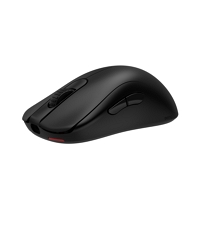
Image 3.2: Driverless setup for DPI and polling rate adjustment on the mouse underside.
3.2 Charging the Mouse
The 4K Enhanced Receiver also functions as a charging dock. To charge the mouse:
- Place the mouse onto the charging contacts of the 4K Enhanced Receiver.
- Ensure the contacts on the mouse align with those on the receiver.
- The mouse can also be charged directly using the USB charging cable connected to a computer or USB power adapter.
4. Operating Instructions
4.1 DPI and Polling Rate Adjustment
The BenQ Zowie S2-DW mouse allows for on-the-fly adjustment of DPI (Dots Per Inch) and polling rate without software. These settings are controlled via buttons on the underside of the mouse.

Image 4.1: Underside of the mouse with DPI and polling rate adjustment buttons.
- DPI Adjustment: Press the DPI button to cycle through available DPI settings (e.g., 400, 800, 1600, 3200). An indicator light will change color to show the current DPI.
- Polling Rate Adjustment: Press the polling rate button to cycle through available polling rates (e.g., 125Hz, 500Hz, 1000Hz, 4000Hz).
4.2 Ergonomic Design Features
The S2-DW features a symmetrical design optimized for agility and stability during various movements.
- Left-Side Curved Design: The inward curve on the left side, combined with the overall back curve, is designed to reduce thumb angle, facilitating a faster index finger click speed.
- Right-Side Curved Design: The inward curve on the right side enhances stability during mouse movement.
- Side Button Placement: The side buttons are positioned for easier thumb access, improving responsiveness.

Image 4.2: Illustration of the left-side curved design for faster clicks.

Image 4.3: Illustration of the right-side curved design for enhanced stability.

Image 4.4: Illustration of the side button design for easier thumb access.
5. Maintenance
5.1 Cleaning
To maintain optimal performance and hygiene, regularly clean your mouse:
- Use a soft, dry cloth to wipe the surface of the mouse.
- For stubborn dirt, slightly dampen the cloth with water or a mild cleaning solution. Avoid harsh chemicals.
- Clean the optical sensor area on the underside with a cotton swab to ensure accurate tracking.
5.2 Mouse Skates Replacement
Over time, mouse skates may wear down. The package includes replacement skates to ensure smooth gliding:
- Carefully peel off the old mouse skates.
- Clean the surface where the skates were attached to remove any adhesive residue.
- Apply the new skates, ensuring they are firmly pressed into place.
6. Troubleshooting
- Mouse not responding:
- Ensure the mouse is powered on.
- Verify the 4K Enhanced Receiver is securely plugged into a USB port.
- Check the mouse battery level and charge if necessary.
- Try plugging the receiver into a different USB port.
- Intermittent connection or signal interference:
- Ensure the 4K Enhanced Receiver is positioned to minimize obstructions between it and the mouse.
- Avoid placing the receiver near other wireless devices or sources of electromagnetic interference. The enhanced receiver is designed to reduce signal interference.
- Poor tracking performance:
- Clean the optical sensor on the underside of the mouse.
- Ensure you are using the mouse on a suitable surface (e.g., a mouse pad).
- Battery life concerns:
- Using the 4K polling rate can consume more battery power. Adjust the polling rate to a lower setting if extended battery life is preferred.
- Ensure the mouse is fully charged before use.

Image 6.1: The enhanced receiver's directional signal reception minimizes interference.
7. Specifications
| Feature | Detail |
|---|---|
| Brand | BenQ |
| Model Number | S2-DW |
| Product Dimensions | 8.5 x 4.5 x 3.75 inches |
| Mouse Weight | 65g (Product title states 65g; package weight is 1.19 pounds) |
| Color | Black |
| Connectivity Technology | USB (Wireless via 4K Enhanced Receiver) |
| Special Feature | Wireless, Driverless, Symmetrical Design |
| Movement Detection Technology | Optical (3950 Sensor) |
| Polling Rate | Up to 4K (4000Hz) |

Image 7.1: Hand grip and mouse dimensions for the S2-DW.
8. Warranty Information
For detailed warranty information regarding your BenQ Zowie S2-DW 4K Wireless Mouse, please refer to the warranty card included with your product or visit the official BenQ Zowie website. Warranty terms and conditions may vary by region.
9. Support
If you encounter any issues not covered in this manual or require further assistance, please contact BenQ Zowie customer support:
- Online Support: Visit the official BenQ Zowie Support Website for FAQs, drivers, and contact options.
- Contact Information: Refer to the product packaging or the BenQ Zowie website for regional contact details.


