Introduction
This manual provides essential information for the safe and efficient operation of your Eliminator Lighting VF1600 EP Fog Machine. The VF1600 EP is a powerful 1650W DMX fog machine designed to create atmospheric effects for various events. It features rapid warm-up, high fog output, and versatile control options including wired and wireless remotes. For optimal performance, use with Rockville RFJG Gallon Fog/Smoke Juice Fluid.

Image: The Eliminator Lighting VF1600 EP Fog Machine shown alongside a bottle of Rockville RFJG Premium Fog Fluid, illustrating the complete product bundle.
Safety Information
Read all instructions carefully before operating this device. Failure to follow safety guidelines may result in injury or damage to the unit.
- For Adult Use Only: This device is not a toy. Use only with adult supervision.
- Ventilation: Ensure adequate ventilation around the machine. Do not block ventilation openings.
- Fluid Use: Use only water-based fog fluid. Never operate the device without fluid. Using other liquids may cause damage or fire.
- Moisture Protection: Keep the device away from rain and moisture. Do not expose to dripping or splashing.
- Power Connection: Always connect to a grounded power outlet. Disconnect power before cleaning or servicing.
- Hot Surfaces: The machine's nozzle and surrounding areas become very hot during operation. Avoid contact. Allow sufficient cooling time before handling.
- No User Serviceable Parts: Do not attempt to repair this unit. Refer all servicing to qualified personnel.
Setup
1. Unpacking
Carefully remove the fog machine and all accessories from the packaging. Verify that all components are present:
- Eliminator Lighting VF1600 EP Fog Machine
- Wired Timer Remote (VFEPT6)
- Wireless Remote (VFEPR2)
- Power Cable
- Rockville RFJG Gallon Fog/Smoke Juice Fluid
2. Placement
Place the fog machine on a flat, stable, non-combustible surface. Ensure there is adequate space around the unit for ventilation and heat dissipation. Do not place the machine directly on carpet or other flammable materials. Position the fog output nozzle away from people and sensitive equipment.

Image: Front view of the Eliminator Lighting VF1600 EP Fog Machine, showing its compact design and output nozzle.
3. Filling the Fluid Tank
Unscrew the cap of the fluid tank located on top of the machine. Carefully pour the Rockville RFJG Gallon Fog/Smoke Juice Fluid into the tank. Do not overfill. Securely replace the cap. The machine features a low fog fluid shut-off sensor to protect the pump.

Image: A bottle of Rockville RFJG Premium Fog Fluid, recommended for use with the VF1600 EP fog machine.
4. Power Connection
Connect the supplied power cable to the power input on the rear of the fog machine. Plug the other end into a suitable grounded electrical outlet (AC 120V, 60Hz, 15A).
5. Remote Control Connection (Optional)
For wired control, plug the VFEPT6 wired remote into the "MANUAL IN" port on the rear panel. For wireless control, ensure the VFEPR2 wireless receiver is connected to the "WIRELESS" port.
6. DMX Connection (Optional)
If integrating with a DMX lighting system, connect a DMX cable from your DMX controller's output to the "DMX IN" port on the VF1600 EP. Use the "DMX OUT" port to daisy-chain to other DMX devices. Set the DMX address using the DIP switches on the rear panel.
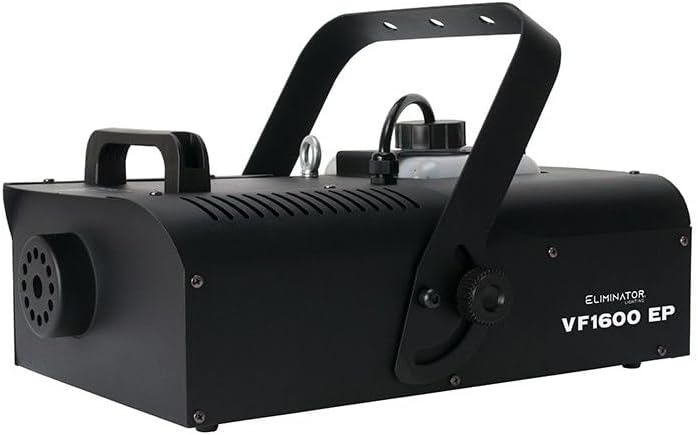
Image: Rear panel of the VF1600 EP fog machine, displaying the power input, DMX In/Out, manual input, wireless input, and DIP switches for DMX addressing.
Operating Instructions
1. Powering On and Warm-up
Flip the "POWER ON/OFF" switch on the rear panel to the ON position. The LED heating indicator will illuminate red, indicating the machine is warming up. The VF1600 EP has a rapid warm-up time of approximately 3 minutes. Once the machine reaches operational temperature, the LED indicator will turn green, signifying it is ready to produce fog.
2. Manual Fog Output
Press the green "FOG" button on the rear panel for immediate fog output. Release the button to stop fog production.

Image: The Eliminator Lighting VF1600 EP fog machine actively producing a dense cloud of fog, demonstrating its output capability.
3. Using the Wired Timer Remote (VFEPT6)
The VFEPT6 remote offers precise control over fog output:
- Interval Knob: Adjusts the time between fog bursts (e.g., 10-30 seconds).
- Duration Knob: Sets the length of each fog burst (e.g., 5-20 seconds).
- Output Knob: Controls the intensity of the fog output.
- ON/OFF Button: Toggles the timer function on or off.
- Continuous Button: Activates continuous fog output until pressed again.
- Manual Button: Provides instant fog output when held down.
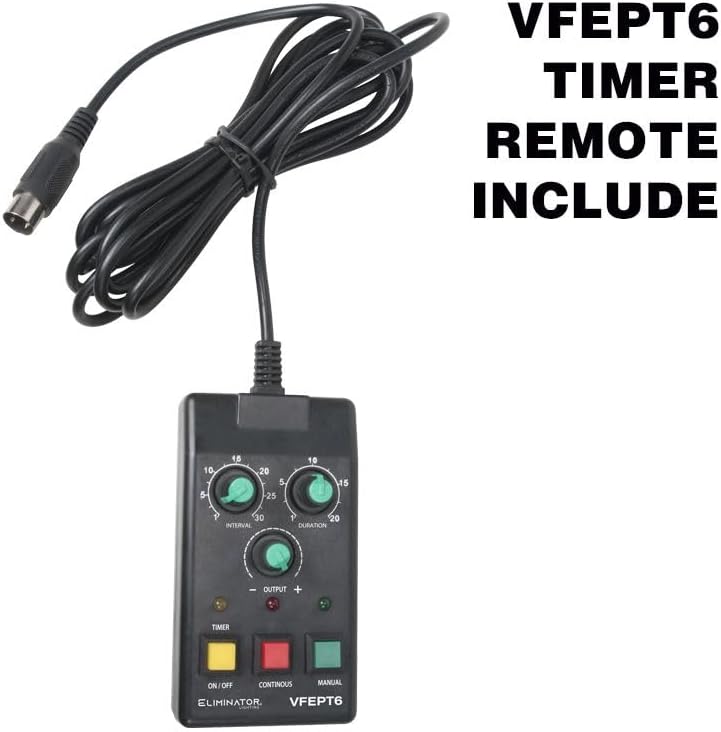
Image: The VFEPT6 wired timer remote control, featuring knobs for interval, duration, and output, along with buttons for on/off, continuous, and manual fog activation.
4. Using the Wireless Remote (VFEPR2)
The VFEPR2 wireless remote provides convenient remote activation:
- Press button 1 to activate fog output.
- Press button 2 to stop fog output.

Image: The VFEPR2 wireless remote control, a compact device for convenient remote activation of the fog machine.
5. DMX Operation
The VF1600 EP can be controlled via DMX. Refer to the DMX channel chart below for specific functions. Ensure the DMX address is correctly set using the DIP switches on the rear panel.
| Channel | Value Range | Function |
|---|---|---|
| 1 | 0-255 | Fog Output (0 = Off, 1-255 = Increasing Output) |
Maintenance
Regular maintenance ensures the longevity and optimal performance of your fog machine.
1. Fluid Management
Always use high-quality, water-based fog fluid like Rockville RFJG. Using other types of fluid can clog the heater and pump, leading to permanent damage. Do not mix different types of fog fluid.
2. Cleaning
After every 40 hours of continuous operation, or if the machine shows signs of reduced output, it is recommended to run a cleaning solution through the system. Use a commercially available fog machine cleaning solution or a mixture of 80% distilled water and 20% white vinegar. Run this solution through the machine for 5-10 minutes in a well-ventilated area. Then, run distilled water through the machine to flush out any residue.
3. Storage
When storing the machine, ensure the fluid tank is empty or filled with cleaning solution to prevent clogs. Store in a cool, dry place away from extreme temperatures.
Troubleshooting
| Problem | Possible Cause | Solution |
|---|---|---|
| No fog output | No power; Low fluid level; Machine not warmed up; Clogged nozzle/pump. | Check power connection; Refill fluid tank; Wait for green LED; Perform cleaning procedure. |
| Weak fog output | Low fluid level; Partial clog; Incorrect fluid type. | Refill fluid tank; Perform cleaning procedure; Ensure correct fluid is used. |
| Machine not heating up | Power issue; Internal component failure. | Check power connection; If problem persists, contact customer support. |
| Remote control not working | Remote not connected; Faulty remote; Wireless receiver issue. | Ensure remote is securely connected; Test with manual button; Contact customer support if remote is faulty. |
Specifications
| Feature | Detail |
|---|---|
| Model | VF1600 EP |
| Output Wattage | 1650 Watts |
| Fog Output | 20,000 cubic feet per minute |
| Warm-up Time | Approx. 3 minutes |
| Control | Wired Remote (VFEPT6), Wireless Remote (VFEPR2), DMX, Manual Button |
| DMX Channels | 1 (Fog Output) |
| Fluid Type | Water-based fog fluid (e.g., Rockville RFJG) |
| Low Fluid Sensor | Yes |
| Material Type | Aluminum |
| Color | Black |
| Item Weight | 29 pounds |
| Product Dimensions | 22 x 14 x 10.75 inches |
Warranty and Support
For warranty information and technical support, please refer to the documentation provided with your purchase or contact Audiosavings customer service directly. Keep your proof of purchase for warranty claims.
Audiosavings Customer Service: Please visit the official Audiosavings website for contact details and support resources.