
1. Introduction
This manual provides detailed instructions for the installation, operation, and maintenance of the Agatige REX-C900 Dual Digital Display PID Temperature Controller. The REX-C900 is an intelligent digital temperature control instrument designed for industrial and home use, featuring high accuracy and strong anti-interference capabilities. Please read this manual thoroughly before using the device to ensure proper function and safety.
2. Safety Information
- Ensure the power supply voltage matches the specifications of the controller (AC100-240V).
- Installation and wiring should be performed by qualified personnel to prevent electric shock or damage to the device.
- Do not operate the controller in environments with excessive moisture, dust, corrosive gases, or high temperatures beyond its specified operating range.
- Disconnect power before performing any maintenance or wiring changes.
- This device is not intended for applications where failure could result in personal injury or significant property damage.
3. Product Overview
The REX-C900 features a dual digital display for Process Value (PV) and Set Value (SV), indicating the current temperature and the target temperature, respectively. It includes control buttons for setting parameters and indicators for output and alarm states.

Figure 3.1: Front view of the REX-C900 controller, showing the PV (red) and SV (green) displays, control buttons (SET, arrow keys), and indicator lights (OUT1, OUT2, AT, ALM1, ALM2).
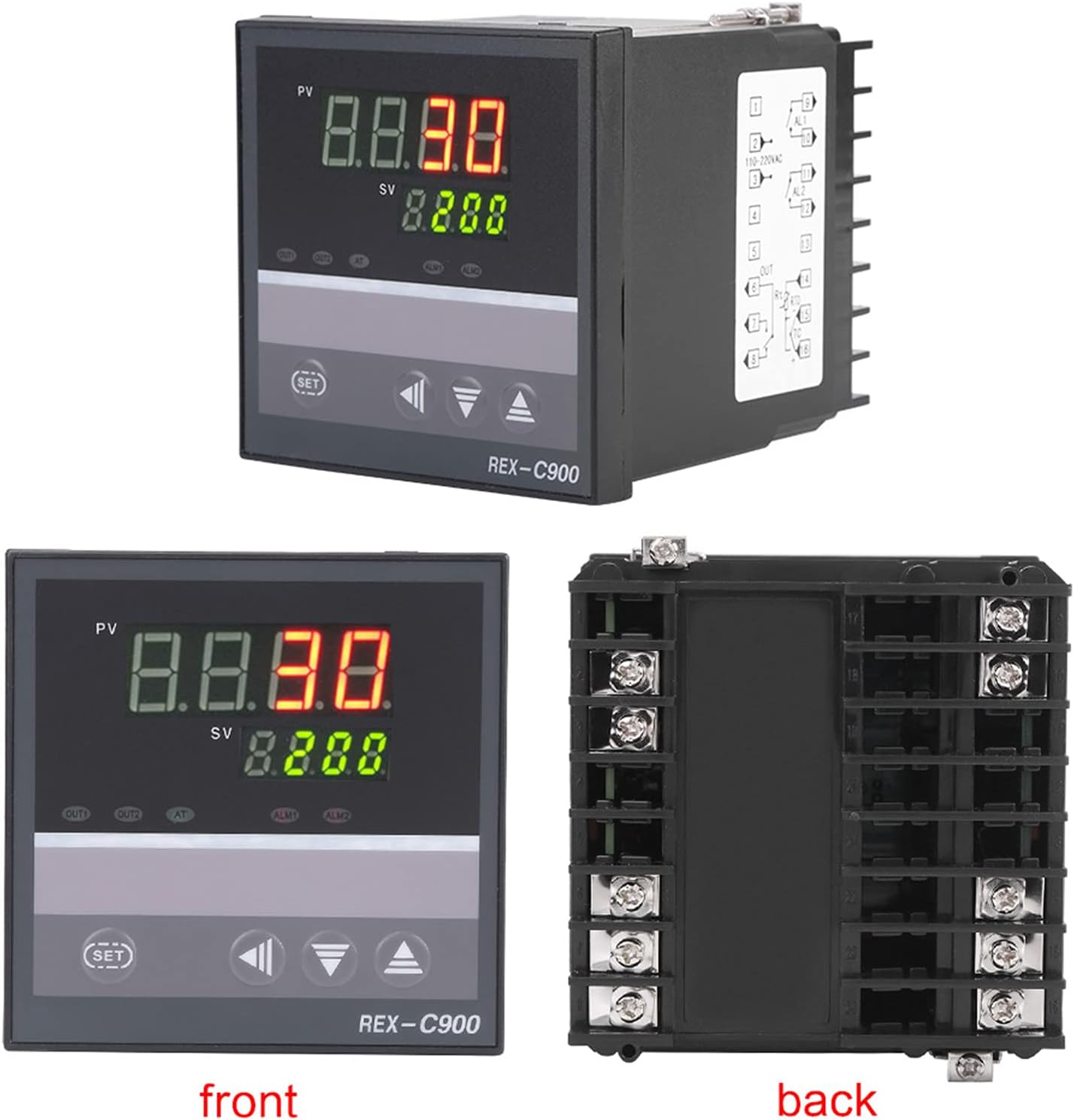
Figure 3.2: Combined view of the front panel and the rear terminal block, illustrating the overall design and connection points of the controller.
4. Specifications
| Feature | Specification |
|---|---|
| Model | REX-C900 |
| Control Type | Temperature |
| Control Mode | Intelligent Temperature Controller (PID) |
| Actual Temperature Range | 0-1300℃ |
| Measurement Error | 0.5℃ |
| Accuracy | ±0.5%FS ±1 digit |
| Resolution | 1℃, 0.1℃ |
| Sampling Period | 3 times/second |
| Output Signal | Voltage and Current (Relay Output) |
| Operating Voltage | AC100-240V |
| Power Supply Voltage | AC85-AC264V 50HZ |
| Input Type | Thermocouple (TC): K, J, R, B, E, N, T Temperature Detector (RTD): PT100, Cu50 |
| Working Environment | 0-50℃, 30-85% RH (non-corrosive) |
| Hole Size | Approx. 95 x 95 x 113mm / 3.7 x 3.7 x 4.4inch |
| Item Weight | 11.8 ounces |

Figure 4.1: Image illustrating the resolution (1℃, 0.1℃) and sampling period (3/sec) of the REX-C900 controller.

Figure 4.2: Image highlighting the measurement accuracy of ±0.5% ±1 digit for the REX-C900 controller.

Figure 4.3: Dimensional drawing of the REX-C900 controller, showing its length, width, and depth for installation planning.
5. Setup and Installation
5.1 Panel Mounting
- Cut a panel opening of approximately 95 x 95 mm (3.7 x 3.7 inches) in your equipment panel.
- Insert the REX-C900 controller into the opening from the front.
- Secure the controller using the provided mounting brackets from the rear of the panel.
5.2 Wiring Connections
Refer to the wiring diagram on the side of the unit and the terminal block image below for correct connections. Ensure all connections are secure and insulated.

Figure 5.1: Rear view of the REX-C900 controller, clearly showing the numbered terminal block for power, sensor, and output connections. Consult the diagram on the unit for specific pin assignments.
- Power Supply: Connect AC100-240V to the designated power terminals.
- Sensor Input: Connect your chosen thermocouple (K, J, etc.) or RTD (PT100, Cu50) to the sensor input terminals. Ensure correct polarity for thermocouples.
- Relay Output: Connect your heating or cooling element to the relay output terminals. Observe the maximum current and voltage ratings of the relay.
- Alarm Output: If using, connect alarm devices to the alarm output terminals.
6. Operating Instructions
6.1 Power On
After completing all wiring, apply power to the controller. The PV display will show the current temperature, and the SV display will show the set temperature.
6.2 Setting the Set Value (SV)
- Press the SET button once. The SV display will begin to flash.
- Use the ▲ (Up) and ▼ (Down) arrow buttons to adjust the desired set temperature. The ◀ (Left) arrow button can be used to shift the digit for faster adjustment.
- Press the SET button again to confirm the new SV. The display will stop flashing.
6.3 Parameter Settings (Advanced)
To access advanced parameters (e.g., PID constants, alarm settings, input type), press and hold the SET button for several seconds until the parameter code appears on the PV display. Use the arrow keys to navigate through parameters and adjust their values. Refer to the detailed parameter list in the full technical manual for specific functions and ranges.
6.4 Auto-Tuning (AT)
The REX-C900 features an auto-tuning function to optimize PID parameters for your specific system. To initiate auto-tuning, press and hold the AT button until the AT indicator lights up. The controller will cycle through heating and cooling to determine optimal settings. Once complete, the AT indicator will turn off, and the new PID parameters will be saved.
7. Maintenance
- Cleaning: Clean the front panel with a soft, dry cloth. Do not use abrasive cleaners or solvents.
- Inspection: Periodically check wiring connections for tightness and signs of wear or corrosion.
- Sensor: Ensure the temperature sensor is clean and properly positioned for accurate readings. Replace damaged sensors promptly.
- Environment: Maintain the operating environment within specified temperature and humidity ranges to prolong the life of the controller.
8. Troubleshooting
| Problem | Possible Cause | Solution |
|---|---|---|
| No display/Power off | No power supply or incorrect wiring. | Check power connections and voltage. Ensure power is supplied to the correct terminals. |
| PV display shows 'HHHH' or 'LLLL' | Sensor open circuit, short circuit, or incorrect input type setting. | Check sensor wiring. Verify sensor type matches controller settings. Replace faulty sensor. |
| Temperature reading inaccurate | Sensor not properly installed, damaged, or calibration error. | Ensure sensor is in good contact with the measured object. Check sensor for damage. Perform auto-tuning. |
| Output not activating | Incorrect wiring, set value not reached, or output mode setting error. | Verify output wiring. Check SV and current PV. Review output control parameters. |
| Controller not holding temperature | PID parameters not optimized, or external disturbance. | Perform auto-tuning. Check for drafts or other environmental factors affecting temperature stability. |
9. Warranty and Support
For warranty information and technical support, please refer to the product packaging or contact your retailer. Keep your purchase receipt as proof of purchase.