
1. Product Overview
The EARMOR M20T Pro electronic earplugs are designed to provide active hearing protection in noisy environments while enhancing situational awareness and communication. Featuring a Noise Reduction Rating (NRR) of 30 dB and Bluetooth 5.4 connectivity, these earplugs suppress harmful loud noises above 82 dB and amplify quiet sounds without distortion. They are suitable for various activities including shooting sports, hunting, training, and industrial settings.

Image: A user wearing the EARMOR M20T Pro electronic earplugs during a shooting activity, demonstrating their use in a practical scenario.
2. Package Contents
Please check the package for the following items:
- EARMOR M20T Pro Electronic Earplugs (1 pair)
- Portable Charging Case (1)
- Various sizes of ear tips (foam and silicone) for optimal fit
- Anti-loss cord (optional)
- USB Charging Cable
- User Manual
3. Product Features
- Active Noise Reduction: NRR 30 dB for effective protection against impulse noise.
- Fast Reaction Time: Sound compression with a rapid 0.5 ms response time.
- Bluetooth 5.4 Connectivity: Seamless wireless connection for music and calls.
- Three Sound Modes: Adaptable to different environments (Silent, Indoor, Outdoor).
- Clear Voice Tracking: Enhanced microphone for clear communication.
- Comfortable Fit: Includes multiple sizes of ear tips and fins for a secure and comfortable fit.

Image: EARMOR M20T Pro earplugs demonstrating the three adjustable sound modes: Indoor, Silent, and Outdoor.

Image: A detailed view of an EARMOR M20T Pro earplug, emphasizing its clear voice tracking capability and 30dB NRR.
4. Getting Started
4.1 Charging the Earplugs and Case
Before first use, fully charge the earplugs and the charging case.
- Place the earplugs into their respective slots in the charging case.
- Connect the charging case to a USB power source using the provided cable.
- The charge status indicators on the case and for the earplugs will illuminate to show charging progress.
- Once fully charged, the indicators will change or turn off.

Image: The EARMOR M20T Pro charging case, showing indicators for both earplug and case charge status, along with anti-loss securing points.
4.2 Fitting the Earplugs
Proper fit is crucial for optimal hearing protection and sound quality.
- Select Ear Tips: Choose the ear tip size (small, medium, large) that provides a snug and comfortable seal in your ear canal. Experiment with both foam and silicone options.
- Insert Earplugs: Gently insert the earplug into your ear canal. For foam tips, compress them before insertion and hold until they expand to create a seal.
- Check Fit: Ensure the earplug sits securely and comfortably. There should be no gaps that allow sound to leak in.
- Optional Anti-Loss Cord: Attach the anti-loss cord if desired for added security during active use.
5. Operating Instructions
5.1 Power On/Off
- Power On: Press and hold the multi-function button on each earplug for approximately 3 seconds until you hear an audible prompt.
- Power Off: Press and hold the multi-function button on each earplug for approximately 3 seconds until you hear an audible prompt.
5.2 Mode Selection
The M20T Pro offers three distinct sound modes to adapt to your environment:
- Silent Mode: Maximizes noise reduction for quiet environments.
- Indoor Mode: Balances noise reduction with ambient sound amplification for indoor ranges or workshops.
- Outdoor Mode: Provides optimal situational awareness and noise reduction for outdoor activities like hunting or shooting.
To change modes, briefly press the multi-function button (approximately 1 second) on either earplug. The earplugs will cycle through the modes with an audible indication.
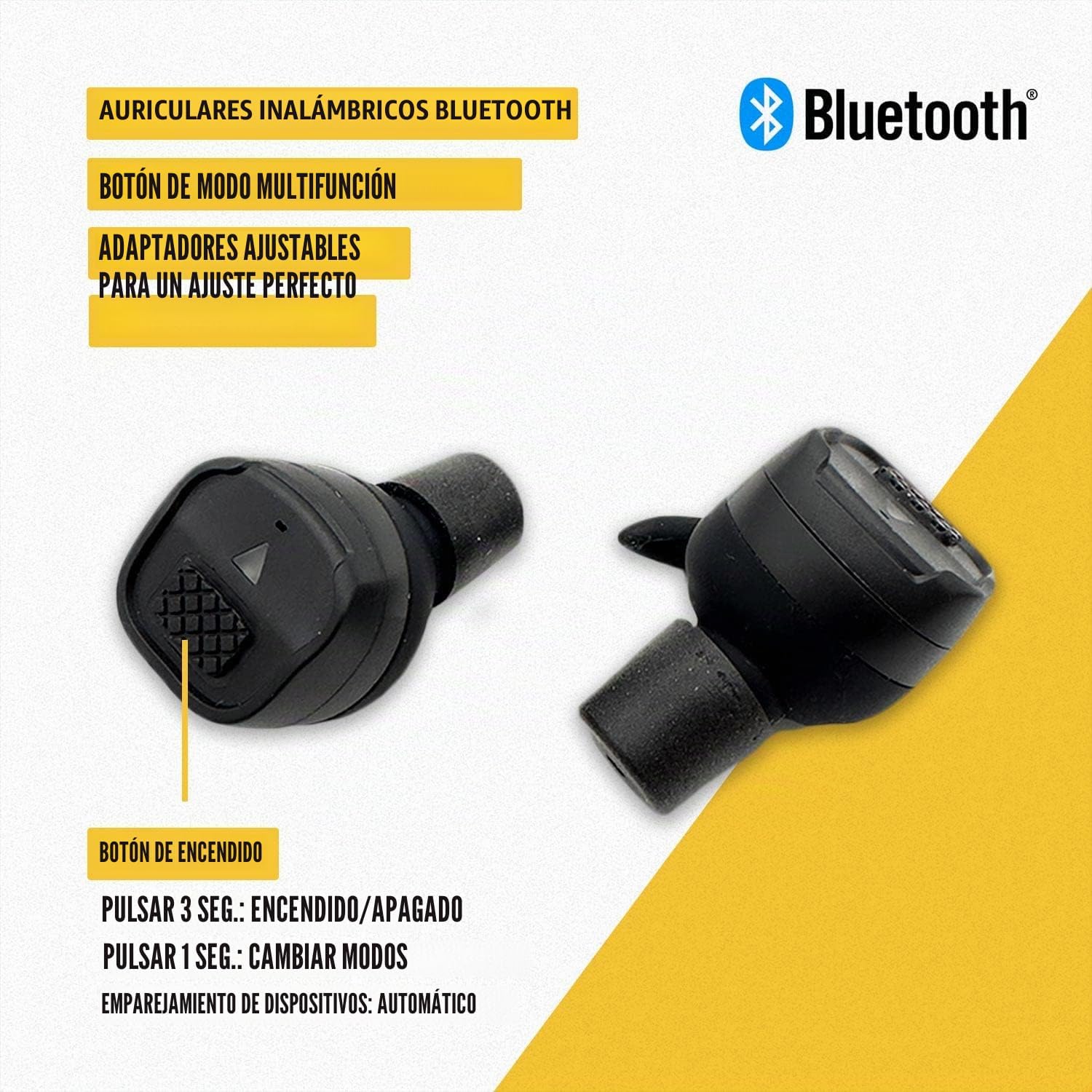
Image: A close-up of an EARMOR M20T Pro earplug, detailing the multi-function button and power button, with instructions for power on/off and mode switching.
5.3 Bluetooth Pairing and Functions
The earplugs automatically enter pairing mode when powered on for the first time or when disconnected from a device.
- Pairing: Turn on the earplugs. On your device (smartphone, tablet), enable Bluetooth and select "EARMOR M20T Pro" from the list of available devices. The earplugs will confirm successful pairing.
- Music Playback: Once paired, you can stream audio from your device. Briefly press the multi-function button once to play/pause music.
- Call Handling: When a call comes in, briefly press the multi-function button once to answer or end the call. Press and hold to reject a call.

Image: A visual guide to the EARMOR M20T Pro's button functions, including single press for HD voice/music and changing sound effects, 2-hour automatic shutdown, and 3-second press for power on/off.
6. Maintenance and Care
To ensure the longevity and optimal performance of your EARMOR M20T Pro earplugs, follow these maintenance guidelines:
- Cleaning: Regularly clean the ear tips with a soft, damp cloth. Ensure no moisture enters the earplug's electronic components. Do not use harsh chemicals or abrasive materials.
- Storage: When not in use, store the earplugs in their charging case to protect them from dust, dirt, and physical damage. Keep them in a cool, dry place away from direct sunlight and extreme temperatures.
- Battery Care: Avoid fully discharging the batteries for extended periods. Charge them regularly, even if not in frequent use, to maintain battery health.
- Inspection: Periodically inspect the ear tips and earplugs for any signs of wear or damage. Replace ear tips if they become worn or lose their sealing capability.
7. Troubleshooting
If you encounter issues with your EARMOR M20T Pro earplugs, refer to the following common problems and solutions:
| Problem | Possible Cause | Solution |
|---|---|---|
| No sound or low volume | Low battery; improper fit; incorrect mode; device volume too low. | Charge earplugs; adjust ear tips for a secure seal; cycle through sound modes; increase device volume. |
| Earplugs not pairing with device | Bluetooth off on device; earplugs not in pairing mode; interference. | Ensure Bluetooth is enabled on your device; power cycle earplugs to re-enter pairing mode; move closer to device; disconnect from other Bluetooth devices. |
| Distorted sound or static | Poor connection; ear tips not sealed properly; environmental interference. | Ensure earplugs are fully charged and paired; adjust ear tips for a better seal; move away from sources of electromagnetic interference. |
| Earplugs not charging | Charging cable faulty; poor contact in case; power source issue. | Check charging cable and power adapter; ensure earplugs are correctly seated in the charging case; try a different USB port or charger. |
8. Technical Specifications
| Feature | Specification |
|---|---|
| Model Name | M20T Pro |
| Noise Reduction Rating (NRR) | 30 dB |
| Single Number Rating (SNR) | 30 dB |
| Bluetooth Version | 5.4 |
| Reaction Time | 0.5 ms |
| Battery Type | Lithium Ion (1 required, included) |
| Product Dimensions | 13 x 12 x 6.5 cm |
| Product Weight | 240 g |
| Material | Polyurethane foam, Plastic |
| Recommended Use | Shooting sports, Hunting, Training, Production, Construction, Noisy environments |
9. Warranty and Support
For warranty information or technical support, please refer to the warranty card included with your product or contact EARMOR customer service through their official website or the retailer where the product was purchased. Please have your model number (M20T Pro) and proof of purchase ready when contacting support.


