
1. Introduction
Thank you for choosing the Aioneus 10000mAh 22.5W Portable Charger. This device is designed to provide reliable and fast charging for a wide range of electronic devices, ensuring you stay powered on the go. Please read this manual carefully to understand the product's features, operation, and safety guidelines.
2. Package Contents
- Aioneus Portable Charger (1 unit)
- 0.3M/1ft USB-A to USB-C Cable (1 unit)
- Power Bank User Manual (1 unit)

Image 2.1: The Aioneus Portable Charger, a USB-A to USB-C cable, and the user manual are included in the package.
3. Product Overview
The Aioneus Portable Charger (Model RE-V51B) is a compact and lightweight power bank featuring a 10000mAh capacity and 22.5W fast charging technology. It includes built-in USB-C and Lightning cables, along with additional USB-A and USB-C ports, allowing simultaneous charging of up to four devices.

Image 3.1: Front view of the Aioneus Portable Charger with dimension reference. The device measures 111.5mm x 69.4mm x 18mm (4.39" x 2.73" x 0.71") and weighs approximately 183g (0.403lb).

Image 3.2: Rear view of the Aioneus Portable Charger highlighting the built-in Type-C Output Cable (22.5W MAX) and iOS Output Cable (10.5W MAX). It also features a USB-A Output Port (22.5W MAX) and a Type-C Input/Output Port (20W MAX).
The integrated smart LED display provides real-time battery percentage and charging status at a glance.
4. Setup
4.1 Initial Charge of Power Bank
Before first use, fully charge your Aioneus Portable Charger. This ensures optimal battery performance and longevity.
- Connect the provided 0.3M/1ft USB-A to USB-C cable to the Type-C Input/Output port on the power bank.
- Plug the other end of the cable into a compatible USB wall adapter (not included) or a computer's USB port.
- The LED display will show the charging progress. The device is fully charged when the display shows 100%.
Video 4.1: This video demonstrates how to recharge the Aioneus Power Bank using the included USB-A to USB-C cable and a wall adapter. It shows the LED display indicating charging status.
5. Operating Instructions
5.1 Checking Battery Level
Press the power button located on the side of the power bank. The smart LED display will illuminate, showing the remaining battery percentage.
5.2 Charging Your Devices
The Aioneus Portable Charger offers multiple ways to charge your devices:
- Using Built-in Cables:
- For iOS devices (iPhone, iPad): Use the built-in Lightning cable.
- For USB-C devices (Android phones, tablets): Use the built-in Type-C cable.
- Using External Ports:
- Connect your device's USB-A charging cable to the USB-A Output port.
- Connect your device's USB-C charging cable to the Type-C Input/Output port (when used as an output).
You can charge up to four devices simultaneously using a combination of the built-in cables and external ports. The power bank supports 22.5W PD & QC fast charging for compatible devices.

Image 5.1: The Aioneus Portable Charger can provide approximately 2.8 full charges for an iPhone 16 Pro.

Image 5.2: The Aioneus Portable Charger supports fast charging, capable of charging an iPhone 16 to 50% in approximately 30 minutes.
Video 5.3: This video demonstrates the use of the built-in cables to charge a mobile phone, highlighting the convenience of integrated charging solutions.
6. Compatibility
The Aioneus Portable Charger is widely compatible with almost all phones and tablets on the market, thanks to its versatile built-in cables and ports. Compatible devices include, but are not limited to:
- iPhone 16, 15, 14, 13, 12, 11 series
- Samsung Galaxy S24, S23, S22, S21, S20 series, A-series, Z Fold series, Z Flip series
- Google Pixel series
- Other Android phones, iPads, and tablets
- Headphones and other small electronic devices
The 10000mAh power bank is also TSA-compliant for air travel.
7. Smart LED Display
The high-definition LED display accurately shows the real-time percentage of remaining power and the current charging status. This feature allows you to monitor the power bank's battery level at a glance, eliminating guesswork about when to recharge it.
8. Safety Information
To ensure safe operation and prolong the life of your power bank, please observe the following:
- Do not open, crush, or incinerate the device.
- Avoid exposing the power bank to temperatures above 65°C (149°F).
- Keep away from water and high humidity.
- Do not use if the battery appears bulged or damaged.
- Keep out of reach of children.
- Dispose of the product responsibly according to local regulations.
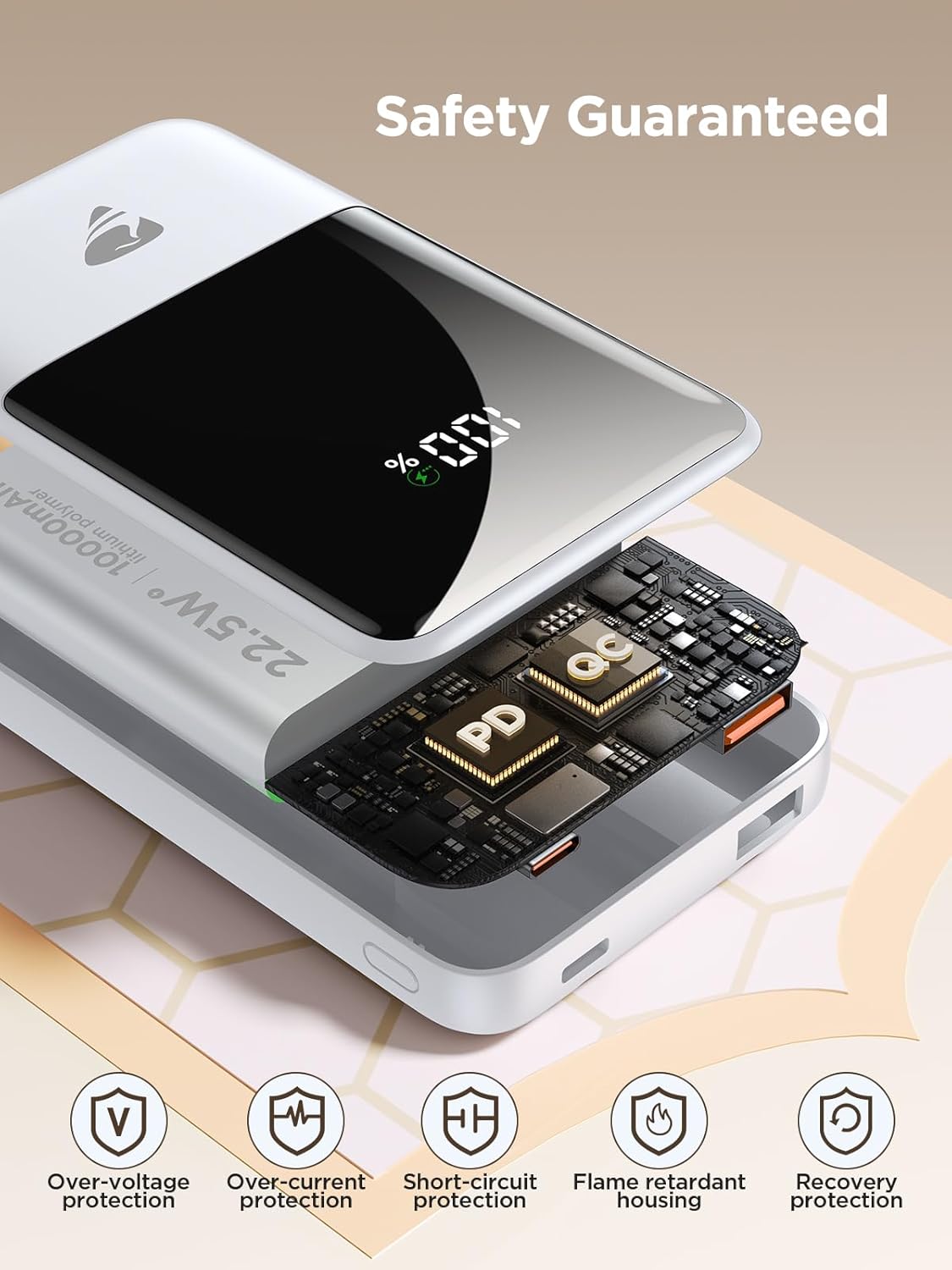
Image 8.1: Internal view highlighting safety features such as Over-Voltage protection, Over-Current protection, Short-Circuit protection, Flame Retardant housing, and Recovery protection.
9. Maintenance
Proper maintenance helps extend the lifespan of your Aioneus Portable Charger:
- Store the power bank in a cool, dry place when not in use.
- Avoid dropping or subjecting the device to strong impacts.
- Clean the exterior with a soft, dry cloth. Do not use harsh chemicals or abrasive materials.
- If storing for extended periods, charge the power bank to about 50-75% capacity every 3 months to prevent deep discharge.
10. Troubleshooting
| Problem | Possible Cause | Solution |
|---|---|---|
| Power bank not charging | Charging cable is loose or damaged; wall adapter is faulty; power bank is fully charged. | Ensure cable is securely connected. Try a different cable or wall adapter. Check LED display for 100% charge. |
| Device not charging from power bank | Device cable is loose or damaged; power bank battery is depleted; device is incompatible. | Ensure cable is securely connected. Recharge the power bank. Verify device compatibility. |
| Slow charging speed | Device does not support fast charging; using a non-fast charging port/cable; multiple devices charging simultaneously. | Ensure device and cable support fast charging. Use the 22.5W output ports/cables. Charging fewer devices may increase speed. |
| LED display not working | Power bank is off; battery is completely depleted; device malfunction. | Press the power button to activate. Recharge the power bank. If issue persists, contact customer service. |
11. Specifications
- Model: RE-V51B
- Battery Capacity: 10000mAh
- Product Dimensions: 0.71 x 2.75 x 4.3 inches (110mm x 69mm x 17.5mm)
- Item Weight: 5.6 ounces (209g)
- Input (Type-C): 5V-3A, 9V-2A
- Output (Type-C): 5V-3A, 9V-2.22A, 12V-1.67A (20W Max)
- Output (USB-A): 5V-3A, 9V-2.22A, 12V-1.67A (22.5W Max)
- Built-in Type-C Cable Output: 5V-3A, 9V-2.22A, 12V-1.67A (22.5W Max)
- Built-in Lightning Cable Output: 5V-2.1A (10.5W Max)
- Special Features: Built-in Cables, Digital Display, Fast Charging, Pocket Size, Slim Design
- Battery Type: Lithium Polymer
12. Warranty and Support
This Aioneus Portable Charger comes with a 3 Months Amazon Warranty. For any product inquiries, technical support, or warranty claims, please contact Aioneus customer service through the platform where you purchased the product.
Manufacturer: CHONGZHENG(HK)CO., LIMITED