
1. Introduction
Thank you for choosing the Lunelyx 1080P Wireless Security Camera. This manual provides essential information for the safe and effective operation of your device. Please read it thoroughly before use and retain it for future reference.
This camera is designed for both indoor and outdoor surveillance, offering 1080p Full HD resolution, AI human detection, color night vision, and two-way audio communication. It connects via 2.4G WiFi and is battery-powered for flexible placement.

Image: The Lunelyx 1080p Wireless Security Camera, highlighting its key features: AI Human Detection, Color Night Vision, and 2.4GHz Wi-Fi Only connectivity.
2. Safety Information
Please observe the following safety precautions to prevent damage to the product or injury to yourself and others:
- Do not disassemble, repair, or modify the camera. This may cause electric shock, fire, or damage to the product.
- Keep the camera away from water, moisture, and extreme temperatures (below 14°F or above 140°F).
- Use only the specified charging method and power adapter.
- Ensure the camera is securely mounted to prevent it from falling.
- Avoid pointing the camera directly at strong light sources, as this may affect image quality and damage the sensor.
- Dispose of batteries according to local regulations. Do not incinerate.
3. Package Contents
Verify that all items are present in your package:
- Lunelyx 1080P Wireless Security Camera (1 unit)
- Mounting Bracket
- Mounting Screws and Wall Plugs
- USB Charging Cable
- User Manual (this document)
4. Product Overview
Familiarize yourself with the components of your Lunelyx Security Camera:

Image: The Lunelyx Wireless Security Camera, showcasing its main body, integrated spotlights, lens, and a smartphone displaying the live video feed from the camera.
Camera Components:
- Camera Lens: Captures 1080p Full HD video.
- Spotlights: Provide illumination for color night vision and deter intruders.
- PIR Motion Sensor: Detects human movement to trigger recordings and alerts.
- Microphone: For two-way audio communication.
- Speaker: For two-way audio communication and audible alerts.
- Mounting Point: For attaching the camera to the wall mount.
- USB Charging Port: For recharging the internal battery.
5. Setup
5.1 Charging the Camera
Before initial use, fully charge the camera. Connect the provided USB charging cable to the camera's charging port and a standard USB power adapter (not included). The charging indicator light will show the charging status.
5.2 App Installation and Account Creation
- Download the companion app from your smartphone's app store (search for 'Lunelyx Security' or refer to the QR code on the packaging).
- Open the app and follow the on-screen instructions to create a new account.
5.3 Connecting the Camera to Wi-Fi
- Ensure your smartphone is connected to a 2.4GHz Wi-Fi network. The camera does not support 5GHz Wi-Fi.
- In the app, select 'Add Device' or the '+' icon.
- Follow the app's instructions to put the camera into pairing mode. This usually involves pressing a reset button on the camera.
- The app will guide you through connecting the camera to your Wi-Fi network, often by displaying a QR code for the camera to scan.
- Once connected, the camera's indicator light will change, and the app will confirm successful pairing.
5.4 Mounting the Camera
The camera can be mounted indoors or outdoors. Choose a location that provides the desired viewing angle and is within Wi-Fi range.
- Mark the drilling spots using the mounting bracket as a template.
- Drill holes and insert the wall plugs if mounting on masonry or drywall.
- Secure the mounting bracket to the wall using the provided screws.
- Attach the camera to the mounting bracket and adjust its angle for optimal coverage.
6. Operating the Camera
6.1 Live View
Open the Lunelyx Security app on your smartphone. Select your camera from the device list to access the live video feed. You can view real-time footage from anywhere with an internet connection.
6.2 Two-Way Audio
The camera features a built-in microphone and speaker, allowing for two-way communication. While in live view, tap the microphone icon in the app to speak through the camera's speaker. Tap the speaker icon to hear audio from the camera's surroundings.

Image: Illustration of the two-way audio feature, showing a child and a speech bubble indicating communication through the camera.
6.3 Motion Detection (AI Human Detection)
The camera uses a PIR sensor for human-centric motion detection, reducing false alarms from pets or vehicles. When motion is detected, the camera will record a clip and send a notification to your smartphone.
- Adjust Sensitivity: In the app settings, you can adjust the motion detection sensitivity to suit your environment.
- Activity Zones: Define specific areas within the camera's view where you want motion to be detected.

Image: Demonstrates Smart AI Human Detection, showing the camera accurately identifying a human while ignoring a dog, with a notification indicating human motion detected.
6.4 Night Vision Modes
The camera offers both infrared (black and white) and color night vision modes.
- Color Night Vision: Utilizes built-in spotlights to provide full-color video even in low-light conditions.
- Infrared Mode: Provides clear black and white video in complete darkness using infrared LEDs.
- You can switch between modes or set it to automatic in the app settings.
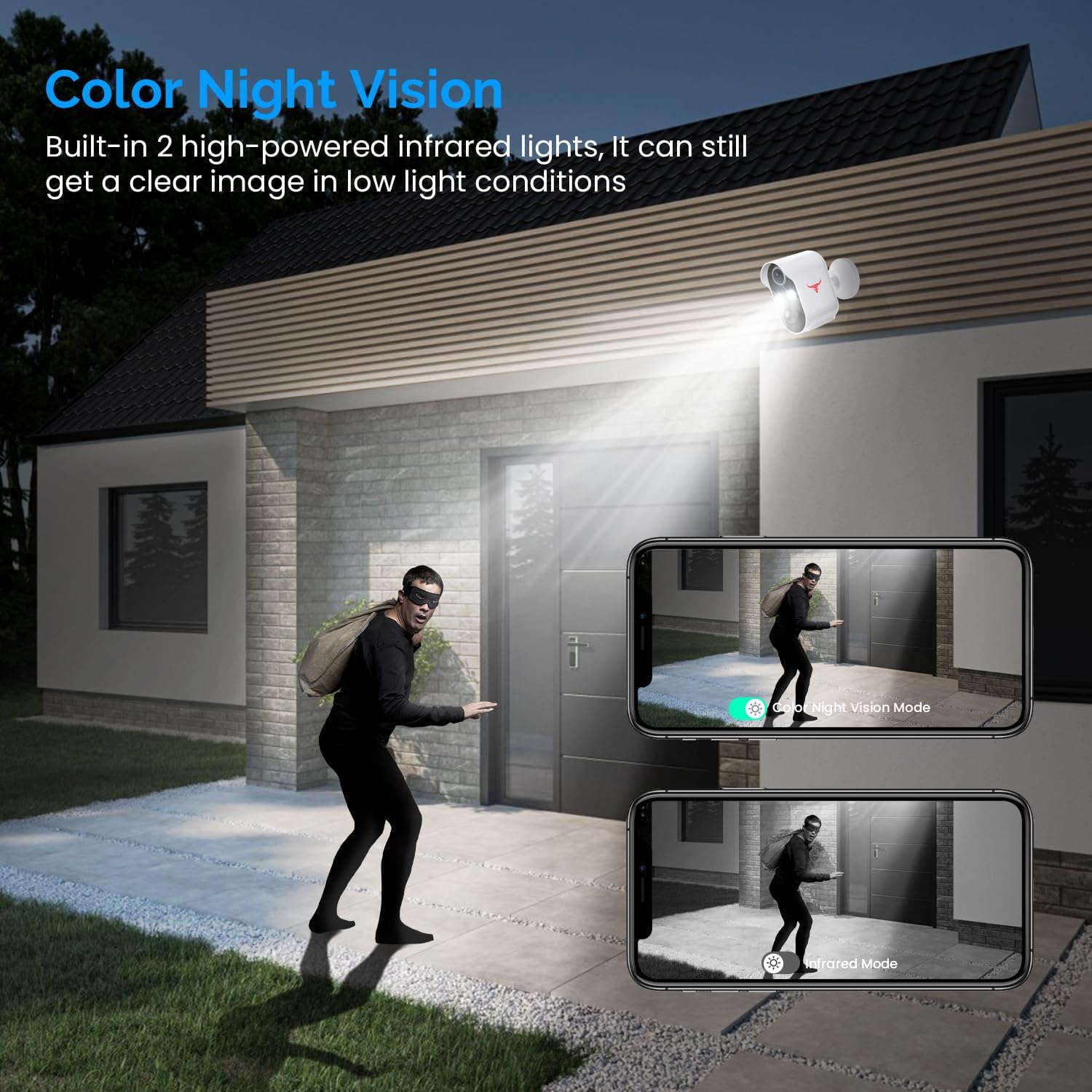
Image: A side-by-side comparison illustrating the difference between Color Night Vision (clear, illuminated color image) and Infrared Mode (black and white image) in low light.
6.5 Cloud Storage
The camera supports AES 128-bit encrypted cloud storage for your video recordings. This service requires a subscription (purchase required) and offers secure storage, fast download, and easy viewing of recorded events.

Image: The Lunelyx camera connected to cloud storage, with icons representing fast download, fast viewing speed, and a free trial option for the service.
7. Maintenance
7.1 Cleaning
To maintain optimal performance, periodically clean the camera lens and body with a soft, dry cloth. Do not use harsh chemicals or abrasive cleaners.
7.2 Battery Care
- Recharge the battery when the app indicates low power.
- Avoid fully discharging the battery frequently to prolong its lifespan.
- If storing the camera for an extended period, charge it to about 50% and store in a cool, dry place.
7.3 Weather Resistance
The camera is IP65 weather-resistant, meaning it is protected against dust and low-pressure water jets. While designed for outdoor use, avoid submerging it in water or exposing it to extreme weather conditions beyond its operating temperature range (14°F to 140°F).

Image: The Lunelyx camera demonstrating its IP65 weather resistance during a rain shower, with additional icons showing its resilience to heatwaves, snowstorms, and thunder showers.
8. Troubleshooting
| Problem | Possible Cause | Solution |
|---|---|---|
| Camera won't power on. | Battery is depleted. | Charge the camera fully using the provided USB cable. |
| Cannot connect to Wi-Fi. | Incorrect Wi-Fi password; Camera too far from router; Not 2.4GHz Wi-Fi. | Verify password; Move camera closer to router; Ensure router is set to 2.4GHz. |
| Frequent false motion alerts. | High motion sensitivity; Environmental factors (e.g., trees, shadows). | Reduce motion sensitivity in app; Set up activity zones to exclude irrelevant areas. |
| No night vision. | Night vision mode off; Obstruction in front of lens. | Check night vision settings in app; Clean lens and ensure no obstructions. |
| Two-way audio not working. | Microphone/speaker muted in app; Network issues. | Ensure audio is enabled in app; Check Wi-Fi connection strength. |
9. Specifications
| Feature | Detail |
|---|---|
| Model Number | R6 |
| Video Resolution | 1080p Full HD |
| Viewing Angle | 140° |
| Night Vision Range | Up to 33 feet (10 meters) |
| Connectivity | 2.4GHz Wi-Fi (IEEE 802.11b/g/n) |
| Power Source | Battery Powered (2 Lithium Polymer batteries included) |
| Battery Voltage | 3.7 Volts |
| Weather Resistance | IP65 |
| Operating Temperature | 14°F to 140°F (-10°C to 60°C) |
| Dimensions (L x W x H) | 2.87 x 1.73 x 3.41 inches (7.3 x 4.4 x 8.65 cm) |
| Weight | 9.6 ounces (272 grams) |
| Material | Acrylonitrile Butadiene Styrene (ABS) |

Image: Diagram showing the physical dimensions of the Lunelyx Security Camera in inches and centimeters.
10. Warranty & Support
Lunelyx products are designed for reliability and performance. For warranty information, technical support, or customer service inquiries, please refer to the contact information provided on the product packaging or visit the official Lunelyx website.
Please have your model number (R6) and purchase details ready when contacting support.