
Introduction
This manual provides comprehensive instructions for the assembly, operation, and maintenance of your anwickjeff Twin Daybed. This daybed is designed with integrated storage drawers, a convenient charging station featuring USB ports and power outlets, and customizable RGB LED lighting. Please read these instructions carefully and thoroughly before beginning assembly or using the product to ensure safe and correct operation.
Important Safety Instructions
- Always follow assembly instructions precisely. Ensure all bolts and screws are securely tightened before use.
- Do not exceed the maximum weight capacity of 330 lbs (approximately 150 kg) for the daybed.
- Use only an 8-inch thick mattress for optimal fit and safety.
- Keep children away from small parts during assembly to prevent choking hazards.
- Ensure the power cord for the charging station and LED lights is properly connected and routed to avoid tripping hazards or damage.
- Do not expose electrical components to water or excessive moisture.
- Periodically check all connections and fasteners to ensure they remain tight and secure.
Package Contents
Before assembly, verify that all components listed below are present and undamaged. If any parts are missing or damaged, please contact customer support.
- Daybed Frame Components (Headboard, Side Panels, Bed Slats, Support Legs)
- 2 x Storage Drawers
- 1 x Charging Station Module (pre-installed in headboard)
- 1 x RGB LED Light Strip (pre-installed in headboard)
- 1 x LED Remote Control
- Assembly Hardware (screws, bolts, washers, Allen wrench)
- Instruction Manual
Setup and Assembly
Assembly typically requires two adults. Please ensure you have adequate space and all tools provided before starting.
- Unpack and Identify Parts: Carefully remove all components from the packaging. Lay them out on a clean, soft surface to prevent scratches. Refer to the parts list to ensure all items are present.
- Assemble the Main Frame: Connect the side panels to the headboard and footboard using the provided hardware. Do not fully tighten screws until the frame is stable.
- Install Bed Slats: Securely attach the bed slats to the frame. This daybed does not require a box spring.
- Attach Headboard Features: The charging station and RGB LED light strip are pre-installed in the headboard. Ensure all internal connections are secure.
- Install Storage Drawers: Insert the two storage drawers into the designated spaces beneath the daybed frame. Ensure the wheels are properly aligned for smooth operation.
- Final Tightening: Once the entire frame is assembled and stable, go back and fully tighten all screws and bolts.
- Connect Power: Plug the power cord from the headboard's charging station into a standard wall outlet.

Operating Instructions
Charging Station
The integrated charging station in the headboard provides convenient power access. It includes 2 standard AC outlets and 2 USB ports.
- Ensure the daybed's main power cord is plugged into a live wall outlet.
- Plug your electronic devices into the available USB ports or AC outlets for charging.
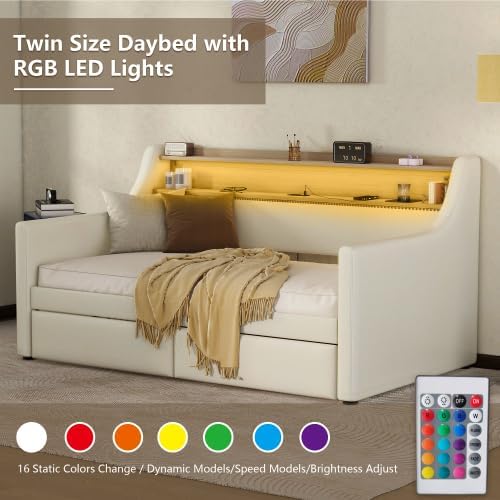
RGB LED Lighting
The RGB LED light strip offers customizable ambient lighting with 16 color options, adjustable brightness, and various dynamic modes.
- Use the provided remote control to power the lights on/off, change colors, adjust brightness, and select dynamic lighting effects.
- Ensure the remote control has working batteries.
- The lights can also be controlled via a mobile application (refer to the specific app instructions if applicable, not provided in this manual).

Storage Drawers
The two spacious storage drawers are designed for easy access and organization.
- Gently pull the drawer handles to open. The drawers are equipped with smooth gliding wheels for effortless movement.
- Push the drawers back into place until they are flush with the daybed frame.

Care and Maintenance
- Upholstery Care: The PU leather upholstery should be dry cleaned only. For minor spills, gently wipe with a clean, damp cloth and dry immediately. Avoid harsh chemicals.
- Frame Cleaning: Wipe the wooden and metal parts of the frame with a soft, dry cloth.
- Drawer Maintenance: Periodically check the drawer wheels and tracks for debris. Clean as needed to ensure smooth operation.
- Electrical Components: Ensure the charging station and LED light connections are secure. Do not attempt to repair electrical components yourself; contact qualified personnel.
- Hardware Check: Every few months, inspect all bolts and screws and tighten them if necessary to maintain the daybed's stability.
Troubleshooting
| Problem | Possible Cause | Solution |
|---|---|---|
| LED lights not turning on or changing color. | No power; remote control battery low; loose connection. | Ensure daybed is plugged in. Replace remote control batteries. Check LED strip connections in the headboard. |
| Charging station (USB/outlets) not working. | No power; loose internal wiring. | Verify the daybed's main power cord is securely plugged into a functional wall outlet. If issue persists, contact support. |
| Storage drawers are difficult to open/close. | Obstruction in tracks; wheels dirty or damaged. | Clear any objects from the drawer tracks. Clean wheels and tracks. Ensure drawers are properly aligned. |
| Daybed feels unstable or wobbly. | Loose assembly hardware. | Retighten all bolts and screws on the frame. Ensure the daybed is on a level surface. |
Product Specifications
- Model: Twin Size Daybed-AWD
- Size: Twin
- Material: Engineered Wood, PU Leather
- Overall Product Dimensions (L x W x H): 79.5" x 45.3" x 36.21"
- Weight Capacity: 330 lbs (150 kg)
- Recommended Mattress Thickness: 8 inches (mattress not included)
- Charging Station: 2 AC Outlets, 2 USB Ports
- LED Lighting: RGB, 16 Colors, Adjustable Brightness
- Storage: 2 Under-bed Drawers
- Assembly Required: Yes
- UPC: 782365754476
- Color (this variant): White+PU+Twin
- Country of Origin: China
Warranty and Support
For warranty information, technical support, or to report missing/damaged parts, please contact the seller or manufacturer directly. Keep your purchase receipt as proof of purchase.
Manufacturer: anwickjeff
