Introduction
This manual provides instructions for the setup, operation, and maintenance of your VINABTY MR23GA AN-MR23GA Replacement Magic Remote Control. This remote is designed to be compatible with various LG OLED evo 4K Smart TV models from the 2023 C3, Z3, G3, and B3 Series, offering voice control and pointer functionalities.
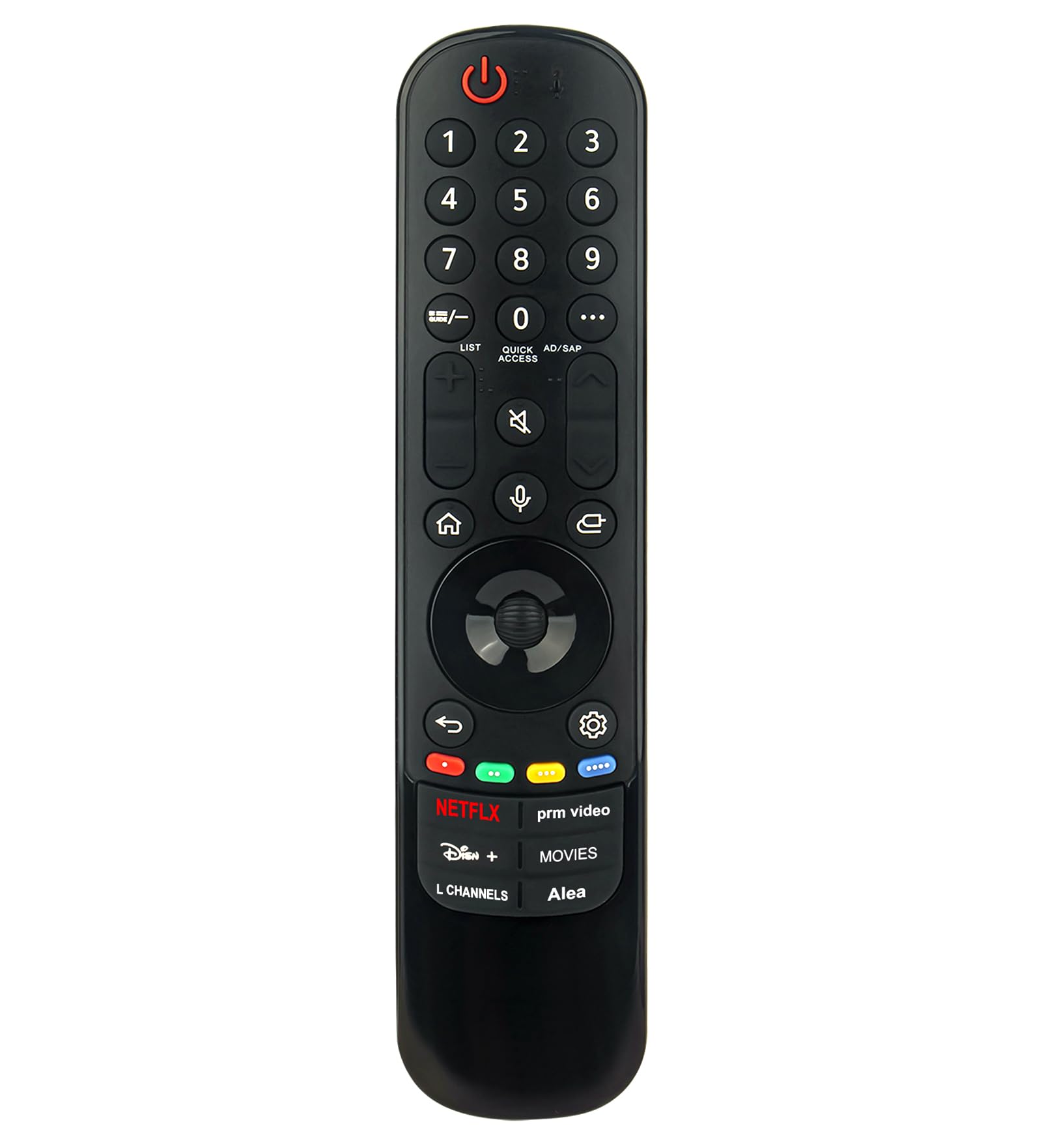
Image: Front view of the VINABTY MR23GA AN-MR23GA Replacement Magic Remote Control, showing all buttons and the scroll wheel.
Setup
1. Battery Installation
- Locate the battery compartment on the back of the remote control.
- Slide the battery cover downwards to open it.
- Insert two (2) AA batteries, ensuring the positive (+) and negative (-) terminals align correctly with the markings inside the compartment.
- Close the battery cover by sliding it back into place until it clicks securely.

Image: Back view of the remote control, highlighting the battery compartment.
2. Initial Pairing (If Required)
For most basic functions, the remote may work immediately after battery installation. However, to utilize advanced features such as voice control and the pointer function, pairing with your LG Smart TV may be necessary. If the pointer does not appear on screen or voice commands are not recognized, follow these steps:
- Turn on your LG Smart TV.
- Point the remote control towards the TV.
- Press the Wheel (OK) button (the center button of the directional pad) on the remote control. The TV should display a message indicating that the remote is registered.
- If pairing fails, try pressing and holding the Home button and Back button simultaneously for 5 seconds to unpair, then repeat step 3.
Operating Instructions
The VINABTY MR23GA remote control provides intuitive navigation and control over your LG Smart TV. Familiarize yourself with the key functions below:
Key Button Functions
- Power Button (⑆): Turns the TV on or off.
- Number Buttons (0-9): Directly input channel numbers or other numerical values.
- LIST / Quick Access: Access channel lists or customize quick access to frequently used apps/functions.
- AD/SAP: Audio Description / Secondary Audio Program.
- Volume Up/Down (+ / -): Adjusts the TV volume.
- Mute Button (🔇): Mutes or unmutes the TV sound.
- Channel Up/Down (▲ / ▼): Changes TV channels.
- Home Button (⌂): Accesses the TV's Home screen/Launcher.
- Voice Recognition Button (🎤): Activates the voice command function.
- Input Button (⎌): Changes the input source (HDMI, AV, etc.).
- Directional Pad (Up, Down, Left, Right): Navigates menus and selections.
- Wheel (OK) Button: Confirms selections and acts as a scroll wheel for pointer navigation.
- Back Button (↶): Returns to the previous screen or menu.
- Settings Button (⚙): Accesses the TV's settings menu.
- Netflix, Disney+, prm video, L Channels, Movies, Alea Buttons: Direct access buttons for specific streaming services and functions.

Image: Detailed view of the remote's front face, showing the layout of all buttons.
Using Voice Control
To use the voice control feature:
- Press and hold the Voice Recognition Button (🎤).
- Speak clearly into the microphone located on the remote control.
- Release the button when you have finished speaking. The TV will process your command.

Image: The remote control with the microphone icon highlighted, indicating the voice control function.
Using the Pointer Function
The Magic Remote allows you to point and click on screen, similar to a computer mouse:
- Move the remote control in the air to make the pointer appear on the TV screen.
- Move the remote to guide the pointer to your desired selection.
- Press the Wheel (OK) button to select an item.
- If the pointer disappears, shake the remote gently or press the Wheel (OK) button to make it reappear.
Maintenance
Cleaning the Remote Control
- Use a soft, dry cloth to wipe the surface of the remote control.
- Do not use liquid cleaners, sprays, or abrasive materials, as these can damage the remote.
Battery Replacement
Replace the batteries when the remote's performance degrades or if the TV displays a low battery warning. Refer to the "Battery Installation" section under Setup for detailed steps.
- Always replace both batteries at the same time.
- Use new AA alkaline batteries for optimal performance.
- Dispose of used batteries according to local regulations.
Troubleshooting
- Remote not responding:
- Check if the batteries are inserted correctly and are not depleted. Replace if necessary.
- Ensure there are no obstructions between the remote and the TV's sensor.
- Try re-pairing the remote control as described in the "Initial Pairing" section.
- Pointer not appearing or erratic:
- Shake the remote gently or press the Wheel (OK) button to reactivate the pointer.
- Ensure the remote is paired correctly.
- Avoid strong light sources directly hitting the remote or TV sensor.
- Voice control not working:
- Ensure the remote is paired and the voice recognition feature is enabled on your TV.
- Speak clearly and hold the Voice Recognition Button while speaking.
- Check your TV's network connection, as voice commands often require internet access.
Specifications
| Feature | Detail |
|---|---|
| Model Number | MR23GA AN-MR23GA AKB76043112 |
| Compatible Devices | LG OLED evo 4K Smart TVs (2023 C3, Z3, G3, B3 Series) |
| Battery Type | 2 x AA batteries |
| Special Features | Voice Control, Pointer Function, Ergonomic Design |
| Product Dimensions | 6 x 2 x 0.5 inches (19 cm / 7.48 in length, 4.3 cm / 1.69 in width) |
| Item Weight | 1.9 ounces |

Image: The remote control with its physical dimensions (length and width) indicated.
Warranty and Support
For warranty information or technical support, please refer to the documentation provided with your purchase or contact the retailer. Keep your purchase receipt for warranty claims.


