
Introduction
Thank you for choosing the 5Rcom Universal Swivel TV Stand. This manual provides essential information for the safe and correct assembly, operation, and maintenance of your new TV stand. Please read these instructions thoroughly before installation and keep them for future reference.
This stand is designed to support flat or curved LED, LCD, OLED, and 4K Smart TVs or computer monitors ranging from 32 to 55 inches, with a maximum weight capacity of 40 kg (88 lbs). It features a sturdy wooden base, height adjustment, and a swivel function for optimal viewing.
Safety Information
- Weight Capacity: Do not exceed the maximum weight capacity of 40 kg (88 lbs) for the TV mount and 10 kg (22 lbs) for the media shelf. Overloading can result in serious injury or product damage.
- VESA Compatibility: Ensure your TV's VESA mounting pattern is within the supported range (Min: 100x100mm, Max: 400x400mm).
- TV Size: This stand is suitable for TVs between 32 and 55 inches.
- Assembly: Assemble the stand strictly according to the instructions. Incorrect assembly may lead to instability and potential hazards.
- Stability: Place the TV stand on a flat, stable, and level surface. Avoid placing it on uneven ground or near edges where it could be easily tipped over.
- Children: Keep children away from the TV stand during assembly. Do not allow children to climb on or play with the stand or mounted TV.
- Inspection: Periodically check all screws and connections to ensure they are secure.

This image illustrates the stable structure and safety design features of the TV stand, including reinforced components for secure TV mounting.
Package Contents
Please verify that all parts are present and undamaged before beginning assembly. If any parts are missing or damaged, contact customer support.
(Note: A detailed parts list with corresponding labels would typically be included here, often with an exploded diagram. For this manual, assume standard components for a TV stand of this type.)
- Main Support Column
- Wooden Base
- TV Mounting Brackets (Left and Right)
- Media Shelf
- Hardware Kit (Screws, washers, spacers for TV and stand assembly)
- Cable Management Clips
- Tools (e.g., Hex Key, Wrench)
Setup and Assembly Instructions
Follow these steps carefully to assemble your TV stand. It is recommended to have two people for assembly, especially when mounting the TV.
- Attach the Main Support Column to the Base: Secure the main support column to the wooden base using the provided screws and tools. Ensure the connection is tight and stable.
- Install the Media Shelf: Slide the media shelf onto the main support column at your desired height. Secure it in place with the designated fasteners.
- Attach TV Brackets to TV: Identify the correct screws, washers, and spacers for your TV's VESA mounting holes. Attach the TV mounting brackets to the back of your TV. Ensure the brackets are level and securely fastened.
- Mount TV to Stand: With assistance, carefully lift the TV and hook the brackets onto the main support column's mounting plate. Engage the safety locks to prevent accidental dislodging.
- Cable Management: Use the provided cable management clips to route and organize your TV and device cables along the main support column for a tidy appearance.
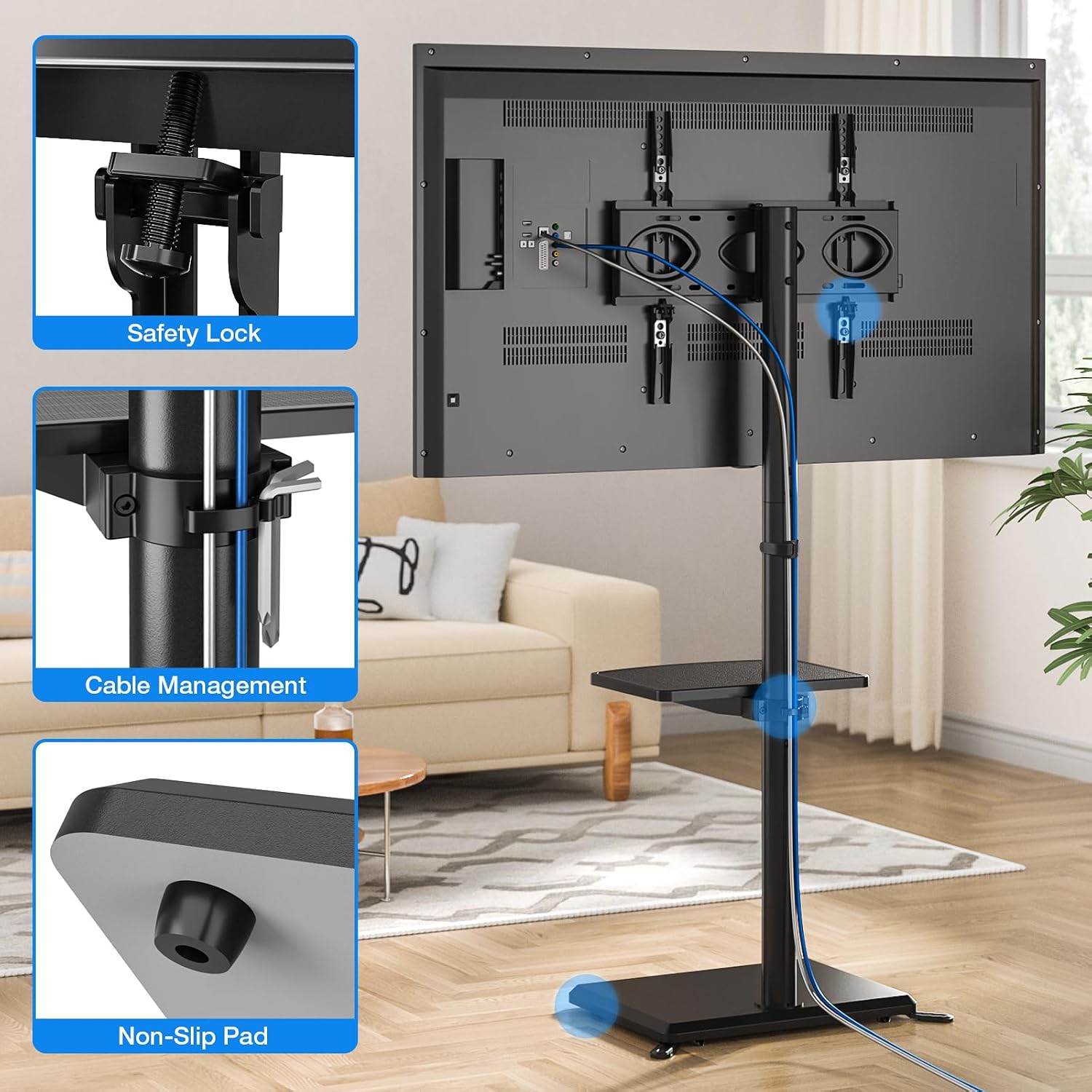
This image details the safety lock for secure TV attachment, the cable management system for organizing wires, and the non-slip pads on the base for stability.

A detailed view of the cable management system, showing how cables can be neatly secured along the stand's column.
Operating Instructions
Height Adjustment
The TV stand allows for flexible height adjustment to achieve optimal viewing angles. The height can be adjusted from 1138 mm to 1188 mm. To adjust the height, loosen the securing bolts on the main support column, carefully raise or lower the TV to the desired position, and then re-tighten the bolts securely.

This diagram shows the adjustable height range of the TV stand, from a minimum of 1293mm to a maximum of 1393mm (total height including TV mount), with a 100mm adjustment range for the TV mounting plate.
Swivel Function
The TV mount features a swivel function, allowing you to rotate your TV up to 35 degrees left or right. Gently push the TV to the desired angle. This allows for comfortable viewing from various positions in your room without moving the entire stand.

This image illustrates the TV stand's swivel feature, allowing the television to rotate up to 35 degrees in either direction for flexible viewing.
Maintenance
- Cleaning: Wipe the stand with a soft, dry cloth. For stubborn marks, a slightly damp cloth can be used, followed by immediate drying. Avoid harsh chemicals or abrasive cleaners.
- Hardware Check: Periodically (e.g., every 3-6 months) check all screws and bolts to ensure they remain tight. Re-tighten if necessary to maintain stability and safety.
- Environmental Conditions: Avoid exposing the stand to extreme temperatures, high humidity, or direct sunlight for prolonged periods, as this may affect the wooden base and overall integrity.
Troubleshooting
- TV is not level: Check that the TV mounting brackets are installed evenly on the back of the TV. Ensure the main support column is securely attached to the base and that the base is on a level surface. Adjust the height of the TV brackets if your TV allows for fine-tuning.
- Stand feels wobbly: Verify that all assembly screws are tightened securely. Ensure the stand is placed on a firm, level surface. If additional stability is needed, ensure any optional support feet are correctly installed.
- Difficulty swiveling the TV: Check for any obstructions behind the TV or around the swivel mechanism. Ensure the TV is not pressing against a wall or other furniture. The swivel mechanism should operate smoothly without excessive force.
- Cables are messy: Re-route cables using the provided cable management clips. Ensure cables are not tangled or obstructing the stand's movement.
Specifications
| Feature | Specification |
|---|---|
| Brand | 5Rcom |
| Model | B0DJSQZGDV |
| Compatible TV Sizes | 32 - 55 inches |
| Max TV Weight Capacity | 40 kg (88 lbs) |
| VESA Compatibility | 100x100mm to 400x400mm |
| Height Adjustment Range | 1138 mm to 1188 mm (from floor to top of column) |
| Swivel Angle | +/- 35 degrees |
| Media Shelf Capacity | 10 kg (22 lbs) |
| Base Dimensions | 425 mm x 325 mm |
| Material | Wood (Base), Metal (Column, Brackets) |
| Color | Black |

This diagram provides comprehensive dimensions and specifications, including compatible TV sizes (32-55 inches), VESA mounting patterns (Min: 100x100mm, Max: 400x400mm), and weight capacities (40 kg for TV, 10 kg for shelf).

This image details the stand's dimensions and VESA compatibility, helping users determine if their TV is suitable for this model.
Warranty Information
This product comes with a standard manufacturer's warranty. Please refer to the warranty card included in your package or contact the retailer for specific details regarding warranty duration and coverage. The warranty typically covers defects in materials and workmanship under normal use.
Customer Support
If you have any questions, require assistance with assembly, or encounter any issues with your 5Rcom TV stand, please contact our customer support team. You can typically find contact information on the product packaging or the retailer's website.
For online support and frequently asked questions, visit the official 5Rcom website or the product page on the platform where you made your purchase.
