
Introduction
Thank you for choosing the COMFIER CF-9212BR3 Massage Chair. This manual provides essential information for the safe and effective operation, maintenance, and troubleshooting of your new massage chair. Please read it thoroughly before use and retain it for future reference.
Important Safety Instructions
To reduce the risk of electric shock, burns, fire, or injury, always follow these basic precautions:
- Read all instructions before using the massage chair.
- Do not use attachments not recommended by the manufacturer.
- Never operate the appliance if it has a damaged cord or plug, if it is not working properly, or if it has been dropped or damaged.
- Keep the cord away from heated surfaces.
- Do not use outdoors.
- Do not operate where aerosol (spray) products are being used or where oxygen is being administered.
- To disconnect, turn all controls to the OFF position, then remove the plug from the outlet.
- This appliance is intended for household use only.
- Consult a physician before using if you have any medical conditions.
Package Contents
Upon unpacking, ensure all items listed below are present and undamaged:
- COMFIER CF-9212BR3 Massage Chair (fully assembled)
- Remote Control
- Power Cord
- Cushion
- User Manual (this document)
Setup Instructions
1. Unpacking and Placement
The COMFIER CF-9212BR3 Massage Chair comes fully assembled in one package, requiring no complex assembly. Carefully remove the chair from its packaging.

Image: Minimum Door Entrance Size
Ensure your doorway has a minimum width of 30 inches (76.2 cm) to allow for easy passage of the packaged massage chair.
Place the massage chair on a flat, stable surface. Ensure there is sufficient space around the chair for reclining and operation, especially for the zero-gravity function.
2. Power Connection
- Locate the power cord and connect it to the power inlet on the back or side of the massage chair.
- Plug the other end of the power cord into a suitable electrical outlet.
- Ensure the power switch (if present) is in the OFF position before plugging in.
Operating Instructions
1. Remote Control Overview
The massage chair is operated using the wired remote control. Familiarize yourself with the buttons and their functions.
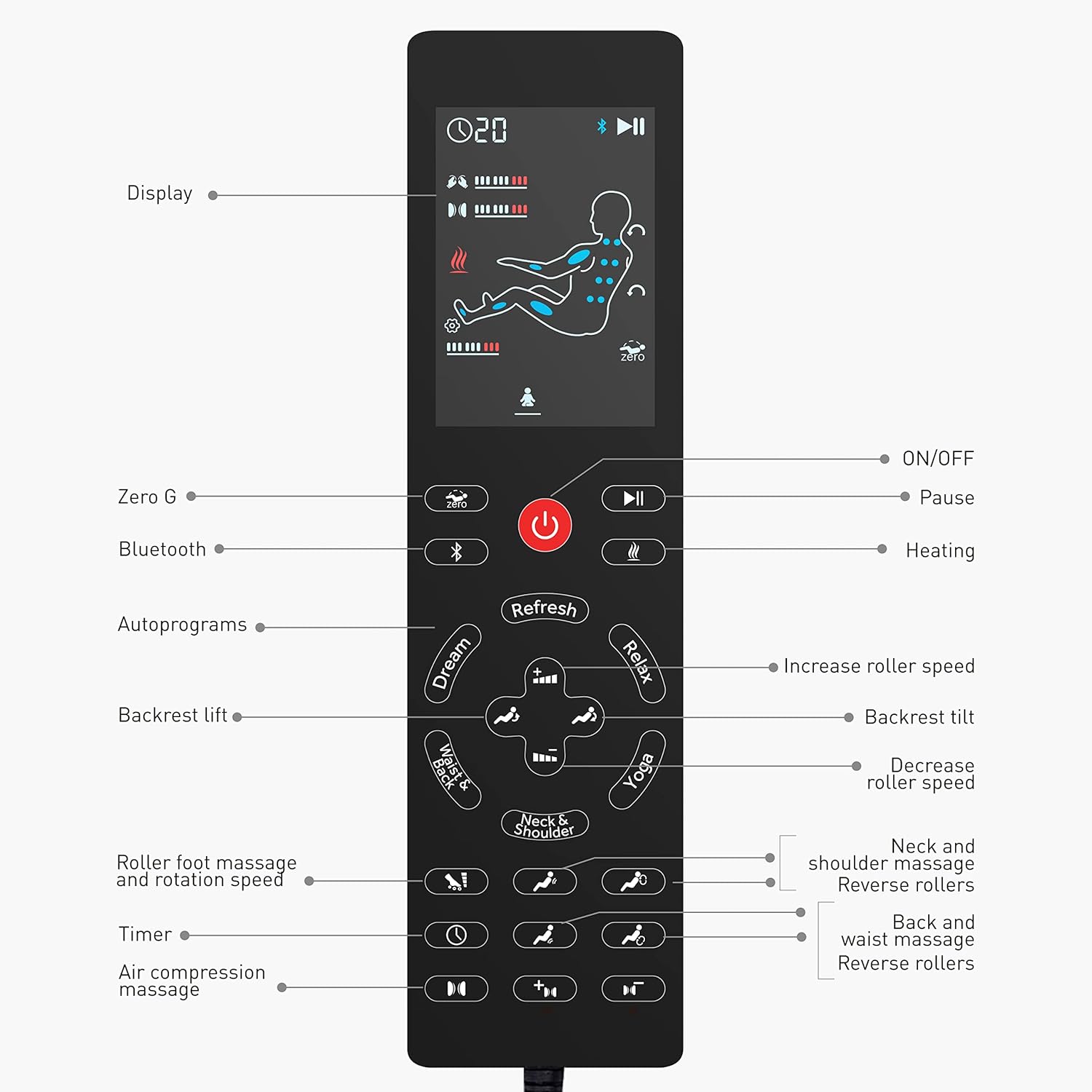
Image: Remote Control Layout
This image displays the remote control, highlighting the display, ON/OFF, Pause, Zero G, Bluetooth, Heating, Autoprograms (Dream, Refresh, Relax, Yoga, Neck & Shoulder, Waist & Back), Backrest lift/tilt, Roller speed adjustment, Roller foot massage, Timer, and Air compression massage controls.
- Display: Shows current settings and massage status.
- ON/OFF: Powers the chair on or off.
- Pause: Temporarily stops the massage program.
- Zero G: Activates and adjusts the zero gravity recline.
- Bluetooth: Activates Bluetooth pairing for audio.
- Heating: Turns the heat function on or off.
- Autoprograms: Selects from pre-set massage routines (Refresh, Relax, Yoga, Neck and Shoulders, Waist and Back, Dream).
- Backrest Lift/Tilt: Adjusts the recline angle of the backrest.
- Roller Speed: Increases or decreases the speed of the massage rollers.
- Roller Foot Massage: Controls the foot rolling massage.
- Timer: Sets the duration of the massage.
- Air Compression Massage: Adjusts settings for shoulder, arm, hip, calf, leg, and foot compression.
2. Basic Operation
- Sit comfortably in the chair.
- Press the ON/OFF button on the remote control to power on the chair.
- Select your desired massage program or customize settings.
- To stop the massage, press the ON/OFF button again.
3. Massage Features
Simulated Masseuse Hands (Shiatsu Kneading)
The chair features 8 shiatsu rollers and 14 massage balls designed to provide deep tissue kneading massage along your body's curve, targeting the neck, shoulders, back, and waist.

Image: Simulate Masseuse Hands
This illustration details the placement of 8 shiatsu rollers and 14 massage balls within the chair, demonstrating how they provide kneading massage to the neck, shoulders, back, waist, and foot rolling massage.
Adjust the shiatsu intensity and roller speed using the remote control to suit your preference.
Full Body Air Compression Massage
Airbags provide compression massage to your shoulders, arms, hips, calves, legs, and feet. There are 3 adjustable intensity levels.

Image: Full Body Air Compression Massage
This image shows the areas covered by the air compression massage, including shoulders, arms, thighs, calves, and feet, with an indicator for 3 intensity levels.
Use the Air Compression Massage buttons on the remote to select your desired intensity and target zones.
Soothing Heat Function
The chair offers a soothing heat function for the back and seat, reaching a maximum temperature of 131°F (55°C).

Image: Soothing Heat for Back and Seat
This image illustrates the heat function, showing warmth applied to the lower back and seat area, with a note indicating a maximum temperature of 131°F.
Activate or deactivate the heat function using the Heating button on the remote control.
Zero Gravity Recline
The chair features 3 levels of zero gravity recline, designed to elevate your legs slightly above your heart, reducing pressure and promoting circulation.

Image: Space-Capsule Zero Gravity
This diagram illustrates the three distinct zero gravity positions: Initial, Comfort, and Deep Zero-Gravity, with the recline angle specified as 126° ± 5°.
Press the Zero G button on the remote to cycle through the zero gravity positions.
Bluetooth Music Playback
Connect your smartphone or other Bluetooth-enabled device to the massage chair to enjoy your favorite music during your massage session.

Image: Connect Your Phone For Music
This image shows a user enjoying music via Bluetooth connectivity on the massage chair, with a note about the footrest being freely retractable up to 6.3 inches.
- Press the Bluetooth button on the remote control.
- On your device, search for "COMFIER Massage Chair" (or similar) in the Bluetooth settings and pair.
- Once connected, audio will play through the chair's speakers.
Extendable Footrest
The footrest can be extended up to 5 inches (or 6.3 inches as per image) to accommodate users of different heights, ensuring a comfortable fit for leg and foot massage.
Adjust the footrest manually by pushing or pulling it to the desired length.
Maintenance
1. Cleaning
- Always unplug the chair before cleaning.
- Wipe the chair's surface with a soft, damp cloth. Do not use abrasive cleaners or solvents.
- For leather surfaces, use a specialized leather cleaner if necessary, following the product's instructions.
- Ensure no liquid enters the internal components.
2. Storage
- When not in use for extended periods, unplug the chair and store it in a cool, dry place.
- Avoid placing heavy objects on the chair.
Troubleshooting
If you encounter any issues with your massage chair, please refer to the following common problems and solutions:
| Problem | Possible Cause | Solution |
|---|---|---|
| Chair does not power on. | Power cord not properly connected; power outlet not working. | Ensure the power cord is securely plugged into both the chair and the wall outlet. Test the outlet with another device. |
| Massage functions are weak or inconsistent. | Incorrect program selected; intensity set too low. | Select a different auto program or manually increase the intensity settings for rollers and air compression. |
| Bluetooth connection fails. | Bluetooth not activated on chair or device; device too far. | Ensure Bluetooth is enabled on both the chair (via remote) and your device. Keep your device close to the chair. Try re-pairing. |
| Chair makes unusual noises. | Normal operation sounds; loose component. | Some operational sounds are normal. If the noise is loud or unusual, discontinue use and contact customer support. |
If the problem persists after attempting these solutions, please contact COMFIER customer support.
Specifications
| Feature | Detail |
|---|---|
| Brand | COMFIER |
| Model Name | CF-9212BR3 |
| Colour | Brown |
| Material | Leather (Polyurethane frame) |
| Product Dimensions (D x W x H) | 38.1D x 76.2W x 63.5H Centimeters |
| Item Weight | 147.41 Pounds (approx. 66.86 kg) |
| Special Features | Heat, Bluetooth, Yoga Stretching, Compression, Foot Rollers, Shiatsu Kneading, Zero Gravity Recliner, SL Track |
| Assembly Required | No |
| Heat Temperature | Max. 131°F (55°C) |
| Footrest Extension | Up to 5 inches (or 6.3 inches as per image) |
| Minimum Door Entrance Size | 30 inches (76.2 cm) |

Image: Product Dimensions
This image provides detailed measurements of the massage chair in both its upright and reclined states, including height (40" upright, 30" reclined), width (29"), and depth (54" upright, 65" reclined).
Warranty and Customer Support
For warranty information, technical support, or any questions regarding your COMFIER CF-9212BR3 Massage Chair, please refer to the warranty card included with your purchase or visit the official COMFIER website. You may also contact customer service through the retailer where the product was purchased.
Please have your model number (CF-9212BR3) and purchase date available when contacting support.