
JOYROOM 3-in-1 Wireless Charging Station
Instruction Manual
Model: JR-W15
Introduction
Thank you for choosing the JOYROOM 3-in-1 Wireless Charging Station. This device is designed to provide a convenient and efficient charging solution for your iPhone, Apple Watch, and AirPods simultaneously. Please read this manual carefully before use to ensure proper operation and to maximize the lifespan of your product.

Image: The JOYROOM 3-in-1 Wireless Charging Station in white, showcasing its ability to charge an iPhone, Apple Watch, and AirPods simultaneously. A power adapter and USB-C cable are also visible.
Package Contents
Please verify that all items are present in your package:
- 3-in-1 Wireless Charger x 1
- USB-A to USB-C Charging Cable x 1
- 18W Adapter x 1
- User Guide x 1
Product Features
- 3-in-1 Charging: Simultaneously charges iPhone (up to 15W), AirPods (up to 5W), and Apple Watch (up to 3W).
- Fast Charging: High-efficiency chip for rapid charging. Requires a PD charger of 30W or higher for optimal speed.
- Magnetic Alignment: Built-in strong magnets ensure instant and precise alignment for MagSafe-compatible iPhones.
- Adjustable Viewing: The phone charging area can adjust its angle by 360° for comfortable viewing in horizontal or vertical orientation.
- Comprehensive Protection: Features overcurrent, overvoltage, over-temperature control, and short circuit detection for safe charging.
Setup Instructions
- Unpack: Carefully remove all components from the packaging.
- Connect Power Adapter: Insert the USB-A end of the charging cable into the provided 18W adapter (or a 30W+ PD adapter for faster charging).
- Connect to Charging Station: Insert the USB-C end of the charging cable into the charging port located on the back of the JOYROOM 3-in-1 Wireless Charging Station.
- Plug into Power Outlet: Plug the power adapter into a wall outlet. The indicator light on the charging station will illuminate, indicating it is ready for use.
Operating Instructions
The JOYROOM 3-in-1 Wireless Charging Station allows for simultaneous charging of three devices.
Charging an iPhone (MagSafe Compatible)
- Place your MagSafe-compatible iPhone onto the vertical charging pad. The built-in magnets will automatically align your device for optimal charging.
- Ensure your iPhone is either without a case or using a MagSafe-compatible case for proper magnetic connection and wireless charging.
- The phone charging area can be rotated 360° to adjust the viewing angle as desired.
Charging Apple Watch
- Place your Apple Watch onto the dedicated charging module located next to the phone stand.
- Ensure the back of your Apple Watch makes full contact with the charging surface.
Charging AirPods
- Place your AirPods (with wireless charging case) onto the flat charging pad at the base of the station.
- Ensure the AirPods case is centered on the charging pad for effective charging.
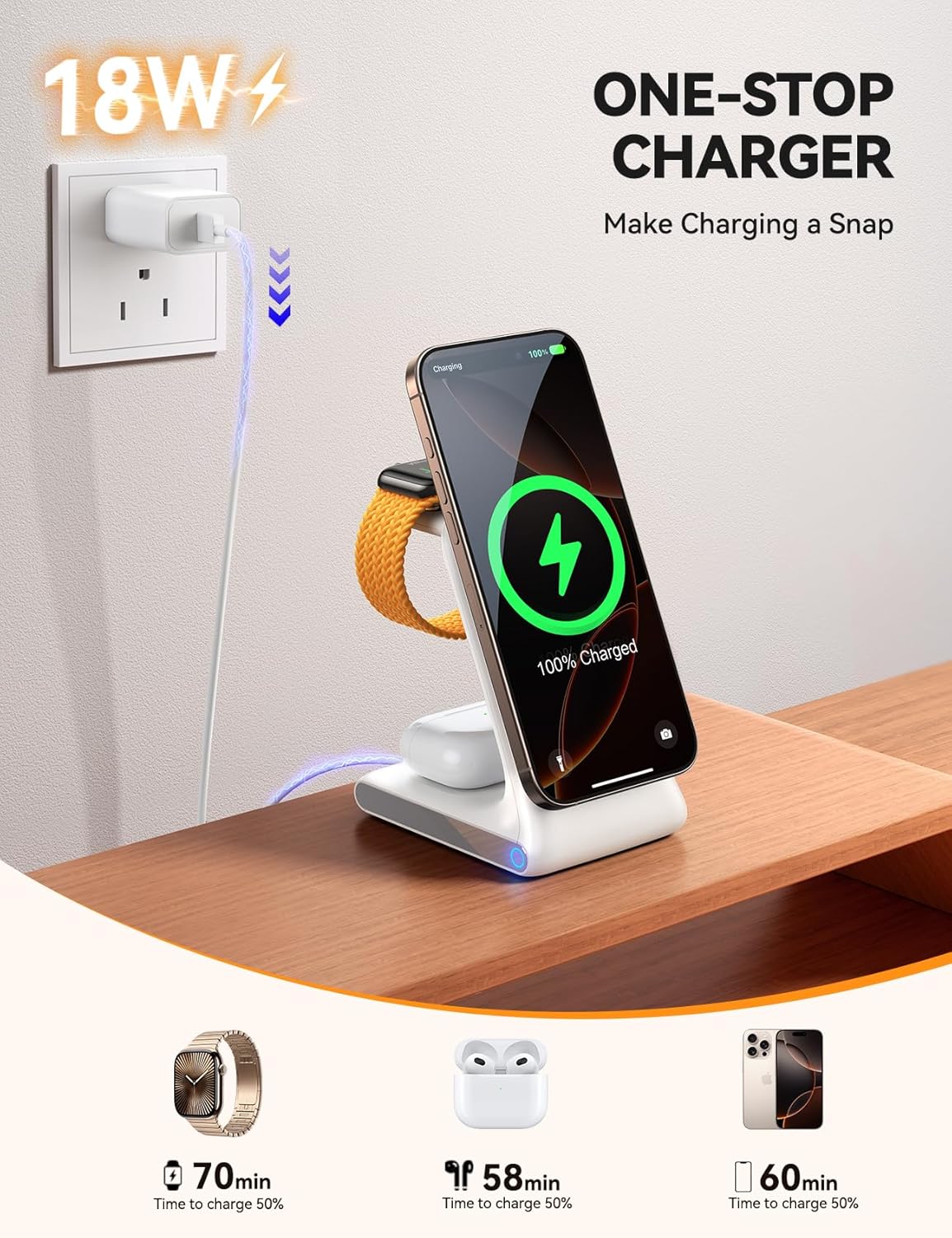
Image: An illustration demonstrating the charging speeds for different devices on the JOYROOM 3-in-1 Wireless Charging Station. It shows an iPhone charging to 50% in 60 minutes, AirPods in 58 minutes, and an Apple Watch in 70 minutes, using an 18W adapter.

Image: A close-up view of the magnetic charging area on the JOYROOM 3-in-1 Wireless Charging Station, illustrating the precise magnetic alignment with an iPhone.
Compatibility
This wireless charging station is designed for Apple devices with wireless charging capabilities:
- iPhone: iPhone 16/16 Plus/16 Pro/16 Pro Max, iPhone 15/15 Plus/15 Pro/15 Pro Max, iPhone 14/14 Plus/14 Pro/14 Pro Max, iPhone 13/13 mini/13 Pro/13 Pro Max, iPhone 12/12 mini/12 Pro/12 Pro Max. (Note: Requires MagSafe magnetic case or no case for wireless charging).
- Apple Watch: Apple Watch 10/9/8/7/6/5/4/3/2/Ultra 2/Ultra 1/SE.
- AirPods: AirPods 4/3/2, AirPods Pro 2/Pro (with wireless charging case).

Image: A visual chart detailing the compatibility of the JOYROOM 3-in-1 Wireless Charging Station with various iPhone (16, 15, 14-12 series), AirPods (4, Pro 2, 2 with wireless case), and Apple Watch (Ultra 1&2, S10-S1, SE 1&2) models.
Safety Information
The JOYROOM 3-in-1 Wireless Charging Station incorporates multiple safety features to protect your devices:
- Overcurrent Protection: Prevents damage from excessive current.
- Overvoltage Protection: Safeguards against voltage spikes.
- Over-temperature Protection: Monitors and regulates the device's temperature to prevent overheating.
- Short Circuit Detection: Automatically detects and prevents short circuits.

Image: An exploded view of the JOYROOM 3-in-1 Wireless Charging Station, illustrating its internal components and highlighting the integrated security features such as over-current, over-voltage, over-temperature protection, and short circuit detection.
Maintenance
- Cleaning: Disconnect the charger from the power source before cleaning. Use a soft, dry cloth to wipe the surface. Do not use abrasive cleaners or solvents.
- Storage: Store the charging station in a cool, dry place away from direct sunlight and extreme temperatures.
- Handling: Avoid dropping or subjecting the device to strong impacts.
Troubleshooting Guide for Apple Watch Charger
If you encounter issues with charging your Apple Watch, consider the following:
- Case Interference: Thick (over 3mm) or metal cases can prevent charging. Remove the case to attempt charging again.
- Device Temperature & Battery Health: Charging may pause if the device overheats. Allow it to cool down to resume. Older batteries may not hold a charge effectively.
- Software Issues: Software can sometimes cause charging problems. Restart and update your Apple Watch to the latest software version.
- Cable and Power Source: Ensure all cables are securely connected. Try using a different power outlet or USB port to rule out power source issues.
If issues persist after following these steps, please contact customer support.
Specifications
| Model Number | JR-W15 |
| Brand | JOYROOM |
| Connector Type | USB Type C |
| Power Source | DC |
| Special Feature | Magsafe Compatible |
| Item Weight | 11.3 ounces |
| Package Dimensions | 6.02 x 5.08 x 3.23 inches |
| Color | White |
Warranty and Support
This product comes with a standard manufacturer's warranty. For detailed warranty information, please refer to the warranty card included in your package or visit the official JOYROOM website.
For technical support, troubleshooting assistance, or any inquiries regarding your JOYROOM 3-in-1 Wireless Charging Station, please contact JOYROOM customer service through their official channels. Contact information can typically be found on the product packaging or the JOYROOM brand website.