
1. Introduction
This manual provides essential information for the safe and correct installation, operation, and maintenance of your ForeverPRO WR55X43825 Refrigerator Main Control Board. This control board is designed as a replacement part for various GE Appliance refrigerator models. Please read these instructions thoroughly before proceeding with installation to ensure proper function and to prevent damage or injury.
2. Safety Information
WARNING: Risk of Electric Shock and Injury.
- Always disconnect power to the refrigerator before attempting any installation, repair, or maintenance. Failure to do so can result in serious injury or death.
- Installation should only be performed by a qualified technician or an individual with experience in appliance repair.
- Wear appropriate personal protective equipment, including gloves and eye protection.
- Ensure all connections are secure and correctly oriented before restoring power.
- Do not attempt to modify the control board or any associated wiring.
- Keep children and pets away from the work area during installation.
3. Product Overview
The ForeverPRO WR55X43825 is a replacement main control board for compatible GE Appliance refrigerators. This component manages various functions of the refrigerator, including temperature regulation, defrost cycles, and compressor operation. It is designed to meet or exceed OEM specifications for quality and performance.
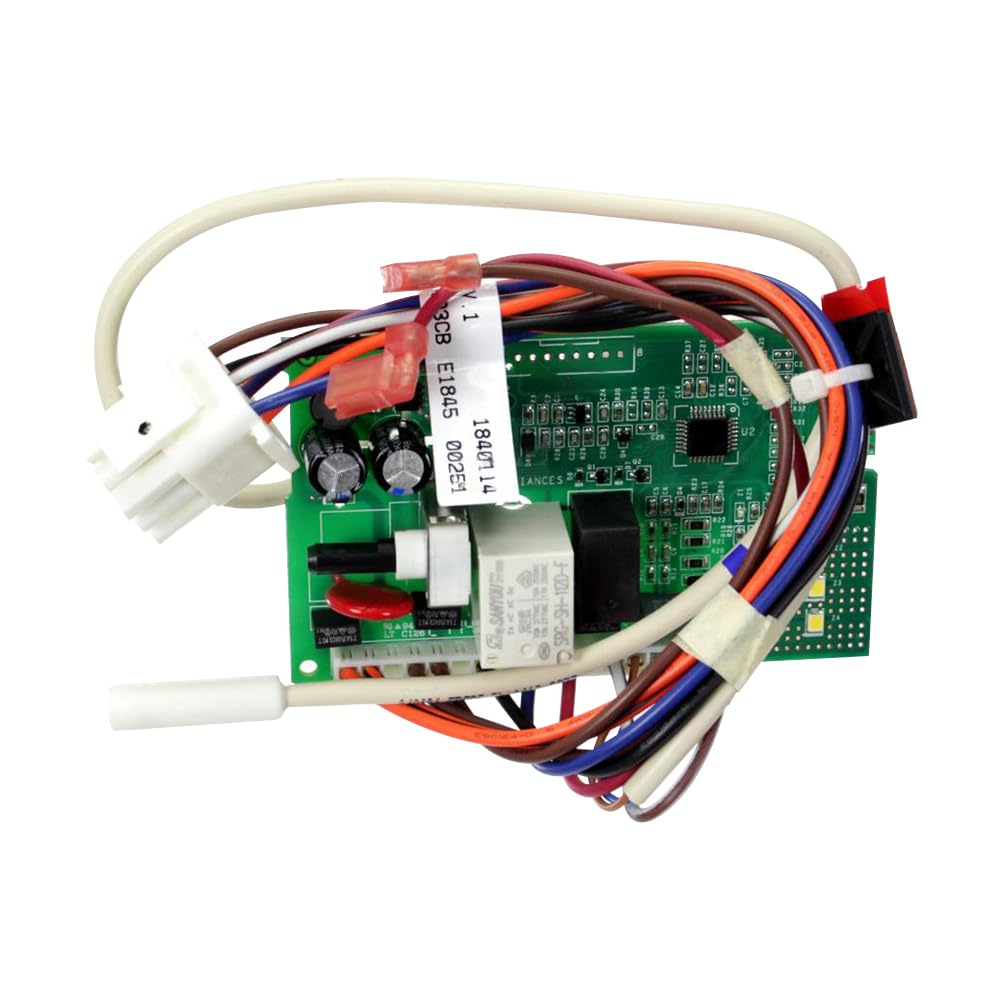
Image 1: ForeverPRO WR55X43825 Refrigerator Main Control Board. This image shows the electronic circuit board with various connectors and components.
Compatible Part Numbers:
This control board replaces the following part numbers:
- WR55X33653
- WR55X33565, WR55X33566, WR55X33567, WR55X33568, WR55X33569, WR55X33570, WR55X33571, WR55X33572, WR55X33573, WR55X33574
- WR55X33645, WR55X33646, WR55X33647, WR55X33648, WR55X33649, WR55X33650, WR55X33651, WR55X33652, WR55X33654, WR55X33655, WR55X33657, WR55X33658
- WR55X35567, WR55X35568
Compatible Refrigerator Models (Partial List):
This control board is compatible with many GE Appliance models, including but not limited to:
- GIE17GSNBRSS, GIE17GSNDRSS, GIE17GSNERSS
- GIE18DTNBRBB, GIE18DTNBRWW, GIE18DTNDRBB, GIE18DTNDRWW, GIE18DTNERBB, GIE18DTNERWW
- GTE16DTNBLWW, GTE16DTNBRCC, GTE16DTNBRWW, GTE16DTNDLWW, GTE16DTNDRCC, GTE16DTNDRWW
- GTE17DTNBRBB, GTE17DTNBRCC, GTE17DTNBRWW, GTE17DTNDRBB, GTE17DTNDRCC, GTE17DTNDRWW
- For a complete list, refer to your appliance's service manual or consult a qualified technician.
4. Installation
Before You Begin:
- Ensure the refrigerator is unplugged from the power outlet.
- Gather necessary tools (e.g., screwdrivers, nut drivers, pliers).
- Take photos of existing wiring connections before disconnecting them for reference.
Step-by-Step Installation:
- Disconnect Power: Unplug the refrigerator from the wall outlet. If the outlet is inaccessible, turn off the circuit breaker supplying power to the refrigerator.
- Locate Control Board: The main control board is typically located at the back of the refrigerator, behind an access panel, or sometimes inside the fresh food compartment behind a cover. Refer to your specific refrigerator model's service manual for the exact location.
- Remove Access Panel: Use appropriate tools to remove any screws or fasteners holding the access panel in place. Carefully set the panel aside.
- Disconnect Wiring: Before disconnecting, take clear photos of all wire connections. Carefully disconnect each wire harness and connector from the old control board. Note their positions.
- Remove Old Control Board: Unfasten any screws, clips, or tabs securing the old control board. Carefully remove it from its housing.
- Install New Control Board: Position the new ForeverPRO WR55X43825 control board into the housing. Secure it with the screws, clips, or tabs that held the old board.
- Reconnect Wiring: Using your reference photos, carefully reconnect all wire harnesses and connectors to their corresponding terminals on the new control board. Ensure each connection is firm and secure.
- Replace Access Panel: Reattach the access panel, ensuring all screws or fasteners are tightened.
- Restore Power: Plug the refrigerator back into the wall outlet or turn on the circuit breaker.
5. Operating (Post-Installation Check)
After installing the new control board and restoring power, perform the following checks to ensure proper functionality:
- Initial Power-Up: Listen for the compressor to start and observe if the interior lights and display (if applicable) illuminate.
- Temperature Monitoring: Allow several hours for the refrigerator and freezer compartments to reach their set temperatures. Use a thermometer to verify temperatures are within the recommended range.
- Functionality Check: Test other features of the refrigerator, such as the ice maker, water dispenser, and fan operation, if applicable to your model.
- Observe for Errors: Check for any error codes or unusual noises. If issues persist, refer to the Troubleshooting section.
6. Maintenance
The ForeverPRO WR55X43825 Refrigerator Main Control Board is a sealed electronic component and requires minimal maintenance. To ensure its longevity and proper function:
- Keep Dry: Ensure the area around the control board remains dry and free from moisture.
- Cleanliness: Periodically inspect the area for dust or debris accumulation. If necessary, gently clean with a soft, dry brush or compressed air (with power disconnected).
- Ventilation: Ensure the refrigerator's ventilation system is not obstructed, as proper airflow helps prevent overheating of electronic components.
7. Troubleshooting
If your refrigerator experiences issues after installing the new control board, consider the following troubleshooting steps:
| Problem | Possible Cause | Solution |
|---|---|---|
| Refrigerator not cooling | Incorrect wiring, faulty component, power issue |
|
| Refrigerator not turning on | No power, loose connection, faulty board |
|
| Error codes displayed | Specific component failure, wiring issue |
|
If troubleshooting steps do not resolve the issue, it is recommended to contact a qualified appliance repair technician.
8. Specifications
- Part Number: WR55X43825
- Manufacturer: ForeverPRO
- Item Weight: 8 ounces
- Product Dimensions: 9 x 6 x 4 inches
- Included Components: Refrigerator Main Control Board
- Compatibility: Designed for various GE Appliance refrigerator models.
9. Warranty Information
This ForeverPRO WR55X43825 Refrigerator Main Control Board comes with a 90 Days Manufacturer Warranty. For specific terms, conditions, and to initiate a warranty claim, please contact ForeverPRO directly or the retailer from whom the product was purchased. Keep your proof of purchase for warranty purposes.
10. Support
For further assistance, technical questions, or if you require professional installation, please consider the following options:
- Contact ForeverPRO: Refer to the packaging or the ForeverPRO website for customer support contact information.
- Professional Appliance Technician: If you are unsure about any step of the installation or troubleshooting process, it is highly recommended to consult a certified appliance repair technician.
- Online Resources: Search for specific service manuals for your GE Appliance refrigerator model, which may provide detailed diagrams and additional troubleshooting steps.