
1. Introduction
The OLAX Mini DC-UPS POE-D6 is a portable power bank designed to provide uninterrupted power to various electronic devices. Featuring a 20000 mAh capacity, it offers multiple output options including 5V USB, 9V/12V DC, and selectable 15V/24V Power Over Ethernet (POE). This device is ideal for maintaining power to routers, modems, cameras, and other compatible electronics during power outages or when a wall outlet is unavailable.
2. Safety Information
- Do not expose the device to water, moisture, or extreme temperatures.
- Avoid dropping or subjecting the device to strong impacts.
- Do not attempt to disassemble, repair, or modify the device. This will void the warranty and may cause damage or injury.
- Keep out of reach of children.
- Use only the provided or approved power adapter for charging the device.
- Ensure proper ventilation when operating the device.
- If the device shows signs of damage, overheating, or unusual behavior, discontinue use immediately.
3. Package Contents
Verify that all items are present in your package:
- OLAX Mini DC-UPS POE-D6 Unit
- AC Power Cable
- DC Output Cable(s)

Image: The OLAX Mini DC-UPS POE-D6 unit shown with its AC power cable and DC output cables.
4. Product Overview
Front Panel: Indicators
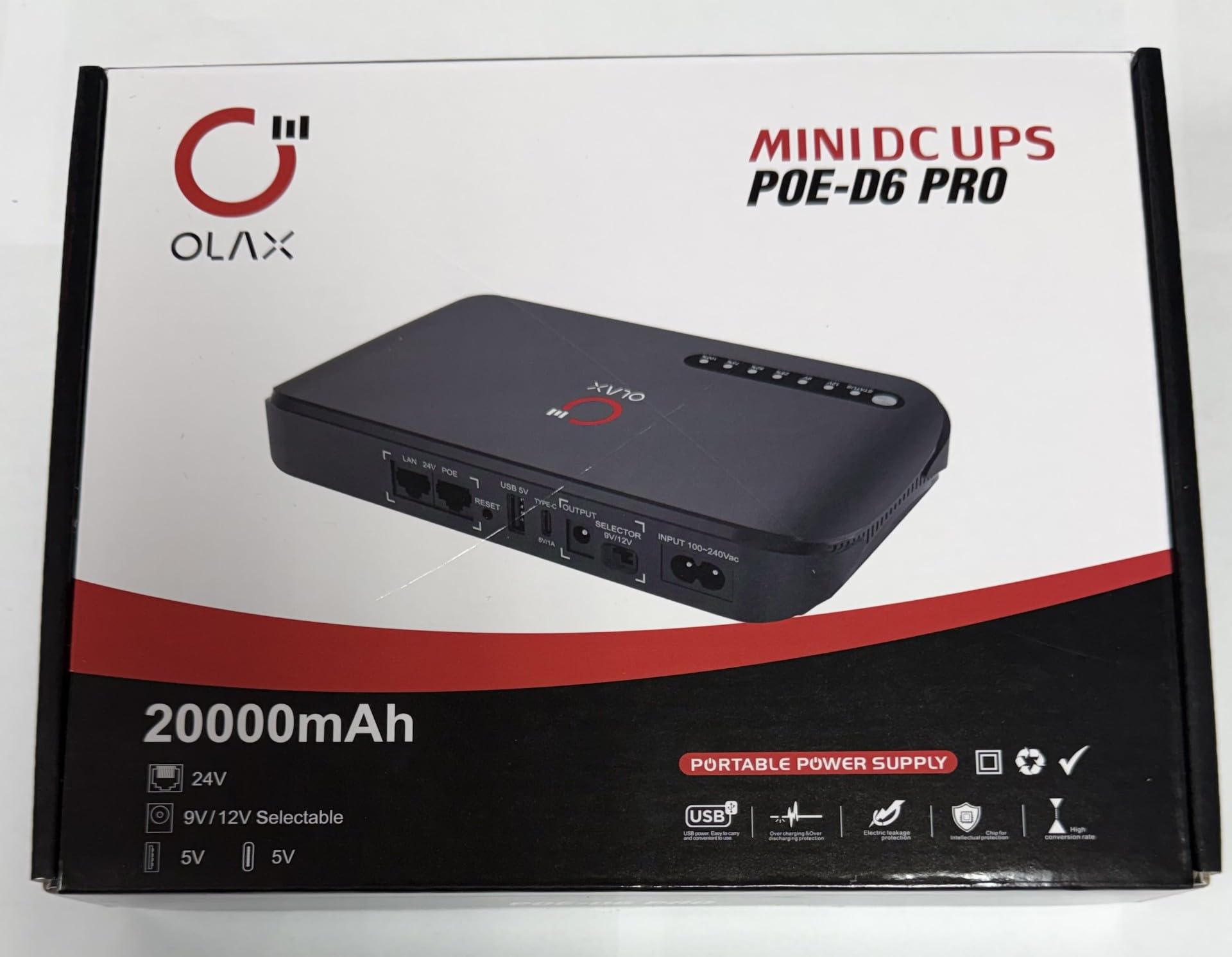
Image: Front view of the OLAX Mini DC-UPS POE-D6, showing the OLAX logo and a row of LED indicators for status and battery level.
- STATUS: Indicates the operational status of the device.
- 12V / 9V: Indicates the selected DC output voltage.
- 25%, 50%, 75%, 100%: Battery level indicators, showing the remaining charge.
Rear Panel: Ports and Controls

Image: Rear view of the OLAX Mini DC-UPS POE-D6, detailing the input and output ports, including LAN, POE, USB, Type-C, DC output, voltage selector, and AC input.
- LAN: Standard Ethernet port for network connection.
- 24V POE: Power Over Ethernet output port.
- RESET: Button to reset the device.
- USB 5V: Standard USB output port for charging 5V devices.
- TYPE-C 5V/1A: USB Type-C output port for charging 5V devices.
- OUTPUT: DC output port.
- SELECTOR 9V/12V: Switch to select between 9V and 12V DC output.
- INPUT 100-240Vac: AC input for charging the UPS.
5. Setup
- Initial Charge: Before first use, fully charge the OLAX Mini DC-UPS. Connect the AC power cable to the INPUT 100-240Vac port on the rear panel and plug it into a wall outlet. The battery level indicators will illuminate, showing the charging progress. All indicators will be solid when fully charged.
- Connect Devices: Identify the appropriate output port and voltage for your device.
- DC Output: For devices requiring 9V or 12V, use the provided DC output cable. Select the correct voltage (9V or 12V) using the SELECTOR switch on the rear panel. Connect one end of the DC cable to the OUTPUT port on the UPS and the other end to your device.
- USB Output: For devices requiring 5V, connect your device's USB cable to either the USB 5V or TYPE-C 5V/1A port.
- POE Output: For POE-compatible devices, connect an Ethernet cable from the 24V POE port on the UPS to your POE device. Ensure the POE voltage selector (if present on your specific model, typically 15V/24V) is set correctly.
6. Operation
The OLAX Mini DC-UPS operates automatically when connected to an AC power source. In the event of a power failure, it will seamlessly switch to battery power, providing continuous operation for your connected devices.
- Power On/Off: The device typically powers on automatically when connected to AC power or when a device is connected to an output port. There is no dedicated power button for manual on/off.
- Monitoring Battery Level: Refer to the LED indicators on the front panel to check the remaining battery capacity.
- Voltage Selection: Use the 9V/12V SELECTOR switch for DC output and the 15V/24V selector for POE output (if applicable to your model) to match the voltage requirements of your connected device. Incorrect voltage selection can damage your device.
7. POE Functionality
The POE (Power Over Ethernet) port allows you to power compatible network devices, such as IP cameras or wireless access points, directly through an Ethernet cable. This eliminates the need for a separate power adapter for the POE device.
- POE Voltage: The POE port on the OLAX POE-D6 supports selectable 15V or 24V output. Ensure the selector switch is set to the correct voltage required by your POE device.
- Connection: Connect one end of a standard Ethernet cable to the 24V POE port on the UPS and the other end to the POE input of your network device.
8. Maintenance
- Cleaning: Clean the device with a dry, soft cloth. Do not use liquid cleaners or solvents.
- Storage: If the UPS is not used for an extended period, charge it at least once every three months to maintain battery health. Store in a cool, dry place away from direct sunlight.
- Battery Care: The device uses a Lithium Iron Phosphate (LiFePO4) battery. Avoid fully discharging the battery frequently to prolong its lifespan.
9. Troubleshooting
- Device not charging:
- Ensure the AC power cable is securely connected to both the UPS and the wall outlet.
- Verify that the wall outlet is functional.
- Connected device not receiving power:
- Check if the UPS has sufficient battery charge.
- Ensure the output cable is correctly connected to both the UPS and your device.
- For DC output, verify that the correct voltage (9V or 12V) is selected.
- For POE output, ensure the correct voltage (15V or 24V) is selected and your device is POE compatible.
- Try connecting a different device to confirm the UPS output is working.
- UPS indicators not lighting up:
- The battery might be completely depleted. Connect the UPS to AC power and allow it to charge for some time.
- If the issue persists, contact customer support.
10. Specifications

Image: The product packaging displaying a detailed table of specifications and common application scenarios for the OLAX Mini DC-UPS POE-D6.
| Feature | Specification |
|---|---|
| Model | POE-D6 PRO |
| Rated Working Voltage | 100-240Vac / 50-60Hz |
| Output Power (Max) | 18W |
| Output (USB) | 5Vdc, 2A |
| Output (Type-C) | 5Vdc, 1A |
| Output (DC) | 9Vdc / 12Vdc, 1.5A |
| Output (POE) | 24Vdc, 0.7A (15V/24V selectable) |
| Battery Type | Lithium Iron Phosphate (LiFePO4) |
| Battery Capacity | 20000 mAh |
| Unit Dimensions (mm) | 206 x 120 x 35 |
| Net Weight (kg) | 0.64 |
*Product specifications are subject to change without notice.
11. Warranty Information
This OLAX product comes with a 1-Year Warranty from the date of purchase. The warranty covers defects in materials and workmanship under normal use. It does not cover damage caused by misuse, accident, unauthorized modification, or improper installation.
12. Support & Contact
For technical support, warranty claims, or further assistance, please refer to the contact information provided with your purchase or visit the official OLAX website.