
Blackview LYPUS-BL9000Pro-12/512-2024Black
Blackview BL9000 Pro 5G Rugged Smartphone User Manual
Model: LYPUS-BL9000Pro-12/512-2024Black
Introduction
Welcome to the user manual for your Blackview BL9000 Pro 5G Rugged Smartphone. This device is engineered for durability and high performance, featuring advanced capabilities such as FLIR thermal imaging, a powerful MediaTek Dimensity 8020 processor, and a robust 8800mAh battery with 120W fast charging. This manual provides essential information to help you set up, operate, maintain, and troubleshoot your device, ensuring you get the most out of its extensive features.
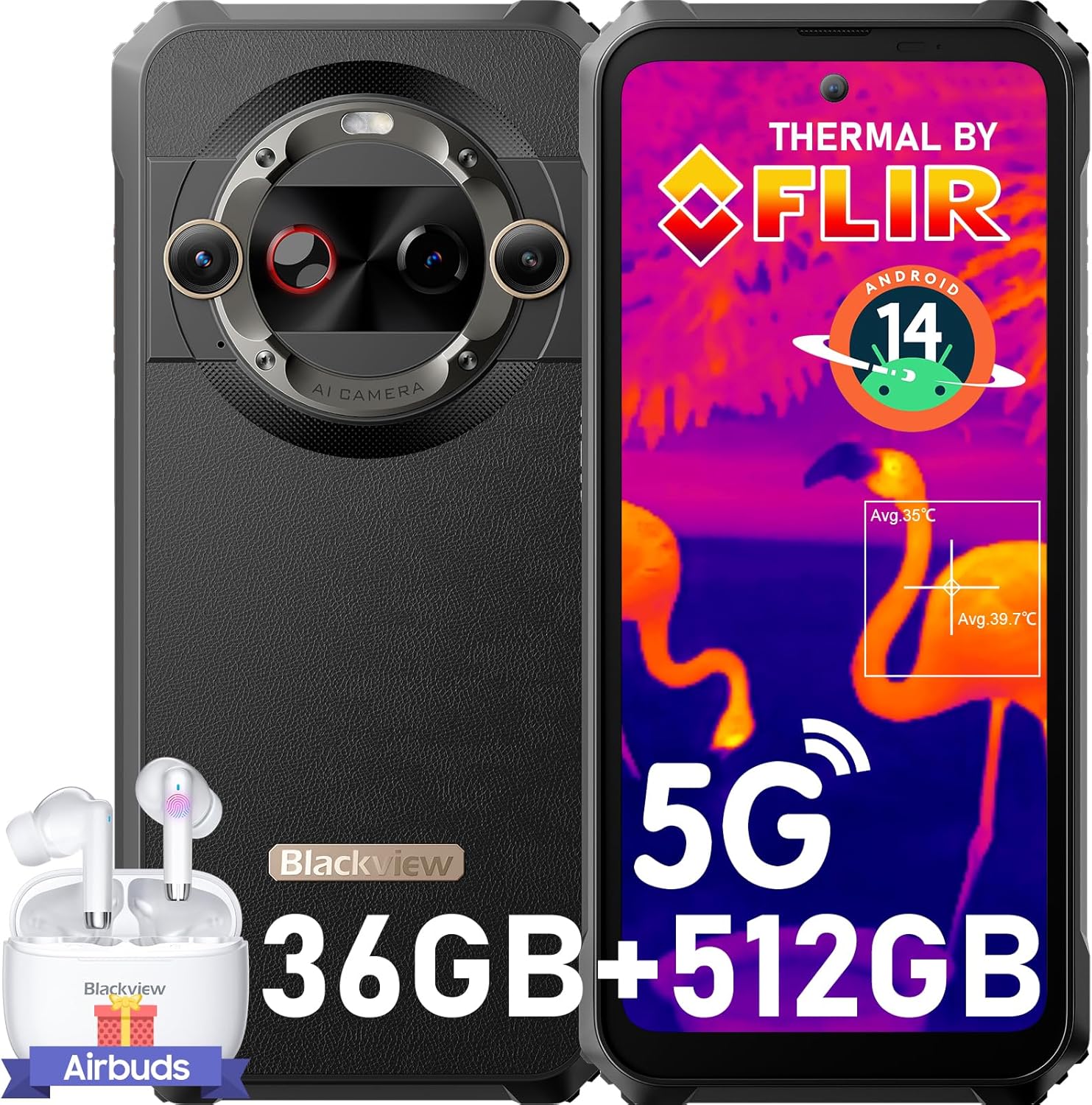
This image displays the Blackview BL9000 Pro 5G rugged smartphone from both front and rear angles, highlighting its thermal imaging capabilities on the screen and the robust design. A pair of Blackview Airbuds are also shown alongside the phone.
Setup
1. SIM Card and Storage Installation
Your BL9000 Pro supports dual nano SIM cards or one nano SIM card and one micro SD/TF card. Locate the SIM tray on the side of the device. Use the provided SIM ejector tool to open the tray. Carefully place your SIM card(s) and/or micro SD card into the designated slots, ensuring correct orientation. Close the tray securely.
2. Initial Charging
Before first use, it is recommended to fully charge your device. Connect the provided 120W fast charger to the phone's charging port. The 8800mAh battery can reach 50% charge in approximately 20 minutes and a full charge in about 53 minutes.

This image illustrates the impressive 8800mAh battery capacity and the 120W ultra-fast charging feature of the BL9000 Pro, indicating that the phone can reach 50% charge in 20 minutes and a full charge in 53 minutes.
3. Powering On/Off
To power on, press and hold the Power button until the Blackview logo appears. To power off, press and hold the Power button, then select 'Power off' from the options.
4. Initial Device Setup
Upon first power-on, follow the on-screen prompts to complete the initial setup. This includes selecting your language, connecting to Wi-Fi, setting up your Google account, and configuring security features like Fingerprint Recognition or Face ID. The device runs on Android 14 with Doke OS 4.0, offering an enhanced user experience.
Operating Your Device
Display Features
The BL9000 Pro features a 6.78-inch FHD+ display with a 120Hz dynamic refresh rate, providing smooth visuals and responsive touch. It boasts a 2408x1080 resolution and 600 nits brightness for clear viewing in various conditions. The display is TÜV SÜD Low Blue Light certified, offering three eye-care modes to reduce eye strain.

This graphic emphasizes the BL9000 Pro's 120Hz display, showcasing its smooth refresh rate and high resolution (2460x1080). It also highlights the TUV SUD Low Blue Light certification for eye comfort and a brightness of 600 Nits.
Camera Usage
The device is equipped with a versatile camera system:
- FLIR Thermal Imaging Camera: Features the highest resolution FLIR Lepton 3.5, allowing for precise temperature insights and report generation. Ideal for diagnostics, outdoor exploration, and rescue missions.
- Rear Cameras: A 50MP anti-shake main camera (OIS) and a 13MP 120° Ultra Wide Angle and Ultra Macro camera. Supports up to 4K video recording.
- Front Camera: A 50MP true color front camera with beauty modes.
- Modes: Includes underwater mode and night mode for diverse shooting conditions.

This image illustrates the advanced FLIR thermal imaging capabilities of the BL9000 Pro, showcasing how it can detect heat signatures in different scenarios, including human figures and various practical applications like home comfort, industrial construction, fire emergencies, and outdoor adventures.

This image details the camera setup of the BL9000 Pro, showcasing its 50MP selfie camera, a 50MP OIS anti-shake rear camera, and a 13MP ultra-wide and ultra-macro camera. It also mentions features like ArcSoft 8.0, 4K video beauty mode, and improved HDR.
Performance and Storage
Powered by the MediaTek Dimensity 8020 5G Octa-Core Processor, the BL9000 Pro ensures smooth operation. It comes with 12GB of RAM (expandable with 24GB virtual RAM for a total of 36GB) and 512GB of internal storage, providing ample space for applications, photos, and videos.

This graphic highlights the internal specifications of the BL9000 Pro, featuring the MediaTek Dimensity 8020 5G processor, 12GB of physical RAM expandable with 24GB of virtual RAM, and a spacious 512GB of internal storage (ROM).
Connectivity
- 5G Network: Supports a wide range of 5G and 4G bands for robust connectivity (check compatibility with your carrier).
- Wi-Fi 6: Dual-band Wi-Fi 6 ensures fast and stable wireless connections.
- NFC: For swift payments and data transfer.
- Navigation: Integrated GPS, Beidou, GLONASS, and Galileo for accurate positioning.
Special Features
- Glove Mode: Allows for smooth screen operation even while wearing gloves.
- X-axis Linear Motor: Delivers extraordinary haptic feedback for a more immersive experience.
- Harman Kardon Smart-PA Speakers: Dual speakers provide superb sound quality for calls and music.
- OTG Function: Enables the phone to act as a mobile power source for other devices.
Doke OS 4.0 Features (Android 14)
The BL9000 Pro runs on Android 14 with Blackview's Doke OS 4.0, offering enhanced privacy protection and a richer functional experience:
- Workspace App: Distinctly separate work and personal profiles.
- Real-time Subtitle: Provides subtitles while watching videos.
- Screen Attention: Keeps the screen on while you're looking at it.
- Thoughtfully Designed Timer: For various tasks and activities.
- Game Mode: Optimizes performance for gaming.
- Focus Mode: Helps you concentrate by pausing distracting apps.

This composite image demonstrates several key features: the phone's glove mode for operation with gloves, its 4K video recording capability, the TUV SUD certified low blue light display for eye protection, dual-band WiFi 6 for fast connectivity, L1+L5 dual GPS for accurate positioning, and the X-axis linear motor for enhanced haptic feedback.

This image demonstrates the user interface of the BL9000 Pro, running on Android 14 with Doke OS 4.0. It highlights features such as the Workspace App for separating work and personal data, real-time subtitles, screen attention, a thoughtfully designed timer, game mode, and focus mode.
Maintenance
Rugged Durability
The Blackview BL9000 Pro is built to withstand harsh environments. It features CORNING GORILLA GLASS 7 for screen protection and holds IP68 & IP69K professional military-grade waterproof certifications, as well as MIL-STD-810H drop certifications. It can endure drops from 5 meters and remain waterproof for 30 minutes under 1.5 meters of water. Its temperature resistance ranges from -20°C to +60°C.
Cleaning and Care
To clean your device, use a soft, damp cloth. Avoid using harsh chemicals or abrasive materials. Ensure all ports are dry before charging or connecting accessories, especially after exposure to water.
Battery Care
To prolong battery life, avoid exposing the device to extreme temperatures. While the 8800mAh battery is designed for longevity, regular charging habits (avoiding full discharge frequently) can help maintain its capacity over time.
Troubleshooting
If you encounter issues with your Blackview BL9000 Pro, consider the following basic troubleshooting steps:
- Restart Device: A simple restart can resolve many minor software glitches.
- Check Connectivity: For network issues, ensure your SIM card is properly inserted and your mobile data or Wi-Fi is enabled. Verify network settings.
- Software Updates: Ensure your device's operating system and applications are up to date. Go to Settings > System > System update.
- Clear Cache: If an app is misbehaving, try clearing its cache (Settings > Apps > [App Name] > Storage > Clear cache).
- Factory Reset: As a last resort, if issues persist, you may consider a factory reset (Settings > System > Reset options > Erase all data). Warning: This will delete all data on your phone. Back up important information first.
For more complex issues, please refer to the support section or contact Blackview customer service.
Specifications
| Feature | Detail |
|---|---|
| Brand | Blackview |
| Model Name | LYPUS-BL9000Pro-12/512-2024Black |
| Operating System | Android 14 |
| RAM Memory Installed Size | 12 GB (36GB with virtual RAM) |
| Memory Storage Capacity | 512 GB |
| CPU Speed | 2.6 GHz (MediaTek Dimensity 8020) |
| Screen Size | 6.78 Inches |
| Resolution | 2400 x 1080 |
| Refresh Rate | 120 Hz |
| Wireless Carrier Compatibility | T-Mobile, Movistar, Claro, Telcel, Bell Wireless, Fido (Not compatible with AT&T, Cricket, Verizon, Sprint, Boost Mobile, Straight Talk) |
| Battery Capacity | 8800mAh |
| Charging Speed | 120W Fast Charge |
| Thermal Imaging | FLIR Lepton 3.5 |
| Rear Camera | 50MP (OIS) + 13MP (Ultra-wide/Macro) |
| Front Camera | 50MP |
| Durability Certifications | IP68, IP69K, MIL-STD-810H, CORNING GORILLA GLASS 7 |
Warranty and Support
Your Blackview BL9000 Pro comes with a 2-year warranty service. Should you encounter any issues or require assistance, please reach out to the point of purchase or Blackview's official customer support channels for prompt assistance. Keep your purchase receipt as proof of warranty.