
1. Introduction
Thank you for choosing the PEJE G08 Smartwatch. This device is designed to enhance your daily life with its advanced features, including a vibrant 2.13-inch AMOLED display, Bluetooth calling, comprehensive sports tracking, and health monitoring. This manual provides essential information for setting up, operating, and maintaining your smartwatch.
Product Dimensions
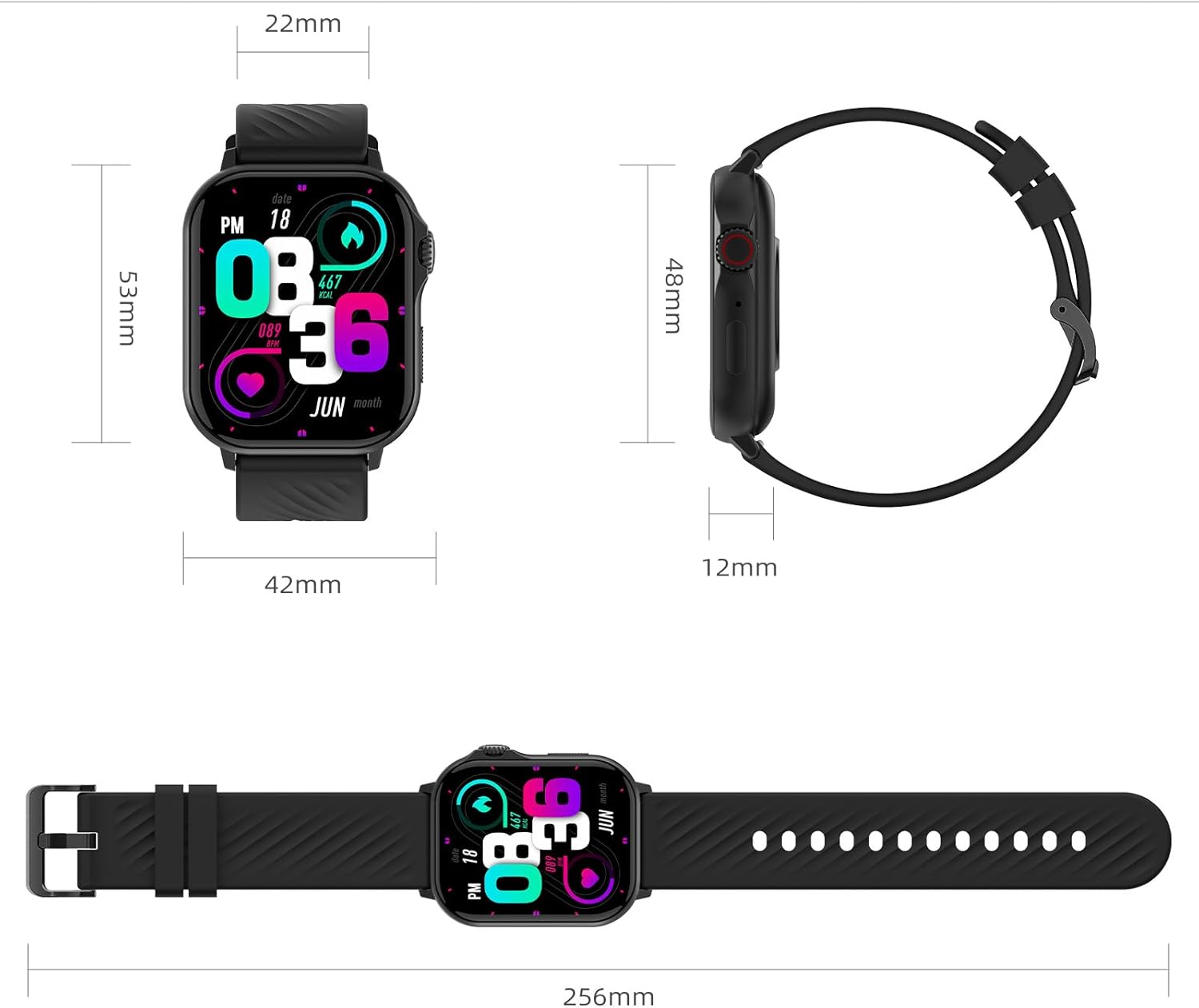
Image 1.1: Smartwatch dimensions. The watch measures 42mm in width and 53mm in height, with a thickness of 12mm. The strap width is 22mm, and the total length with the strap is 256mm.
2. What's in the Box
Upon opening your PEJE G08 Smartwatch package, you should find the following items:
- PEJE G08 Smartwatch
- User Manual
- USB Magnetic Charging Cable

Image 2.1: Package contents including the smartwatch, user manual, and charging cable.
3. Setup
3.1 Initial Charging
Before first use, fully charge your smartwatch. Connect the magnetic charging cable to the charging points on the back of the watch and plug the USB end into a power adapter (not included) or a computer's USB port. A full charge typically takes approximately 2.5 hours.
3.2 App Installation and Pairing
To unlock all features, download the official PEJE app on your smartphone. The app is compatible with iOS 9.0+ and Android 5.0+ devices.
- Scan the QR code in the manual or on the watch screen (if available) to download the PEJE app, or search for "PEJE" in your phone's app store.
- Open the app and create an account or log in.
- Ensure Bluetooth is enabled on your smartphone.
- In the PEJE app, navigate to "Device" or "Add Device" and select your smartwatch from the list of available devices.
- Confirm the pairing request on both your phone and the smartwatch.

Image 3.1: The smartwatch is compatible with iOS 9.0+ and Android 5.0+ smartphones.
4. Operating Instructions
4.1 Basic Navigation
- Touch Screen: Swipe left/right, up/down to navigate through menus and features. Tap to select.
- Side Button: Press to return to the home screen or wake the device. Long press for power options.
4.2 Bluetooth Calling
After successful Bluetooth pairing, you can make and receive calls directly from your smartwatch.
- Answering Calls: When a call comes in, tap the green icon on the watch screen.
- Making Calls: Access the dial pad or contact list on your watch to initiate a call.
- The smartwatch features a built-in microphone and high-fidelity speaker for clear communication.

Image 4.1: Bluetooth 5.2 calling feature, showing options to answer, reject, or mute calls, along with a built-in microphone and speaker.
4.3 AI Voice Assistant
Utilize the integrated AI voice assistant for convenient control and information access.
- After Bluetooth pairing and data synchronization via the PEJE app, access the AI voice assistant directly on your watch.
- Use voice commands to check the time, set alarms, reminders, or inquire about the weather.

Image 4.2: AI Voice Assistant in action, responding to voice commands for time and weather.
4.4 Sports Modes and GPS Tracking
The smartwatch supports over 100 sports modes and features integrated GPS for accurate outdoor activity tracking.
- Select your desired sport mode from the watch menu to begin tracking.
- The integrated GPS accurately records detailed routes for outdoor activities like walking and running.
- Review your progress and detailed data in the PEJE app.

Image 4.3: Over 123 sports modes available for tracking various physical activities.

Image 4.4: Integrated GPS tracking your location and compatible with multiple satellite systems for reliable connectivity.
4.5 Health Monitoring
The smartwatch provides continuous monitoring of key health metrics.
- Heart Rate Monitoring: Continuously tracks heart rate data during daily activities, exercise, and sleep.
- Blood Oxygen Monitoring: Monitors your blood oxygen level in real-time.
- Sleep Monitoring: Automatically tracks sleep onset, duration, and stages (deep, light, REM).
- Menstrual Cycle Tracking: Designed for women's health, this feature monitors and predicts your menstrual cycle.

Image 4.5: Continuous heart rate monitoring for better body awareness.

Image 4.6: Blood oxygen monitoring to ensure a healthier metabolism.

Image 4.7: Sleep monitoring provides detailed analysis for better sleep habits.

Image 4.8: Menstrual cycle tracking helps users prepare and avoid surprises.
4.6 Custom Watch Faces
Personalize your smartwatch with over 200 stylish watch faces or create your own using personal photos.
- In the PEJE app, navigate to the watch face selection menu.
- Choose from pre-designed faces or select "Edit" to customize.
- Select a photo from your album and save to apply.

Image 4.9: Custom watch faces allow for daily personalization.
4.7 Other Practical Functions
The smartwatch offers a variety of other useful features:
- Music Control
- Weather Forecast
- Stopwatch
- Water Drinking Reminder
- Camera Control
- Alarm Clock
- Find Phone
- Sedentary Reminder
- Message Notifications (view and filter information from apps)

Image 4.10: Multiple practical functions to simplify your day.
5. Maintenance
5.1 Water Resistance
The PEJE G08 Smartwatch has a 1ATM water resistance rating, meaning it can withstand sweat, splashes, and rain. It is suitable for daily use and during workouts.
- Do not use for swimming, hot baths, or immersion in saltwater.
- Avoid exposing the watch to high-pressure water or steam.
- If the watch gets wet, wipe it dry with a soft cloth before charging or using buttons.

Image 5.1: Water resistance up to 1 ATM, suitable for daily use and light exposure to water.
5.2 Cleaning and Care
- Regularly clean the watch and strap with a soft, dry cloth.
- Avoid using harsh chemicals or abrasive materials.
- Ensure the charging contacts are clean and dry to prevent corrosion.
6. Troubleshooting
| Problem | Possible Solution |
|---|---|
| Watch does not turn on | Ensure the watch is fully charged. Press and hold the side button for several seconds. |
| Cannot pair with smartphone | Ensure Bluetooth is enabled on your phone. Restart both the watch and phone. Make sure the PEJE app is updated. |
| Inaccurate health data | Ensure the watch is worn snugly on your wrist, not too tight or too loose. Clean the sensor on the back of the watch. |
| Short battery life | Reduce screen brightness, disable unnecessary notifications, or limit continuous heart rate monitoring. |
| GPS not tracking | Ensure you are in an open outdoor area with clear sky view. Allow the watch to acquire a GPS signal before starting your activity. |
7. Specifications
- Model Name: G08 (W26+ - ZW01 MAX)
- Display: 2.13-inch AMOLED Touch Screen (410*502 resolution)
- Operating System: AsteroidOS
- Connectivity: Bluetooth 5.2
- Water Resistance: 1ATM (1 Meter depth)
- Battery Capacity: 300 mAh (Rated 280 Milliamp Hours in specs)
- Battery Life: Up to 7 days (normal use), approx. 96 hours (intensive use)
- Charging Time: Approx. 2.5 hours
- Memory Storage: 128 MB
- RAM: 640 KB
- Compatible Devices: Android (5.0+), iOS (9.0+)
- Strap Material: Silicone

Image 7.1: Battery performance details for the smartwatch.
8. Warranty and Support
8.1 Warranty Information
The PEJE G08 Smartwatch comes with a six-month limited warranty from the date of purchase. This warranty covers manufacturing defects under normal use. It does not cover damage caused by misuse, accidents, unauthorized modifications, or failure to follow the instructions in this manual.
8.2 Customer Support
For any questions, technical assistance, or warranty claims, please contact PEJE customer service through the official PEJE app or the retailer where you purchased the product. Please have your purchase receipt and product model number ready when contacting support.