
1. Product Overview
The iGPSPORT BSC300T is an upgraded flagship model in the BSC series, designed for cyclists who seek advanced features at an accessible price. It offers a comprehensive set of functions for professional riding experiences, distinguishing itself from basic models by integrating high-end features.
Key features include a vibrant 2.4-inch color touchscreen, robust battery life, detailed navigation capabilities, and extensive data analysis options.
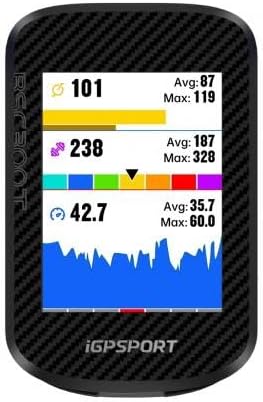
Figure 1: Front view of the iGPSPORT BSC300T Cycle Computer, showing its color display with various data metrics like speed, heart rate, and power.
2. Getting Started: Setup
2.1 Package Contents
Before you begin, ensure all standard accessories are present:
- iGPSPORT BSC300T Device
- Standard Bike Mount
- Quick Start Manual
- Type-C Charging Cable (not explicitly listed but implied by Type-C port)
2.2 Charging the Device
The BSC300T features a Type-C charging port. For optimal performance, fully charge the device before first use.
- Connect the Type-C cable to the device's charging port.
- Connect the other end of the cable to a USB power adapter (not included) or a computer USB port.
- The device will indicate charging status on the screen.
- A full charge provides approximately 20 hours of battery life.
2.3 Mounting the Device
The BSC300T comes with a standard bike mount. The device itself has a fixed mounting interface compatible with this mount.
- Secure the standard bike mount to your bicycle's handlebars or stem according to the mount's instructions.
- Align the BSC300T with the mount and twist it until it locks securely into place.
2.4 Initial Power On and Pairing
To power on the device, press and hold the power button (usually located on the side or bottom) until the screen illuminates.

Figure 2: The iGPSPORT BSC300T displaying its main menu, along with side and bottom views highlighting its physical buttons and sleek design.
For full functionality, pair your BSC300T with the iGPSPORT companion app on your smartphone via BLE5.0. You can also connect various ANT+ compatible sensors (e.g., heart rate monitors, speed/cadence sensors, power meters) and other peripherals like Shimano Di2, SRAM eTap, Campagnolo EPS power meters, smart trainers, heart rate monitors, radars, speed sensors, cadence sensors, speed/cadence sensors, iGPSPORT bike lights, and E-bikes.
- Download the iGPSPORT app from your smartphone's app store.
- Enable Bluetooth on your smartphone and open the iGPSPORT app.
- Follow the in-app instructions to search for and pair with your BSC300T.
- Once paired, you can manage device settings, sync ride data, and receive smart notifications.
3. Operating the Device
3.1 Touchscreen and Button Operation
The BSC300T features a responsive 2.4-inch color touchscreen for intuitive navigation. It also includes 6 physical buttons for reliable operation, especially useful in adverse weather conditions like rain.
- Touchscreen: Tap to select options, swipe to navigate menus or data pages.
- Physical Buttons: Use the buttons for precise control, such as starting/stopping a ride, navigating menus, or confirming selections. Refer to the quick start manual for specific button functions.
3.2 Starting and Ending a Ride
To begin a ride, simply touch the screen or press the designated physical button. The device will automatically start recording data once GPS signal is acquired.
- Ensure GPS is active and has a lock before starting for accurate tracking.
- To end a ride, press the stop button and confirm saving the data.
3.3 Navigation Features
The device includes a built-in colorful map to help you stay on course and understand your surroundings.

Figure 3: A collage showcasing various functionalities of the BSC300T, including its detailed navigation map, customizable data screens, physical button interaction, and smartphone notification display.
- Map Display: View your current location and planned route on the colorful map.
- One-Touch Return: Quickly navigate back to your starting point or a previously marked location.
- Off-Course Warning: Receive alerts if you deviate from your planned route, ensuring you stay on track even in unfamiliar terrain.
3.4 Data Display and Customization
The BSC300T provides extensive data metrics for a professional riding analysis. It supports over 130 professional data points across 15 categories, with over 1000 data combinations.
- Customizable Pages: Personalize your ride data pages to display the information most relevant to you.
- Advanced Metrics: Access detailed data such as Training Stress Score (TSS), Intensity Factor, and Peak Power, which can be freely configured.
- Graphical Display: Data is presented graphically for easy interpretation and rich insights into your performance.
3.5 Smart Notifications
When paired with your smartphone, the BSC300T can display messages and notifications directly on its screen.
- Receive alerts for incoming calls, texts, and other app notifications without needing to check your phone.
- This feature helps you stay connected and informed without interrupting your ride.
4. Maintenance
To ensure the longevity and optimal performance of your iGPSPORT BSC300T, follow these maintenance guidelines:
- Cleaning: Wipe the device with a soft, damp cloth. Avoid using abrasive cleaners or solvents that could damage the screen or casing.
- Water Resistance: The device is IPX7 waterproof, meaning it can withstand immersion in up to 1 meter of water for 30 minutes. While it is resistant to rain and splashes, avoid prolonged submersion or high-pressure water jets. Ensure the Type-C port cover is securely closed when not charging.
- Storage: Store the device in a cool, dry place away from direct sunlight and extreme temperatures.
- Battery Care: For long-term storage, charge the battery to about 50% to prevent deep discharge. Recharge periodically if stored for extended periods.
5. Troubleshooting
If you encounter issues with your iGPSPORT BSC300T, try the following steps:
- Device Not Powering On:
- Ensure the device is fully charged. Connect it to a power source and wait a few minutes before attempting to power on again.
- Try a different charging cable or power adapter.
- GPS Signal Issues:
- Ensure you are in an open area with a clear view of the sky.
- Wait for the device to acquire a GPS lock before starting your ride. This may take a few minutes, especially on first use or after a long period of inactivity.
- Sensor Pairing Problems:
- Ensure the sensor is active and within range of the BSC300T.
- Check the sensor's battery.
- Try re-pairing the sensor through the device's settings menu.
- Touchscreen Unresponsive:
- Ensure your fingers are clean and dry.
- Try restarting the device.
- If the issue persists, use the physical buttons for navigation.
- Data Sync Issues:
- Ensure your smartphone's Bluetooth is enabled and the iGPSPORT app is open.
- Check your internet connection on the smartphone.
- Restart both the device and the smartphone.
If these steps do not resolve the issue, please contact iGPSPORT customer support for further assistance.
6. Specifications
| Feature | Specification |
|---|---|
| Model | BSC300T |
| Screen Size | 2.4 inches |
| Screen Resolution | 240 x 320 |
| Display Type | Semi-reflective Color Display |
| Touchscreen | Supported (Single Touch) |
| Buttons | 6 Physical Buttons |
| Device Dimensions (LxWxH) | 82 x 53 x 14.5 mm |
| Device Weight | 66g |
| Internal Memory | 8GB |
| Bluetooth | BLE5.0 |
| ANT+ | Supported |
| Wi-Fi | Not Supported |
| GPS | Single Band, 5 Satellites (GPS+BeiDou+GLONASS+Galileo+QZSS), AGPS Supported |
| Peripheral Support | Shimano Di2, SRAM eTap, Campagnolo EPS Power Meters, Smart Trainers, Heart Rate Monitors, Radars, Speed Sensors, Cadence Sensors, Speed/Cadence Sensors, iGPSPORT Bike Lights, E-bike Connection |
| Waterproof Rating | IPX7 |
| Battery Life | 20 Hours |
| Charging Port | Type-C (Data Transfer Supported) |
| Operating Temperature | -10°C to 50°C |
| Standard Accessories | BSC300T, Standard Bike Mount, Quick Start Manual |
7. Warranty and Support
For warranty information and customer support, please refer to the official iGPSPORT website or contact the retailer from whom you purchased the device. Keep your proof of purchase for warranty claims.
For technical assistance, software updates, or further inquiries, visit the iGPSPORT support page or contact their customer service team directly.