
1. Introduction
Thank you for choosing the WOOPKER AFA3116-01 Stereo Receiver Amplifier. This device is designed to provide high-quality audio amplification for your home speaker system, offering versatile connectivity options including Bluetooth 5.3, AUX, USB, and Optical inputs. This manual provides essential information for safe operation, setup, and maintenance of your amplifier.
2. Safety Instructions
- Read all instructions carefully before operating the device.
- Keep this manual for future reference.
- Do not expose the device to rain, moisture, or extreme temperatures.
- Ensure proper ventilation; do not block any ventilation openings.
- Use only the power adapter supplied with the unit.
- Do not attempt to repair or modify the device yourself. Refer all servicing to qualified personnel.
- Disconnect the power adapter from the wall outlet if the unit is not in use for a long period.
- Install the Bluetooth antenna before using Bluetooth input to ensure optimal reception.
3. Package Contents
Verify that all items are present in the package:
- WOOPKER AK3116 Stereo Audio Amplifier Receiver x1
- 24V/5.0A Power Supply x1
- User Manual x1
- Remote Control x1
- Bluetooth Antenna x1

Figure 3.1: Package Contents
4. Product Overview
4.1 Front Panel
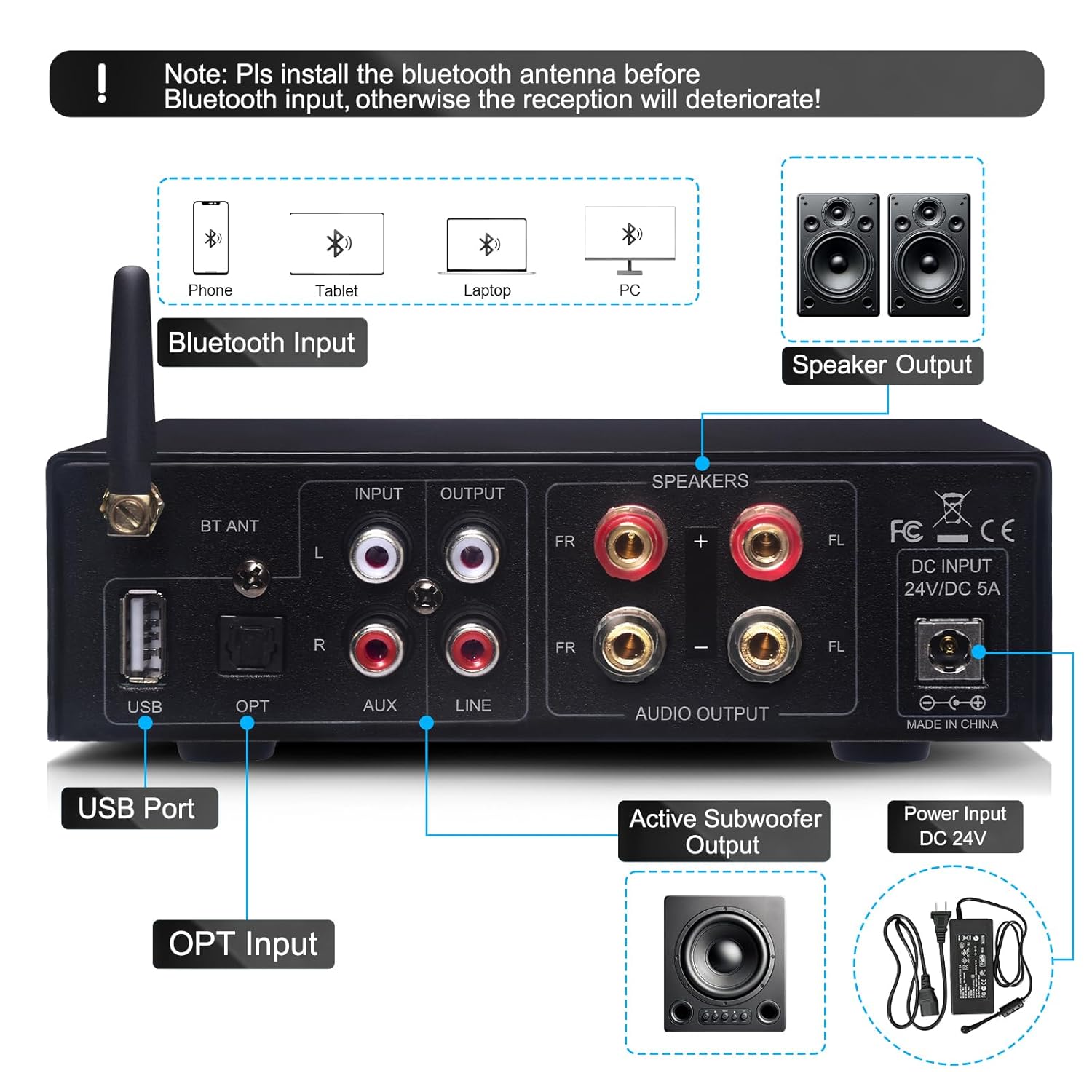
Figure 4.1: Front Panel Layout
- Power Switch: Toggles the amplifier on or off.
- Input Indicators: LEDs for IR, BT (Bluetooth), USB, OPT (Optical), AUX, and Input selection.
- Treble Control: Adjusts high-frequency audio output.
- Bass Control: Adjusts low-frequency audio output.
- Volume Control: Adjusts the overall output volume.
- AUX Input: 3.5mm jack for connecting external audio devices.
4.2 Rear Panel
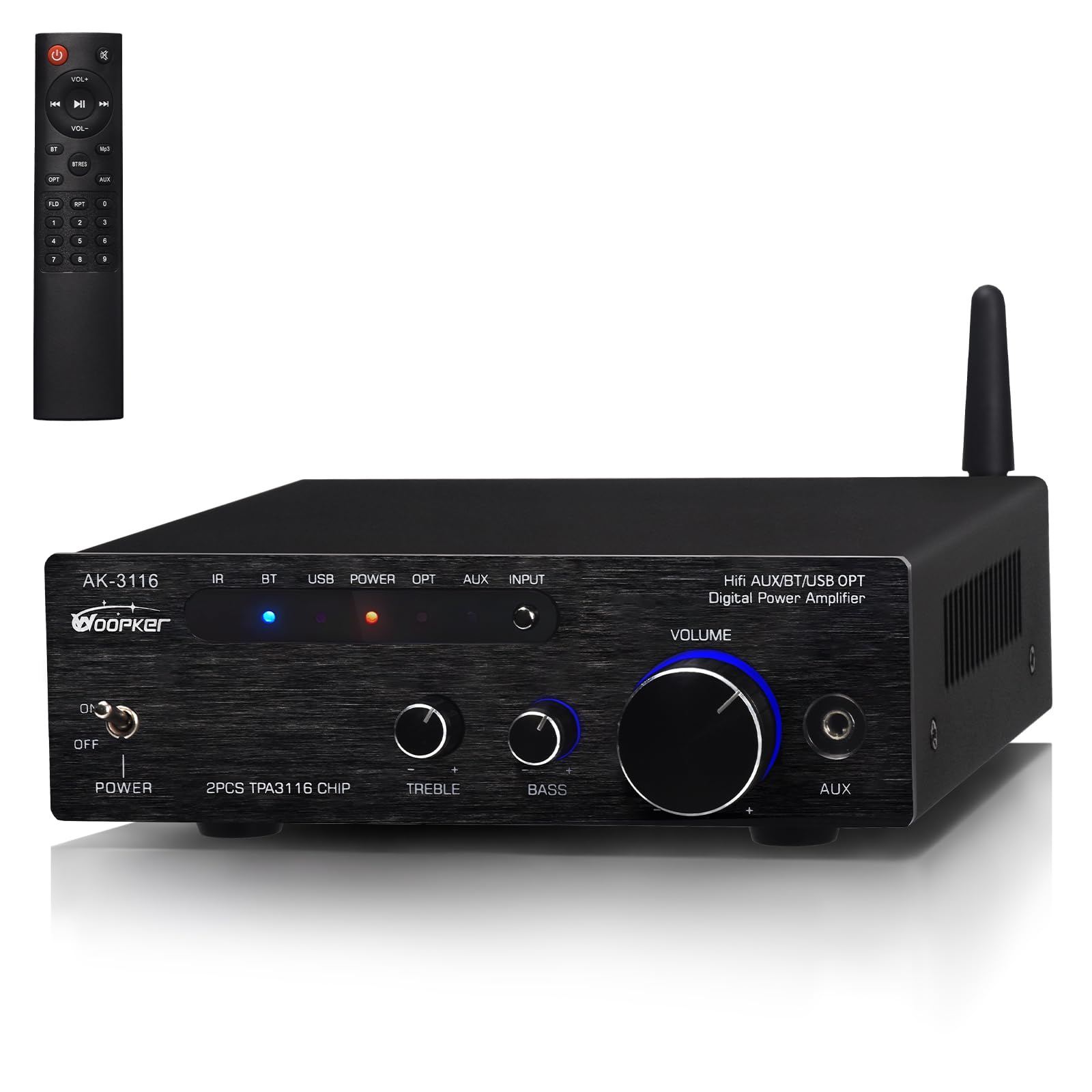
Figure 4.2: Rear Panel Connections
- BT ANT: Connection point for the Bluetooth antenna.
- USB Port: For connecting USB storage devices for audio playback.
- OPT Input: Optical digital audio input.
- AUX Input (RCA): Stereo RCA input for analog audio sources.
- LINE Output (RCA): Stereo RCA output for connecting to another amplifier or recording device.
- SPEAKERS (FR/FL): Binding posts for connecting passive stereo speakers.
- AUDIO OUTPUT (Active Subwoofer): RCA output for connecting an active subwoofer.
- DC INPUT 24V/5A: Power input for the included 24V DC power adapter.
5. Setup
5.1 Connecting Speakers
- Ensure the amplifier is powered off and unplugged.
- Connect your passive speakers to the SPEAKERS binding posts on the rear panel. Ensure correct polarity (red to red, black to black) for both left (FL) and right (FR) channels.
5.2 Connecting Audio Sources
Choose one of the following methods to connect your audio source:
- Bluetooth: Screw the provided Bluetooth antenna into the BT ANT port.
- AUX (RCA): Connect your audio device (e.g., CD player, turntable with pre-amp) to the AUX Input (RCA) ports using an RCA cable.
- USB: Insert a USB flash drive containing audio files into the USB Port.
- Optical: Connect a device with an optical output (e.g., TV, game console) to the OPT Input using an optical cable.
- Front AUX (3.5mm): Connect a portable audio device to the 3.5mm AUX input on the front panel.
5.3 Connecting an Active Subwoofer
If you wish to add an active subwoofer to your system:
- Connect an RCA cable from the AUDIO OUTPUT (Active Subwoofer) port on the amplifier's rear panel to the input of your active subwoofer.
5.4 Power Connection
- Connect the supplied 24V/5A power adapter to the DC INPUT 24V/5A port on the rear panel.
- Plug the power adapter into a suitable wall outlet.
6. Operating Instructions
6.1 Power On/Off
Flip the POWER switch on the front panel to turn the amplifier on or off.
6.2 Input Selection
The amplifier automatically detects the active input. You can also cycle through inputs using the input selection button on the front panel or the remote control.
6.3 Volume and Tone Control
- Volume: Rotate the large VOLUME knob on the front panel clockwise to increase volume and counter-clockwise to decrease. The remote control also has volume adjustment buttons.
- Treble/Bass: Use the TREBLE and BASS knobs to adjust the high and low frequencies of the audio output to your preference.
6.4 Bluetooth Pairing
- Ensure the Bluetooth antenna is installed.
- Turn on the amplifier and select Bluetooth input. The BT indicator will flash.
- On your mobile device (phone, tablet, laptop), enable Bluetooth and search for available devices.
- Select "AK3116" (or similar name) from the list to pair.
- Once paired, the BT indicator will glow steadily, and you can play audio from your device.

Figure 6.1: Bluetooth 5.3 Connection
6.5 Remote Control Usage
The included remote control allows for convenient adjustment of volume, input selection, and power from a distance.

Figure 6.2: Remote Control Operation
7. Maintenance
- Cleaning: Use a soft, dry cloth to clean the exterior of the amplifier. Do not use liquid cleaners or solvents.
- Storage: If storing the unit for an extended period, unplug it from the power outlet and store it in a cool, dry place.
- Ventilation: Ensure the ventilation openings are clear of dust and debris to prevent overheating.
8. Troubleshooting
| Problem | Possible Cause | Solution |
|---|---|---|
| No power | Power adapter not connected; Power outlet faulty; Power switch off. | Check power adapter connection; Try a different outlet; Ensure power switch is on. |
| No sound output | Incorrect input selected; Speaker wires loose; Volume too low; Audio source issue. | Select correct input; Check speaker connections and polarity; Increase volume; Verify audio source is playing. |
| Bluetooth not connecting | Bluetooth antenna not installed; Device not in pairing mode; Interference. | Install Bluetooth antenna; Ensure amplifier is in Bluetooth input mode and BT indicator is flashing; Move closer to the amplifier; Restart Bluetooth on your device. |
| Remote control not working | Batteries depleted; Obstruction; Remote out of range. | Replace remote control batteries; Remove any obstructions between remote and amplifier; Ensure you are within effective range. |
| Distorted sound | Volume too high; Source audio quality poor; Speaker impedance mismatch. | Reduce volume; Test with a different audio source; Ensure speakers match recommended impedance. |
9. Specifications
| Feature | Specification |
|---|---|
| Model Number | AFA3116-01 |
| Brand | WOOPKER |
| Output Power | RMS 100W x 2 (200W total) |
| Number of Channels | 2 |
| Amplifier ICs | 2x Texas Instruments TPA3116 |
| Bluetooth Version | 5.3 |
| Bluetooth Range | Up to 60 feet (approx. 18 meters) |
| Inputs | Bluetooth, AUX (RCA), USB, Optical, AUX (3.5mm front) |
| Outputs | Speaker Output, Active Subwoofer Output (RCA), Line Output (RCA) |
| Power Supply | DC 24V/5A |
| Voltage | 24 Volts (DC) |
| Mounting Type | Freestanding |
| Item Weight | 3.61 pounds |
| Package Dimensions | 12.64 x 8.94 x 3.23 inches |
9.1 Output Power vs. Speaker Impedance

Figure 9.1: Maximum Output Power Chart
10. Warranty and Support
WOOPKER products are designed for reliability and performance. For warranty information, technical support, or service inquiries, please refer to the contact information provided on your purchase receipt or visit the official WOOPKER website. Please have your model number (AFA3116-01) and purchase date available when contacting support.