
Introduction
The TACTACAM Defend Cellular Security Camera provides robust outdoor surveillance without the need for Wi-Fi. Designed for remote locations, this motion-activated camera transmits images and videos via a cellular connection, ensuring you stay informed about your property, job site, or remote areas. This manual will guide you through the setup, operation, and maintenance of your camera.
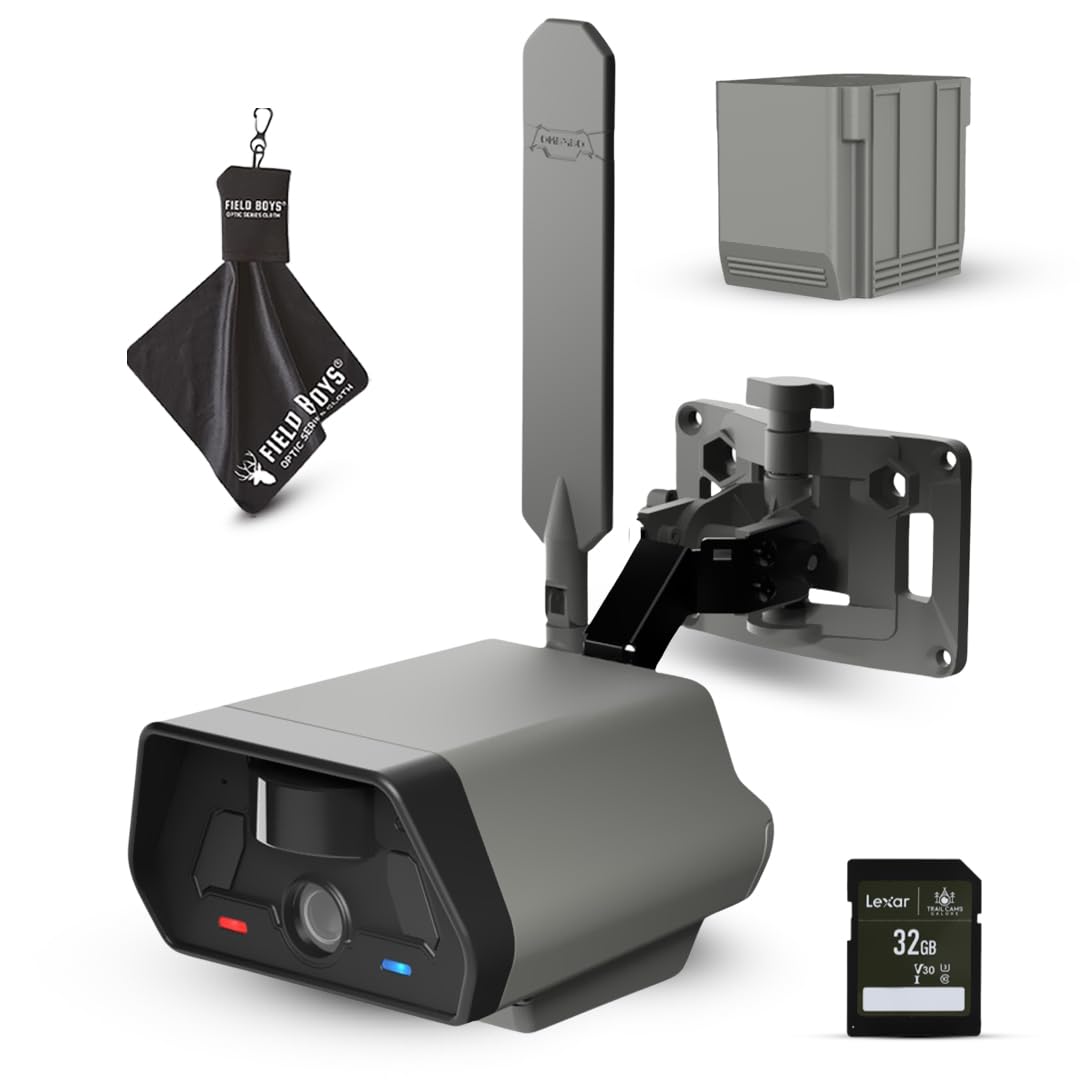
Image: The TACTACAM Defend Cellular Security Camera, Model DFD-GRD01, mounted on a wooden post, providing surveillance over a wide outdoor area.
Package Contents
Verify that all items are present in your package:
- TACTACAM Defend Cellular Security Camera
- Defend Rechargeable Battery
- Lexar 32GB SD Card
- Mounting Bracket
- Quick Start Guide
- Field Boys Microfiber Cleaning Cloth
Features
The TACTACAM Defend Cellular Security Camera offers a range of features for reliable remote monitoring:
- Cellular Connectivity: Operates without Wi-Fi, sending images and videos via cellular network (subscription required).
- Motion Activated: Records and alerts upon detecting motion, optimizing battery life and data usage.
- Rechargeable Battery: Includes a dedicated rechargeable battery for extended operation.
- SD Card Storage: Comes with a 32GB SD card for local storage of captured media.
- Optional Power: Compatible with optional solar panels and additional rechargeable accessories (sold separately).
- Smartphone Control: Manage settings, view live feeds, and receive notifications through a dedicated smartphone application.
- Outdoor Durability: Designed for outdoor use, capable of withstanding various environmental conditions.
- 4K Video Resolution: Captures high-definition video for clear surveillance.


Image: Accessories including the rechargeable battery, optional solar panel, and included 32GB SD card.
Setup
Follow these steps to set up your TACTACAM Defend Cellular Security Camera:
- Charge Battery: Fully charge the included Defend Rechargeable Battery before first use.
- Insert SD Card: Open the camera housing and insert the Lexar 32GB SD Card into the designated slot. Ensure it is correctly oriented.
- Install Battery: Insert the charged rechargeable battery into the camera's battery compartment.
- Mount Camera: Secure the camera using the provided mounting bracket. Choose a location that offers a clear view of the area you wish to monitor and has adequate cellular signal. The camera can be mounted on walls, posts, or trees.

Image: A person installing the TACTACAM Defend camera onto a wooden beam, demonstrating a typical mounting scenario.
- Download App: Download the official TACTACAM Defend app from your smartphone's app store (iOS or Android).
- Create Account & Add Camera: Open the app, create an account, and follow the in-app instructions to add your new camera. This typically involves scanning a QR code on the camera or entering its serial number.
- Select Subscription Plan: Choose a cellular data subscription plan through the app. Plans vary in data allowance and features.
- Test Connectivity: After selecting a plan, the camera will attempt to connect to the cellular network. Confirm successful connection through the app.

Image: The TACTACAM Defend camera securely mounted on a tree, illustrating its versatility for various outdoor environments.
Operation
Once set up, operate your TACTACAM Defend camera using the smartphone app:
- Live View: Access a live video feed from your camera through the app (data plan dependent).
- Motion Detection: The camera automatically detects motion and captures images or video clips based on your settings.
- Notifications: Receive instant alerts on your smartphone when motion is detected.
- On-Demand Media: Request pictures and videos from your camera at any time via the app.
- Settings Adjustment: Customize motion sensitivity, capture intervals, and other camera settings remotely through the app.
- Cloud Storage: Captured media is stored in the cloud according to your subscription plan, accessible via the app.

Image: A user interacting with the TACTACAM Defend app on a smartphone, displaying recent motion detection events and captured media.
Maintenance
Regular maintenance ensures optimal performance of your camera:
- Clean Lens: Use the provided microfiber cleaning cloth to gently clean the camera lens and housing, removing dust, dirt, or smudges.
- Battery Check: Monitor battery levels regularly via the app. Recharge or replace batteries as needed. Consider optional solar power for continuous charging.
- SD Card Management: Periodically check the SD card status. While cloud storage is primary, local storage acts as a backup. Format the SD card if performance issues arise (this will erase all local data).
- Firmware Updates: Check the app for available firmware updates. Install updates to ensure your camera has the latest features and security enhancements.
- Physical Inspection: Periodically inspect the camera and mounting bracket for any signs of wear, damage, or loose connections.
Troubleshooting
If you encounter issues with your TACTACAM Defend camera, try these troubleshooting steps:
- No Cellular Connection:
- Ensure your subscription plan is active and has sufficient data.
- Check the camera's location for adequate cellular signal strength. Relocate if necessary.
- Restart the camera by removing and reinserting the battery.
- Camera Not Capturing Motion:
- Adjust motion sensitivity settings in the app.
- Ensure the camera's field of view is clear of obstructions.
- Verify the battery is charged.
- App Connectivity Issues:
- Ensure your smartphone has a stable internet connection.
- Update the app to the latest version.
- Log out and log back into your TACTACAM Defend account.
- Poor Image/Video Quality:
- Clean the camera lens with the microfiber cloth.
- Ensure the camera is securely mounted and not vibrating.
For further assistance, please refer to the support section on the TACTACAM website or contact customer service.
Specifications
| Feature | Detail |
|---|---|
| Model Name | Defend by Tactacam Cellular Security Camera |
| Model Number | DFD-GRD01 |
| Recommended Uses | Outdoor Security |
| Connectivity Technology | Wireless (LTE Cellular) |
| Special Feature | Motion Sensor |
| Indoor/Outdoor Usage | Outdoor |
| Compatible Devices | Smartphone |
| Controller Type | Smartphone App |
| Mount Type | Wall Mount |
| Power Source | Rechargeable Battery, Optional Solar Powered |
| Video Capture Resolution | 4K |
| Video Capture Format | MPEG-4 |
| Item Dimensions | 5.9 x 4.8 x 3.5 inches |
Official Product Video
Video: An official product video showcasing the features and applications of the TACTACAM Defend Cellular Security Camera in various outdoor and remote settings.
Warranty and Support
The TACTACAM Defend Cellular Security Camera comes with a one-year comprehensive warranty. This warranty covers manufacturing defects and ensures your investment is protected. For technical support, warranty claims, or any questions regarding your camera, please contact TACTACAM customer service. Detailed contact information can be found on the official TACTACAM website.
For the latest support resources and FAQs, visit: www.tactacam.com/support

