1. Introduction
This manual provides essential information for the proper setup, operation, and maintenance of your XCOAST SIONA 2 Nano Smartwatch. Please read this manual thoroughly before using the device to ensure optimal performance and longevity.
2. Product Overview
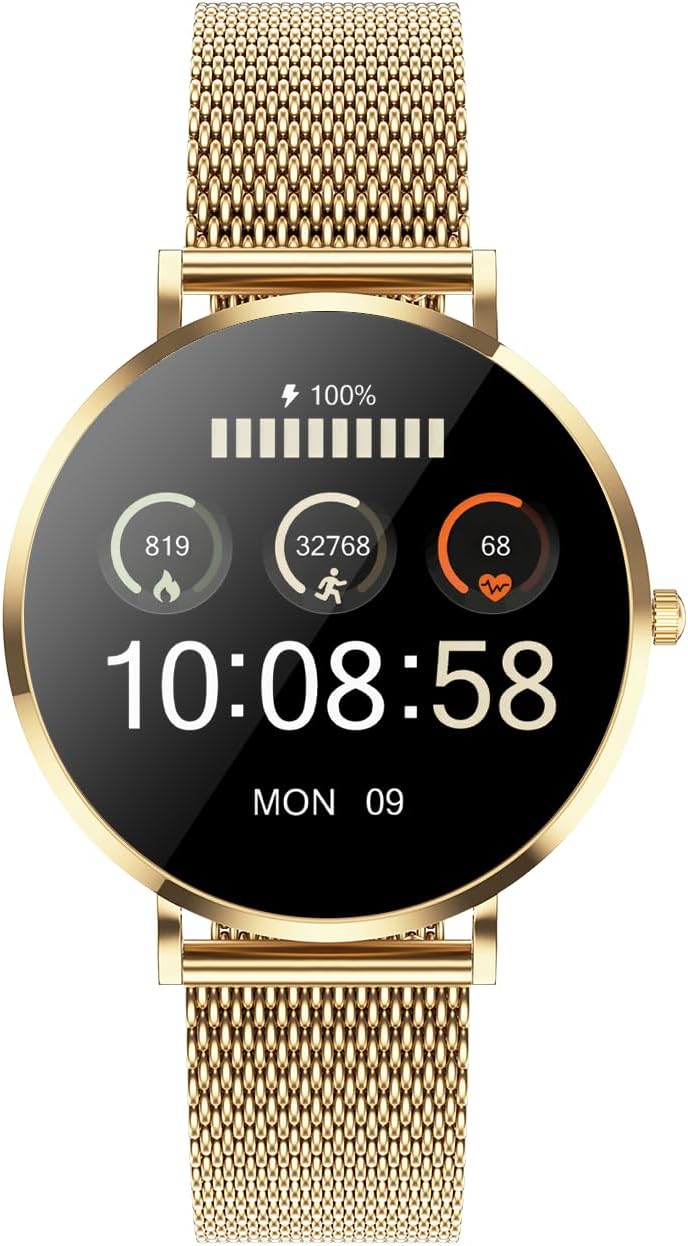
The XCOAST SIONA 2 Nano is a compact and elegant smartwatch designed for daily wear and health monitoring. It features an ultra-thin profile and a vibrant AMOLED display.
2.1 Key Features
- Ultra-thin Design: Only 6.9 mm high.
- Compact Size: 3.7 cm diameter.
- Premium Materials: Stainless steel case and strap, AMOLED display with extra hardened glass.
- Health Monitoring: Heart rate, blood pressure, blood oxygen, sleep tracking, menstrual calendar.
- Fitness Tracking: 21 sports modes, calorie counter, distance tracking, pedometer.
- Long Battery Life: Up to 6 days on a single charge.
- Notifications: Discreet alerts for incoming calls and messages.
- Water Resistance: Suitable for swimming (max. 1 meter water depth).
- Compatibility: Supports iOS and Android smartphones.
2.2 Device Components

3. Setup
3.1 Initial Charging
Before first use, fully charge your smartwatch. Connect the charging cable to the charging contacts on the back of the watch and to a USB power source. The watch display will indicate charging status.
3.2 App Installation
To unlock the full functionality of your SIONA 2 Nano Smartwatch, download and install the companion app on your smartphone.
- Scan the QR code provided in the watch packaging or search for "XC FIT App" in your smartphone's app store (available for iOS and Android).
- Install the application.

3.3 Device Pairing
After installing the app, pair your smartwatch with your smartphone:
- Ensure Bluetooth is enabled on your smartphone.
- Open the XC FIT app and follow the on-screen instructions to add a new device.
- Select "SIONA 2 Nano" from the list of available devices.
- Confirm the pairing request on both your smartphone and the smartwatch.
4. Operating Instructions
4.1 Navigation
- Touch Screen: Swipe left/right, up/down to navigate through menus and features. Tap to select.
- Side Button: Press to wake the screen, return to the home screen, or access the main menu.
4.2 Health Tracking
The SIONA 2 Nano continuously monitors various health parameters:
- Heart Rate: Access the heart rate monitor from the main menu to view your current heart rate.
- Blood Pressure & Blood Oxygen: Initiate measurements from the respective menu options. Ensure the watch is worn snugly on your wrist for accurate readings.
- Sleep Monitoring: The watch automatically tracks your sleep patterns when worn during sleep. View detailed analysis in the XC FIT app.
- Menstrual Calendar: Track your cycle within the app for personalized insights.

4.3 Sports Modes
The smartwatch supports 21 different sports modes to track your activities:
- Navigate to the "Sports" menu on your watch.
- Select your desired activity (e.g., Jogging, Yoga, Walking, Crosstrainer, Climbing).
- The watch will begin tracking duration, calories burned, and other relevant metrics.

4.4 Notifications
Receive discreet notifications for calls and messages directly on your wrist. Ensure notification permissions are enabled in the XC FIT app and your smartphone settings.
5. Maintenance
5.1 Cleaning
Regularly clean your smartwatch and strap with a soft, dry cloth. If necessary, use a slightly damp cloth and mild soap, then dry thoroughly. Avoid harsh chemicals or abrasive materials.
5.2 Water Resistance
The SIONA 2 Nano is waterproof and suitable for swimming up to 1 meter depth. It is not recommended for diving, high-pressure water activities, or hot water environments (e.g., saunas, hot showers) as steam can penetrate the seals.
6. Troubleshooting
- Watch not turning on: Ensure the watch is fully charged.
- Cannot pair with smartphone: Check if Bluetooth is enabled on your phone and the watch is within range. Restart both devices and try again.
- Inaccurate health data: Ensure the watch is worn snugly on your wrist, not too tight or too loose. Avoid excessive movement during measurements.
- Notifications not appearing: Verify that notification permissions are granted to the XC FIT app in your phone's settings and within the app itself.
- App not syncing data: Ensure the watch is connected via Bluetooth to the app. Try closing and reopening the app.
7. Specifications
| Feature | Specification |
|---|---|
| Brand | XCOAST |
| Model Number | 570491-G |
| Color | Gold |
| Operating System | Other |
| Screen Size | 37 Millimeters |
| Connectivity | Bluetooth |
| Special Features | Extremely flat and small (37 x 6.9 mm) |
| Compatible Devices | Smartphone |
| Battery Composition | Lithium-ion |
| Rechargeable Battery | Yes |
| Memory Storage Capacity | 1 MB |
| Battery Capacity | 135 Milliampere-hour (mAh) |
| Wireless Communication Standard | Bluetooth |
| GPS | No GPS |
| Shape | Round |
8. Warranty and Support
Your XCOAST SIONA 2 Nano Smartwatch comes with a 2-year warranty. For any technical issues or support inquiries, please refer to the contact information provided in your product packaging or visit the official XCOAST website.
Spare parts availability is guaranteed for 5 years from the date of purchase.