
X-Sense SBS50, SWS51, SWS0A
X-Sense Smart Water Leak Detector System User Manual
Models: SBS50 Base Station, SWS51 Smart Water Leak Detector, SWS0A Smart Water Leak Detector
1. Introduction
This manual provides detailed instructions for the installation, operation, and maintenance of your X-Sense Smart Water Leak Detector System. This system is designed to provide real-time alerts for water leaks, helping to prevent potential water damage in your home.
2. What's Included
Your X-Sense Smart Water Leak Detector System package includes the following components:
- 1 x SBS50 Base Station
- 3 x SWS51 Smart Water Leak Detectors
- 3 x SWS0A Smart Water Leak Detectors
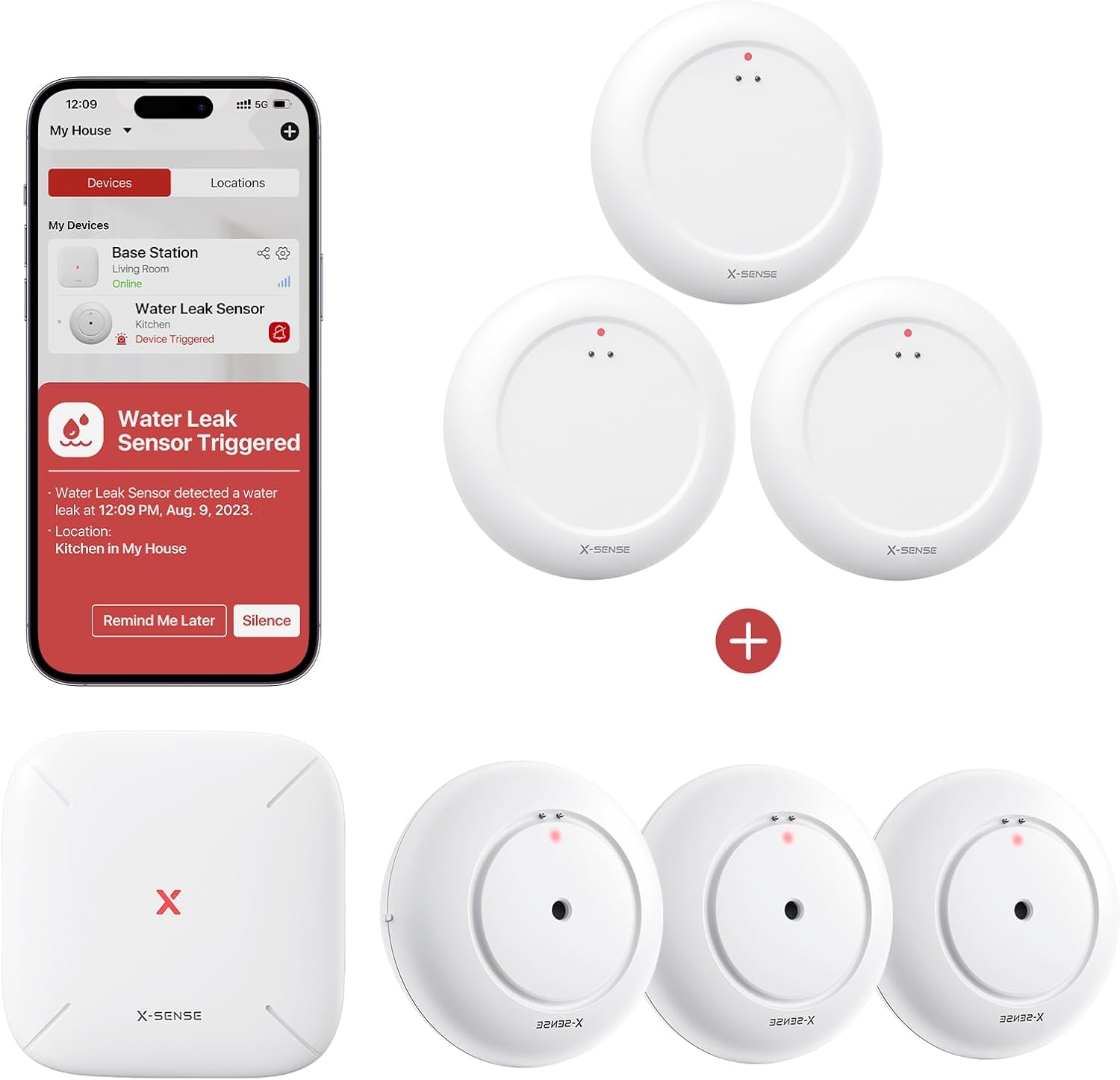
Figure 1: System Components and App Notification Example
This image displays the X-Sense SBS50 Base Station (square device), three SWS51/SWS0A water leak detectors (round devices), and a smartphone screen showing a "Water Leak Sensor Triggered" alert from the X-Sense app. The app notification indicates a water leak detected in the kitchen, providing options to "Remind Me Later" or "Silence" the alert.
3. Product Overview
3.1 SBS50 Base Station
The SBS50 Base Station acts as the central hub for your water leak detection system, connecting the detectors to your home network and sending notifications to your smartphone.
3.2 SWS51 & SWS0A Smart Water Leak Detectors
These compact detectors are designed to sense water at very low levels. They feature both top and bottom sensors to detect water from various sources, including drips and shallow puddles. The ultra-slim design allows for placement in tight spaces.
- Top Sensors: Detect water drips from above.
- Bottom Sensors: Detect water on surfaces, sensing as little as 0.4 mm depth.
4. Setup Instructions
- Download the X-Sense Home Security App: Search for "X-Sense Home Security" in your smartphone's app store (iOS or Android) and install it.
- Power On the SBS50 Base Station: Connect the base station to a power outlet using the provided adapter. Wait for the indicator light to show it's ready for pairing.
- Add Base Station to App: Open the X-Sense app, create an account or log in, and follow the in-app instructions to add the SBS50 Base Station to your network.
- Activate Water Leak Detectors: For each SWS51/SWS0A detector, remove the battery insulation tab (if present) or insert the batteries according to the markings.
- Pair Detectors with Base Station: In the X-Sense app, select your SBS50 Base Station and follow the instructions to add new water leak detectors. The app will guide you through the pairing process for each SWS51/SWS0A unit.
- Placement: Strategically place the water leak detectors in areas prone to water leaks, such as under sinks, near water heaters, washing machines, dishwashers, or in basements. Ensure the sensors are in direct contact with the surface where water might accumulate.
5. Operating Instructions
5.1 Real-Time Notifications
When a water leak is detected by any SWS51 or SWS0A sensor, the SBS50 Base Station will trigger an audible alarm, and a push notification will be sent to your smartphone via the X-Sense Home Security app. This allows for immediate action, even when you are away from home.
5.2 App Features
The X-Sense Home Security app provides comprehensive control and monitoring capabilities:
- Alarm Volume Adjustment: Modify the base station's alarm volume.
- Mute Alarm: Temporarily silence an active alarm.
- Alarm History: View a log of all detected leaks and system events.
- "Remind Me Later" Function: Temporarily mute alerts for predefined durations (10 min, 30 min, 2 hrs, 6 hrs, 12 hrs).
- Device Testing: Perform self-tests on detectors to ensure proper functionality.
- Low Battery Alerts: Receive notifications when detector batteries are low.
- Device Sharing: Share access to your system with family members, allowing them to monitor device status and receive alerts.
6. Maintenance
- Battery Replacement: When a low battery alert is received, replace the batteries in the affected SWS51/SWS0A detector promptly. Refer to the detector's specific battery type and replacement instructions.
- Sensor Cleaning: Periodically inspect the water sensing probes on both the top and bottom of the detectors. Clean any dust, debris, or mineral deposits using a soft, dry cloth to ensure optimal sensitivity. Avoid using harsh chemicals or abrasive materials.
- System Testing: Regularly test your water leak detectors using the in-app testing feature to confirm they are functioning correctly.
7. Troubleshooting
- No Notifications:
Ensure your smartphone has an active internet connection and push notifications are enabled for the X-Sense Home Security app.
Verify the SBS50 Base Station is online and connected to your Wi-Fi network.
Check the battery status of the water leak detectors in the app.
- Detector Not Pairing:
Ensure the detector is within range of the SBS50 Base Station.
Confirm batteries are correctly installed and have sufficient charge.
Try resetting the detector and attempting the pairing process again.
- False Alarms:
Inspect the sensor probes for any moisture, dust, or conductive debris that might be triggering the alarm.
Ensure the detector is placed on a dry, stable surface away from condensation or high humidity sources that are not actual leaks.
- Base Station Offline:
Check the power connection to the SBS50 Base Station.
Verify your home Wi-Fi network is operational.
Restart the base station by unplugging and replugging it.
8. Specifications
| Feature | Specification |
|---|---|
| Brand | X-Sense |
| Models Included | SBS50, SWS51, SWS0A |
| Sensing Depth | As low as 0.4 mm |
| Mounting Type | Surface Mount |
| Output Type | Digital |
| Specific Use | Water Leak Detection |
9. Warranty and Support
For warranty information, technical support, or further assistance, please refer to the official X-Sense website or contact X-Sense customer service directly. Keep your purchase receipt for warranty claims.
Online Resources: www.x-sense.com
Related Documents - SBS50, SWS51, SWS0A
 |
X-Sense Smart Water Leak Sensor with Base Station User Manual User manual for the X-Sense Smart Water Leak Sensor (SWS0A) and Base Station (SBS50), detailing setup, operation, testing, troubleshooting, and technical specifications. |
 |
X-SENSE SWS51 & SBS50 Smart Water Leak Sensor User Manual User manual for the X-SENSE SWS51 Smart Water Leak Sensor and SBS50 Base Station. Learn about setup, operation, troubleshooting, and technical specifications for detecting water leaks in your home. |
 |
X-Sense SWS51 Smart Water Leak Sensor User Manual This user manual provides detailed instructions for the X-Sense SWS51 Smart Water Leak Sensor, covering installation, setup, operation, maintenance, troubleshooting, and technical specifications. |
 |
X-Sense SWS51 Smart Water Leak Sensor User Manual Learn about the X-Sense SWS51 Smart Water Leak Sensor, its features, installation, and troubleshooting. This device detects water leaks and sends instant alerts to your smartphone via the X-Sense Home Security app. |
 |
X-Sense XH02-M: Vernetzter RF-Funk-Hitzemelder - Technische Spezifikationen & Merkmale Entdecken Sie den X-Sense XH02-M, einen vernetzten RF-Funk-Hitzemelder. Erfahren Sie mehr über seine zuverlässige Wärmeerkennung, leistungsstarke Funkvernetzung, erweiterte Funktionen mit der SBS50-Basisstation und technische Daten. Ideal für Umgebungen mit Fehlalarmrisiko. |
 |
X-Sense XS01-M Vernetzter Funk-Rauchmelder: Funktionen, Technische Daten & Bedienung Umfassende Informationen zum X-Sense XS01-M vernetzten Funk-Rauchmelder, einschließlich Hauptmerkmalen, technischer Daten, Betriebsmodi und Lieferumfang. Erfahren Sie mehr über die intelligente Überwachung Ihres Zuhauses. |
Ask a question about this manual
Ask about setup, troubleshooting, compatibility, parts, safety, or missing instructions. Manuals+ will review the question and use this page’s manual context to help answer it.