
1. Introduction
Thank you for purchasing the ZZH YC765-ZW Double Din Car Stereo. This manual provides detailed instructions for installation, operation, and maintenance of your new car stereo. Please read this manual thoroughly before use to ensure proper functionality and to maximize your user experience. Keep this manual for future reference.
2. Safety Information
- Do not operate the device in a manner that distracts you from driving. Always prioritize road safety.
- Ensure all wiring is correctly connected to prevent short circuits or damage to the vehicle's electrical system.
- Avoid exposing the unit to extreme temperatures, direct sunlight for prolonged periods, or excessive moisture.
- Do not attempt to disassemble or modify the unit. This may void the warranty and cause damage.
- Consult a professional for installation if you are unsure about any wiring procedures.
3. Package Contents
Verify that all items listed below are included in your package:
- 1 x Double Din Car Stereo Unit
- 2 x Power Cables
- 1 x Remote Control
- 1 x Backup Camera
- 1 x Frame
- 1 x Backup Camera Cable
- 1 x Video Cable
- Brackets & Screws
- User Manual

Figure 3.1: Included Package Components
4. Product Overview
The ZZH YC765-ZW is a 7-inch Double Din Car Stereo featuring a full HD touchscreen. It offers a range of functionalities including Bluetooth connectivity for hands-free calls and audio streaming, Mirror Link for smartphone integration, AM/FM radio, USB/TF/AUX input, and support for a backup camera.

Figure 4.1: ZZH YC765-ZW Car Stereo Front View and Accessories
5. Installation Guide
5.1 Wiring Diagram
Refer to the following diagram for proper wiring connections. Incorrect wiring can cause damage to the unit or vehicle.
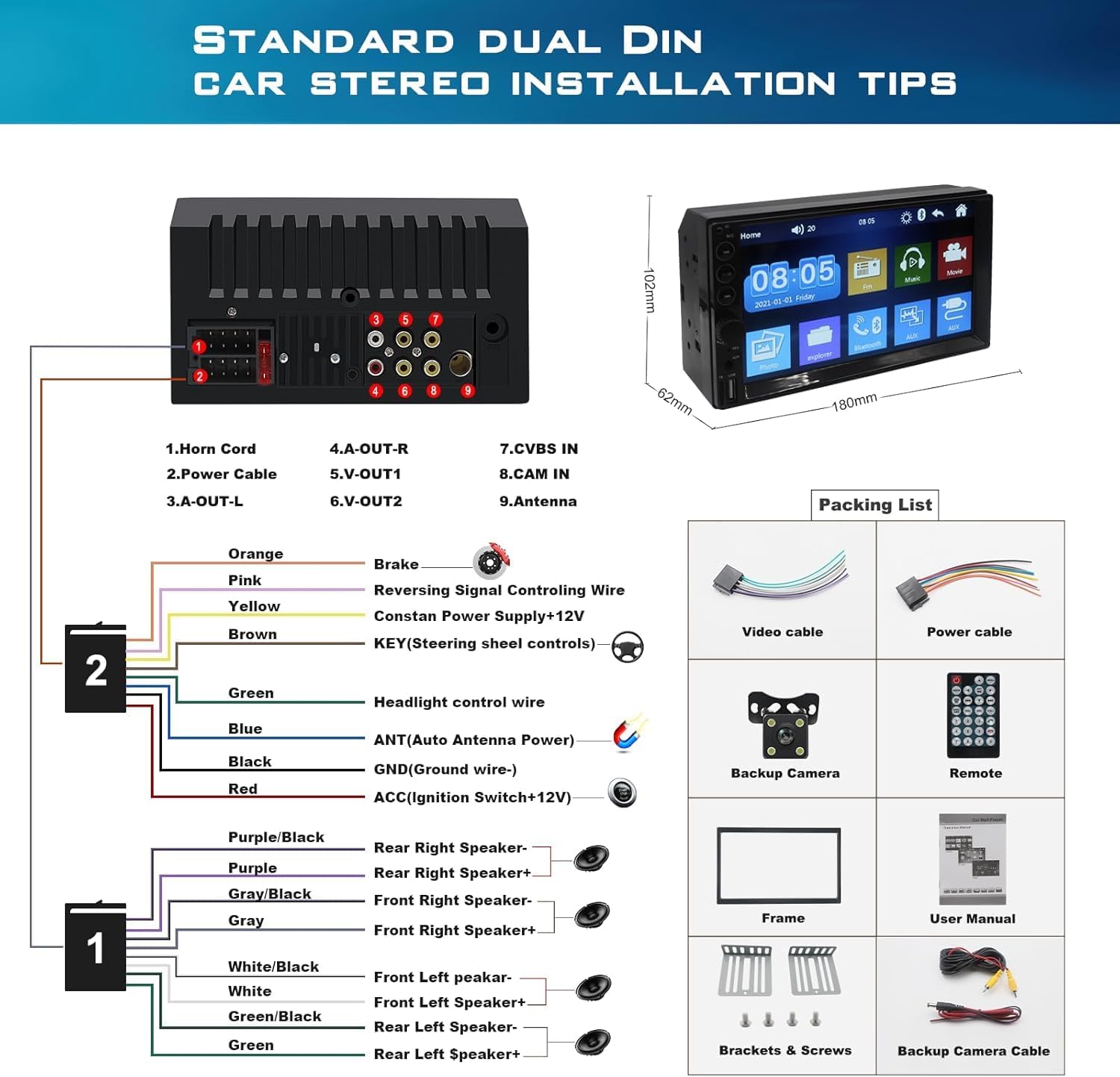
Figure 5.1: Main Wiring Connections
5.2 Backup Camera Installation
Connect the backup camera as shown in the diagram. The camera activates automatically when the vehicle is shifted into reverse gear.

Figure 5.2: Backup Camera Wiring
6. Operating Instructions
6.1 Basic Operation
- Power On/Off: Press the power button on the front panel or remote control.
- Volume Control: Use the rotary knob on the front panel or the volume buttons on the remote.
- Touchscreen: Navigate menus and select functions by touching the icons on the 7-inch display.
6.2 Bluetooth Function
The stereo features an upgraded Bluetooth module for stable connections and clear calls.
- Enable Bluetooth on your mobile device.
- On the car stereo, navigate to the Bluetooth menu.
- Search for available devices and select "ZZH Car Stereo" (or similar name).
- Confirm pairing on both devices.
- Once paired, you can make/receive calls and stream audio.

Figure 6.1: Bluetooth Calling Interface
6.3 Mirror Link
Mirror Link allows you to project your smartphone screen onto the car stereo display. Supports iOS (one-way projection) and Android (bidirectional connection) via USB.
- Connect your smartphone to the stereo's USB port using a data cable.
- Select the Mirror Link function on the stereo.
- Follow on-screen prompts to establish the connection.
Note: Mirror Link functionality may vary with different smartphone models and operating system versions. Samsung phones are not supported for Mirror Link.

Figure 6.2: Mirror Link Connection
6.4 AM/FM Radio
Access the AM/FM radio tuner to listen to your favorite stations.
- Frequency Range: AM: 522-1620KHz, FM: 87.5-108MHz.
- Auto Scan: Use the auto scan function to find and save available stations.
- Manual Tuning: Manually adjust the frequency to fine-tune stations.

Figure 6.3: AM/FM Radio Interface
6.5 Media Playback (USB/TF/AUX)
The stereo supports various media inputs for audio and video playback.
- USB: Insert a USB flash drive into the front USB port to play music or videos.
- TF Card: Insert a TF (MicroSD) card into the front TF slot for media playback.
- AUX: Connect external audio devices via the 3.5mm AUX input.

Figure 6.4: Supported Play Modes
6.6 Backup Camera Display
When the vehicle is in reverse, the stereo automatically displays the backup camera feed, providing a clear view of the area behind your vehicle with parking guidelines.

Figure 6.5: Reversing Image Display
6.7 Steering Wheel Control (SWC)
The unit supports connection to your vehicle's steering wheel controls for convenient operation of basic functions like volume, track change, and call management. Refer to the wiring diagram for SWC connection. Note: While a SWC wire is present, the user interface for programming SWC buttons may not be available on all units.

Figure 6.6: Steering Wheel Control Functionality
7. Maintenance
- Cleaning: Use a soft, dry cloth to clean the screen and unit. Avoid abrasive cleaners or solvents.
- Temperature: Do not expose the unit to extreme temperatures.
- Firmware Updates: Check the manufacturer's website for any available firmware updates to ensure optimal performance.
8. Troubleshooting
| Problem | Possible Cause | Solution |
|---|---|---|
| No Power | Incorrect wiring; Blown fuse; Vehicle battery issue. | Check power cable connections; Inspect and replace fuse if necessary; Verify vehicle battery voltage. |
| No Sound | Speaker wires disconnected; Volume too low; Incorrect audio source. | Check speaker wiring; Increase volume; Select correct audio input (e.g., Bluetooth, USB, AUX, Radio). |
| Bluetooth Not Connecting | Bluetooth not enabled on phone/stereo; Device not in pairing mode; Interference. | Ensure Bluetooth is active on both devices; Put stereo in pairing mode; Move closer to the unit; Restart devices. |
| Mirror Link Not Working | Incorrect USB cable; Unsupported phone model; App not installed. | Use original data cable; Confirm phone compatibility (Samsung not supported); Ensure necessary apps are installed. |
| Backup Camera Not Displaying | Camera wiring incorrect; Reverse signal wire not connected. | Check camera power and video connections; Ensure the pink reverse signal wire is correctly connected to the vehicle's reverse light. |
9. Specifications
| Feature | Detail |
|---|---|
| Model Number | YC765-ZW |
| Product Dimensions | 2.44 x 7 x 4 inches (62 x 178 x 102 mm) |
| Item Weight | 1.83 pounds |
| Screen Size | 7 Inch |
| Display Resolution | 1024*600 |
| Connectivity Technology | Bluetooth, USB |
| Controller Type | Android, iOS (via Mirror Link) |
| Special Features | Built-In Bluetooth, Hands-Free Calling, SD Card Input, Screen Mirroring, Touchscreen |
| Compatible Devices | Smartphone, iPhone |
| Connector Type | USB |
| Audio Output Mode | Stereo |
| Surround Sound Channel Configuration | 4 |
| Video Encoding Support | AVI, DIVX, MP4, FLV, PMP, RM, RMVB, MPG |
| AM Radio Frequency Range | 522~1620KHz |
| FM Radio Frequency Range | 87.5-108MHz |
10. Warranty and Support
ZZH provides quality products and customer support. For any issues or inquiries regarding your ZZH YC765-ZW car stereo, please contact our customer service team. We offer 7*24 customer support to assist you.
Please retain your proof of purchase for warranty claims. Specific warranty terms and conditions may apply and are subject to the retailer's policy at the time of purchase.

Figure 10.1: ZZH Customer Support


