1. Introduction
The AVXANKTG EAPDX-63AVE-RGB is a multi-functional DIN rail mounted protection device designed to safeguard electrical circuits and connected equipment. It integrates overvoltage, undervoltage, and overcurrent protection, along with a clear 3-in-1 digital display for real-time monitoring of voltage (V), current (A), and power consumption (KWH). This manual provides essential information for the safe and effective installation, operation, and maintenance of your device.
2. Safety Information
- Always disconnect power to the circuit before attempting any installation, wiring, or maintenance procedures. Failure to do so can result in serious injury or death.
- Installation and wiring should only be performed by qualified and licensed electricians in accordance with all local and national electrical codes.
- Ensure that the device is installed in a dry, well-ventilated area, free from excessive dust, moisture, and corrosive gases.
- Do not operate the device if it appears damaged or if any internal components are exposed.
- Verify that the rated voltage and current of your electrical system are compatible with the device's specifications.
3. Product Overview
The EAPDX-63AVE-RGB device features a compact design for DIN rail mounting, making it suitable for various industrial and residential electrical panels. Its integrated display provides immediate feedback on critical electrical parameters.
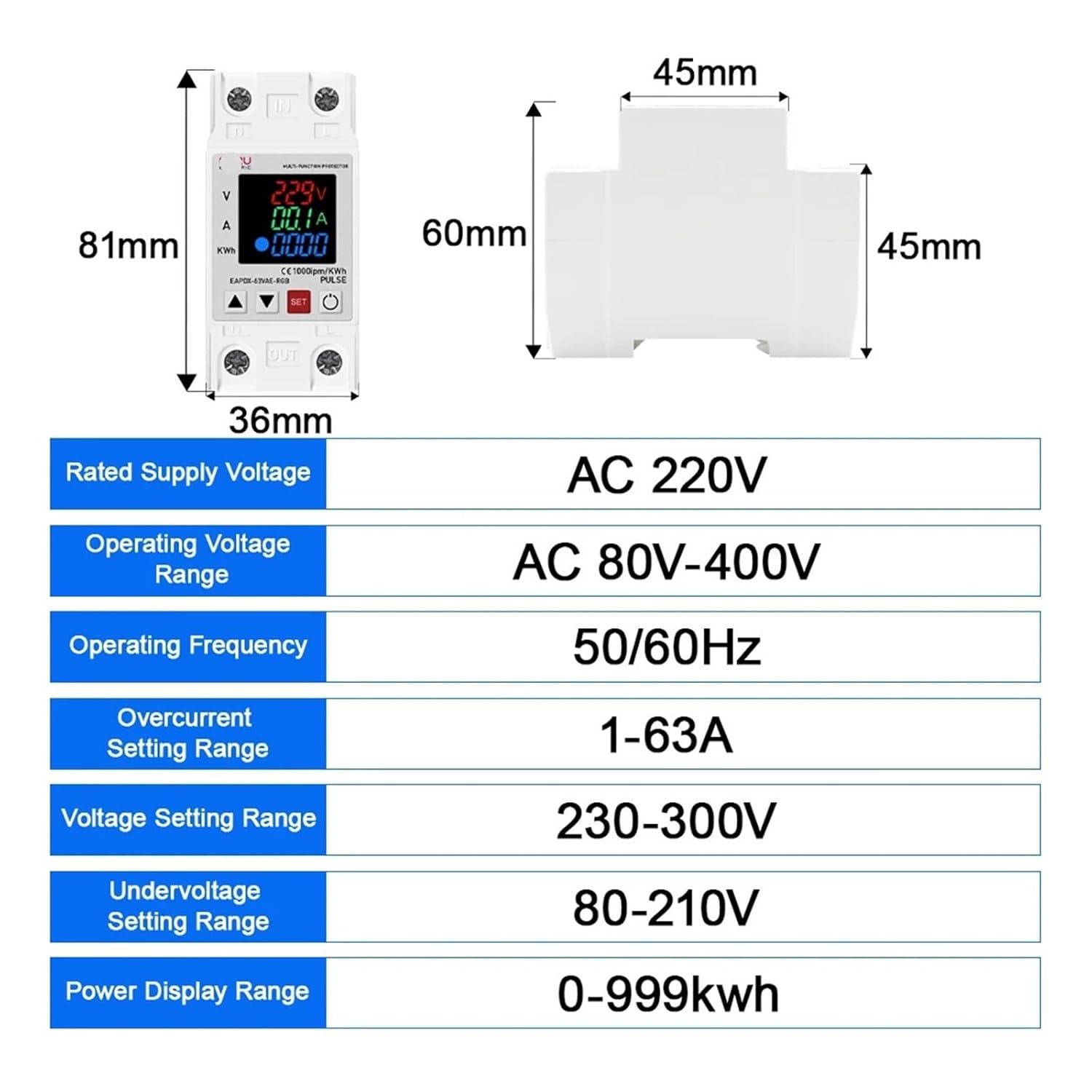
This image displays the physical dimensions of the EAPDX-63AVE-RGB device, measuring 81mm in height, 36mm in width, and 60mm in depth when mounted on a DIN rail. It also presents a table of electrical specifications including rated supply voltage (AC 220V), operating voltage range (AC 80V-400V), operating frequency (50/60Hz), overcurrent setting range (1-63A), overvoltage setting range (230-300V), undervoltage setting range (80-210V), and power display range (0-999kwh).
4. Setup and Installation
- Mounting: Securely attach the EAPDX-63AVE-RGB device onto a standard 35mm DIN rail within your electrical panel.
- Wiring:
- Identify the 'IN' terminals for the incoming power supply (Line and Neutral).
- Identify the 'OUT' terminals for the outgoing load connection (Line and Neutral).
- Connect the incoming AC 220V power supply to the 'IN' terminals.
- Connect your load (e.g., appliances, circuits) to the 'OUT' terminals.
- Ensure all wire connections are tight and secure to prevent loose contacts and overheating.
- Initial Power-Up: Once wiring is complete and verified, restore power to the circuit. The device display should illuminate, showing real-time voltage and current readings.
5. Operating Instructions and Parameter Settings
The device features a digital display and three buttons: 'SET', 'Up Arrow', and 'Down Arrow' for configuration.
5.1 Display Modes
The display cycles through Voltage (V), Current (A), and Kilowatt-hour (KWH) readings. The 'PULSE' indicator flashes to show power consumption activity.
5.2 Setting Protection Parameters
To adjust the protection thresholds:
- Enter Setting Mode: Press and hold the 'SET' button for approximately 3-5 seconds until the display shows a flashing parameter.
- Navigate Parameters: Briefly press the 'SET' button to cycle through the adjustable parameters: Overvoltage (OV), Undervoltage (UV), Overcurrent (OC), and their respective recovery delays.
- Adjust Values: When the desired parameter is flashing, use the 'Up Arrow' and 'Down Arrow' buttons to increase or decrease the value.
- Confirm and Exit: After setting all desired parameters, press and hold the 'SET' button again for 3-5 seconds to save the settings and exit the setting mode. If no button is pressed for a certain period, the device will automatically save and exit.
5.3 Adjustable Ranges
- Overvoltage Setting Range: 230V - 300V
- Undervoltage Setting Range: 80V - 210V
- Overcurrent Setting Range: 1A - 63A
Note: The device will automatically cut off power if any monitored value exceeds or falls below the set thresholds. Power will be restored automatically after a set delay once the values return to normal operating ranges.
6. Maintenance
- Cleaning: Periodically clean the device's exterior with a soft, dry cloth. Do not use abrasive cleaners or solvents. Ensure power is disconnected before cleaning.
- Inspection: Regularly inspect the wiring connections for tightness and signs of wear or damage.
- No User-Serviceable Parts: The device contains no user-serviceable parts. Do not attempt to open or repair the unit yourself. Refer all servicing to qualified personnel.
7. Troubleshooting
| Problem | Possible Cause | Solution |
|---|---|---|
| Device display is off. | No power supply; Loose wiring. | Check incoming power supply. Verify 'IN' terminal wiring is secure. |
| Device trips frequently. | Overvoltage, undervoltage, or overcurrent condition; Protection thresholds set too low/high. | Check actual voltage/current. Adjust protection parameters to appropriate levels for your load. Reduce load if overcurrent persists. |
| Incorrect voltage/current reading. | Faulty wiring; Device malfunction. | Verify wiring connections. If problem persists, contact support. |
| Device does not reset after tripping. | Fault condition still present; Manual reset required (if configured). | Ensure the fault condition (e.g., overvoltage) has cleared. Some models may require a manual power cycle or button press to reset. |
8. Specifications
| Parameter | Value |
|---|---|
| Model Number | EAPDX-63AVE-RGB |
| Rated Supply Voltage | AC 220V |
| Operating Voltage Range | AC 80V-400V |
| Operating Frequency | 50/60Hz |
| Overcurrent Setting Range | 1-63A |
| Overvoltage Setting Range | 230-300V |
| Undervoltage Setting Range | 80-210V |
| Power Display Range | 0-999kwh |
| Dimensions (H x W x D) | 81mm x 36mm x 60mm |
| Manufacturer | AVXANKTG |
9. Warranty and Support
For specific warranty information, technical assistance, or to report any issues with your AVXANKTG EAPDX-63AVE-RGB device, please contact your original retailer or the manufacturer directly. Keep your purchase receipt as proof of purchase for warranty claims.


