
1. Introduction
This manual provides instructions for the installation, operation, and maintenance of the YuanLey 18-Port 2.5G Unmanaged PoE Switch. This device features 16 x 2.5 Gigabit PoE ports and 2 x 10G SFP+ uplink ports, designed to provide high-speed network connectivity and Power over Ethernet (PoE) capabilities for compatible devices. It supports IEEE802.3af/at standards with a total PoE power budget of 250W.
2. Package Contents
Verify that your package contains the following items:
- YuanLey Network Switch (Model: YS25-1602P-JP)
- Rack Mounting Kits
- Power Cable
- User Manual (this document)
3. Product Overview
3.1 Front Panel

Figure 1: Front Panel Layout
The front panel of the switch features 16 x 2.5G Base-T PoE ports (Ports 1-16) and 2 x 10G SFP+ uplink ports (Ports 17-18). Each port has corresponding LED indicators for link status and activity. The device also includes power and system status LEDs.
3.2 Rear Panel
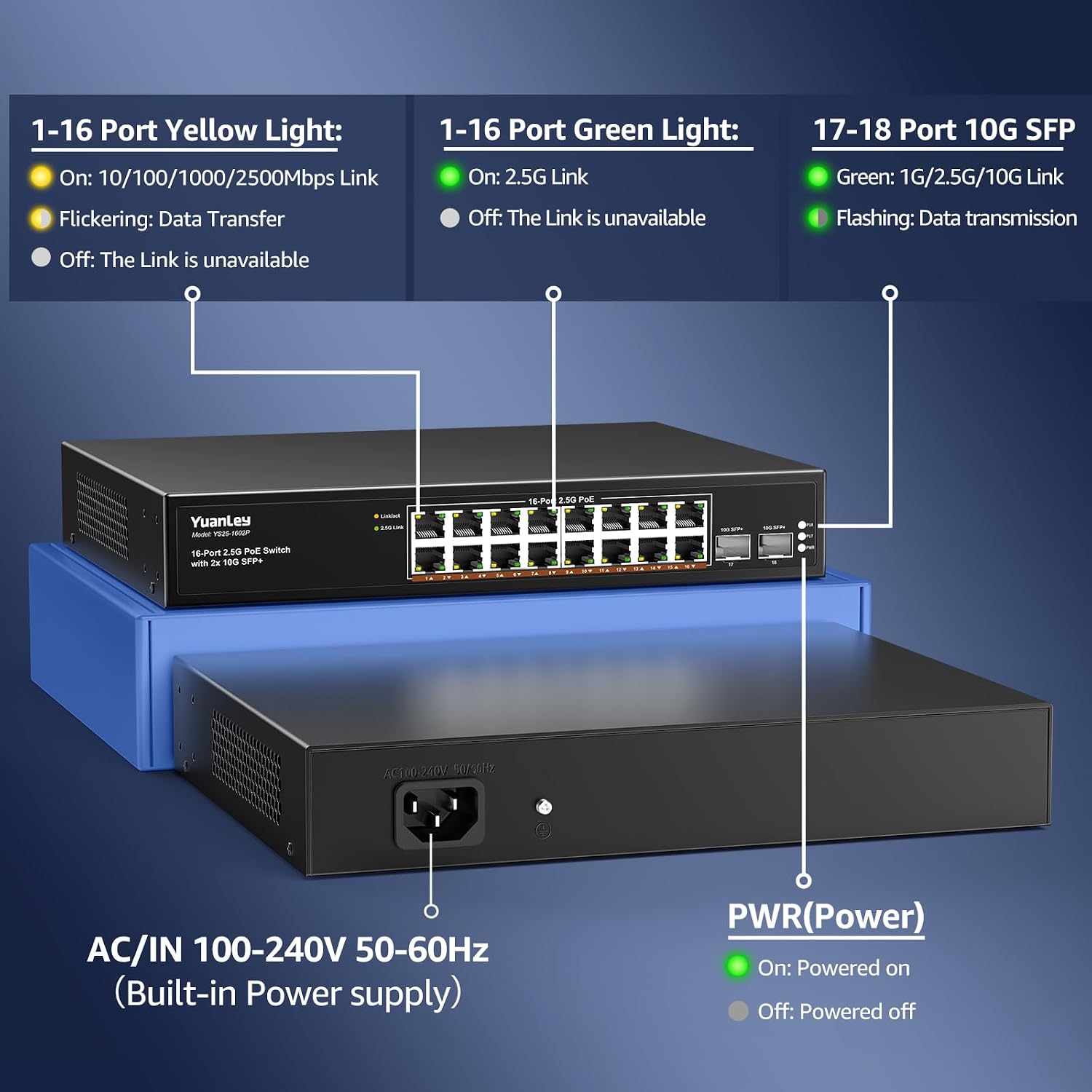
Figure 2: Rear Panel with Power Input
The rear panel contains the AC power input (100-240V, 50-60Hz) for the built-in power supply. No external power brick is required.
3.3 LED Indicators

Figure 3: LED Indicator Details
- PWR (Power) LED:
- Green (On): Device is powered on.
- Off: Device is powered off.
- 1-16 Port Yellow Light:
- On: 10/100/1000/2500Mbps Link established.
- Flickering: Data transfer in progress.
- Off: Link is unavailable.
- 1-16 Port Green Light:
- On: 2.5G Link established.
- Off: Link is unavailable.
- 17-18 Port 10G SFP+ Green Light:
- On: 1G/2.5G/10G Link established.
- Flashing: Data transmission in progress.
4. Setup Instructions
The YuanLey 18-Port 2.5G PoE Switch is designed for plug-and-play operation, requiring no complex configuration.
4.1 Physical Placement
The switch supports both desktop placement and rack mounting. Ensure adequate ventilation around the device to prevent overheating.

Figure 4: Rack Mount Installation

Figure 5: Desktop Placement
4.2 Connecting the Switch
- Power Connection: Connect the provided power cable to the AC input on the rear panel of the switch and then to a standard electrical outlet. The PWR LED should illuminate.
- Uplink Connection: Connect one of the 10G SFP+ ports (Ports 17-18) to your router or main network device using an appropriate SFP+ module (not included) and fiber optic cable, or use a standard Ethernet port for a slower uplink if SFP+ is not available.
- Device Connection (Non-PoE): Connect non-PoE network devices (e.g., computers, NAS, gaming PCs) to any of the 16 x 2.5G Base-T PoE ports using standard Ethernet cables (Cat5e, Cat6, or Cat6a recommended for optimal performance).
- Device Connection (PoE): Connect PoE-compatible devices (e.g., IP cameras, Wi-Fi 6 APs) to any of the 16 x 2.5G Base-T PoE ports. The switch will automatically detect and provide power to these devices according to IEEE 802.3af/at standards.
For optimal performance with 2.5G and 10G speeds, ensure you use appropriate cabling (Cat5e or higher for 2.5G, Cat6a or higher for 10G, or fiber for SFP+ connections).
Video 1: Overview of the YuanLey 16-Port 2.5G PoE Switch with 10G SFP+ features and connectivity.
5. Operating Instructions
Once connected, the YuanLey 18-Port 2.5G PoE Switch operates automatically. It is an unmanaged switch, meaning no software configuration is required.
5.1 Power over Ethernet (PoE) Functionality
The switch's 16 PoE ports automatically detect and supply power to IEEE 802.3af/at compliant devices. This eliminates the need for separate power adapters for PoE-enabled devices, simplifying installation and reducing cable clutter.
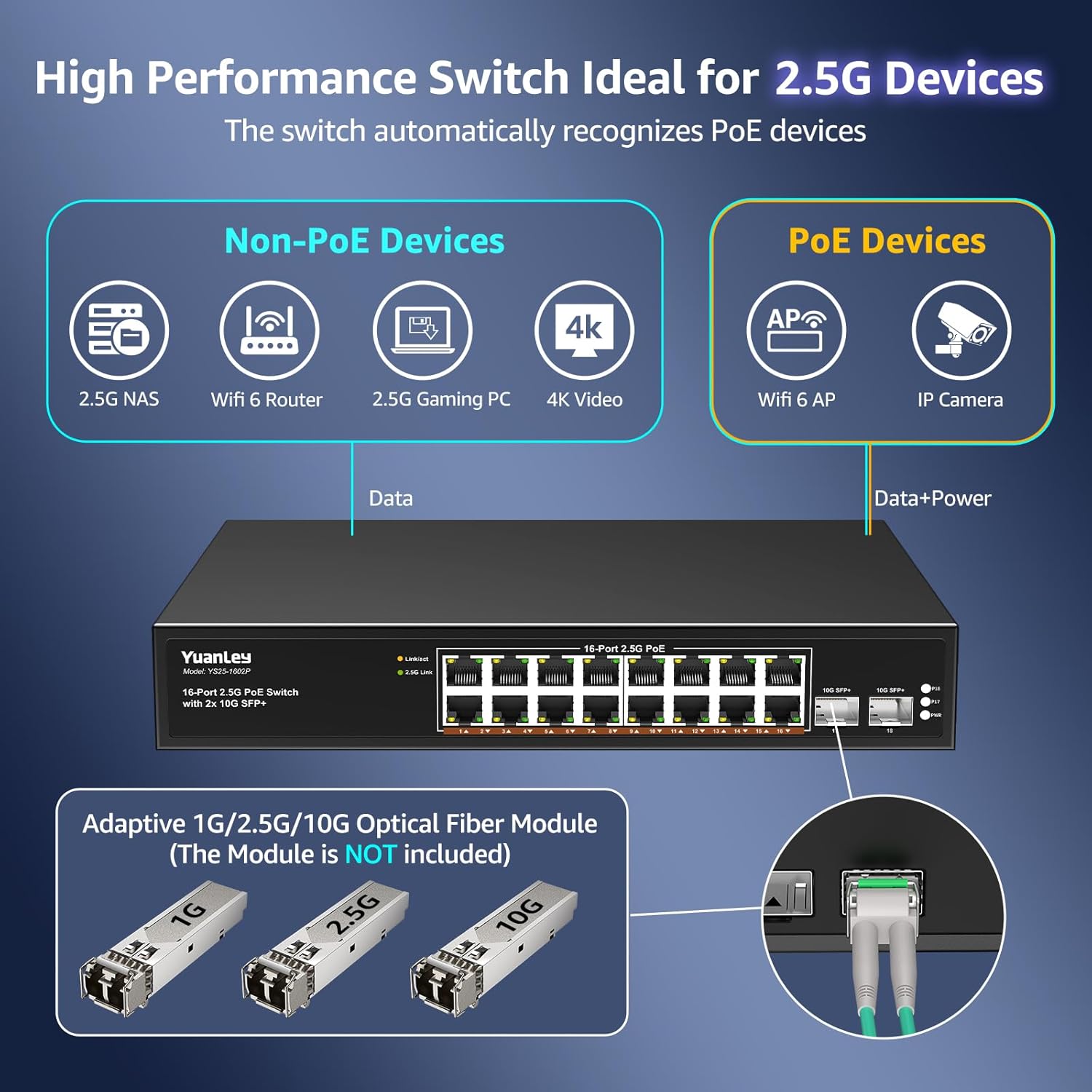
Figure 6: Connecting PoE and Non-PoE Devices
5.2 Network Speed and Compatibility
The 16 x 2.5G Base-T ports support adaptive speeds of 10/100/1000Mbps and 2.5Gbps. The 2 x 10G SFP+ ports are compatible with 1G, 2.5G, and 10G SFP modules, providing flexible high-speed uplink options. The switch offers a 160Gbps switching capacity for efficient data handling.

Figure 7: 2.5Gbps Speed Advantage
5.3 Application Scenarios
This switch is suitable for various network environments requiring high bandwidth and PoE, including 4K video streaming, online gaming, NAS storage, Wi-Fi 6 access points, and general office or home network expansion.

Figure 8: Multiple Application Scenarios
6. Maintenance
To ensure optimal performance and longevity of your YuanLey PoE switch, follow these maintenance guidelines:
- Cleaning: Use a soft, dry cloth to clean the exterior of the switch. Do not use liquid or aerosol cleaners.
- Ventilation: Ensure that the cooling vents on the sides of the switch are not obstructed. The fanless design relies on passive cooling.
- Environmental Conditions: Operate the switch within the specified temperature range of -10°C to 50°C (14°F to 122°F). Avoid placing the switch in direct sunlight or near heat sources.
- Cable Management: Keep network cables organized and free from kinks or excessive bends to maintain signal integrity.

Figure 9: Fanless Design for Silent Operation
7. Troubleshooting
If you encounter issues with your YuanLey PoE switch, refer to the following common troubleshooting steps:
- No Power:
- Ensure the power cable is securely connected to both the switch and a working electrical outlet.
- Verify the power outlet is functional by plugging in another device.
- Check if the PWR LED on the front panel is illuminated.
- No Link/Activity on a Port:
- Confirm the Ethernet cable is securely connected to both the switch port and the connected device.
- Try a different Ethernet cable to rule out cable failure.
- Check the LED indicators for the specific port (refer to Section 3.3). If no link light, the cable or device may be faulty.
- Ensure the connected device is powered on and functioning correctly.
- PoE Device Not Powering On:
- Verify that the connected device is IEEE 802.3af/at compliant.
- Ensure the total power consumption of all connected PoE devices does not exceed the switch's total PoE budget (250W).
- Try connecting the PoE device to a different PoE port on the switch.
- If possible, test the PoE device with another known working PoE source.
- Slow Network Speed:
- Ensure all connected devices and cables support 2.5G or 10G speeds for optimal performance. Using older Cat5 cables may limit speeds.
- Check for network congestion or issues with the uplink connection to your router.
The switch is equipped with 6KV lightning protection for enhanced reliability.
8. Specifications
| Feature | Description |
|---|---|
| Brand | YuanLey |
| Model Number | YS25-1602P-JP |
| Number of Ports | 18 (16 x 2.5G PoE, 2 x 10G SFP+) |
| PoE Standard | IEEE 802.3af/at |
| Total PoE Power | 250W (up to 30W per port) |
| Data Transfer Rate | 2.5 Gigabits Per Second (RJ45), 10 Gigabits Per Second (SFP+) |
| Switching Capacity | 160Gbps |
| Interface | PoE, SFP+ |
| Switch Type | Unmanaged, Fixed, PoE |
| Case Material | Metal |
| Operating Temperature | -10°C to 50°C (14°F to 122°F) |
| Lightning Protection | 6KV |
| Compatible Devices | Camera, Desktop, Laptop, Printer, Server |
9. Warranty and Support
9.1 Warranty Information
The YuanLey 18-Port 2.5G Unmanaged PoE Switch comes with a 1-year warranty from the date of purchase. This warranty covers manufacturing defects and ensures the product functions as described under normal use. Please retain your proof of purchase for warranty claims.
9.2 Technical Support
For technical assistance, troubleshooting beyond this manual, or warranty inquiries, please contact YuanLey customer support. Refer to the contact information provided with your product packaging or visit the official YuanLey website for support resources.