
Introduction
This manual provides essential information for the setup, operation, and maintenance of your M-AUDIO Forty Eighty 8-inch 150W Studio Monitor Speaker. Designed for audio professionals and enthusiasts, this bi-amplified monitor delivers precise sound reproduction for production, mixing, and content creation. Please read this manual thoroughly before using your speaker to ensure optimal performance and longevity.

Front view of the M-AUDIO Forty Eighty 8-inch Studio Monitor Speaker, showcasing its design and components.
Package Contents
Verify that all items listed below are included in your package:
- M-AUDIO Forty Eighty Speaker
- Isolation Pad
- Power Cable
- Quickstart Guide
- Safety and Warranty Manual
Setup
1. Placement
Position your M-AUDIO Forty Eighty speaker on a stable, flat surface, ideally at ear level in your listening environment. Use the included isolation pad to minimize unwanted vibrations and improve acoustic accuracy. Ensure adequate space around the rear port for optimal bass response.

The M-AUDIO Forty Eighty speaker positioned in a studio setup, demonstrating typical placement for monitoring.
2. Connections
The Forty Eighty speaker offers versatile input options:
- XLR Input: For balanced audio connections from professional audio interfaces or mixers.
- TRS Input: For balanced or unbalanced audio connections from various sources.
- Bluetooth: For wireless audio streaming from compatible devices.
Connect your audio source to the desired input on the rear panel of the speaker. Ensure all connections are secure.

A detailed view of the rear panel, highlighting the TRS and XLR input jacks for connecting audio sources.
3. Power Connection
Connect the included power cable to the AC input on the rear of the speaker, then plug the other end into a grounded electrical outlet. Ensure the power switch is in the 'OFF' position before connecting to power.

The rear panel of the M-AUDIO Forty Eighty, illustrating the power input, power switch, and volume control.
Operating Instructions
1. Power On/Off
To power on the speaker, flip the power switch on the rear panel to the 'ON' position. The front panel LED will illuminate. To power off, flip the switch back to 'OFF'.
2. Volume Control
Adjust the overall output volume using the 'VOLUME' knob on the rear panel. Start with a low volume setting and gradually increase it to a comfortable listening level.
3. Listening Modes
The Forty Eighty features instant front panel listening modes for different monitoring needs:
- FLAT Mode: Provides a true, uncolored frequency response for accurate mix referencing.
- HYPE Mode: Enhances bass and treble frequencies to simulate consumer playback systems (e.g., earbuds, car stereos).
- CUSTOM Mode: Activates custom EQ settings configured via the M-AUDIO Studio Control App.
Cycle through these modes using the dedicated button on the front panel.

Illustration of the speaker's frequency response in different modes and the control app interface for customization.
4. Bluetooth Pairing and True Wireless Stereo (TWS)
To pair a Bluetooth device:
- Ensure the speaker is powered on.
- Press and hold the Bluetooth button on the front panel until the LED flashes, indicating pairing mode.
- On your device, search for 'M-AUDIO Forty Eighty' in the Bluetooth settings and select it to connect.
For True Wireless Stereo (TWS) pairing (if using two Forty Eighty speakers):
- Ensure both speakers are powered on and not connected to any other Bluetooth device.
- Press and hold the Bluetooth button on both speakers simultaneously until they enter TWS pairing mode.
- Once paired, one speaker will act as the master and the other as the slave, providing stereo audio.
5. M-AUDIO Studio Control App
The M-AUDIO Studio Control App allows for advanced customization of your speaker's sound profile. Download the app from your device's app store.
- EQ Settings: Adjust the 5-band equalizer to fine-tune the sound to your room acoustics or personal preference.
- Presets: Save and recall custom sound profiles for different applications or listening environments.
Connect the app to your speaker via Bluetooth to access these features.
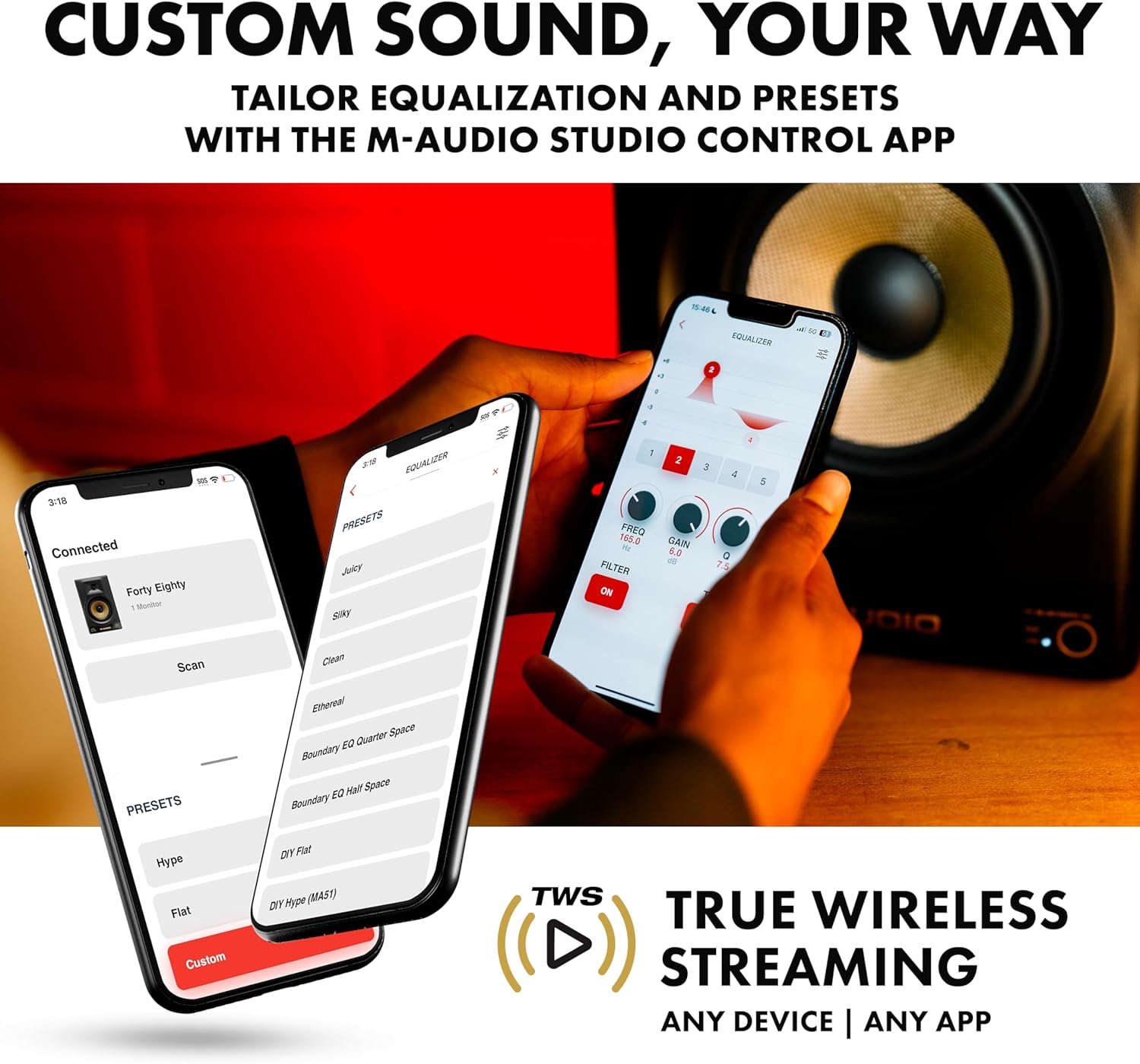
A user interacting with the M-AUDIO Studio Control App on a smartphone, demonstrating the equalization controls.
Maintenance
To ensure the longevity and optimal performance of your M-AUDIO Forty Eighty speaker, follow these maintenance guidelines:
- Cleaning: Use a soft, dry cloth to clean the exterior of the speaker. Avoid using abrasive cleaners, solvents, or waxes, as these can damage the finish.
- Environment: Keep the speaker away from direct sunlight, heat sources, and excessive moisture. Ensure proper ventilation to prevent overheating.
- Handling: Avoid dropping or subjecting the speaker to strong impacts. When moving the speaker, lift it carefully from the base.
- Storage: If storing the speaker for an extended period, disconnect it from power and store it in a cool, dry place, preferably in its original packaging.
Troubleshooting
This section addresses common issues you might encounter with your M-AUDIO Forty Eighty speaker.
- No Sound:
- Ensure the speaker is powered on and the volume is turned up.
- Check all audio cable connections from your source to the speaker.
- Verify that the correct input source is selected on your audio device.
- If using Bluetooth, ensure the speaker is paired and connected to your device, and the device's volume is up.
- Distorted Sound:
- Reduce the volume level on both the speaker and your audio source.
- Check for damaged audio cables and replace if necessary.
- Ensure the audio source is not sending an overdriven signal.
- Bluetooth Connection Issues:
- Ensure the speaker is within the Bluetooth range (approximately 30.5 meters / 100 feet).
- Remove any obstacles between the speaker and your Bluetooth device.
- Try unpairing and re-pairing the device.
- If experiencing random loud static popping sounds, especially when Bluetooth pairing is lost, try forgetting the speaker in your phone's Bluetooth settings and re-establishing the connection.
- Speaker Not Entering Standby Mode:
- The M-AUDIO Forty Eighty speaker does not feature an automatic standby mode. It must be manually powered off using the rear panel switch.
Specifications
| Feature | Specification |
|---|---|
| Model Name | FORTYEIGHTY |
| Speaker Type | Monitor |
| Speaker Maximum Output Power | 150 Watts |
| Woofer Diameter | 8 Inches (Kevlar) |
| Tweeter Diameter | 1.25 Inches |
| Frequency Response | 22 KHz (Upper limit, full range not specified) |
| Connectivity Technology | Auxiliary, Bluetooth |
| Wireless Communication Technology | Bluetooth 5.3 |
| Bluetooth Range | 30.5 Meters (100 Feet) |
| Control Method | App (M-AUDIO Studio Control App) |
| Audio Output Mode | Stereo (with TWS pairing) |
| Inputs | XLR, TRS |
| Product Dimensions (D x W x H) | 11.5"D x 10"W x 15"H |
| Item Weight | 22 Pounds |
| Color | Black |
| Indoor/Outdoor Usage | Indoor |
| Manufacturer | inMusic Brands Inc. |
| UPC | 694318026342 |
Warranty and Support
The M-AUDIO Forty Eighty speaker comes with a Limited Warranty. Please refer to the included Safety and Warranty Manual for detailed information regarding warranty terms, conditions, and registration procedures.
For technical support, product registration, or additional resources, please visit the official M-AUDIO website or contact their customer service department. Contact information can be found in the Safety and Warranty Manual or on the M-AUDIO website.