
Kuulaa KL-YD70
Kuulaa 2-Pack 10000mAh 22.5W PD Power Bank User Manual
Model: KL-YD70 | Brand: Kuulaa
Introduction
Thank you for choosing the Kuulaa 2-Pack 10000mAh 22.5W PD Power Bank. This portable charger is designed to provide efficient and reliable power for your mobile devices on the go. Featuring a slim metal shell, LED digital display, and fast charging capabilities, it ensures your devices stay powered throughout your day. This manual provides essential information for proper setup, operation, maintenance, and troubleshooting.
What's in the Box
- 2 x Kuulaa 10000mAh Power Bank
- 2 x USB-C Charging Cable
- 1 x Instruction Manual

Image: The Kuulaa Power Bank package contents, including two power banks, two USB-C cables, and the instruction manual.
Key Features
- 10000mAh High Capacity: Each power bank provides sufficient power to charge smartphones multiple times, ensuring extended usage for your devices.
- 22.5W PD+QC 3.0 Fast Charging: Equipped with Power Delivery (PD) and Quick Charge (QC 3.0) technologies, allowing for rapid charging of compatible devices, significantly reducing charging time.
- Dual-Device Charging: Features both USB-C (PD, max 20W) and USB-A (QC, max 22.5W) output ports, enabling simultaneous charging of two devices.
- LED Digital Display: A clear LED screen displays the exact remaining battery percentage, allowing for precise power management.
- Slim and Durable Metal Shell: Crafted from aerospace-grade aluminum alloy, providing a scratch-resistant, ergonomic, and ultra-slim design for easy portability.
- Advanced Safety Protection: Built-in intelligent integrated circuits protect against overcharging, overvoltage, overcurrent, and short circuits, ensuring safe operation.
- Airplane Approved: Designed to meet air travel regulations, making it a convenient companion for flights.
- Universal Compatibility: Compatible with a wide range of devices including iPhones, Samsung Galaxy phones, iPads, smartwatches, and AirPods.

Image: A close-up of the Kuulaa power bank, emphasizing its 10000mAh capacity, LED digital display, and durable metal shell.

Image: The power bank actively fast charging a smartphone, demonstrating its 22.5W output capability.

Image: The power bank connected to and charging both a smartphone and a tablet concurrently.

Image: A user with the power bank in an airport, highlighting its suitability for air travel.
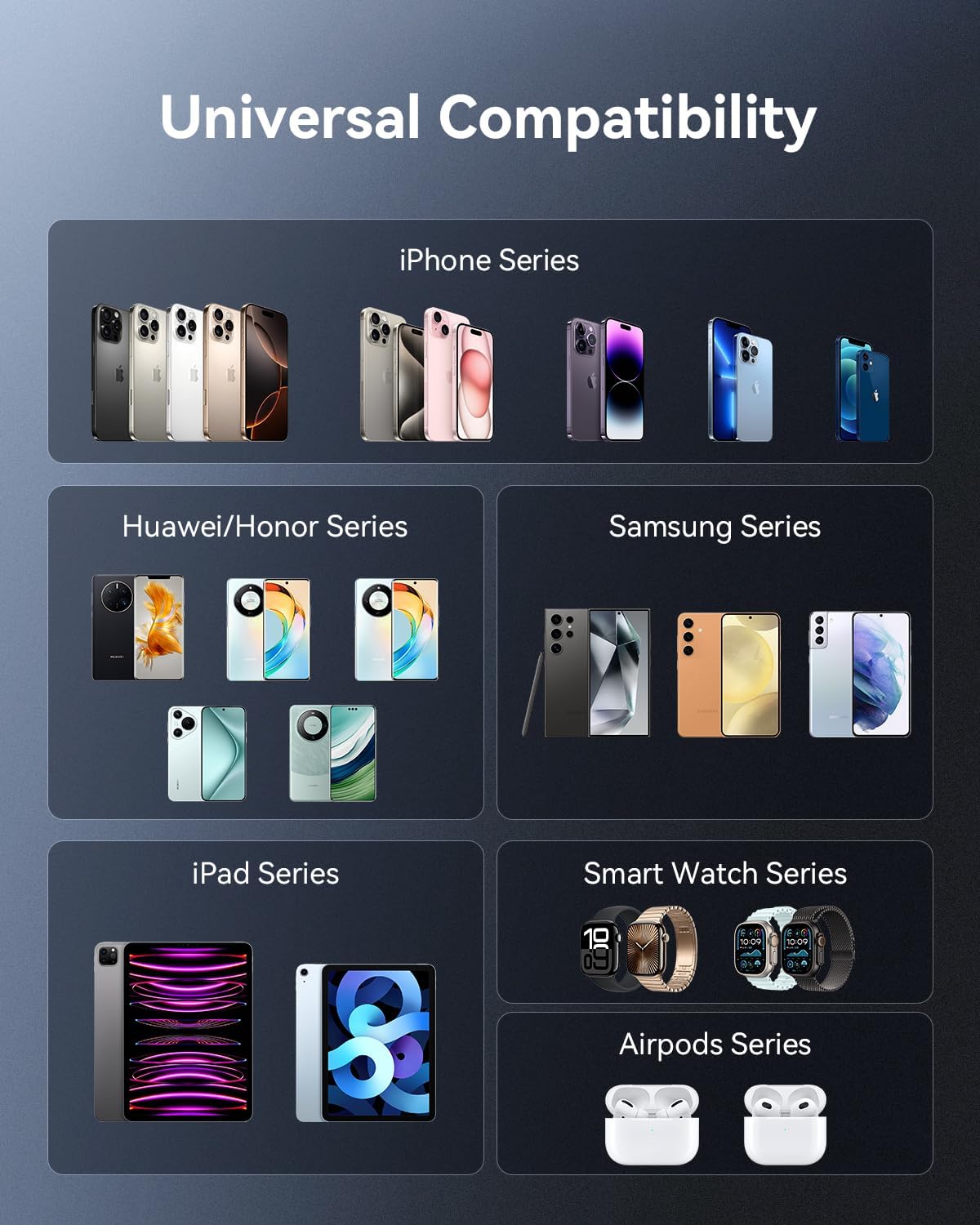
Image: A visual representation of the power bank's broad compatibility with different electronic devices.
Setup
Initial Charge of the Power Bank
Before first use, it is recommended to fully charge your Kuulaa Power Bank.
- Connect the provided USB-C cable to the USB-C IN/OUT port on the power bank.
- Connect the other end of the USB-C cable to a compatible USB wall charger (not included). For fastest charging, use an 18W or 20W PD-compatible charger.
- The LED digital display will show the charging progress, indicating the battery percentage.
- Once the display shows "100%", the power bank is fully charged and ready for use.

Image: The power bank connected to a wall charger for recharging, illustrating the input port.
Operating Instructions
Charging Your Devices
- Identify the correct charging cable for your device (USB-C to USB-C, USB-A to Lightning, etc.).
- Connect one end of your device's charging cable to the appropriate output port on the power bank (USB-C IN/OUT or USB-A OUT).
- Connect the other end of the cable to your device.
- The power bank will automatically begin charging your device. The LED display will show the power bank's remaining battery percentage.
- To charge two devices simultaneously, connect each device to an available output port.
Checking Battery Level
Press the power button once to activate the LED digital display and view the current battery percentage of the power bank.
Product Demonstration Video
Video: A demonstration of the Kuulaa 2-Pack Portable Charger, highlighting its ultra-thin metal shell, 22.5W fast charging, input/output ports, and ability to charge multiple devices simultaneously. It also shows its portability and the package contents.
Maintenance
- Keep the power bank away from extreme temperatures (hot or cold) and direct sunlight.
- Avoid dropping or subjecting the power bank to strong impacts.
- Do not expose the power bank to water or excessive moisture.
- Clean the power bank with a soft, dry cloth. Do not use harsh chemicals or abrasive materials.
- For long-term storage, charge the power bank to approximately 50-70% every 3 months to preserve battery health.
Troubleshooting
| Problem | Possible Cause | Solution |
|---|---|---|
| Power bank not charging | Charging cable faulty; Wall adapter insufficient; Power bank battery depleted. | Try a different USB-C cable; Use a wall adapter with sufficient power (e.g., 18W PD); Ensure power bank is not completely drained. |
| Device not charging from power bank | Charging cable faulty; Device not compatible; Power bank battery depleted. | Try a different charging cable; Ensure your device is compatible with USB charging; Recharge the power bank. |
| Slow charging | Cable not fast-charge compatible; Device not fast-charge compatible; Multiple devices charging simultaneously. | Use a fast-charge compatible cable; Check if your device supports PD/QC 3.0; Charging multiple devices may reduce individual charging speed. |
| LED display not working | Power bank is off; Malfunction. | Press the power button to activate the display; If issue persists, contact customer support. |
Specifications
| Feature | Detail |
|---|---|
| Brand | Kuulaa |
| Model Number | KL-YD70 |
| Battery Capacity | 10000 Milliamp Hours (mAh) |
| Output Power | Max 22.5W (USB-A), Max 20W (USB-C PD) |
| Input (Recharge) | USB Type C (18W Max) |
| Special Features | Digital Display, Fast Charging, Pocket Size, Scratch Resistant, Slim |
| Item Weight | 5.3 ounces (approx. 150g per unit) |
| Color | Silver |
| Manufacturer | Shenzhen Kula Technology Co., Ltd. |
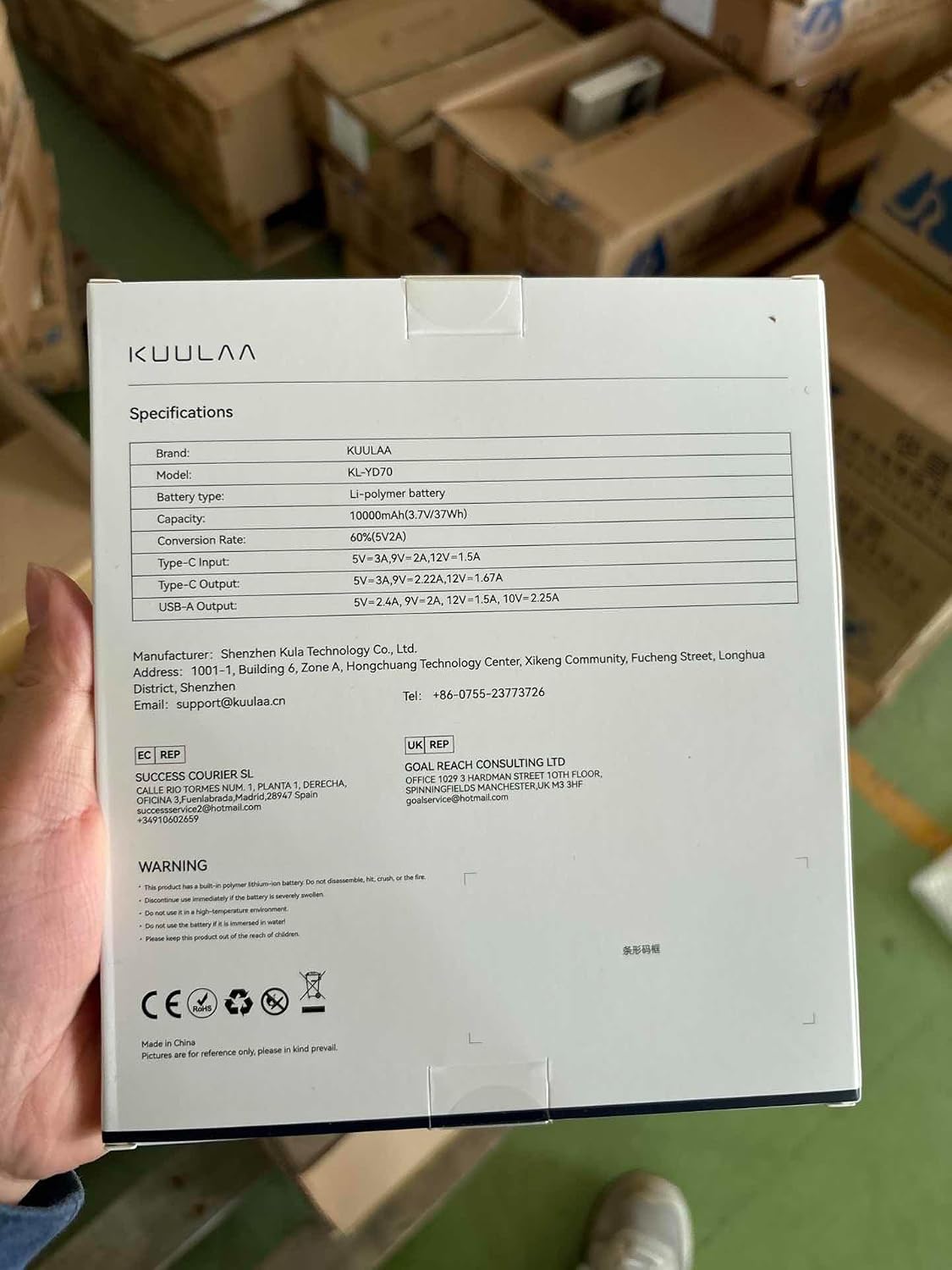
Image: The product packaging displaying detailed specifications.
Warranty and Support
For warranty information and customer support, please refer to the contact details provided on the product packaging or visit the official Kuulaa website. Keep your purchase receipt for warranty claims.
Related documentsKL-YD70


Ask a question about this manual
Ask about setup, troubleshooting, compatibility, parts, safety, or missing instructions. Manuals+ will review the question and use this page’s manual context to help answer it.