
Soundavo PSB-1000DSP(Version 2)
Soundavo PSB-1000DSP (Version 2) Subwoofer Amplifier User Manual
Class D 1000W RMS Subwoofer Amplifier for Home Theater
1. Introduction
Thank you for purchasing the Soundavo PSB-1000DSP (Version 2) Subwoofer Amplifier. This amplifier is designed to deliver powerful and precise bass for your home theater and audio systems. Featuring a Class D circuit design, built-in DSP settings, and versatile connectivity options, it provides an exceptional audio experience. This manual will guide you through the setup, operation, and maintenance of your new amplifier.
2. Safety Information
Please read all safety instructions carefully before operating the amplifier. Retain this manual for future reference.
- Power Source: Connect the amplifier only to the specified power supply voltage as indicated on the unit. Ensure the AC voltage selector is set correctly for your region (110-120V or 220-240V).
- Ventilation: Do not block any ventilation openings. Ensure adequate airflow around the unit to prevent overheating.
- Water and Moisture: Do not expose the amplifier to rain, moisture, or excessive humidity. Do not place objects filled with liquids, such as vases, on the unit.
- Heat: Keep the amplifier away from heat sources such as radiators, heat registers, stoves, or other apparatus that produce heat.
- Servicing: Do not attempt to service this product yourself. Refer all servicing to qualified service personnel.
- Cleaning: Unplug the unit from the power outlet before cleaning. Use a dry cloth for cleaning. Do not use liquid cleaners or aerosol cleaners.
3. Product Overview
The Soundavo PSB-1000DSP (Version 2) is a high-performance Class D subwoofer amplifier designed for robust bass delivery in home theater environments. It features a 2U rack-mountable design and provides 1000W RMS at 4 Ohms. The integrated Digital Signal Processing (DSP) allows for precise control over audio parameters, ensuring optimal performance with various subwoofer sizes and room acoustics.
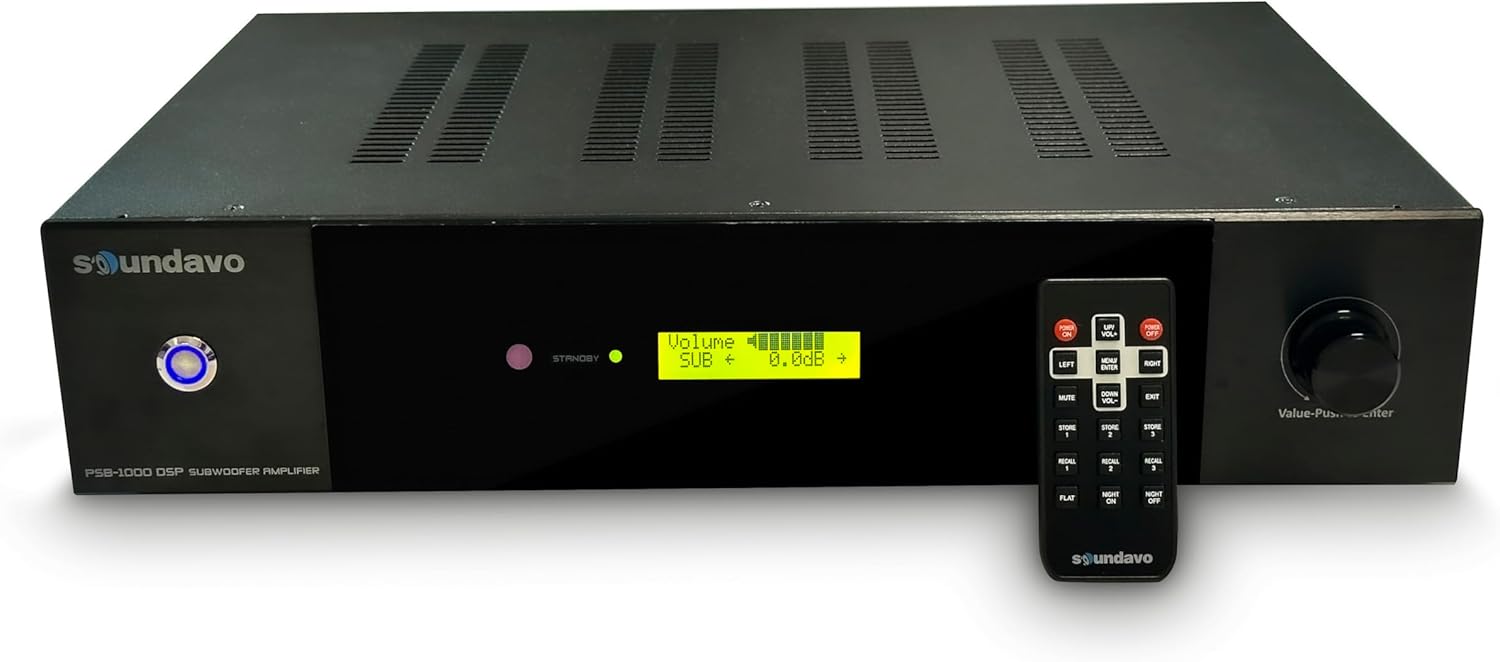
Figure 3.1: Front view of the PSB-1000DSP amplifier with its remote control, showcasing the LCD display and control knob.
Key Features:
- High Wattage Power Output: Delivers 1 x 1000W RMS @ 4 Ohms (or 2 x 500W RMS @ 8 Ohms minimum load).
- Versatile Connectivity: Stereo/mono line level audio input (RCA), LFE input, stereo speaker level input/outputs.
- RS-232 Control Ports: For integration with control systems, allowing master volume and muting control.
- Digital Signal Processing (DSP): Built-in DSP for adjusting Crossover Frequency, Crossover Slopes, Phase, Low Cut, and storing up to 3 presets.
- Flexible Power Management: Audio On/Off Detects, RS-232, and 12VDC Trigger for automatic power control.
- User-Friendly Interface: LCD display on the front panel for easy navigation and settings adjustment.
- Protection Features: Short circuit and thermal protection built-in.
4. Package Contents
Upon unpacking your Soundavo PSB-1000DSP (Version 2) amplifier, please ensure all items are present and in good condition:
- Soundavo PSB-1000DSP (Version 2) Subwoofer Amplifier
- IR Remote Control
- AC Power Cord
- User Manual (this document)
If any items are missing or damaged, please contact your retailer or Soundavo customer support immediately.
5. Setup and Connections
Proper setup is crucial for optimal performance. Follow these steps to connect your amplifier.
5.1 Rear Panel Overview

Figure 5.1: Rear panel of the PSB-1000DSP amplifier, detailing the various input, output, and control ports.
5.2 AC Voltage Selector
Before connecting the power cord, ensure the AC VOLTAGE SELECTOR switch on the rear panel is set to the correct voltage for your region (110-120V or 220-240V). Incorrect voltage selection can damage the unit.

Figure 5.2: Detail of the AC Voltage Selector switch on the rear panel.
5.3 Audio Connections
The PSB-1000DSP offers multiple ways to connect to your audio system:
- Line Level Input (RCA): Connect your receiver's LFE (Subwoofer Out) or stereo pre-out to the LINE IN (LFE/MONO or L/R) RCA jacks. If using a single LFE output, connect to the LFE/MONO input.
- Speaker Level Input: For receivers without line-level outputs, connect the speaker outputs of your receiver to the SPEAKER LEVEL IN terminals. Use the SPEAKER LEVEL OUT terminals to pass the signal through to your main speakers if needed.
- Subwoofer Output: Connect your passive subwoofer(s) to the SUB OUTPUT binding posts. The amplifier supports 1 x 1000W RMS @ 4 Ohms or 2 x 500W RMS @ 8 Ohms. Ensure your subwoofer's impedance matches the amplifier's output capabilities.
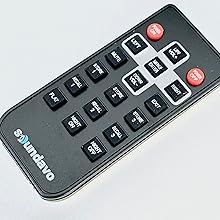
Figure 5.3: Detail of the subwoofer output terminals, indicating connection options for 4 Ohm and 8 Ohm loads.
5.4 Control Connections
- 12V Trigger: Connect a 12V trigger cable from your receiver or control system to the 12V TRIGGER IN jack. This allows the amplifier to power on/off automatically with your main system.
- RS-232: Use the RS-232 port for advanced control integration with home automation systems. Refer to the RS-232 command set documentation for detailed protocols.
- SERVICE USB: This port is for firmware updates and service purposes only. Do not connect consumer devices to this port.
6. Operating the Amplifier
The PSB-1000DSP (Version 2) can be operated via its front panel controls or the included IR remote control.
6.1 Front Panel Controls
The front panel features an LCD display and a multi-function knob (Value-Push to Enter).
Figure 6.1: Close-up of the LCD display, showing volume and other DSP settings.
- LCD Display: Shows current settings, menu options, and volume level.
- Multi-function Knob: Rotate to navigate menu options or adjust values. Push to select an option or confirm a setting.
6.2 Remote Control Functions
The IR remote control provides convenient access to all amplifier functions.

Figure 6.2: The included IR remote control for the PSB-1000DSP amplifier.
- Power ON/OFF: Turns the amplifier on or off.
- MUTE: Mutes or unmutes the audio output.
- UP/VOL+, DOWN/VOL-: Adjusts volume level.
- LEFT, RIGHT: Navigates menu options horizontally.
- MENU/ENTER: Enters the menu or confirms a selection.
- EXIT: Exits the current menu or setting.
- STORE 1/2/3: Saves current DSP settings to one of three memory presets.
- RECALL 1/2/3: Recalls one of the three saved DSP presets.
- FLAT: Resets DSP settings to a flat frequency response.
- NIGHT ON/OFF: Activates or deactivates Night Mode, which typically reduces dynamic range for late-night listening.
6.3 DSP Settings
The built-in DSP allows for fine-tuning of your subwoofer's performance. Access the DSP menu via the front panel knob or remote control.
- Master Volume Level: Adjusts the overall output volume of the subwoofer.
- Crossover Frequency: Sets the upper frequency limit for the subwoofer. Adjustable to blend seamlessly with your main speakers.
- Crossover Slopes: Select from 4 different slopes (e.g., 12dB, 24dB, 36dB, 48dB per octave) to control the steepness of the crossover filter.
- Phase: Adjusts the phase (0° or 180°) to ensure the subwoofer's output is in phase with your main speakers, preventing cancellation at the crossover point.
- Low Cut: Sets a high-pass filter to remove extremely low frequencies that may not be reproducible by your subwoofer or could cause distortion.
- Presets: Store up to 3 customized DSP settings optimized for different content (e.g., music, movies, late-night listening) or subwoofer sizes (e.g., 8", 10", 12" subs).
6.4 Power Management Modes
The three-way switch on the rear panel allows you to select the amplifier's power-on mode:
- 12V Trigger Mode: The amplifier powers on/off when a 12V trigger signal is detected.
- Auto On/Off (Music Signal Detect): The amplifier automatically turns on when an audio signal is detected and enters standby after a period of no signal. The auto-off delay can be set from 5-30 minutes in 5-minute increments via the DSP menu.
- Always On Mode: The amplifier remains powered on continuously.
7. Maintenance
To ensure the longevity and optimal performance of your Soundavo PSB-1000DSP amplifier, follow these maintenance guidelines:
- Cleaning: Regularly wipe the exterior with a soft, dry cloth. Avoid using abrasive cleaners, solvents, or chemical sprays, as they may damage the finish.
- Ventilation: Ensure that the ventilation grilles are free from dust and obstructions. Periodically use a soft brush or vacuum cleaner to remove any accumulated dust.
- Connections: Occasionally check all cable connections to ensure they are secure and free from corrosion.
- Storage: If storing the amplifier for an extended period, disconnect it from the power supply and store it in a cool, dry place, away from direct sunlight and extreme temperatures.
8. Troubleshooting
If you encounter issues with your amplifier, refer to the following common problems and solutions:
| Problem | Possible Cause | Solution |
|---|---|---|
| No power / Unit does not turn on. | Power cord not securely connected; AC voltage selector incorrect; Power outlet faulty. | Ensure power cord is fully inserted. Verify AC voltage selector matches your region's voltage. Test power outlet with another device. |
| No sound from subwoofer. | Input cables loose or incorrect; Subwoofer cables loose or incorrect; Amplifier muted; Incorrect input selected; DSP settings (e.g., Low Cut too high). | Check all RCA/speaker level input and subwoofer output connections. Ensure amplifier is not muted. Verify correct input source is selected on your receiver/preamp. Review DSP settings. |
| Amplifier turns off unexpectedly. | Overheating; Auto On/Off mode engaged with no signal; Short circuit in speaker wiring. | Ensure adequate ventilation. Check power management mode (12V Trigger, Auto On/Off, Always On). Inspect speaker wiring for shorts. Allow unit to cool if overheated. |
| Distorted or poor sound quality. | Incorrect DSP settings; Overdriving the amplifier/subwoofer; Loose connections. | Adjust DSP settings (Crossover, Phase, Volume). Reduce input level from source. Check all audio connections. |
| Remote control not working. | Batteries dead or inserted incorrectly; Obstruction between remote and amplifier; Remote sensor blocked. | Replace batteries. Ensure clear line of sight to the amplifier's IR sensor. |
| Difficult menu navigation. | User unfamiliarity with sequential menu access. | Familiarize yourself with the menu structure. Use the remote control for easier navigation. Note that some settings require sequential scrolling. |
9. Specifications
| Feature | Specification |
|---|---|
| Model Number | PSB-1000DSP(Version 2) |
| Output Power | 1000 Watts RMS @ 4 Ohms (1 x 1000W) or 500 Watts RMS @ 8 Ohms (2 x 500W) |
| Amplifier Class | Class D |
| Connectivity Technology | RCA |
| Controller Type | Foot Control (referring to the knob, not a literal foot pedal) |
| Special Feature | Subwoofer Amplifier with DSP |
| Compatible Devices | Amplifier, Receivers, Pre-amps |
| Audio Output Mode | Surround |
| Surround Sound Channel Configuration | 5.1 (typical system integration) |
| Color | Black |
| Item Weight | 17.69 pounds |
| Package Dimensions | 22.36 x 17.63 x 9.29 inches |
| Manufacturer | Soundavo |
10. Warranty and Support
Soundavo products are designed and manufactured to the highest quality standards. This product is covered by a limited warranty against defects in materials and workmanship. Please refer to the warranty card included with your product or visit the official Soundavo website for detailed warranty terms and conditions.
For technical support, troubleshooting assistance, or warranty claims, please contact Soundavo customer service through their official website or the contact information provided with your purchase. When contacting support, please have your product model number (PSB-1000DSP Version 2) and purchase details ready.
For more information, visit the Soundavo Store on Amazon.
Related documentsPSB-1000DSP(Version 2)

Ask a question about this manual
Ask about setup, troubleshooting, compatibility, parts, safety, or missing instructions. Manuals+ will review the question and use this page’s manual context to help answer it.