Introduction
Thank you for choosing the Muvit Anc Serenity Wireless Headphones. This manual provides detailed instructions for the proper use, setup, and maintenance of your headphones. Please read this manual thoroughly before using the product to ensure optimal performance and longevity.
What's in the Box
- Muvit Anc Serenity Wireless Headphones
- User Manual
- Protective Case
- Detachable Audio Cable (3.5mm Jack)
- Charging Cable (Type not specified, typically USB)
Note: The charging cable type is not explicitly listed in the product specifications but is standard for wireless headphones.
Product Overview
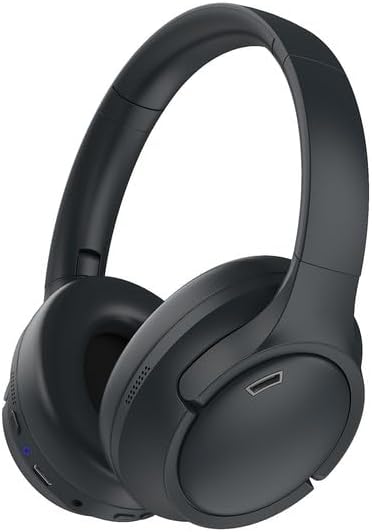
Figure 1: Muvit Anc Serenity Wireless Headphones. This image displays the black over-ear headphones from a slight angle, showing the earcups, headband, and some control buttons on the left earcup.
The Muvit Anc Serenity headphones feature a circum-aural (over-ear) design for comfort and effective sound isolation. They are equipped with controls on the earcups for easy access to functions such as power, volume, and Active Noise Cancellation (ANC).
Setup
1. Charging the Headphones
- Connect the charging cable to the charging port on the headphones.
- Connect the other end of the cable to a USB power source (e.g., computer, wall adapter).
- The LED indicator will show the charging status. A full charge is indicated when the LED changes color or turns off.
2. Bluetooth Pairing (Wireless Connection)
- Ensure the headphones are charged and powered off.
- Press and hold the Power button until the LED indicator flashes, indicating pairing mode.
- On your device (e.g., phone, tablet, computer), enable Bluetooth and search for available devices.
- Select "Muvit Serenity" from the list of found devices.
- Once paired, the LED indicator will stop flashing and remain solid, or turn off.
3. Wired Connection (Optional)
- Connect one end of the detachable 3.5mm audio cable to the audio input port on the headphones.
- Connect the other end of the cable to the 3.5mm audio output jack on your device.
- The headphones will operate in passive mode when connected via cable, typically without requiring power or Bluetooth.
Operating Instructions
Power On/Off
- Power On: Press and hold the Power button for approximately 3 seconds.
- Power Off: Press and hold the Power button for approximately 5 seconds.
Active Noise Cancellation (ANC)
- Locate the ANC button on the headphones.
- Press the ANC button once to activate Active Noise Cancellation. The LED indicator for ANC will illuminate.
- Press the ANC button again to deactivate ANC. The LED indicator will turn off.
Music and Call Control (Remote Control)
The headphones feature integrated controls for managing audio playback and phone calls. Specific button functions may vary slightly, but generally include:
- Play/Pause: Single press the Multi-function button.
- Volume Up/Down: Press the Volume + or Volume - buttons.
- Next Track: Press and hold Volume + (or double-press Multi-function button).
- Previous Track: Press and hold Volume - (or triple-press Multi-function button).
- Answer/End Call: Single press the Multi-function button.
- Reject Call: Press and hold the Multi-function button.
Compatible Devices
The Muvit Anc Serenity headphones are compatible with a wide range of devices, including:
- Computers
- Smartphones
- Tablets
- Car Audio Systems (via Bluetooth or 3.5mm jack, if supported)
Maintenance
Cleaning
- Use a soft, dry, lint-free cloth to clean the surfaces of the headphones.
- For earcups, gently wipe with a slightly damp cloth if necessary, then dry immediately.
- Do not use harsh chemicals, solvents, or abrasive cleaners.
Storage
- When not in use, store the headphones in the provided protective case to prevent damage.
- Avoid storing in extreme temperatures, direct sunlight, or high humidity.
Water Resistance
These headphones are not waterproof. Avoid exposure to water, rain, sweat, or other liquids. Damage caused by liquid exposure is not covered under warranty.
Troubleshooting
No Power
- Ensure the headphones are fully charged.
- Verify the charging cable and power source are functioning correctly.
Cannot Pair via Bluetooth
- Make sure the headphones are in pairing mode (flashing LED).
- Ensure Bluetooth is enabled on your device and it is within range (typically 10 meters).
- Try forgetting the device from your device's Bluetooth list and re-pairing.
- Restart both the headphones and your device.
No Audio or Poor Sound Quality
- Check the volume levels on both the headphones and your connected device.
- If using Bluetooth, ensure a stable connection. Move closer to your device or reduce interference.
- If using the wired connection, ensure the 3.5mm cable is fully inserted into both ports and is not damaged.
- Test with a different audio source or device.
ANC Not Working
- Ensure the ANC feature is activated (check the ANC LED indicator).
- Make sure the headphones are properly seated on your ears to create a good seal.
Specifications
| Model Name | Serenity |
| Brand | muvit |
| Connectivity Technology | Wireless (Bluetooth) and Wired |
| Wireless Communication Technology | Bluetooth |
| Form Factor | Circum-Auriculaire (Over-Ear) |
| Ear Placement | Supra-auriculaire (On-Ear) - Note: Product description indicates Over-Ear, but this specification is also listed. |
| Noise Isolation | Active Noise Cancellation |
| Impedance | 32 Ohms |
| Headphone Jack | 3.5 mm Jack |
| Control Method | Remote Control |
| Cable Function | Detachable |
| Water Resistance Level | Not waterproof |
| Compatible Devices | Computer, Phone, Tablet, Car Audio System |
Warranty and Support
Specific warranty information for the Muvit Anc Serenity Wireless Headphones is not provided in the product details. For warranty claims, technical support, or inquiries regarding spare parts, please contact the manufacturer, muvit, directly or refer to the official product packaging and documentation.
Information regarding guaranteed software updates is also not available.


