
Legami SPS0003
Legami The Sound of Cuteness Kitty Wireless Speaker with Stand User Manual
Model: SPS0003
1. Introduction
Thank you for choosing the Legami The Sound of Cuteness Kitty Wireless Speaker with Stand. This device combines a portable wireless speaker with a convenient phone stand, designed to enhance your audio experience and provide a stable holder for your smartphone or tablet. Please read this manual carefully before use to ensure proper operation and to maximize the product's lifespan.

Image 1.1: The Legami The Sound of Cuteness Kitty Wireless Speaker, showcasing its dual function as a speaker and phone stand, and its USB rechargeable feature.
2. Product Overview
The Legami Kitty Wireless Speaker is a compact and portable audio device. It features a wireless connection for audio streaming and an integrated stand to hold your mobile device. The speaker is rechargeable via a USB cable.
2.1 Components
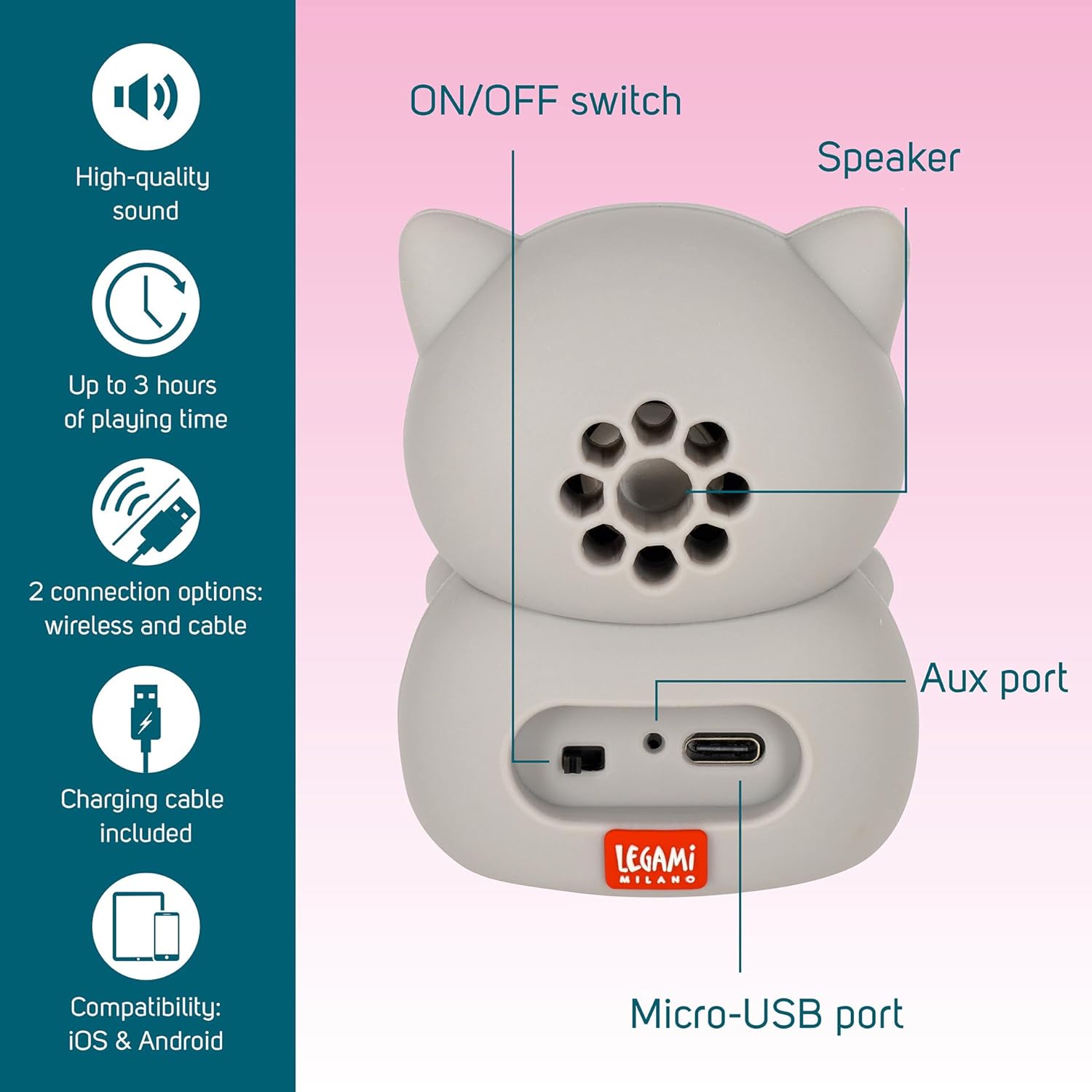
Image 2.1: Rear view of the speaker showing the ON/OFF switch, speaker grille, and Micro-USB port. Please note: The port labeled 'Aux port' in some product images is a status LED and does not provide auxiliary audio input.
- ON/OFF Switch: Powers the speaker on or off.
- Speaker: Audio output.
- Micro-USB Port: For charging the speaker.
- Status LED: Indicates power and charging status. (Note: This is often mistaken for an Aux port in some visuals, but it is an indicator light.)
- Phone Stand: Integrated feet to hold your smartphone or tablet.
3. Package Contents
- Legami The Sound of Cuteness Kitty Wireless Speaker with Stand
- USB Charging Cable
- User Manual
4. Setup
4.1 Charging the Speaker
Before first use, fully charge the speaker. Connect the supplied USB charging cable to the Micro-USB port on the back of the speaker and the other end to a USB power source (e.g., computer USB port, USB wall adapter). The status LED will indicate charging status (e.g., red for charging, off or blue for fully charged, depending on the model).
4.2 Powering On/Off
- To power on: Slide the ON/OFF switch to the 'ON' position. The status LED will light up, indicating the speaker is ready for pairing.
- To power off: Slide the ON/OFF switch to the 'OFF' position. The status LED will turn off.
4.3 Bluetooth Pairing
- Ensure the speaker is powered on and within close proximity (within 10 meters) of your Bluetooth-enabled device.
- On your smartphone or tablet, go to the Bluetooth settings.
- Search for available devices. The speaker will appear as "Legami Speaker" or a similar name.
- Select the speaker from the list to pair. Once successfully paired, you may hear an audible confirmation, and the status LED might change (e.g., solid blue).
- The speaker will automatically attempt to reconnect to the last paired device when powered on.
5. Operating Instructions
5.1 Playing Audio
Once paired, simply start playing audio from your connected device. The sound will be streamed wirelessly to the Legami Kitty Speaker. Volume control is managed directly from your connected smartphone or tablet.
5.2 Using the Phone Stand
The speaker features integrated feet that extend to form a stable stand for your smartphone or tablet. Gently pull out the front paws of the Kitty speaker to create a cradle for your device. Place your phone or tablet securely in the stand for hands-free viewing.

Image 5.1: A smartphone positioned in the integrated stand of the Legami Kitty speaker, demonstrating its hands-free viewing capability.

Image 5.2: The Legami Kitty speaker shown with its phone stand in various positions, illustrating its flexibility for different viewing angles.
6. Charging
The speaker is powered by an internal rechargeable battery. When the battery is low, the status LED may flash or change color (refer to specific model indications). To recharge, connect the provided USB cable to the Micro-USB port on the speaker and a standard USB power source. Charging time may vary. A full charge provides approximately 3 hours of playing time.
7. Troubleshooting
| Problem | Possible Cause | Solution |
|---|---|---|
| Speaker does not turn on. | Battery is depleted. | Charge the speaker using the provided USB cable. |
| Cannot pair with Bluetooth device. | Speaker is not in pairing mode or too far. | Ensure speaker is on and within 10 meters. Turn off and on the speaker. Disable and re-enable Bluetooth on your device. |
| No sound after pairing. | Volume too low on device or speaker. | Increase volume on your connected device. Ensure media audio is routed to the speaker in your device's Bluetooth settings. |
| Sound quality is poor or intermittent. | Interference or distance. | Move the speaker closer to your device. Avoid obstacles between the speaker and device. Avoid strong electromagnetic interference. |
| Speaker does not have an Aux port. | Misinterpretation of visual cues. | The device primarily supports Bluetooth connectivity. The port sometimes visually indicated as 'Aux' is a status LED. Please rely on Bluetooth for audio input. |
8. Specifications
| Feature | Detail |
|---|---|
| Model Number | SPS0003 |
| Dimensions (L x W x H) | 5.1 x 6.1 x 8 cm (2.0 x 2.4 x 3.1 inches) |
| Weight | 200 grams |
| Connectivity Technology | Bluetooth |
| Wireless Communication Technology | Bluetooth |
| Power Source | Battery Powered (Rechargeable via USB) |
| Max Speaker Output Power | 5 Watts |
| Speaker Size | 6 Centimeters |
| Audio Output Mode | Stereo |
| Special Features | Wireless Connection, Portable Stand |
| Compatible Devices | Laptop, Smartphone, Tablet |
| Included Components | USB Power Cable |
| Material | Plastic |
9. Safety Information
- Do not expose the speaker to water or excessive moisture. It is not waterproof.
- Avoid extreme temperatures.
- Do not disassemble or attempt to repair the device yourself. This will void the warranty.
- Keep out of reach of children.
- Use only the provided USB cable for charging.
- Dispose of the product responsibly according to local regulations.
10. Warranty and Support
Legami products are designed with quality and reliability in mind. For warranty information or technical support, please refer to the documentation included with your purchase or visit the official Legami website. Keep your proof of purchase for warranty claims.
Related documentsSPS0003

Ask a question about this manual
Ask about setup, troubleshooting, compatibility, parts, safety, or missing instructions. Manuals+ will review the question and use this page’s manual context to help answer it.