
1. Introduction
Thank you for choosing the XHDATA D109WB and D220 Portable Radios. This manual provides detailed instructions for the setup, operation, and maintenance of your new radios. Please read this manual thoroughly before use to ensure optimal performance and longevity of your devices.

Image 1: The XHDATA D109WB (black) and D220 (orange) portable radios.
2. Product Overview
The XHDATA D109WB and D220 are versatile portable radios designed for excellent reception and ease of use. The D109WB offers a wide range of bands including FM, AM, Shortwave (SW), Longwave (LW), and NOAA Weather Band (WB), along with advanced features like Bluetooth, TF card playback, and an alarm clock. The D220 is a compact and lightweight FM/AM/SW radio, ideal for portability and simple operation.
2.1 XHDATA D109WB Key Features
- Frequency Bands: FM (64-108MHz), AM (520-1710KHz), LW (153-513KHz), SW (1711-29999KHz), NOAA Weather Band (162.40-162.55MHz).
- DSP Chip: Enhances reception sensitivity.
- Audio Output: 40mm speaker for clear sound, 3.5mm stereo headphone jack.
- Multimedia: MP3 music mode, Bluetooth 5.0 connectivity, TF card support.
- Emergency Features: NOAA Weather Band for alerts, SOS Distress Alarm.
- Convenience: Alarm clock, 500 memory stations, Auto Frequency Search (ATS).

Image 2: The XHDATA D109WB radio highlighting its various features including FM/AM/SW/WB, NOAA Scan Alert, Bluetooth, TF card, Alarm Clock, 5W Speaker, SOS Alarm, 500 Memory Stations, Earphone Jack, and Auto Frequency Search.
2.2 XHDATA D220 Key Features
- Frequency Bands: FM, AM, Shortwave (SW).
- Compact Design: Small size (125x74x30mm) and lightweight (125g without batteries) for easy portability.
- Simple Controls: Tuning knob, band switch, volume/power switch button for straightforward operation.
- Reception: Excellent signal reception with a long antenna.

Image 3: The XHDATA D220 radio demonstrating its compact size and ease of carrying, with dimensions of 125mm (4.9 inches) in height, 72mm (2.8 inches) in width, and 28mm (1.1 inches) in depth.
3. Package Contents
Please check the package for the following items:
- XHDATA D109WB Radio (if purchased as a set)
- XHDATA D220 Radio (if purchased as a set)
- Headphone Jack
- Power Adapter (for D109WB, if included)
- User Manual (this document)
Note: Batteries are typically not included and must be purchased separately.
4. Controls and Features
4.1 XHDATA D109WB Controls
The D109WB features a comprehensive control panel and display. Refer to the image below for a visual guide to its main components.

Image 4: The XHDATA D109WB radio displaying its frequency ranges for WB (162.40-162.55MHz), LW (153-513KHz), SW (1711-29999KHz), MW (520-1710KHz), and FM (64-108MHz).
- Power Button: Turns the radio on/off.
- Tuning Dial/Buttons: For manual station selection.
- Band Switch: Selects between FM, AM, SW, LW, WB.
- Volume Control: Adjusts audio output level.
- Display Screen: Shows frequency, time, battery status, and other information.
- Numeric Keypad: For direct frequency input or memory recall.
- Memory Buttons: Save and recall favorite stations.
- Bluetooth/MP3/TF Card Controls: Play, pause, skip tracks, mode selection.
- Alarm A/B Buttons: Set and activate alarms.
- SOS Button: Activates distress alarm.
- Headphone Jack: For private listening.
- DC-IN Port: For external power adapter.
- Antenna: Extendable telescopic antenna for improved reception.
4.2 XHDATA D220 Controls
The D220 is designed for simplicity. Its main controls are located on the side and front panels.

Image 5: The XHDATA D220 radio with its key components labeled, including the long antenna, tuning dial, volume/power switch, FM/AM/SW switch, bracket, 2xAA battery compartment, and 3.5mm earphone jack.
- Long Antenna: Extendable for enhanced signal reception.
- Tuning Dial: For manual station selection.
- Volume/Power Switch: Rotates to adjust volume and push to power on/off.
- FM/AM/SW Switch: Slides to select the desired frequency band.
- Bracket: Integrated stand for upright positioning.
- Battery Compartment: Holds 2xAA batteries.
- 3.5mm Earphone Jack: For private listening.
5. Setup
5.1 Battery Installation
Both radios require batteries for portable operation.
- XHDATA D109WB: Typically uses a rechargeable lithium battery. Open the battery compartment cover, insert the battery according to the polarity markings, and close the cover. Ensure the battery is fully charged before first use using the provided power adapter.
- XHDATA D220: Requires 2xAA batteries. Open the battery compartment cover on the back of the radio. Insert the batteries, matching the positive (+) and negative (-) terminals as indicated inside the compartment. Close the cover securely.
5.2 Initial Power On
- XHDATA D109WB: Press and hold the Power button until the display illuminates.
- XHDATA D220: Rotate the Volume/Power switch clockwise until you hear a click and the radio turns on.
6. Operating Instructions
6.1 Power On/Off and Volume Control
- Power On/Off:
- D109WB: Press and hold the Power button.
- D220: Rotate the Volume/Power switch.
- Volume Adjustment:
- D109WB: Use the dedicated volume buttons or knob (if present).
- D220: Rotate the Volume/Power switch.
6.2 Band Selection and Tuning
Extend the telescopic antenna fully for optimal reception, especially for FM and SW bands.
- XHDATA D109WB:
- Band Selection: Press the "BAND" button or use the dedicated band switch to cycle through FM, AM, SW, LW, WB.
- Manual Tuning: Use the tuning knob or up/down arrow buttons to fine-tune to a specific frequency.
- Automatic Tuning (ATS): Press the "ATS" button (if available) to automatically scan and save strong stations.
- Direct Frequency Input: Use the numeric keypad to enter a frequency directly.
- XHDATA D220:
- Band Selection: Use the FM/AM/SW slide switch on the side of the radio.
- Manual Tuning: Rotate the Tuning Dial on the side to find desired stations.
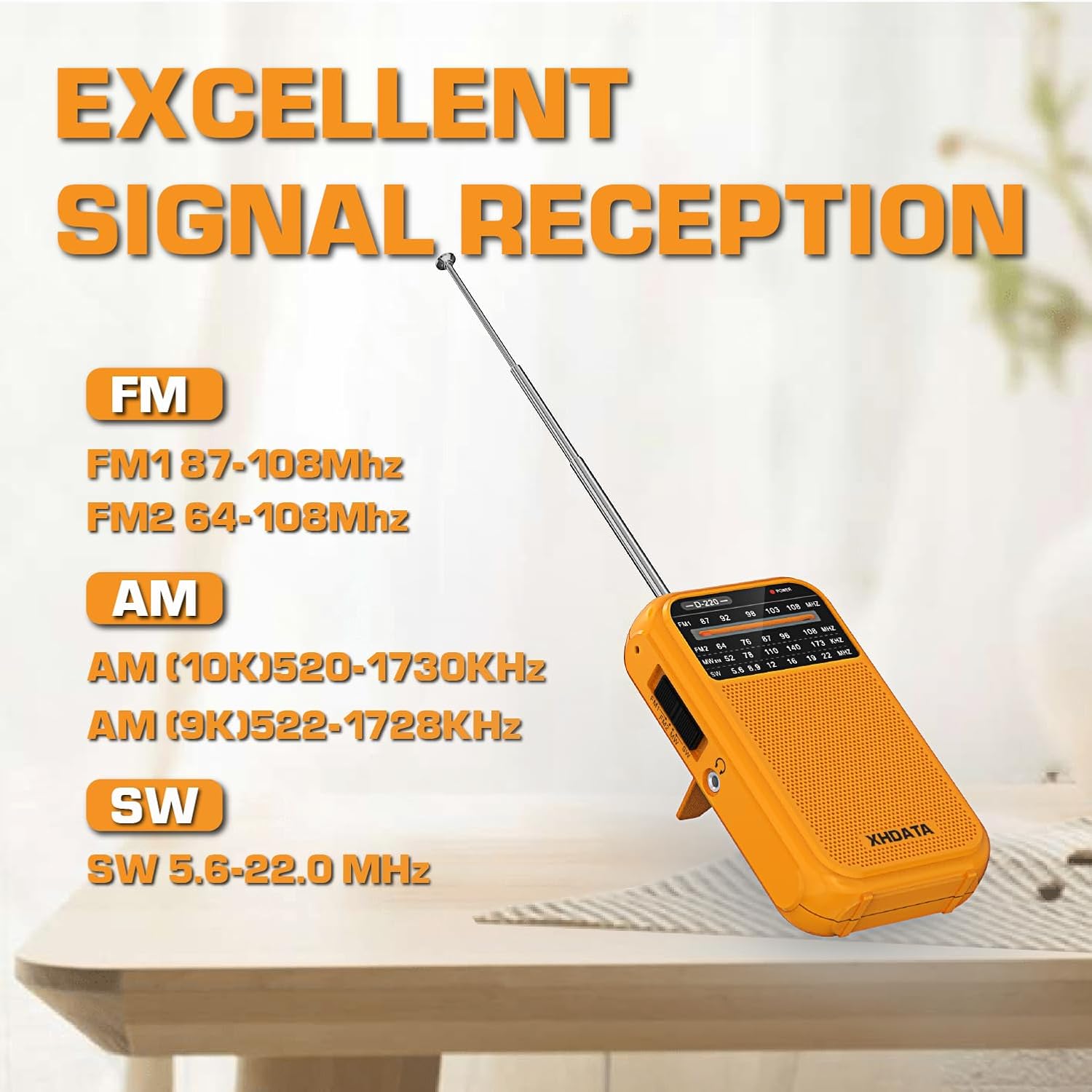
Image 6: The XHDATA D220 radio demonstrating its excellent signal reception capabilities across FM (FM1 87-108MHz, FM2 64-108MHz), AM (AM 10K 520-1730KHz, AM 9K 522-1728KHz), and SW (5.6-22.0 MHz) bands.
6.3 NOAA Weather Band (D109WB Only)
The D109WB can receive 7 NOAA Weather Bands to provide real-time weather alerts.
- Accessing WB: Switch the band to "WB". The radio will automatically scan for NOAA weather channels.
- Weather Alerts: The radio is designed to alert you to severe weather conditions when in WB mode.

Image 7: The XHDATA D109WB radio featuring 7 NOAA Weather Bands and an SOS Distress Alarm function, indicated by a red glowing circle around the SOS button.
6.4 Multimedia Playback (D109WB Only)
- Bluetooth Connection:
- Switch the D109WB to Bluetooth mode.
- Enable Bluetooth on your mobile device and search for "XHDATA D109WB" (or similar).
- Pair the devices. Once connected, you can play audio from your device through the radio.
- TF Card Playback:
- Insert a TF (MicroSD) card with MP3 audio files into the designated slot.
- Switch the radio to MP3/TF card mode.
- Use the playback controls (play/pause, next/previous track) to manage your music.

Image 8: The XHDATA D109WB radio showcasing its wireless Bluetooth connectivity and support for TF cards, allowing for music playback from external devices or memory cards.
6.5 Alarm Clock and SOS Alarm (D109WB Only)
- Setting Alarm: Refer to the D109WB's specific instructions for setting Alarm A and Alarm B, usually involving pressing and holding the alarm button, then using tuning buttons to set time.
- SOS Alarm: Press the "SOS" button to activate a loud distress alarm. Press it again to deactivate.
6.6 Headphone Use
Both radios are equipped with a 3.5mm headphone jack for private listening. Insert standard 3.5mm headphones into the jack. The internal speaker will typically mute automatically.
7. Maintenance
- Cleaning: Wipe the radio with a soft, dry cloth. Do not use abrasive cleaners or solvents.
- Battery Care:
- Remove batteries from the D220 if the radio will not be used for an extended period to prevent leakage.
- For the D109WB, ensure the rechargeable battery is charged regularly to maintain its lifespan. Avoid fully discharging the battery frequently.
- Storage: Store the radio in a cool, dry place away from direct sunlight and extreme temperatures.
- Antenna: Handle the telescopic antenna carefully to avoid bending or breaking. Retract it when not in use.
8. Troubleshooting
| Problem | Possible Cause | Solution |
|---|---|---|
| Radio does not power on. | Dead or incorrectly installed batteries. | Check battery polarity. Replace batteries (D220) or charge battery (D109WB). |
| Poor reception/static. | Antenna not extended, weak signal, interference. | Extend antenna fully. Reposition the radio. Try tuning to a different frequency. Move away from electronic devices. |
| No sound from speaker. | Volume too low, headphones connected, mute activated. | Increase volume. Disconnect headphones. Check for mute function (D109WB). |
| D109WB Bluetooth not connecting. | Radio not in Bluetooth mode, device not discoverable, too far. | Ensure D109WB is in Bluetooth mode. Make sure your device's Bluetooth is on and discoverable. Move devices closer. |
9. Specifications
9.1 XHDATA D109WB Specifications
- Frequency Range:
- FM: 64-108MHz
- AM: 520-1710KHz
- LW: 153-513KHz (9K)
- SW: 1711-29999KHz
- NOAA WB: 162.40-162.55MHz
- Speaker: 40mm
- Connectivity: Bluetooth 5.0, TF Card, 3.5mm Headphone Jack
- Special Features: DSP Chip, NOAA Weather Band, SOS Alarm, Alarm Clock, MP3 Playback, 500 Memory Stations, ATS.
- Power Source: Battery Powered (Rechargeable Lithium, typically)
- Included Components: Headphone Jack, Power Adapter, User Manual
9.2 XHDATA D220 Specifications
- Frequency Range:
- FM: 64-108MHz (FM1 87-108MHz, FM2 64-108MHz)
- AM: 520-1730KHz (10K), 522-1728KHz (9K)
- SW: 5.6-22.0 MHz
- Dimensions: 125mm x 74mm x 30mm (approx. 4.9 x 2.9 x 1.2 inches)
- Weight: 125g (without batteries)
- Connectivity: 3.5mm Earphone Jack
- Power Source: 2xAA Batteries
- Included Components: User Manual
10. Safety Information
- Do not expose the radio to water or excessive moisture.
- Avoid extreme temperatures, direct sunlight, and dusty environments.
- Do not attempt to disassemble or modify the radio. This will void the warranty and may cause damage.
- Keep out of reach of children.
- Dispose of batteries properly according to local regulations.
- Prolonged listening at high volume levels may cause hearing damage.
11. Warranty and Support
XHDATA products are designed for reliability and performance. For specific warranty details, please refer to the warranty card included with your purchase or contact XHDATA customer support directly. For technical assistance or further inquiries, please visit the official XHDATA website or contact their customer service department.


