
Introduction
This manual provides comprehensive instructions for the setup, operation, and maintenance of your G-MARK G5000 Wireless In-Ear Monitor System. Designed for professional audio monitoring, this UHF dual-channel system offers reliable performance for stage, studio, bands, and live performances. Please read this manual thoroughly before using the system to ensure optimal performance and longevity of the product.
Package Contents
Upon unpacking, please verify that all the following items are included in your package:
- 1 x Wireless In-Ear System Transmitter
- 2 x UHF Bodypack Transceivers
- 2 x 6.35mm Audio Cables
- 2 x In-Ear Headphones
- 1 x Power Adapter
- 2 x Antennas
- 1 x User Manual

Image: All components included in the G-MARK G5000 Wireless In-Ear Monitor System package, including the transmitter, two bodypacks, earphones, cables, power adapter, antennas, and user manual.
Product Overview
The G-MARK G5000 system consists of a main transmitter unit and two portable bodypack receivers, designed for high-quality audio monitoring.
System Components
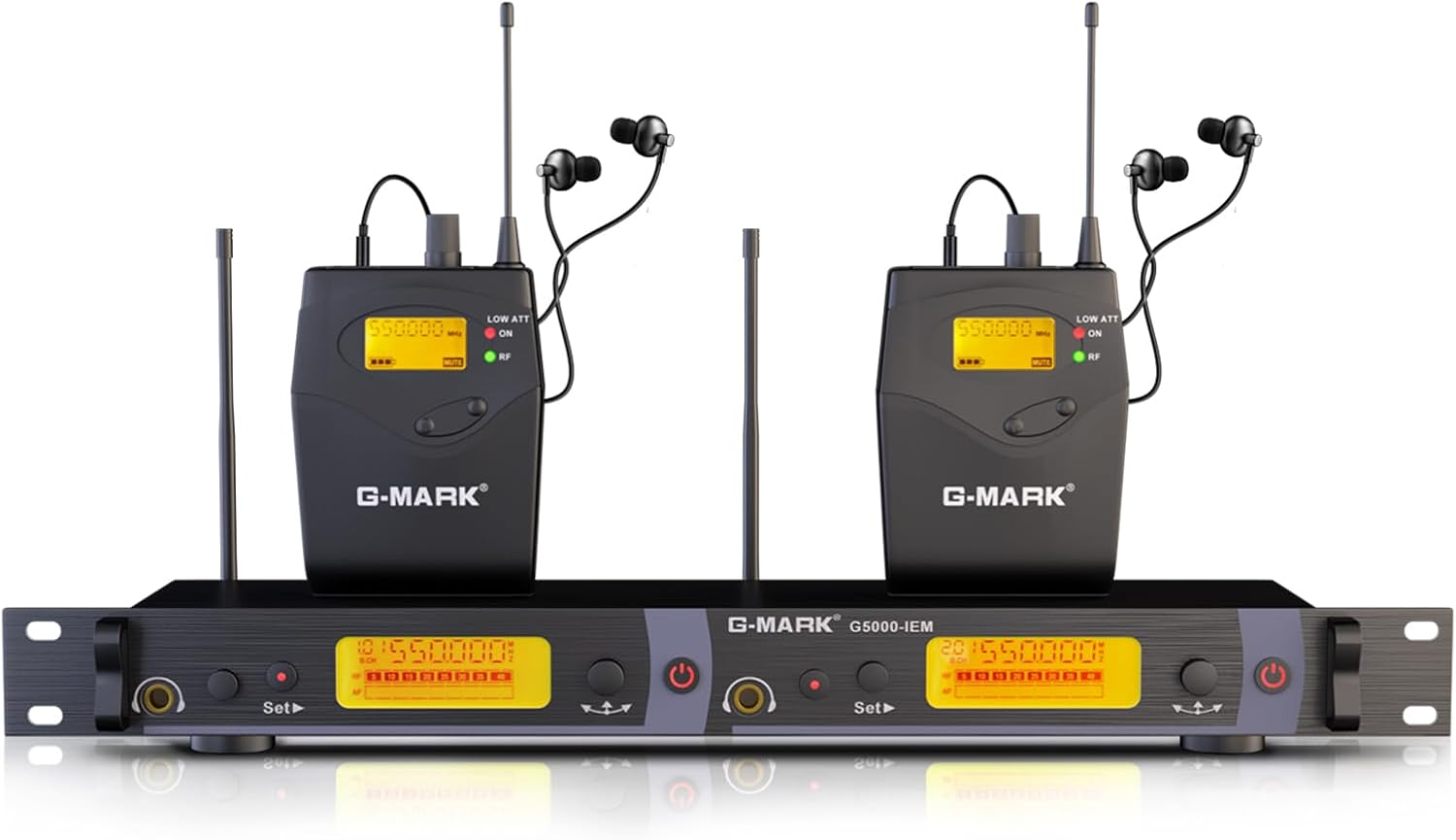
Image: The G-MARK G5000 Wireless In-Ear Monitor System, showcasing the rack-mountable transmitter unit and two bodypack receivers with attached earphones and antennas.
- Transmitter Unit: The central unit that sends audio signals wirelessly. Features a robust metal casing and can be installed on standard rack units.
- Bodypack Receivers: Two portable receivers that receive audio from the transmitter. Each bodypack connects to a pair of in-ear headphones.
- In-Ear Headphones: Provide clear audio monitoring for the user.
Key Features
- UHF Wireless Technology: Operates within the 520-580MHz frequency range, ensuring stable and clear signal transmission with low noise and latency.
- Dual Channel System: Supports two independent monitoring channels simultaneously.
- Extended Wireless Range: Offers a wireless range of 160-262 feet (approximately 50-80 meters) in open spaces.
- Expandable System: Supports an unlimited number of bodypack receivers for team monitoring.
- Wide Frequency Response: 20Hz-25KHz with a 107 dB dynamic range.
- Compatibility: Features 6.35mm mixed input for connection with various audio devices like mixers and amplifiers.

Image: Illustration highlighting the G-MARK G5000's sound equalization capabilities, including powerful bass, full-bodied midrange, and pure, bright treble for enhanced audio quality.

Image: Diagram showing the G-MARK G5000 transmitter wirelessly connecting to multiple bodypack receivers, demonstrating its expandable nature for team use.

Image: Visual representation of the G-MARK G5000's 80-meter reception distance and low-latency wireless transmission, ensuring real-time audio synchronization for performers.

Image: An illustration demonstrating the G-MARK G5000's compatibility with various audio devices such as mixing consoles, effectors, active speakers, and professional amplifiers.

Image: A close-up of the G-MARK G5000 transmitter, highlighting its UHF wireless transmission technology and integrated noise reduction chip for clear, original sound effects.

Image: Collage showing various scenarios where the G-MARK G5000 system can be used, including theatrical performances, orchestra rehearsals, tavern residencies, and general live performances.
Setup Guide
Follow these steps to set up your G-MARK G5000 Wireless In-Ear Monitor System:
- Transmitter Placement: Place the transmitter unit in a stable location, preferably within line of sight of the bodypack receivers. Ensure adequate ventilation. If rack-mounting, secure it properly.
- Connect Antennas: Screw the two provided antennas onto the antenna connectors at the rear of the transmitter unit.
- Connect Audio Input: Use the 6.35mm audio cables to connect your audio source (e.g., mixing console, audio interface) to the "AF IN (L)" and "AF IN (R)" inputs on the rear of the transmitter. Ensure the input levels are appropriate.
- Power Connection: Connect the power adapter to the DC 12V-18V input on the transmitter and then plug it into a power outlet.
- Power On Transmitter: Press the power button on the transmitter unit. The display should illuminate.
- Bodypack Preparation: Insert appropriate batteries (not included, typically AA) into each bodypack receiver. Connect the in-ear headphones to the 3.5mm output jack on each bodypack.
- Power On Bodypacks: Turn on each bodypack receiver.
- Frequency Pairing:
- On the transmitter, use the "Set" button and arrow keys to select the desired channel/frequency for each output (Channel 1 and Channel 2).
- On each bodypack, access the frequency setting menu (refer to the bodypack's specific controls) and synchronize it with the corresponding channel set on the transmitter. The bodypack display should show a stable RF signal indicator once paired.
- Audio Check: Play audio from your source and adjust the input level on the transmitter and the volume on each bodypack receiver to a comfortable monitoring level.
Operating Instructions
Once the system is set up, follow these guidelines for operation:
- Volume Control: Each bodypack receiver has an independent volume control. Adjust it to a safe and comfortable listening level. Prolonged exposure to high volumes can cause hearing damage.
- Channel Selection: The transmitter allows selection of up to 100 channels. If you experience interference, try switching to a different channel on both the transmitter and the corresponding bodypack.
- Monitoring Multiple Users: For additional users, simply power on another bodypack receiver and pair it to one of the transmitter's channels. The system supports an unlimited number of receivers per channel.
- Signal Indicators: Monitor the RF (Radio Frequency) and AF (Audio Frequency) indicators on both the transmitter and bodypacks. A stable RF light indicates a strong wireless connection. The AF light indicates audio signal presence.
- Battery Life: Pay attention to the battery indicator on the bodypack receivers. Replace batteries promptly when low to avoid signal loss during performance.
Maintenance
Proper maintenance ensures the longevity and optimal performance of your system:
- Cleaning: Use a soft, dry cloth to clean the exterior of the transmitter and bodypacks. Do not use liquid cleaners or solvents.
- Earphone Care: Clean your in-ear headphones regularly with a mild disinfectant wipe. Replace ear tips as needed for hygiene and sound quality.
- Storage: When not in use, store the system in a cool, dry place, away from direct sunlight and extreme temperatures. Remove batteries from bodypacks if storing for extended periods.
- Antennas: Handle antennas carefully to prevent bending or damage.
Troubleshooting
If you encounter issues with your G-MARK G5000 system, refer to the following common problems and solutions:
| Problem | Possible Cause | Solution |
|---|---|---|
| No sound from earphones. |
|
|
| Interference or static. |
|
|
| Short wireless range. |
|
|
Specifications
Detailed technical specifications for the G-MARK G5000 Wireless In-Ear Monitor System:
| Feature | Detail |
|---|---|
| Model Name | G5000-2 |
| Connectivity Technology | Wireless |
| Wireless Communication Technology | RF (UHF 520-580Mhz) |
| Wireless Range | 160 - 262 feet (approx. 50-80 meters) |
| Frequency Response | 20Hz-25KHz |
| Dynamic Range | 107 dB |
| Number of Channels | 100 |
| Compatible Devices | Audio Mixer, Music Production Equipment |
| Input Jack | 6.35 mm Jack (for audio input) |
| Output Jack | 3.5 mm Jack (for headphones on bodypack) |
| Special Feature | Volume Control |
| Item Weight | 5.09 pounds (total package) |
| Manufacturer | G-MARK |
| UPC | 748743241280 |
Warranty and Support
G-MARK products are designed for reliability and performance. For specific warranty details, please refer to the warranty card included with your product or contact G-MARK customer support directly. Keep your purchase receipt as proof of purchase for any warranty claims.
For technical assistance, troubleshooting not covered in this manual, or service inquiries, please visit the official G-MARK website or contact their customer service department. Contact information can typically be found on the product packaging or the brand's official website.


