
1. Introduction
This manual provides essential instructions for the setup, operation, and maintenance of your Fitoncloud F19 Smart Watch. Please read this guide thoroughly to ensure proper use and to maximize your device's features.

Image 1.1: The Fitoncloud F19 Smart Watch, showcasing its rose gold finish and diamond accents, alongside an alternative silicone band.
2. What's in the Box
Upon unboxing your Fitoncloud F19 Smart Watch, verify that all components are present:
- Rose Gold Smart Watch (1 unit)
- Pink Silicone Band (1 unit) & Steel Band with Gold Diamonds (pre-attached)
- User Manual (1 unit)
- Magnetic USB Charger Cable (1 unit)
- Screen Protectors (2 units)

Image 2.1: All items included in the Fitoncloud F19 Smart Watch package.
3. Setup Guide
3.1 Charging the Device
Before initial use, fully charge your smartwatch. Connect the magnetic USB charger cable to the charging points on the back of the watch and to a standard USB power adapter (not included). A full charge typically takes approximately 2 hours.

Image 3.1: The smartwatch indicating charging status, highlighting its IP68 waterproof rating and battery specifications.
3.2 App Installation and Pairing
- Download the FitCloudPro app from the App Store (iOS) or Google Play Store (Android).
- Ensure Bluetooth is enabled on your smartphone.
- Open the FitCloudPro app and follow the on-screen instructions to create an account and pair your F19 Smart Watch.
- During pairing, grant necessary permissions for notifications and health data synchronization.
- To enable call functionality, connect the watch's Bluetooth for calls separately within your phone's Bluetooth settings (often appears as 'Watch Call' or similar).
3.3 Band Adjustment
The F19 Smart Watch comes with two bands: a steel band with gold diamonds and a pink silicone band. The steel band can be adjusted by removing links using the included tool. Refer to the diagram below for guidance on link removal.
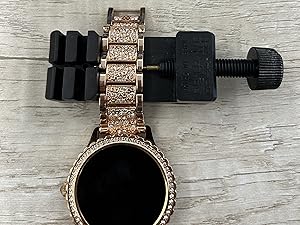
Image 3.2: Instructions for adjusting the metal watch band by removing links.
4. Operating Instructions
4.1 Basic Navigation
The F19 Smart Watch features a 1.3-inch HD full-touch color screen. Swipe across the screen to access different functions and menus. The side button typically serves as a power button or a return-to-home function.

Image 4.1: The smartwatch display, emphasizing its high-definition features.
4.2 Making and Answering Calls
Once paired via Bluetooth, you can make and answer calls directly from your watch using its built-in Hi-Fi speaker and microphone. Access the call log or contacts through the watch interface.

Image 4.2: Demonstrating the Bluetooth call feature of the smartwatch.
4.3 Smart Notifications
Receive SMS and app notifications (e.g., Facebook, Twitter, WhatsApp, Instagram) directly on your wrist. The watch will alert you by vibration. Note that sending or replying to messages is not supported directly from the watch.

Image 4.3: Smartwatch displaying incoming notifications from various applications.
4.4 Health Monitoring
The F19 Smart Watch provides continuous health monitoring features:
- Heart Rate: Monitors your heart rate throughout the day.
- Blood Pressure: Provides blood pressure readings.
- Blood Oxygen (SpO2): Measures blood oxygen saturation levels.
- Sleep Tracking: Analyzes sleep patterns (deep sleep, light sleep, awake time).
- Women's Physiological Cycle: Tracks menstrual periods and provides reminders.
- Breathing Training: Guided breathing exercises.
- Sedentary & Water Reminders: Prompts you to move or drink water.
Note: Health monitoring data is for reference only and should not be used for medical diagnosis or treatment.

Image 4.4: Overview of the 24/7 health monitoring features.

Image 4.5: The smartwatch's dedicated women's health tracking interface.
4.5 Activity Tracking & Sport Modes
The watch supports over 100 sport modes (e.g., walking, running, hiking, yoga, cycling, basketball). It automatically monitors and records daily steps, exercise time, and calories burned.

Image 4.6: Display of various sport modes and activity data.
4.6 Music Control
Connect your watch to your phone via Bluetooth to control music playback. You can switch tracks and adjust volume directly from your watch.
4.7 Other Features
The F19 Smart Watch includes additional functionalities:
- Alarm Clock: Set multiple alarms.
- Stopwatch & Timer: For timing activities.
- Weather Forecast: Displays current weather conditions.
- Find Phone: Helps locate your paired smartphone.
- Camera Control: Remotely trigger your phone's camera.
- AI Voice Assistant: Use voice commands for various tasks.

Image 4.7: A collage of various utility features available on the smartwatch.
4.8 Customizing Dials
The FitCloudPro app offers a variety of personalized dial wallpapers. You can also customize the watch face with your own photos.
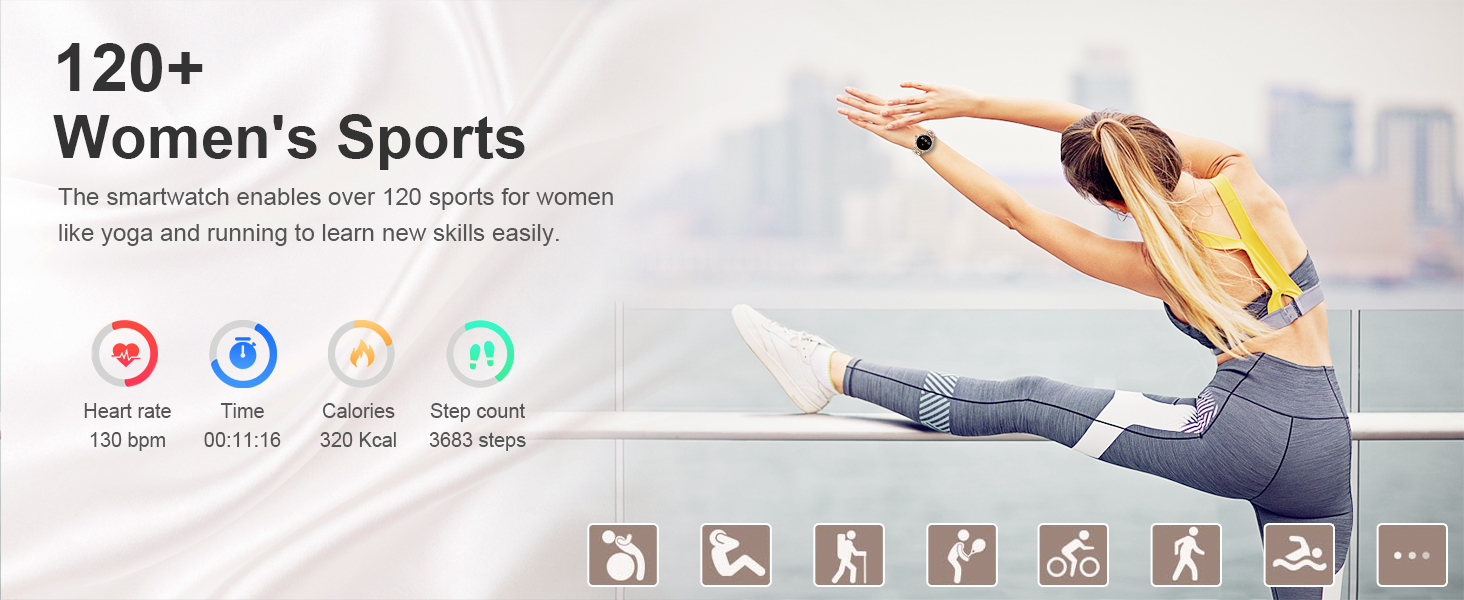
Image 4.8: Examples of customizable watch faces and the app interface for selection.
5. Maintenance
5.1 Water Resistance
The F19 Smart Watch has an IP68 waterproof rating, meaning it is resistant to dust and can withstand immersion in water up to 1.5 meters for 30 minutes. It is suitable for daily use, such as hand washing, rainy days, and sweating during sports. However, it is not recommended for hot showers, saunas, or diving.

Image 5.1: The smartwatch's IP68 waterproof capability in a daily scenario.
5.2 Cleaning and Care
- Wipe the watch screen and body with a soft, dry cloth.
- If necessary, use a slightly damp cloth for stubborn smudges, then dry thoroughly.
- Avoid using harsh chemicals, abrasive cleaners, or solvents, as these can damage the watch's finish and seals.
- Keep the charging contacts clean and dry to ensure efficient charging.
5.3 Battery Care
- Charge the watch regularly to maintain battery health.
- Avoid completely draining the battery frequently.
- Store the watch in a cool, dry place when not in use for extended periods.
- Avoid exposing the watch to extreme temperatures (hot or cold), as this can degrade battery performance.
6. Troubleshooting
If you encounter issues with your Fitoncloud F19 Smart Watch, refer to the following common solutions:
- Watch not turning on: Ensure the watch is fully charged. Connect it to the charger for at least 30 minutes.
- Cannot pair with phone:
- Ensure Bluetooth is enabled on your phone and the watch.
- Make sure the FitCloudPro app is installed and running.
- Restart both your phone and the watch.
- Forget the device in your phone's Bluetooth settings and attempt to pair again through the app.
- Notifications not appearing:
- Check app permissions in your phone settings to ensure FitCloudPro has access to notifications.
- Verify that notification alerts are enabled within the FitCloudPro app for specific applications.
- Ensure the watch is connected to your phone via Bluetooth.
- Inaccurate health data:
- Ensure the watch is worn snugly on your wrist, but not too tight.
- Clean the sensor on the back of the watch.
- Note that environmental factors and individual physiology can affect readings.
- Short battery life:
- Reduce screen brightness.
- Disable unnecessary features or frequent monitoring if not required.
- Ensure the watch is fully charged each time.
If problems persist, please contact customer support for further assistance.
7. Specifications
| Feature | Specification |
|---|---|
| Model Number | F19 |
| Screen Size | 1.3 Inches |
| Screen Type | HD Full Touch Color Screen |
| Connectivity | Bluetooth 5.2 |
| Operating System Compatibility | Android 5.0+ and iOS 10.0+ |
| Battery Capacity | 200 mAh Lithium Polymer |
| Charging Time | Approx. 2 hours |
| Working Time | Approx. 3-5 days |
| Standby Time | Approx. 14-25 days |
| Waterproof Rating | IP68 |
| Memory Storage Capacity | 128 MB |
| Item Weight | 7.8 ounces |
8. Warranty and Support
8.1 Warranty Information
Specific warranty details for the Fitoncloud F19 Smart Watch are provided by the manufacturer. Please refer to any warranty cards included in your product packaging or contact Fitoncloud customer support for information regarding warranty coverage and terms.
8.2 Customer Support
For any product questions, technical assistance, or support needs, please contact Fitoncloud directly. They aim to provide satisfactory solutions within 24 hours.
You can typically find contact information on the Fitoncloud official website or through the retailer where you purchased the product.
