
1. Introduction
This manual provides essential instructions for setting up, operating, and maintaining your Fitoncloud F19 Feminine Smartwatch. Please read it thoroughly to ensure optimal performance and longevity of your device. This smartwatch is designed to enhance your daily life with features like health monitoring, fitness tracking, and smart notifications.
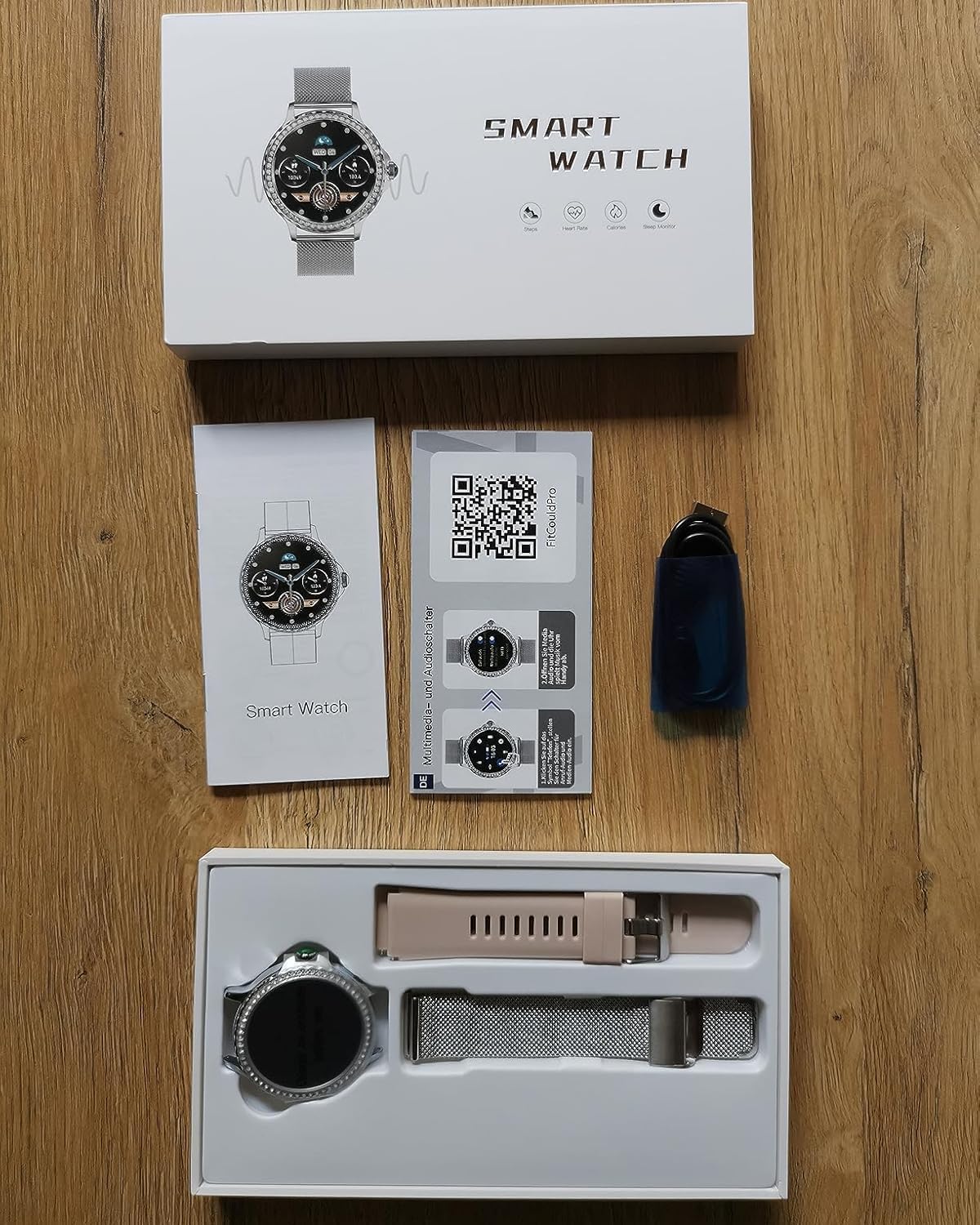
2. What's in the Box
- Sliver Smart Watch (1 unit)
- Pink Silicone Band (1 unit) & Steel Band (1 unit)
- User Manual (1 unit)
- Magnetic USB Charger Cable (1 unit)
- Screen Protectors (2 units)
3. Setup
3.1 Initial Charging and Activation
Before first use, fully charge your smartwatch using the provided magnetic USB charger cable. Connect the magnetic end to the charging points on the back of the watch and the USB end to a compatible power source. The watch will activate once charging begins.
3.2 App Download and Pairing
- Scan the QR code provided in the user manual or on the watch screen to download the companion app (FitCloudPro) from your smartphone's app store.
- Ensure Bluetooth is enabled on your smartphone.
- Open the FitCloudPro app and follow the on-screen instructions to search for and pair with your F19 Smartwatch.

3.3 Strap Installation and Adjustment
The smartwatch comes with two interchangeable straps: a silver steel strap and a pink silicone strap. To install or change a strap, align the pins on the strap with the holes on the watch body and slide the quick-release lever to secure it. For the steel band, use the provided tool to remove or add links for a comfortable fit.
4. Operating Instructions
4.1 Basic Navigation
Navigate the smartwatch interface by swiping left, right, up, or down on the 1.3-inch HD touchscreen. Use the side button for power on/off, returning to the home screen, or accessing the main menu.
4.2 Bluetooth Calling and Notifications
With Bluetooth 5.2, the smartwatch allows you to make and answer calls directly from your wrist. It supports storing up to 100 contacts. Receive phone messages and app notifications (e.g., social media, SMS) directly on the watch. You can also control music playback from your wrist.


4.3 Additional Features
The smartwatch includes features such as an alarm clock, timer, calculator, weather forecast, remote camera shutter control, and a 'Find Phone' function. Sedentary and drink reminders can also be set to promote a healthier lifestyle.
5. Health Monitoring
The F19 Smartwatch features a Gravity sensor for effective monitoring of various health metrics. Data collected is for informational purposes only and should not be used as professional medical data.
- Heart Rate Monitoring: Tracks your heart rate in real-time.
- Blood Pressure Monitoring: Measures your blood pressure.
- Blood Oxygen Monitoring: Monitors your blood oxygen levels.
- Sleep Tracking: Analyzes your sleep patterns, including deep sleep, light sleep, and REM stages.
- Women's Health Tracking: Supports pregnancy and menstrual cycle tracking with detailed data displayed in the app.


6. Fitness Tracking
The smartwatch offers over 100 exercise modes, including walking, running, cycling, and yoga. It tracks your workout path, heart rate, distance, step count, and calories burned in real-time.

7. Customization
7.1 Watch Faces
Choose from 6 pre-installed dials or explore over 170 additional dials within the FitCloudPro app. You can also customize your watch face by setting any picture from your phone as the background.

8. Battery and Charging
The smartwatch features a 200 mAh battery. A full charge takes approximately 2 hours, providing up to 10 hours of talk time, 5 days of normal usage, and 15 days of standby time. Lowering screen brightness and usage frequency can extend battery life.
9. Maintenance
9.1 Waterproof Rating
The F19 Smartwatch is IP68 waterproof, making it suitable for everyday activities such as hand-washing and exposure to rain. It is not recommended for swimming or showering with hot water.
9.2 Cleaning
Use a soft, dry cloth to clean the watch screen and body. For the silicone band, mild soap and water can be used. Ensure the watch is completely dry before charging or prolonged use.
10. Troubleshooting
If you encounter any issues with your smartwatch, please refer to the troubleshooting section in the full user manual or contact customer support.
11. Specifications
- Model Number: F19 Feminine Smartwatch
- Screen Size: 1.3 Inches
- Operating System: Android 5.0+ and iOS 10.0+
- Connectivity Technology: Bluetooth 5.2
- Battery Capacity: 200 Milliamp Hours (Lithium Polymer)
- Waterproof Rating: IP68
- Item Weight: 7.4 ounces
- Product Dimensions: 11.22 x 3.9 x 0.75 inches
12. Warranty and Support
This smartwatch is compatible with Android 5.0 & iOS 10.0 Above Smartphones. For any quality issues or support needs, please contact Fitoncloud customer service representatives via Amazon. We provide replacement, return, and quality maintenance services year-round.
