
1. Product Overview
The Fitoncloud F01 Stylish Smartwatch is designed for women, offering a blend of elegant design with comprehensive smart features. It supports Bluetooth calls, health monitoring, fitness tracking, and smart notifications, compatible with both Android and iOS devices.

Image: The Fitoncloud F01 Stylish Smartwatch featuring a rose gold band and a diamond-studded bezel, showcasing its elegant design.
2. What's in the Box
Your Fitoncloud F01 Stylish Smartwatch package includes the following items:
- Smart Watch (x1)
- Sliver Stainless Steel Strap (x1)
- Pink Skin-friendly Silicone Strap (x1)
- User Manual (x1)
- Charging Cable (x1)
- Screen Protectors (x2)
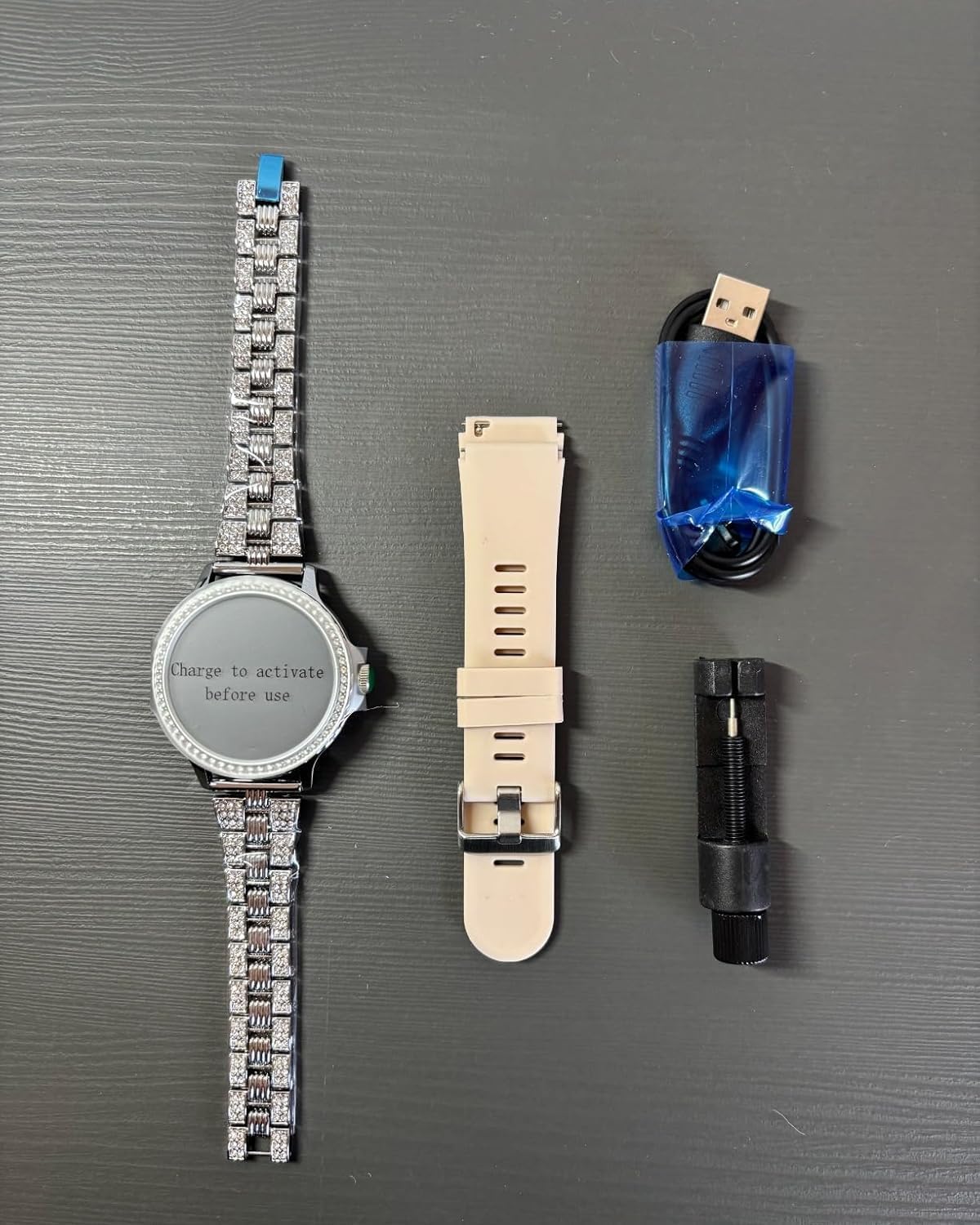
Image: All components included in the Fitoncloud F01 Stylish Smartwatch package, neatly arranged.
Video: A detailed unboxing of the smartwatch, showing all included accessories and components.
3. Setup Guide
3.1 Charging the Smartwatch
Before initial use, fully charge your smartwatch. Connect the magnetic charging cable to the charging points on the back of the watch and plug the USB end into a power adapter (not included) or a computer's USB port. A full charge takes approximately 2 hours.

Image: The smartwatch connected to its magnetic charging cable, illustrating the charging process.
3.2 App Installation and Pairing
To unlock the full potential of your smartwatch, download the FitCloudPro app from your device's app store (compatible with Android 5.0+ and iOS 10.0+).
- Scan the QR code in the user manual or search for "FitCloudPro" in the App Store or Google Play Store.
- Install the app and create an account.
- Ensure Bluetooth is enabled on your smartphone.
- Open the FitCloudPro app, navigate to the "Device" section, and tap "Add Device" or "Bind Smartwatch".
- Select your smartwatch from the list of available devices (e.g., "F01 Smartwatch") to pair.
- Follow any on-screen prompts to complete the pairing process.
Video: A step-by-step guide on how to quickly connect your smartwatch to your phone via the FitCloudPro app.
3.3 Adjusting the Watch Band
The smartwatch comes with two types of bands: a stainless steel strap and a silicone strap. The stainless steel strap can be adjusted to fit your wrist using the included tool.
- Identify the pins on the side of the stainless steel strap links.
- Place the strap in the adjustment tool, aligning the pin with the tool's pusher.
- Gently turn the tool's screw to push out the pin.
- Remove the desired number of links.
- Reassemble the strap by inserting the pins back into the links.
Video: Instructions on how to shorten a steel watch band for a comfortable fit.
Video: A demonstration of how to install a steel watch band onto the smartwatch.
4. Operating the Smartwatch
4.1 Basic Navigation
The smartwatch features a 1.3-inch full-touch HD screen. Swipe left, right, up, or down to navigate through menus and functions. Tap to select an option, and press the side button to return to the home screen or power on/off.
4.2 Making and Answering Calls
With built-in Bluetooth 5.2, the smartwatch allows you to make and answer calls directly from your wrist. Ensure your watch is paired with your phone and the call function is enabled in the app.
- To make a call: Access the dialer or contacts list on your watch.
- To answer a call: Tap the green icon on the watch screen when a call comes in.

Image: A woman answering a call directly from her smartwatch while driving, demonstrating the convenience of Bluetooth calling.
4.3 Smart Notifications
Receive real-time notifications for calls, messages, and app alerts (e.g., Facebook, Twitter, WhatsApp, Instagram) directly on your watch. Configure notification settings within the FitCloudPro app.

Image: A woman checking messages on her smartwatch, with icons for popular messaging apps visible.
4.4 Customizing Watch Faces
Personalize your smartwatch with over 170 watch faces available in the FitCloudPro app. You can also use your own photos as a custom dial.
Video: A tutorial demonstrating how to use your own photos as a custom watch face on the smartwatch.
4.5 Music Control and Voice Assistant
Control music playback on your phone directly from your watch. The smartwatch also features a voice assistant for hands-free commands.

Image: The smartwatch showing music control options and an interface for voice assistant commands.
4.6 Other Functions
The smartwatch includes additional useful features:
- Alarm Clock, Timer, Stopwatch, Calculator
- Weather Forecast
- Remote Camera Shutter
- Find Phone function
5. Health Monitoring
The Fitoncloud F01 Smartwatch provides comprehensive health monitoring features to help you stay informed about your well-being.

Image: The smartwatch interface showing real-time data for heart rate, blood pressure, blood oxygen, and sleep.
5.1 Heart Rate, Blood Pressure, and SpO2 Monitoring
Monitor your heart rate, blood pressure, and blood oxygen (SpO2) levels in real-time. Access these functions directly from the watch or view detailed data in the FitCloudPro app.
5.2 Sleep Monitoring
The smartwatch automatically tracks your sleep patterns, including deep sleep, light sleep, and REM sleep. Review your sleep data in the app to understand and improve your sleep quality.
5.3 Women's Health Tracking
Dedicated features for women's health allow you to track your menstrual cycle and pregnancy status, providing detailed data and predictions within the app.

Image: The smartwatch showing women's health tracking features, including a calendar for menstrual cycle prediction.
5.4 Sedentary and Drink Reminders
Set reminders to move or drink water throughout the day to maintain healthy habits.
6. Fitness Tracking
With over 100 exercise modes, the smartwatch is your ideal fitness companion.

Image: A woman jogging outdoors, with the smartwatch displaying various fitness metrics.
- 100+ Sport Modes: Track activities like walking, running, cycling, yoga, basketball, badminton, swimming, and more.
- Real-time Data: Monitor your workout path, heart rate, distance, step count, and calories burned.
7. Maintenance
7.1 IP68 Waterproof Rating
The smartwatch is IP68 waterproof, making it suitable for everyday activities like hand-washing and getting wet. It can withstand immersion in water up to 1.5 meters deep.

Image: The smartwatch being splashed with water, highlighting its IP68 waterproof feature.
7.2 Cleaning
Regularly clean your smartwatch screen and bands with a soft, dry cloth. For the screen, use the provided screen protectors and cleaning wipes if necessary.
8. Troubleshooting
If you encounter issues with your smartwatch, try the following steps:
- Connectivity Issues: Ensure Bluetooth is on and the watch is within range of your phone. Restart both devices and try pairing again.
- Charging Problems: Verify the charging cable is securely connected to both the watch and the power source. Try a different USB port or adapter.
- Inaccurate Readings: Ensure the watch is worn snugly on your wrist, not too tight or too loose. Clean the sensors on the back of the watch.
- App Syncing: Make sure the FitCloudPro app is updated to the latest version. Close and reopen the app, or restart your phone.
9. Specifications
| Model Name | F01 Stylish Smartwatch |
| Brand | Fitoncloud |
| Screen Size | 1.3 Inches |
| Display Type | LCD |
| Resolution | 390 x 390 |
| Connectivity Technology | Bluetooth 5.2 |
| Operating System | Android 5.0+ and iOS 10.0+ |
| Battery Capacity | 200 Milliamp Hours |
| Battery Charge Time | 2 Hours |
| Battery Average Life | 3-5 days (usage), 15 days (standby) |
| Water Resistance Level | IP68 (1.5 Meters) |
| Band Material Type | Stainless Steel + Silicone |
| Metrics Measured | Blood Oxygen (SpO2), Blood Pressure, Heart Rate, Sleep Duration, Step Count |
| Special Features | Make/Answer Calls, Call/Message Alerts, Speakers, Heart Rate/Blood Oxygen/Blood Pressure/Sleep/Women Physiological Cycle Monitor, Alarms Clocks, Music/Camera Controller, Find Phone, Sedentary/Drink Reminders, Timer, Weather Display, Stopwatch, Calculator, 100+ Sport Modes, Steps Tracker, Calories Counter, Distance Tracker, IP68 Waterproof, 1.3'' Full Touch HD Screen with 100+ Dials |
10. Warranty and Support
Fitoncloud Smart Watch provides a 1-year after-sales warranty and a 30-day no-reason return policy. If you have any questions about your Fitoncloud Smart Watch for Women, feel free to contact us by email. We will reply within 24 hours and do our best to solve your problems, ensuring you enjoy perfect after-sales service.
For further assistance, please refer to the contact information provided in your product packaging or visit the official Fitoncloud website.