
Introduction
Thank you for choosing ThxToms Heated Gloves, Model G0005. These gloves are designed to provide warmth and comfort in cold conditions, featuring three-level temperature control, touchscreen compatibility, and a waterproof design. Please read this manual thoroughly before use to ensure proper operation and maintenance.
Safety Guidelines
- Do not use the gloves if they are wet or damp. Ensure batteries are dry before charging or connecting.
- Keep batteries away from extreme heat sources or open flames.
- Do not puncture, drop, or disassemble the batteries.
- If you experience any discomfort, excessive heat, or skin irritation, immediately turn off the gloves and remove them.
- Supervise children when they are using heated gloves.
- Store gloves and batteries in a cool, dry place when not in use.
- Only use the provided charger and batteries with these gloves.
Package Contents
Verify that all items are present in your package:
- 1 Pair of Heated Gloves
- 2 x 7.4V 2500 mAh Rechargeable Batteries
- 1 x Dual Charger
- 1 x User Manual
- 1 x Laundry Bag

Image: Contents of the ThxToms Heated Gloves package.
Product Features
The ThxToms Heated Gloves are equipped with several features to enhance your comfort and usability:
- Customizable Three-Level Temperature Control: Adjust warmth with three heat settings: Red (High, 2.5-3h), Blue (Medium, 3.5-4.5h), or Green (Low, 5-6h).
- 30-Second Heat-Up & Finger-Wrapping Elements: Experience rapid warmth with heating elements strategically placed around each finger.
- Fingertip Touchscreen Compatibility: Use smartphones and other touchscreen devices without removing your gloves.
- Silicone Palm Grip: Provides a secure and anti-slip hold for various activities.
- Long-Lasting Rechargeable Battery: Equipped with two 7.4V/2500mAh batteries, offering up to 6 hours of continuous warmth on the lowest setting. Includes a battery level indicator.
- Waterproof Design: Constructed with water-resistant materials, suitable for outdoor activities in various weather conditions.
- Ultra-Soft Breathable Velvet Lining: Ensures maximum comfort, flexibility, and dexterity.
- Windproof Buckle: Helps keep snow and cold air out.
- Reflective Strip: Enhances visibility in low-light conditions.

Image: Key features of the ThxToms Heated Gloves.

Image: Wind resistance and touchscreen functionality.
Sizing Information
To ensure the best fit, please refer to the sizing chart below:
| Measuring Part | S | M | L | XL |
|---|---|---|---|---|
| A Middle Finger Length | 3.11in | 3.22in | 3.34in | 3.42in |
| B Palm Width | 7.48in | 7.87in | 8.26in | 8.66in |
| C Full Length | 10.23in | 10.63in | 11.02in | 11.42in |

Image: Sizing guide for ThxToms Heated Gloves.
Setup & Operation
1. Charging the Batteries
- Connect the dual charger to a power outlet.
- Insert both 7.4V 2500mAh batteries into the charger.
- Allow approximately 4-5 hours for a full charge. The indicator lights on the charger will change to show charging status.
2. Connecting Batteries to Gloves
- Locate the zippered pocket on the cuff of each glove.
- Open the pocket and connect the battery cable from the glove to the fully charged battery.
- Place the battery securely inside the pocket and close the zipper.

Video: Demonstrates connecting the battery to the glove and securing it in the pocket.
3. Powering On/Off and Adjusting Heat
- To Turn On: Press and hold the power button on the back of the glove for 3 seconds. The LED indicator will light up, typically starting on the high (red) setting.
- To Adjust Heat: Press the power button briefly to cycle through the heat settings: Red (High), Blue (Medium), Green (Low).
- To Turn Off: Press and hold the power button for 3 seconds until the LED indicator turns off.

Image: Easy steps for using the heated gloves.
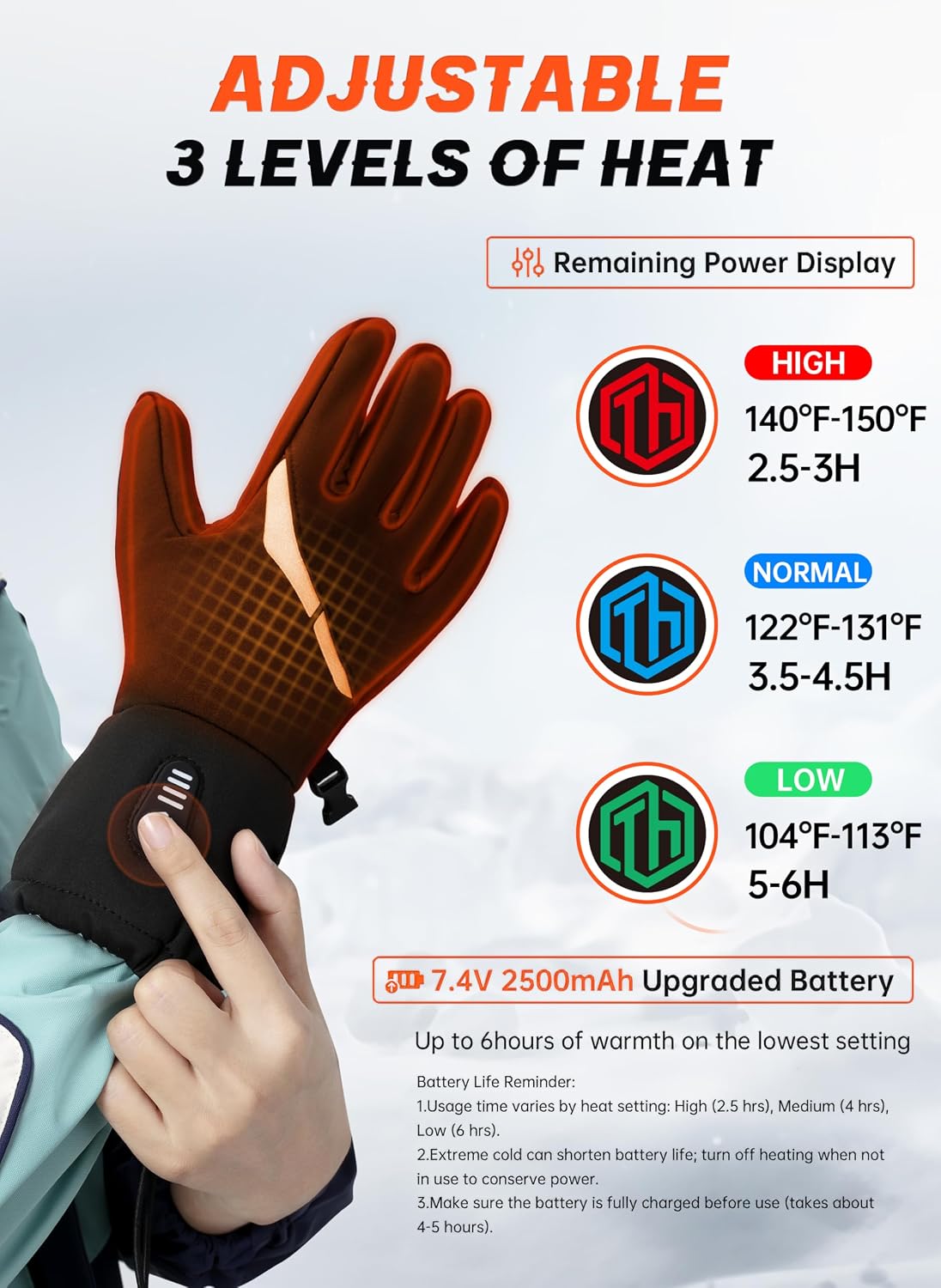
Image: Adjustable heat levels and battery life.

Video: Demonstrates the waterproof, thin, soft, and touchscreen features of the heated gloves.
Care and Maintenance
Proper care will extend the life of your ThxToms Heated Gloves:
- Before Cleaning: Always remove the batteries from the gloves before washing.
- Hand Wash: Hand wash is recommended. Use a mild detergent and cold water. Gently rub the gloves and rinse thoroughly.
- Machine Wash: If machine washing, place the gloves in the provided laundry bag to protect them. Use a gentle cycle with cold water and mild detergent.
- Drying: Do not tumble dry. Air dry the gloves completely before reconnecting batteries or storing. Ensure no moisture remains in the battery pockets or connection points.
- Storage: Store gloves and batteries in a cool, dry place. Charge batteries periodically (e.g., every 3-6 months) if not used for extended periods to maintain battery health.
Troubleshooting
If you encounter issues with your ThxToms Heated Gloves, try the following:
- Gloves Not Heating:
- Ensure batteries are fully charged and correctly connected to the gloves.
- Press and hold the power button for 3 seconds to ensure the gloves are turned on.
- Check the battery level indicator on the glove. If low, recharge the batteries.
- Uneven Heating:
- Ensure the heating elements are not creased or folded inside the glove.
- Verify that both batteries are fully charged and functioning correctly.
- Short Battery Life:
- Battery life varies significantly with the heat setting. Higher settings consume power faster.
- Ensure batteries are fully charged before each use.
- Extreme cold can slightly reduce battery performance.
- Touchscreen Not Responding:
- Ensure the touchscreen-compatible fingertips are making direct contact with the screen.
- Clean the glove fingertips and device screen.
If problems persist, please contact ThxToms customer support.
Specifications
| Specification | Detail |
|---|---|
| Brand | ThxToms |
| Model Name | G0005 |
| Material | Polyester |
| Glove Type | Mitten (Note: Product images show full-finger gloves, this may be a data discrepancy) |
| Age Range | Adult |
| Color | Black |
| Special Feature | Windproof |
| Hand Orientation | Ambidextrous |
| Batteries | 2 x 7.4V 2500 mAh |
| Heat Settings | 3 Levels (High, Medium, Low) |
| Max Heat Duration (Low) | Up to 6 hours |
Warranty and Support
ThxToms Heated Gloves Model G0005 come with a 1-Year Warranty from the date of purchase. This warranty covers manufacturing defects and issues arising from normal use.
For warranty claims, technical support, or any questions regarding your product, please contact ThxToms customer service through the retailer where you purchased the product or visit the official ThxToms website for contact information.
Please retain your proof of purchase for warranty purposes.