
Introduction
This manual provides detailed instructions for the setup, operation, maintenance, and troubleshooting of your NBCP Wireless Guitar Controller, Model KT602. This controller is designed for use with PlayStation 4, PlayStation 3, and PC gaming systems, offering a responsive and immersive experience for compatible music rhythm games.

Image 1: NBCP Wireless Guitar Controller with USB Receiver
Package Contents
- 1 x NBCP Wireless Guitar Controller (Model KT602)
- 1 x 2.4G USB Wireless Receiver
- 1 x Adjustable Shoulder Strap
- 1 x User Manual (this document)
Product Overview
Familiarize yourself with the various components of your guitar controller:

Image 2: Labeled Components of the Guitar Controller
- Strum Bar: Used for strumming notes.
- Whammy Bar: Used for pitch bending effects.
- 5-Color Buttons: Frets (Green, Red, Yellow, Blue, Orange) for playing notes.
- PS4 Melody Buttons: Specific buttons for PS4 Guitar Hero Live gameplay.
- Arrow Keys: Navigation buttons.
- Indicator Light: Shows connection status and power.
- PS/Mode Keys: PlayStation button / Mode switch.
- Key (Select/Esc): Select or Escape button.
- Button (Pause/Start): Pause or Start button.
- Power Switch: Turns the controller on or off.
- Game Mode Button: Switches between game modes.
- Sound Effect Switch: Activates or deactivates sound effects.
- Strap Buckle: Attachment points for the shoulder strap.
- Battery Compartment: Holds 4 AA batteries.
- Dongle/Receiver: 2.4G USB wireless receiver for connecting to your console/PC.
Setup
1. Battery Installation
- Locate the battery compartment on the back of the guitar body.
- Open the compartment cover.
- Insert 4 new AA batteries, ensuring correct polarity (+/-).
- Close the battery compartment cover securely.
2. Guitar Assembly
The guitar neck is detachable for convenient storage and transport.

Image 3: Detachable Guitar Neck and Adjustable Strap
- Align the guitar neck with the body, ensuring the connector pins are properly seated.
- Gently push the neck into the body until it clicks into place.
- To detach, press the release button (if present) and pull the neck away from the body.
3. Attaching the Shoulder Strap
- Attach each end of the adjustable shoulder strap to the strap buckles located on the guitar body.
- Adjust the strap length for comfortable gameplay.
4. Connecting the USB Receiver
- Insert the 2.4G USB wireless receiver into an available USB port on your PlayStation 4, PlayStation 3, or PC.
- The system should automatically recognize the receiver.
Operating Instructions
1. Powering On/Off
- To power on the controller, slide the Power Switch to the 'ON' position. The indicator light will illuminate.
- To power off, slide the Power Switch to the 'OFF' position.
- The controller features an automatic power-off function to conserve battery life when idle.
2. Wireless Connection
Once the USB receiver is plugged in and the guitar controller is powered on, they should automatically connect. The indicator light on the guitar will confirm a successful connection.
3. Game Compatibility
The NBCP Wireless Guitar Controller is compatible with various music rhythm games across different platforms:
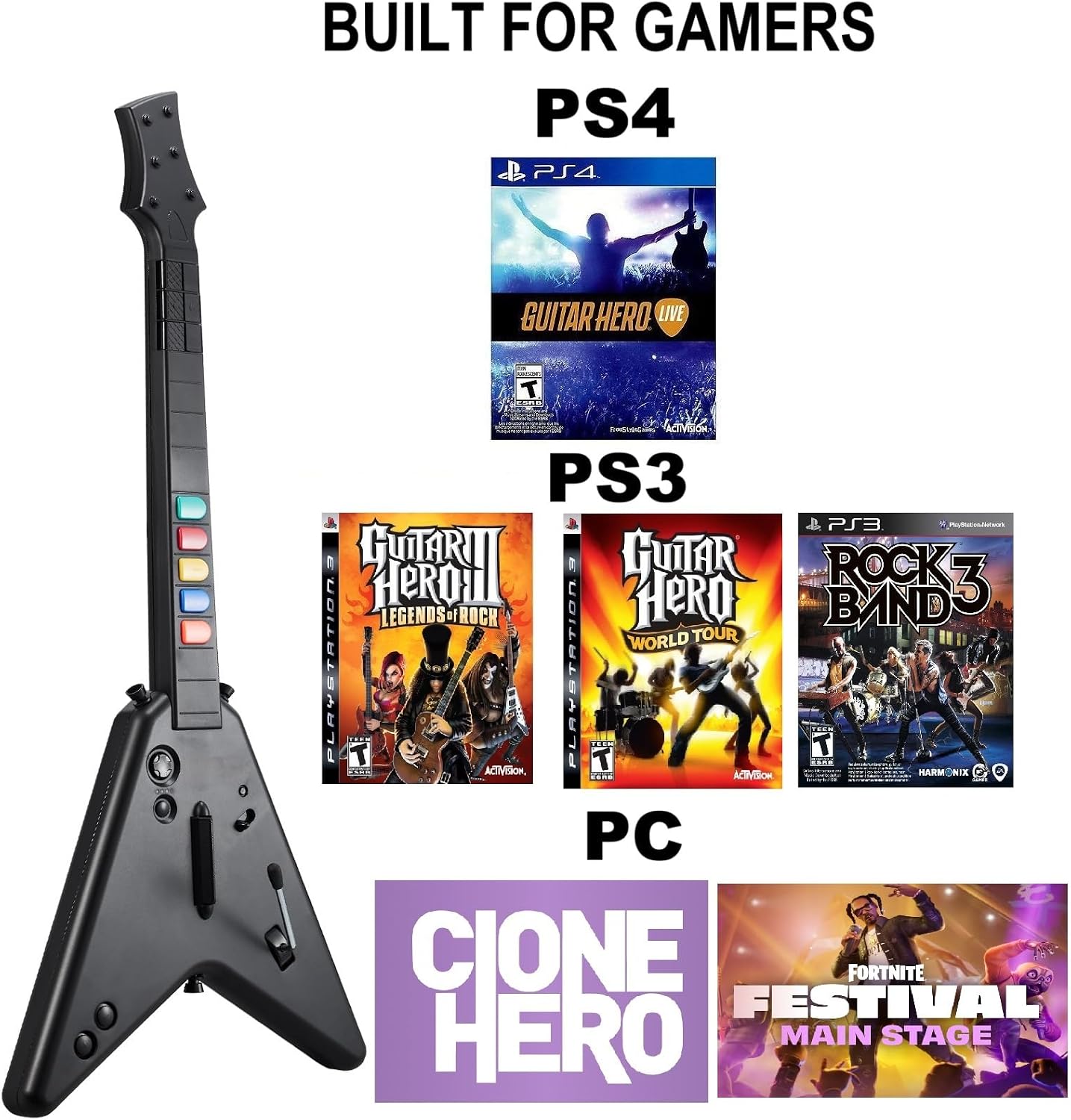
Image 4: Game Compatibility Overview
- PlayStation 4 (PS4): Supports Guitar Hero Live. Note: Not compatible with Rock Band 4.
- PlayStation 3 (PS3): Compatible with Guitar Hero III: Legends of Rock and Guitar Hero: World Tour.
- PC: Works with Fortnite Festival and Clone Hero.
4. PC Specifics
- Supports Windows 10 and Windows 11 operating systems. (Windows 7 is not supported).
- On PC, the controller may operate in a keyboard and mouse emulation mode for certain functions, allowing for basic navigation.
5. Two-Player Mode
For games that support it, two NBCP Wireless Guitar Controllers can be used simultaneously for a shared gaming experience. Ensure each controller has its own USB receiver plugged into the system.
Maintenance
1. Cleaning
- Wipe the controller with a soft, dry cloth.
- Avoid using harsh chemicals or abrasive cleaners.
2. Battery Care
- Remove batteries if the controller will not be used for an extended period to prevent leakage.
- Replace all 4 AA batteries simultaneously with new ones. Do not mix old and new batteries.
3. Storage
- Store the controller in a cool, dry place away from direct sunlight and extreme temperatures.
- Detaching the neck can save space during storage.
Troubleshooting
- Controller Not Connecting:
Ensure the USB receiver is securely plugged into the console/PC. Verify that the guitar controller has fresh batteries and is powered on. Try plugging the receiver into a different USB port. - Buttons/Strum Bar Unresponsive:
Check battery levels. Ensure the controller is within range of the USB receiver. If buttons feel stiff, continued use may improve responsiveness. - PC Compatibility Issues (Windows 11):
Some users have reported that on Windows 11, the controller may be recognized as a keyboard, leading to unintended inputs (e.g., continuous spacebar input) and locking PC controls. If this occurs, unplug the wireless receiver. Ensure your game (e.g., Clone Hero, Fortnite Festival) is configured to recognize the guitar controller input correctly. Driver updates for your PC's USB ports or specific game settings might be required. - Game Not Recognizing Controller:
Confirm that the game you are playing is listed as compatible. Some games, like Rock Band 4 on PS4, are not supported. Check in-game controller settings to ensure the correct input device is selected. - Lag or Input Delay:
Ensure there are no obstructions between the controller and the USB receiver. Minimize interference from other wireless devices. Check battery levels.
Specifications
- Model Number: KT602
- Brand: NBCP
- Connectivity: 2.4G Wireless USB Receiver
- Compatible Devices: PlayStation 4, PlayStation 3, PC (Windows 10 & 11)
- Controller Type: Guitar
- Power Source: 4 x AA Batteries (not included)
- Item Weight: Approximately 2.55 pounds (1.16 kg)
- Package Dimensions: Approximately 18.22 x 14.53 x 3.46 inches (46.28 x 36.91 x 8.79 cm)
Support Information
For any questions, technical assistance, or support regarding your NBCP Wireless Guitar Controller, please contact NBCP customer service. We are committed to providing 24/7 service with replies typically within 24-48 hours to assist with troubleshooting and product inquiries.
Please refer to the official NBCP store or product packaging for the most current contact information.