
1. Introduction
The BIOS Living Eclipse Double Fold Rollator is a stable and lightweight walking aid designed to provide comfort, independence, and ergonomic support for users both indoors and outdoors. Constructed from durable aluminum, this rollator features a unique double-folding frame for compact storage and transport, adjustable handles, a comfortable seat, and various accessories to enhance user experience.
2. Product Components
- Rollator Frame with Wheels
- Adjustable Ergonomic Handles with Brakes
- Padded Seat
- Padded Backrest
- Messenger Bag with Reflective Tape and Strap
- Cane Holder
- Cup Holder
- Bell
- Mobility LED Light
3. Setup and Assembly
Follow these steps to assemble your BIOS Living Eclipse Double Fold Rollator. Ensure all components are present and undamaged before beginning assembly.

Figure 1: Fully assembled BIOS Living Eclipse Double Fold Rollator.
- Unfold the Frame: Carefully unfold the rollator frame until it locks into its open position. Ensure all locking mechanisms are engaged.
- Attach Front Wheels: Insert the front wheels into the designated slots on the front legs of the rollator. Ensure they click securely into place.
- Install Handles: Slide the ergonomic handles into the main frame. Adjust the height to your preference (see 'Adjusting Handle Height' in Operating Instructions) and secure them with the provided fasteners.
- Attach Backrest: Secure the padded backrest to the designated points on the handles.
- Attach Storage Bag: Fasten the messenger bag beneath the seat using its attachment points.
- Install Accessories: Attach the cane holder, cup holder, bell, and mobility LED light to your preferred locations on the frame or handles.
Video 1: Installation Guide for Rollators with Seat. This video demonstrates the assembly process for a rollator, including attaching wheels, handles, and accessories.
4. Operating Instructions
4.1 Walking with the Rollator
Position yourself between the handles, allowing ample space for an ergonomic walking motion. Maintain an upright posture and use the handles for stability. The 8-inch PVC wheels and 360° swivel front wheels facilitate smooth movement across various terrains.
4.2 Braking System
To slow down or stop, gently pull the brake levers upwards. To engage the parking brake, push the brake levers downwards until they lock into place. This will prevent the rollator from moving when stationary.
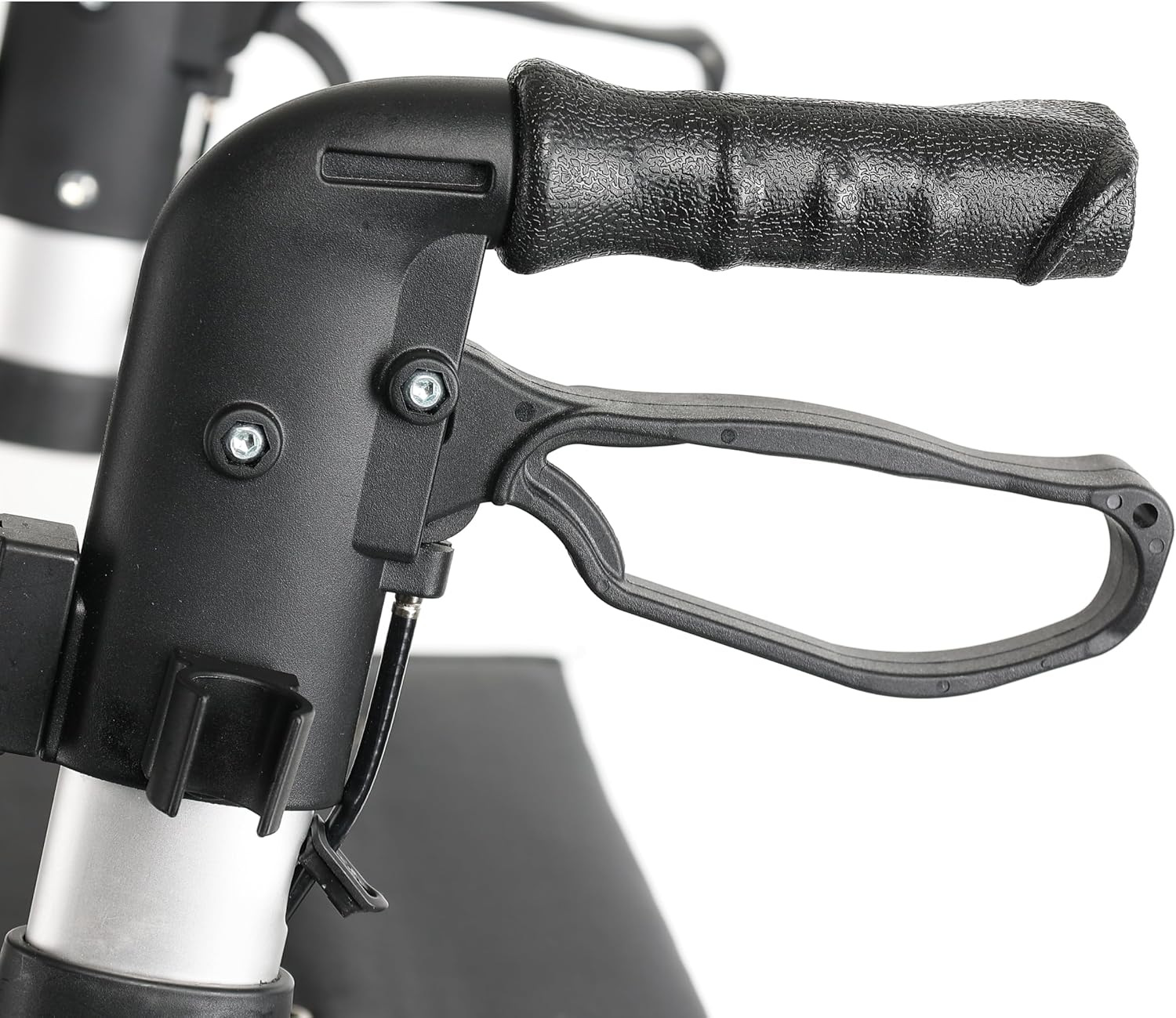
Figure 2: Ergonomic handle with integrated brake lever.
4.3 Using the Seat
The rollator features a convenient seat (18”/46 cm wide by 10”/25 cm deep, with a floor to seat height of 21”/53.4 cm) for short periods of rest. Ensure the parking brakes are engaged before sitting. The padded backrest provides additional comfort. WARNING: DO NOT move the rollator while seated.
4.4 Adjusting Handle Height
The ergonomic handles are height-adjustable from 31.6” to 36.6” (80.5 cm to 93 cm). To adjust, locate the adjustment buttons or levers on the handle shafts, press them, and slide the handles to the desired height. Ensure they lock securely into position before use.
4.5 Folding the Rollator
The Eclipse Rollator offers two folding options: a side-to-side fold allowing it to stand independently, and a more compact fold for travel and storage. To fold, remove the messenger bag, then lift the strap located on the seat to collapse the frame. The rollator weighs approximately 19.8 lbs (9 kg) when folded.

Figure 3: The rollator folded for compact storage and transport.
4.6 Curb Climber
Utilize the curb pedal located near the rear wheels to easily lift the front wheels over small obstacles like steps or curbs, maintaining stability.
Video 2: MAXWALK Rollator Walker Features. This video showcases various features of a rollator, including its wheels, braking system, seat, and folding mechanism.
5. Maintenance
Regular maintenance ensures the longevity and safe operation of your rollator.
- Cleaning: Wipe down the frame and seat with a damp cloth and mild detergent. Avoid abrasive cleaners.
- Wheel Inspection: Periodically check the wheels for wear and tear. Ensure they rotate freely and are free of debris.
- Brake Check: Test the brakes regularly to ensure they engage properly and hold the rollator securely. Adjust if necessary according to manufacturer guidelines.
- Fasteners: Ensure all screws, knobs, and locking pins are tight and secure.
6. Troubleshooting
If you encounter any issues with your rollator, refer to the following common troubleshooting tips:
- Rollator does not roll smoothly: Check wheels for debris, ensure they are properly installed, and inspect for any damage.
- Brakes are not engaging: Inspect brake cables for damage or looseness. Ensure brake levers are fully depressed or pulled. Consult a professional if issues persist.
- Rollator feels unstable: Verify that all frame connections are securely locked and handles are adjusted to an appropriate height.
7. Specifications
| Model Name | Eclipse Double Fold Rollator |
| Item Model Number | RLG21 |
| Brand | BIOS Living |
| Material | Aluminum |
| Color | White |
| Weight Capacity | 300 lbs / 136 kg |
| Lightweight | 19.8 lbs / 9 kg |
| Adjustable Handle Height | 31.6 - 36.6 inches / 80.5 - 93 cm |
| Seat Dimensions | 18 inches / 46 cm Wide x 10 inches / 25 cm Deep |
| Floor to Seat Height | 21 inches / 53.4 cm |
| Wheel Size | 8 inches / 20.3 cm PVC wheels |
| Manufacturer | Thermor Ltd. |
8. Safety Information
Always prioritize safety when using the rollator.
- Ensure all locking mechanisms are engaged before use.
- Always engage parking brakes before sitting on the seat.
- WARNING: DO NOT move the rollator while seated.
- Regularly inspect the rollator for any signs of wear, damage, or loose components.
- Consult a healthcare professional for proper guidance on using a mobility aid.
9. Warranty and Support
For warranty information, technical support, or replacement parts, please contact BIOS Living customer service. Keep your purchase receipt as proof of purchase.