
ClimaTek 1196817
ClimaTek OEM Upgraded Condenser Fan Motor
Model: 1196817 - Instruction Manual
Introduction
This manual provides essential information for the safe and effective installation, operation, and maintenance of your new ClimaTek OEM Upgraded Condenser Fan Motor, part number 1196817. This motor is designed as a direct replacement for ICP part # 1196817 and is compatible with various systems, including those from ICP.
Please read this manual thoroughly before attempting any installation or operation. Keep this manual for future reference.
Safety Information
WARNING: Always disconnect power to the unit before installing, servicing, or performing maintenance on the condenser fan motor. Failure to do so can result in serious injury or death.
- Installation and servicing should only be performed by qualified personnel.
- Wear appropriate personal protective equipment (PPE), including safety glasses and gloves, during installation and maintenance.
- Ensure all wiring connections are secure and comply with local electrical codes.
- Verify correct voltage and current ratings before connecting the motor.
- Do not operate the motor if it is damaged or if any components are missing.
Setup and Installation
This section outlines the general steps for replacing an existing condenser fan motor. Specific procedures may vary based on the HVAC unit model.
- Power Disconnection: Locate the main power switch for the outdoor condenser unit and turn it OFF. Verify power is disconnected using a voltage tester.
- Access Motor: Remove the top grille or access panel of the condenser unit to expose the fan motor and blade assembly.
- Remove Fan Blade: Loosen the set screw on the fan blade hub and carefully slide the fan blade off the motor shaft. Note the orientation of the blade for reinstallation.
- Disconnect Wiring: Photograph or diagram the existing wiring connections to the old motor. Disconnect all electrical wires.
- Remove Old Motor: Unbolt or unmount the old motor from its bracket.
- Install New Motor: Mount the new ClimaTek 1196817 motor onto the existing bracket. Ensure it is securely fastened.
- Connect Wiring: Connect the new motor's wires according to the diagram or photograph taken earlier. Ensure all connections are tight and insulated.
- Reinstall Fan Blade: Slide the fan blade onto the new motor shaft, ensuring it is oriented correctly and positioned at the same height as before. Tighten the set screw securely. Ensure the blade spins freely without hitting any obstructions.
- Secure Access: Replace the top grille or access panel.
- Restore Power: Turn the main power switch for the condenser unit back ON.
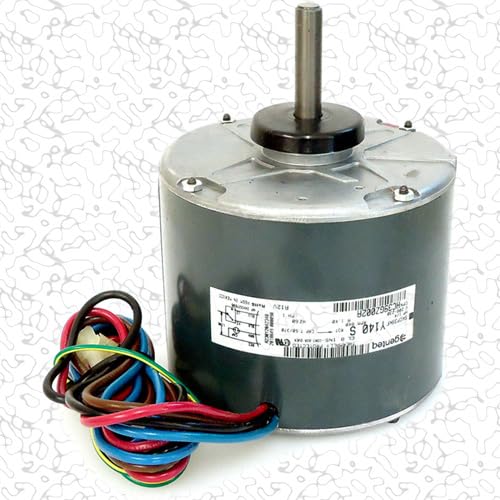
Image 1: The ClimaTek OEM Upgraded Condenser Fan Motor, model 1196817, showing its main body, shaft, and multi-colored wiring harness. This motor is a direct replacement for ICP part # 1196817.
Operating Instructions
Once installed, the condenser fan motor operates automatically as part of the HVAC system's cooling cycle. No direct user interaction is required for its operation.
- Ensure the outdoor unit is clear of debris and obstructions to allow for proper airflow.
- Listen for unusual noises during operation, which may indicate a problem.
Maintenance
Regular maintenance helps ensure the longevity and efficient operation of your condenser fan motor.
- Annual Inspection: Annually, or more frequently in dusty environments, inspect the motor for signs of wear, corrosion, or damage.
- Cleanliness: Keep the motor and fan blade free of dirt, dust, and debris. Accumulated grime can reduce efficiency and lead to premature failure. Always disconnect power before cleaning.
- Fan Blade Balance: Check the fan blade for any signs of imbalance or damage. A wobbling blade can put undue stress on the motor bearings.
- Wiring Check: Periodically inspect wiring connections for tightness and signs of fraying or overheating.
Troubleshooting
This section provides basic troubleshooting steps for common issues. For complex problems, consult a qualified HVAC technician.
| Problem | Possible Cause | Solution |
|---|---|---|
| Motor does not start | No power; faulty capacitor; seized bearings; incorrect wiring. | Check power supply; inspect/replace capacitor; check for obstructions; verify wiring. |
| Motor runs hot | Insufficient airflow; dirty coils; incorrect voltage; worn bearings. | Clear obstructions; clean coils; verify voltage; inspect/replace motor if bearings are worn. |
| Excessive noise/vibration | Loose mounting; unbalanced fan blade; worn bearings. | Tighten mounting bolts; inspect/balance/replace fan blade; replace motor if bearings are worn. |
Specifications
- Model: 1196817
- Type: OEM Upgraded Condenser Fan Motor
- Brand: ClimaTek
- Replaces: ICP Part # 1196817
- Product Dimensions: 7 x 15 x 7 inches
- Item Weight: Approximately 12.88 Pounds (206 Ounces)
- Manufacturer: ICP (as per product listing)
Warranty and Support
Specific warranty information for this ClimaTek product is not provided in the general product details. Please refer to the product packaging or contact the seller, North America HVAC, for detailed warranty terms and conditions.
For technical support or further assistance, please contact a qualified HVAC professional or the seller directly. You can find seller information on your purchase receipt or the product listing page on Amazon.
Seller: North America HVAC
Ask a question about this manual
Ask about setup, troubleshooting, compatibility, parts, safety, or missing instructions. Manuals+ will review the question and use this page’s manual context to help answer it.