
Metz MQE7600
Contents
Metz MQE7600 4K UHD Smart TV User Manual
Model: MQE7600
1. Introduction
The Metz MQE7600 is a 4K UHD Smart TV featuring QLED+ technology, a matte anti-glare screen, and Google TV. It is designed to deliver an exceptional viewing experience with vibrant colors, deep blacks, and clear audio, enhanced by Dolby Vision and Dolby Atmos. This manual will guide you through the essential steps to get the most out of your new television.
For optimal performance and safety, please read this manual thoroughly before operating the television and retain it for future reference.
2. Setup
2.1 Package Contents
Before you begin, ensure all items are present in the box:
- Metz MQE7600 4K UHD Smart TV
- Remote Control
- Power Cable
- User Manual (this document)
- Bases (TV Stand)

Figure 2.1: TV Dimensions and Included Accessories. This image illustrates the physical dimensions of the television, both with and without its stand, and provides a visual list of items included in the package, such as the remote control, cables, and manual. It also details the available input/output ports on the side of the TV.
2.2 Stand Installation
To install the TV stand:
- Carefully place the TV screen-down on a soft, flat surface to prevent damage.
- Align the stand bases with the screw holes on the bottom of the TV.
- Secure the bases using the provided screws. Do not overtighten.
- Carefully lift the TV to its upright position on a stable, level surface.
2.3 Initial Connections
Connect your devices to the TV:
- Power: Plug the power cable into the TV's power input, then into a wall outlet.
- HDMI Devices: Connect external devices (e.g., Blu-ray player, game console) to the HDMI ports. The TV has 3 HDMI ports.
- USB Devices: Connect USB storage devices to the 2 USB ports for media playback.
- Network: For internet access, connect an Ethernet cable to the LAN port or connect wirelessly via Wi-Fi during the initial setup.
- Antenna/Cable: Connect your antenna or cable TV source to the DVB-T2/S/S2/C input.
3. Operating
3.1 Remote Control Overview
The included remote control allows you to navigate the TV's features. It uses Bluetooth for enhanced connectivity and includes dedicated buttons for popular streaming services. The unique power button also functions as a remote finder.

Figure 3.1: Remote Control Features. This image shows the remote control, emphasizing its design and the use of a unique nanometer material certified by SGS, aimed at promoting family health. It also mentions the included accessories: remote control, cable, manual, and bases.
3.2 Google TV Features
Your Metz MQE7600 TV comes with Google TV, providing access to a vast library of movies, shows, and apps. The interface is designed to personalize content recommendations based on your viewing habits.
- Voice Control: Use the built-in Google Assistant by saying "Hey Google" or pressing the voice assistant button on your remote to search for content, control smart home devices, and more.
- App Access: Download and stream from your favorite apps like Netflix, Prime Video, YouTube, and Disney+ directly from the Google Play Store.
- Chromecast Built-in: Cast content from your compatible smartphone, tablet, or computer directly to the TV.

Figure 3.2: Google TV Interface. This image displays the Google TV home screen, showcasing its ability to aggregate content from various streaming services. It highlights the voice control feature, allowing users to easily search for and open applications like YouTube.
3.3 Picture and Sound Settings
The MQE7600 offers advanced technologies for superior audio-visual performance.
- QLED+ Technology: Experience vivid colors and enhanced brightness. The QLED+ display precisely restores 1.07 billion levels of stunning colors, offering 93% DCI-P3 color gamut and 47% color refinement.
- 4K UHD Resolution: Enjoy incredibly sharp and detailed images with 3840x2160 pixels.
- Matte Anti-Glare Screen: The matte screen reduces reflections and fingerprints, providing a comfortable viewing experience even in brightly lit rooms.

Figure 3.3: Matte Screen Advantage. This image demonstrates the benefit of the matte screen, showing how it eliminates glare and reflections compared to a standard glossy screen, providing a more comfortable viewing experience.
- HDR and Dolby Vision: Bring movies to life with stunning HDR and Dolby Vision picture quality, offering brilliant highlights, vibrant colors, and striking details.

Figure 3.4: HDR and Dolby Vision Enhancement. This image illustrates the visual improvement provided by HDR and Dolby Vision technologies, showcasing more vibrant colors and deeper contrast on the MQE7600 compared to a standard display.
- Dolby Atmos: Immerse yourself in multi-dimensional audio that flows around you, creating a truly cinematic experience.

Figure 3.5: Dolby Atmos Sound. This image visually represents the immersive sound experience of Dolby Atmos, showing sound waves expanding from the television to create a surround-sound effect.
- Adaptive Ambient Light: The TV automatically adjusts screen brightness and color temperature based on ambient light conditions, reducing eye strain and protecting your vision.

Figure 3.6: Adaptive Ambient Light. This image demonstrates the adaptive ambient light feature, showing how the TV automatically adjusts its brightness and color temperature to match the room's lighting, thereby reducing eye fatigue.
- Low Blue Light: Hardware-level low blue light chips effectively and precisely reduce blue light in the 415-455 nm range, further protecting your eyes. The TV is TÜV Rheinland certified for flicker-free display.

Figure 3.7: Eye Care Features (Flicker-Free & Low Blue Light). This image highlights the TV's eye protection features, showing a comparison between a flicker-free display and a normal display with visible flickering. It also illustrates the low blue light chips that reduce harmful blue light emissions.
4. Maintenance
4.1 Cleaning the TV
To clean your Metz TV:
- Always unplug the TV before cleaning.
- Use a soft, dry, lint-free cloth to wipe the screen and cabinet.
- For stubborn marks on the screen, lightly dampen the cloth with water or a specialized screen cleaner. Never spray cleaner directly onto the screen.
- Avoid using abrasive cleaners, waxes, or solvents as they can damage the finish.
4.2 Software Updates
Your TV may receive software updates periodically to improve performance and add new features. Ensure your TV is connected to the internet to receive these updates automatically. You can also check for updates manually through the TV's settings menu.
5. Troubleshooting
If you encounter issues with your TV, refer to the following common problems and solutions:
| Problem | Possible Cause | Solution |
|---|---|---|
| No Power | Power cable disconnected; Power outlet issue | Ensure power cable is securely connected. Try a different power outlet. |
| No Picture/Sound | Incorrect input source; External device issue; Cable issue | Check the selected input source. Ensure external devices are powered on. Check HDMI/AV cables for secure connection. |
| Remote Control Not Working | Low batteries; Obstruction; Pairing issue | Replace batteries. Remove any obstructions between remote and TV. Re-pair the Bluetooth remote if necessary (refer to TV settings). |
| Wi-Fi Connection Issues | Router issue; Incorrect password; Signal interference | Restart your router. Double-check Wi-Fi password. Move TV closer to router or reduce interference. |
| Picture Quality Issues (e.g., blurry, distorted) | Source quality; Picture settings; Cable issue | Ensure the source content is high quality. Adjust picture settings (brightness, contrast, sharpness). Check HDMI/AV cables. |
If the problem persists after trying these solutions, please contact Metz customer support.
6. Specifications
Key technical specifications for the Metz MQE7600 43-inch model:
- Brand: Metz
- Model: MQE7600
- Screen Size: 43 Inches (110 cm diagonal)
- Display Technology: QLED+, LED
- Resolution: 4K UHD (3840x2160 Pixels)
- Refresh Rate: 60 Hz
- Operating System: Google TV
- Audio Technology: Dolby Atmos
- Video Technology: HDR, Dolby Vision
- Connectivity: Wi-Fi, Bluetooth, Google Cast, Ethernet
- HDMI Ports: 3
- USB Ports: 2
- Special Features: Matte Anti-Glare Screen, Adaptive Ambient Light Sensor, Low Blue Light, Auto Volume Leveller, Bezel-Less Design, Game Mode
- Dimensions (L x W x H) with Stand: 95.69 x 26.77 x 62.19 cm
- Weight: 6.2 kg
- Energy Efficiency Class (SDR): F
- Energy Efficiency Class (HDR): G
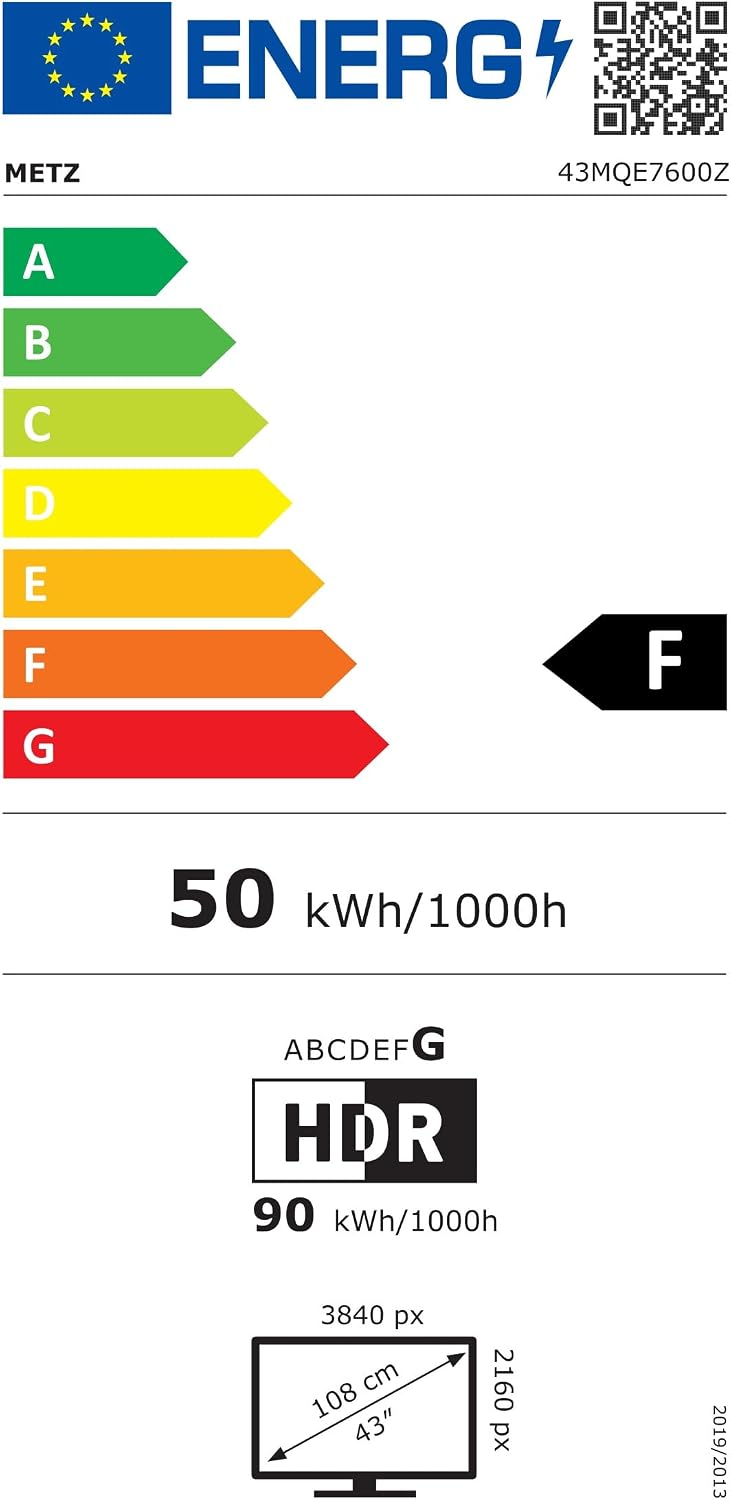
Figure 6.1: Energy Label. This image displays the EU energy label for the Metz 43MQE7600Z television, indicating its energy efficiency ratings for both Standard Dynamic Range (SDR) and High Dynamic Range (HDR) content, along with power consumption details. More information can be found at eprel.ec.europa.eu/qr/1899884.
7. Warranty and Support
Your Metz MQE7600 television comes with a manufacturer's warranty of 2 years. This warranty covers defects in materials and workmanship under normal use.
For warranty claims, technical support, or further assistance, please refer to the contact information provided in your product packaging or visit the official Metz website. Please have your model number (MQE7600) and purchase details ready when contacting support.
Documents and downloads
Ask a question about this manual
Ask about setup, troubleshooting, compatibility, parts, safety, or missing instructions. Manuals+ will review the question and use this page’s manual context to help answer it.