
1. Introduction
This manual provides essential information for the safe and efficient operation, installation, and maintenance of your Mirage SETCWC120E Air Conditioner Mini Split Inverter X32. Please read this manual thoroughly before using the appliance and retain it for future reference. This unit is designed to provide both cooling and heating functions for indoor environments.
2. Safety Information
Always observe the following safety precautions to reduce the risk of electric shock, fire, or injury.
- Installation must be performed by qualified personnel in accordance with national wiring standards.
- Ensure the power supply matches the unit's specifications (115V).
- Do not operate the unit with wet hands.
- Do not insert objects into the air outlet or inlet.
- Keep flammable materials away from the unit.
- Disconnect power before cleaning or maintenance.
- This appliance uses R32 refrigerant. Handle with care and ensure proper ventilation during service.
3. Product Overview
The Mirage SETCWC120E is an Inverter X32 mini split air conditioner designed for efficient cooling and heating. It features R32 refrigerant for improved environmental performance and energy efficiency.
3.1 Key Features
- Utilizes R32 refrigerant, offering enhanced efficiency and reduced environmental impact.
- Inverter technology for stable temperature control and energy savings (17 SEER efficiency).
- Real-time diagnostic capabilities to detect operational failures.
- Durable copper coil construction.
- Optional Wi-Fi integration (communication interface sold separately).
3.2 Unit Components

Figure 1: Front view of the Mirage SETCWC120E indoor unit. This image displays the sleek white design of the air conditioner, featuring the "Mirage" logo on the left and "X32 INVERTER" branding on the right.

Figure 2: Angled view of the Mirage SETCWC120E indoor unit. This perspective highlights the depth and side profile of the unit, showing its compact design suitable for various room layouts.

Figure 3: Mirage SETCWC120E indoor unit highlighting R32 refrigerant. This image emphasizes the use of R32 refrigerant, noting its 0% impact on the ozone layer and being 3 times more ecological than R410A.
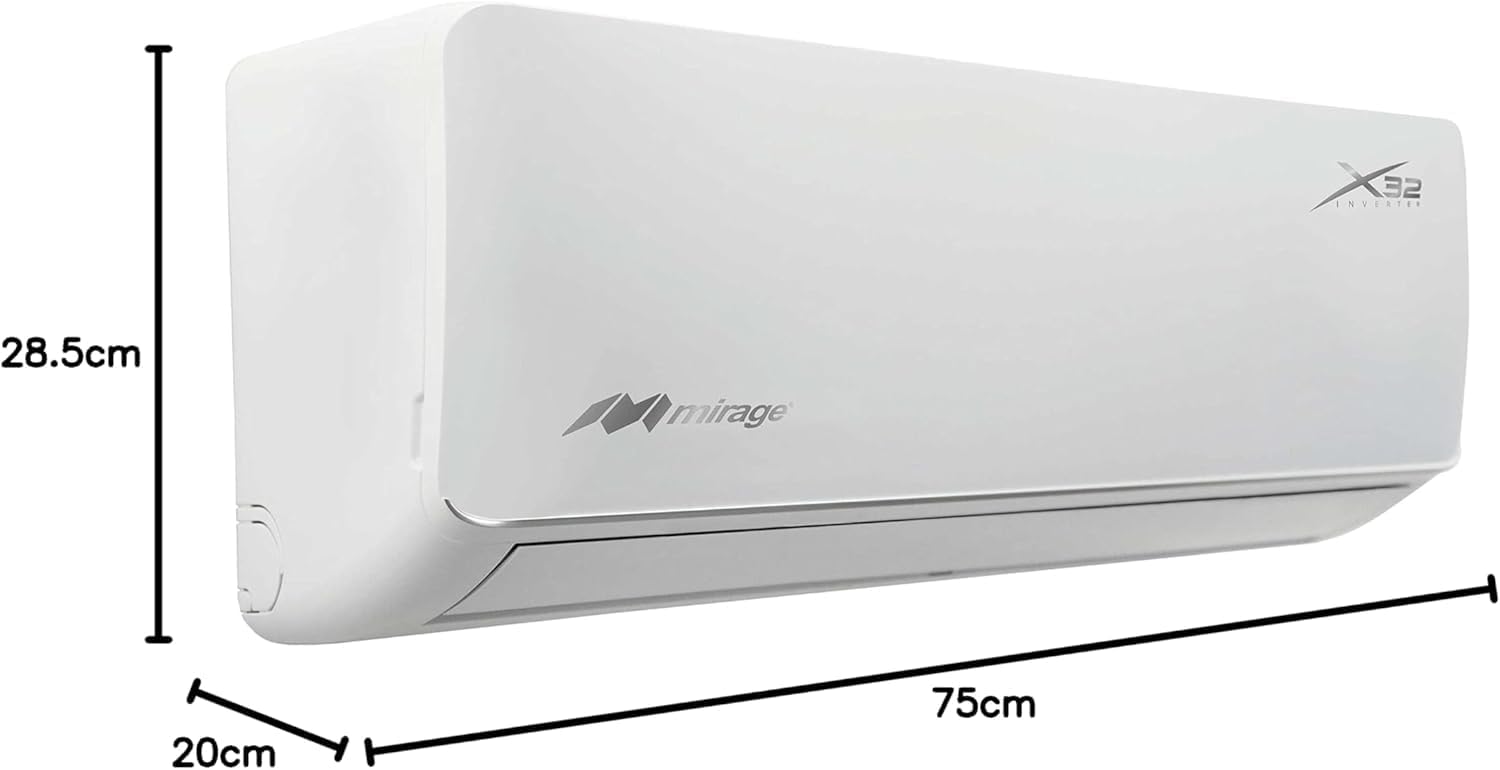
Figure 4: Dimensions of the Mirage SETCWC120E indoor unit. This image provides a visual representation of the unit's measurements: 20cm depth, 75cm width, and 28.5cm height.
4. Setup and Installation
The installation of this mini split air conditioner requires specialized knowledge and tools. It is strongly recommended that installation be performed by a certified HVAC professional to ensure proper functioning, safety, and compliance with local regulations.
4.1 Pre-Installation Checks
- Verify that the power supply voltage and frequency match the unit's requirements (115V).
- Ensure the installation location for both indoor and outdoor units provides adequate space for airflow and maintenance.
- Confirm that the wall structure can support the weight of the indoor unit.
4.2 Professional Installation
A qualified technician will handle the following:
- Mounting the indoor unit securely.
- Installing the outdoor unit on a stable surface.
- Connecting refrigerant lines and electrical wiring between units.
- Performing vacuuming and refrigerant charging.
- Testing the system for leaks and proper operation.
5. Operating Instructions
Your Mirage SETCWC120E is controlled via a wireless remote control. Familiarize yourself with the remote's functions for optimal use.
5.1 Remote Control Overview

Figure 5: The remote control for the Mirage SETCWC120E air conditioner. The remote features a digital display at the top showing temperature, mode, and fan speed. Buttons include ON/OFF, COOL, HEAT, SPEED, TIMER, MODE, MENU/OK, and L/R SWING, U/D SWING for adjusting airflow direction.
5.2 Basic Operation
- Power On/Off: Press the ON/OFF button to start or stop the unit.
- Mode Selection: Press the MODE button to cycle through operating modes: Cool, Heat, Fan, Dry, Auto.
- Temperature Adjustment: Use the + and - buttons to set the desired temperature.
- Fan Speed: Press the SPEED button to adjust the fan speed (Auto, Low, Medium, High).
- Swing Function: Use the L/R SWING and U/D SWING buttons to adjust the horizontal and vertical airflow direction.
- Timer Function: Press the TIMER button to set a scheduled on or off time.
6. Maintenance
Regular maintenance ensures optimal performance and extends the lifespan of your air conditioner. Always disconnect power before performing any maintenance.
6.1 Air Filter Cleaning
- Open the front panel of the indoor unit.
- Remove the air filters.
- Clean the filters with a vacuum cleaner or wash them with lukewarm water and mild detergent.
- Allow filters to dry completely before reinstalling.
- Clean filters every two weeks or more frequently depending on usage and air quality.
6.2 Outdoor Unit Cleaning
Periodically check the outdoor unit for debris, leaves, or dirt that may obstruct airflow. Gently clean the coils with a soft brush or water hose. Avoid bending the fins.
6.3 Professional Servicing
It is recommended to have a qualified technician inspect and service your unit annually to check refrigerant levels, clean coils, and ensure all components are functioning correctly.
7. Troubleshooting
Before contacting service, review the following common issues and solutions:
| Problem | Possible Cause | Solution |
|---|---|---|
| Unit does not start | No power; remote control batteries low; circuit breaker tripped. | Check power supply; replace remote batteries; reset circuit breaker. |
| Insufficient cooling/heating | Dirty air filters; blocked outdoor unit; wrong mode selected; temperature setting too high/low. | Clean air filters; clear obstructions from outdoor unit; select correct mode; adjust temperature. |
| Unusual noise | Loose parts; fan obstruction; normal operating sounds (e.g., refrigerant flow). | Check for loose parts; remove obstructions; if persistent or loud, contact service. |
| Water leakage from indoor unit | Clogged drain pipe; improper installation. | Clear drain pipe; contact installer for inspection. |
If the problem persists after attempting these solutions, or if the unit displays an error code, please contact a qualified service technician.
8. Specifications
| Feature | Detail |
|---|---|
| Model Number | SETCWC120E |
| Brand | Mirage |
| Capacity | 1 Ton (12000 British Thermal Units) |
| Voltage | 115V |
| Refrigerant | R32 |
| Seasonal Energy Efficiency Ratio (SEER) | 17.4 |
| Special Feature | Heating & Cooling Function |
| Noise Level | 43 Decibels |
| Indoor Unit Dimensions (L x W x H) | 75 cm x 20 cm x 28.5 cm |
| Weight | 33 kg (approximate total package weight) |
9. Warranty and Support
For warranty information, please refer to the warranty card included with your product or contact Mirage customer support directly. Keep your proof of purchase for warranty claims.
For technical assistance, troubleshooting beyond this manual, or to schedule service, please contact Mirage customer service. Contact details can typically be found on the manufacturer's official website or on the product packaging.


