1. Introduction
This manual provides instructions for the safe and efficient use of your Link2Home Cord Reel, Model EM-EL-375KX. This device is designed to provide convenient power distribution with its 30 ft. extension cord, multiple outlets, and USB charging ports. Please read this manual thoroughly before operating the product and retain it for future reference.

Figure 1: Link2Home Cord Reel EM-EL-375KX. This image displays the cord reel unit, highlighting its compact design, the three grounded power outlets, and the two USB ports on the front panel, along with the integrated power switch and circuit breaker reset button.
2. Safety Information
Adherence to the following safety guidelines is crucial to prevent electric shock, fire, or personal injury.
- Do not exceed electrical ratings: The total current draw of all connected devices must not exceed the cord reel's maximum rating. Refer to the "Specifications" section for details.
- Indoor use only: This cord reel is intended for indoor use in dry locations. Do not expose to moisture or rain.
- Fully uncoil cord: Always uncoil the extension cord completely before use to prevent overheating.
- Grounding: Ensure the cord reel is plugged into a properly grounded 3-prong outlet.
- Avoid damage: Do not use if the cord or housing is damaged. Do not attempt to open or modify the unit.
- Children and pets: Keep out of reach of children and pets.
- Circuit Breaker: The built-in circuit breaker provides overload protection. If it trips, disconnect devices, wait for it to cool, and then press the reset button.
3. Product Features
The Link2Home Cord Reel EM-EL-375KX offers the following key features:
- 30 ft. 16 AWG SJT Cable: Provides extended reach with durable, thermoplastic insulated hard service cord.
- 3 Grounded 120V Outlets: For connecting multiple electrical devices.
- 2 USB Ports (Type-A/C): Delivers 2.4A fast charging for compatible USB devices.
- Built-in Circuit Breaker: Automatically protects connected devices from damage due to current or voltage overload.
- ON/OFF Switch with Power Light Indicator: Allows for easy control of power to all outlets and USB ports.
- Tangle-Free Cord Management: Integrated reel design keeps the cord neat and organized.
- Compact and Portable Design: Features a unique four-handle design for easy transport and storage.
- CSA Certified: Ensures compliance with safety standards.
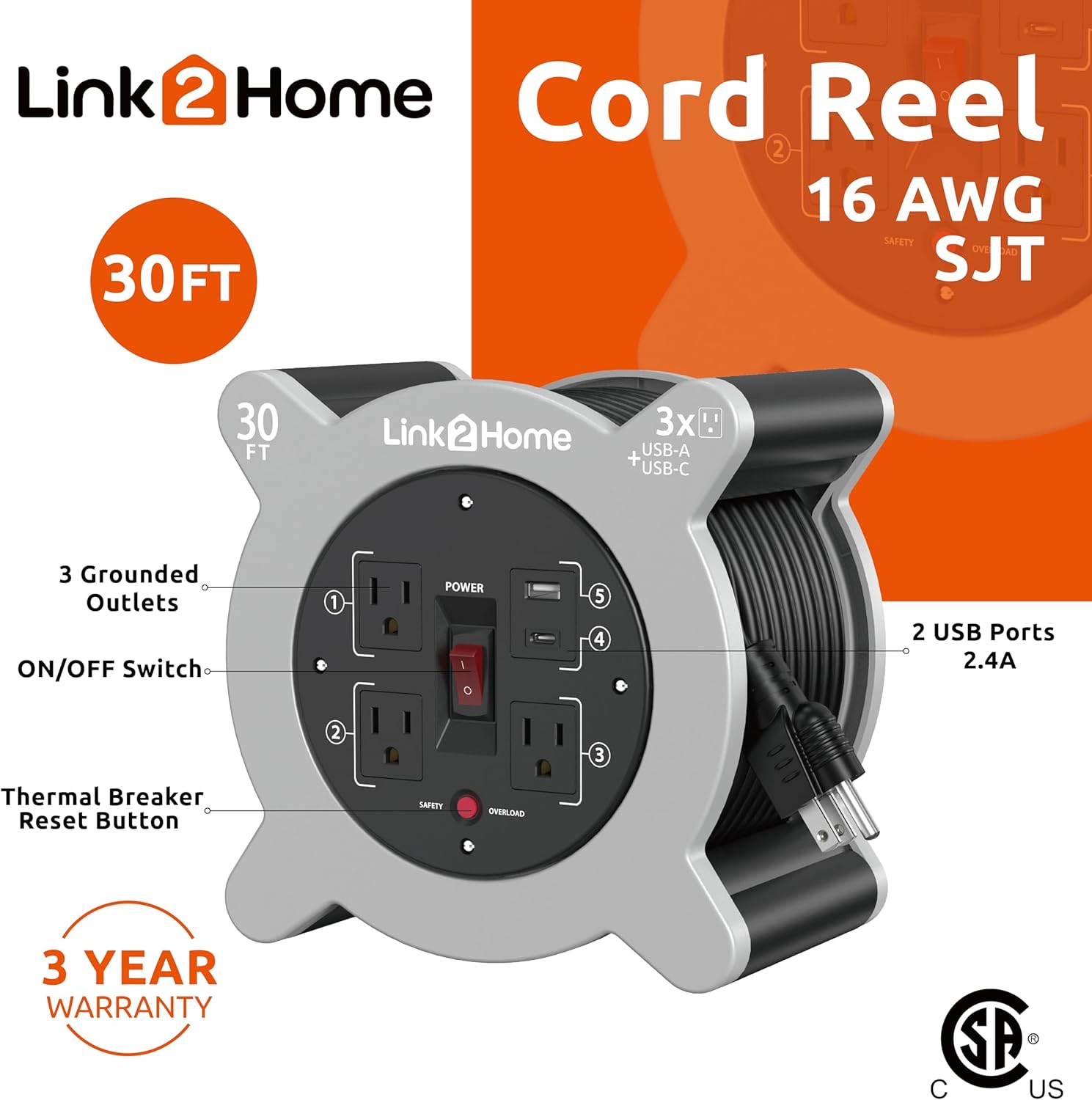
Figure 2: Labeled components of the Link2Home Cord Reel. This image points out the 3 grounded outlets, ON/OFF switch, thermal breaker reset button, and the 2 USB ports, along with the 30 ft. 16 AWG SJT cable and 3-year warranty information.

Figure 3: Detail of the high-quality SJT cable. This image illustrates the construction of the 16 AWG SJT cable, indicating its thermoplastic insulation and hard service cord designation for durability.
4. Setup
- Unpack: Carefully remove the cord reel from its packaging. Inspect the unit for any signs of damage.
- Placement: Position the cord reel on a stable, dry surface, away from water sources or flammable materials.
- Uncoil the Cord: Grasp the plug end of the extension cord and pull it out from the reel. Ensure the entire length of the cord required for use is uncoiled to prevent heat buildup.
- Connect to Power: Plug the cord reel's main plug into a standard, properly grounded 120V AC wall outlet.
5. Operation
- Power On/Off: Locate the red ON/OFF switch on the front panel. Press the switch to the 'ON' position (illuminated) to supply power to the outlets and USB ports. Press it to the 'OFF' position to cut power.
- Connecting Devices:
- For AC powered devices, plug them into any of the three grounded 120V outlets.
- For USB powered devices, connect them to the USB-A or USB-C ports. The USB ports provide 2.4A fast charging.

Figure 4: Link2Home Cord Reel in an operational setting. This image shows the cord reel connected to an iron and a smartphone, demonstrating its use for both AC-powered appliances and USB charging.
- Cord Management: The cord reel features an anti-twist cable solution for smooth extension and retraction.

Figure 5: Cable management feature of the Link2Home Cord Reel. This image highlights the design that facilitates anti-twist cable extension and retraction, keeping the cord organized.
- Retracting the Cord: When finished, unplug all devices and the main plug from the wall outlet. Use the built-in handle on the side of the reel to manually wind the cord back into the unit. Ensure the cord winds evenly to prevent tangles.

Figure 6: Easy rewind mechanism with built-in handle. This image shows the side of the cord reel with the integrated handle designed for manual and easy retraction of the extension cord.
6. Maintenance
- Cleaning: Disconnect the cord reel from all power sources before cleaning. Wipe the exterior with a soft, dry cloth. Do not use liquid cleaners or immerse the unit in water.
- Storage: Store the cord reel in a cool, dry place when not in use. Ensure the cord is fully retracted and neatly wound. The slim profile allows for easy storage.

Figure 7: Slim profile of the Link2Home Cord Reel. This image demonstrates the compact side view of the cord reel, highlighting its design for convenient storage in various spaces.
- Inspection: Periodically inspect the cord and plug for any signs of wear, cuts, or damage. If damage is found, discontinue use and contact customer support.
7. Troubleshooting
| Problem | Possible Cause | Solution |
|---|---|---|
| No power to outlets/USB ports. |
|
|
| Cord reel feels warm during use. |
|
|
| USB devices not charging. |
|
|
8. Specifications
| Model Number | EM-EL-375KX |
| Cable Length | 30 ft. |
| Wire Gauge | 16 AWG SJT |
| AC Outlets | 3 Grounded 120V Outlets |
| USB Ports | 2 (Type-A/C) |
| USB Output | 2.4A Fast Charge |
| Circuit Breaker | Built-in Overload Protection |
| Certifications | CSA Certified |
| Material | Plastic, Rubber |
| Item Weight | 3.43 pounds |
| Package Dimensions | 8.94 x 6.97 x 5.08 inches |
9. Warranty and Support
The Link2Home Cord Reel EM-EL-375KX is covered by a 3-year warranty from the date of purchase. This warranty covers defects in materials and workmanship under normal use.
For warranty claims, technical support, or any questions regarding your product, please contact Link2Home customer service. Refer to the product packaging or the official Link2Home website for current contact information.


