
Monster Open Touch Pro100
Monster Open Touch Pro 100 User Manual
Model: Open Touch Pro100 | Brand: Monster
1. Introduction
Welcome to the user manual for your Monster Open Touch Pro 100 Open Ear Headphones. These innovative earbuds combine advanced audio technology with a unique open-ear design, a full-color touch screen charging case, and versatile playback options, including an independent MP3 mode. This manual provides detailed instructions on setup, operation, maintenance, and troubleshooting to ensure you get the most out of your device.
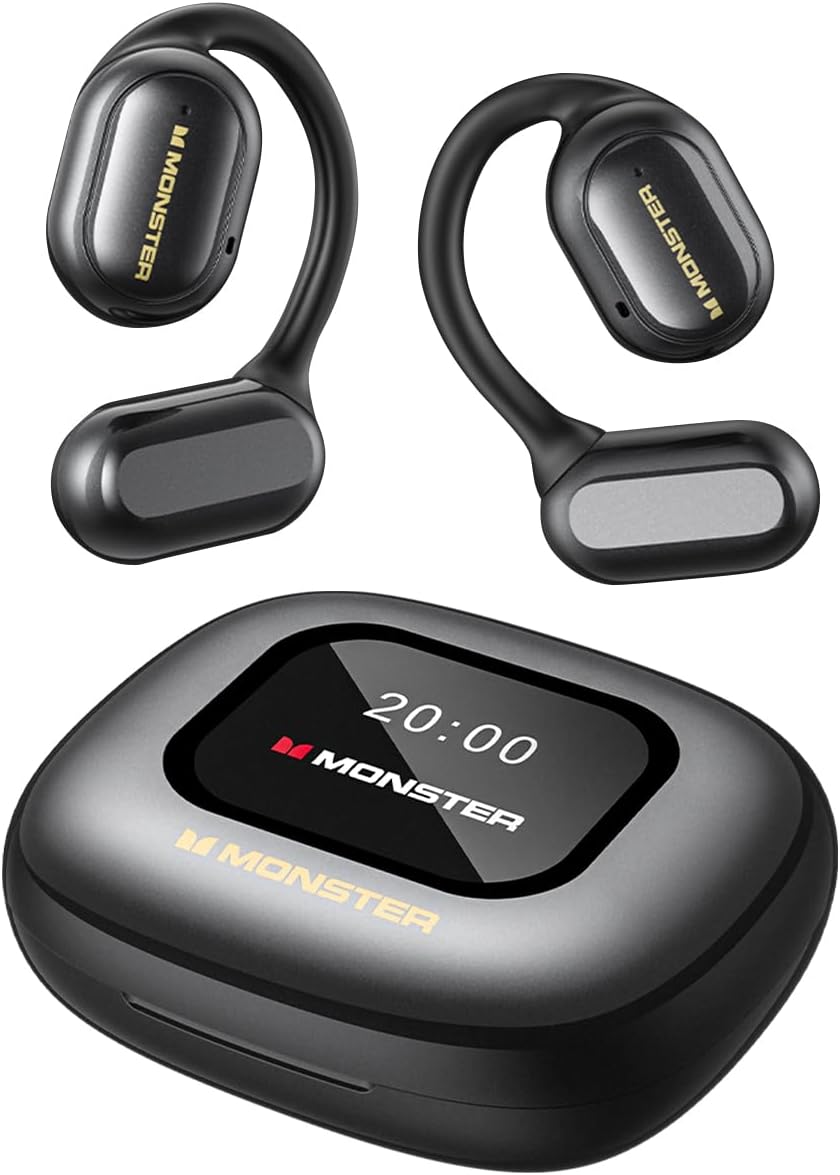
Figure 1: Monster Open Touch Pro 100 Earbuds and Charging Case
2. What's in the Box
Please check the package contents to ensure all items are present:
- Monster Open Touch Pro 100 Earbuds (Left and Right)
- Charging Case with Full-Color Touch Screen
- USB Charging Cable
- Protective Case
- User Manual
3. Product Features
3.1. Pure Monster Sound & ENC Noise Cancellation
Experience clear and detailed audio with the high-quality 16.2mm large drivers. The ENC (Environmental Noise Cancellation) adaptive noise separation technology ensures crystal-clear conversations by intelligently adjusting to environmental changes, providing a more comfortable listening experience.

Figure 2: 16.2mm Large Driver for Clear Sound Quality

Figure 3: ENC Noise Cancellation for Crystal Clear Calls
3.2. LED Full-Color Smart Screen & Independent MP3 Mode
The multi-touch smart charging case features an LED full-color screen, allowing precise control over music playback, track switching, and volume adjustment. It also offers multiple EQ modes for a personalized listening experience. With a built-in TF card slot (TF Card NOT included), the earbuds can function independently as an MP3 player without needing a phone or network, providing convenience and freedom to enjoy music anywhere.

Figure 4: LED Full-Color Touch Screen Functions

Figure 5: TF Card Input for Independent MP3 Playback
3.3. Open-Ear Design & Comfort
The innovative open-ear design allows you to enjoy music while staying aware of your surroundings, enhancing safety alongside providing a comfortable listening experience. The ergonomic curved ear-hook design, crafted from skin-friendly silicone, ensures secure wear during activities without feeling intrusive, keeping you fresh and burden-free all day.

Figure 6: Open-Ear Design for Comfortable Wear
3.4. Bluetooth 5.4 Technology
Featuring the latest Bluetooth 5.4 technology, these wireless earbuds ensure low power consumption and low latency, while delivering faster connection speeds, longer range, and greater stability. Enjoy seamless wireless audio with minimal interruptions and reliable, high-quality sound.
3.5. All-Day Battery Life
Enjoy up to 8 hours of playback on a single charge, and extend to 30 hours with the charging case. Whether on a long trip or a busy workday, these Bluetooth earbuds ensure all-day music without worrying about power. The compact charging case provides additional battery life and is easy to carry, keeping your earbuds charged and ready.

Figure 7: Extended Battery Life
3.6. IPX5 Waterproof Performance
Whether sweating during workouts or caught in light rain, the IPX5 waterproof rating effectively protects the earbuds from moisture, enhancing their durability. This allows for confident use in various conditions, ensuring uninterrupted music enjoyment at the gym, outdoors, or during daily activities. Note: The charging case is not waterproof.

Figure 8: IPX5 Waterproof Performance for Earbuds
4. Setup
4.1. Charging the Earbuds and Case
Before first use, fully charge the earbuds and the charging case. Place the earbuds into the charging case. Connect the USB charging cable to the charging port on the case and plug the other end into a USB power adapter (not included). The screen on the charging case will indicate the charging status. A full charge typically takes approximately 1.5-2 hours.
4.2. Initial Power On
The earbuds will automatically power on when removed from the charging case. To manually power on, press and hold the touch control area on both earbuds for 3 seconds until you hear a power-on prompt.
5. Operating Instructions
5.1. Bluetooth Pairing
- Ensure the earbuds are charged and powered on.
- Open the charging case. The earbuds will enter pairing mode automatically, indicated by a flashing light on the earbuds.
- On your device (smartphone, tablet, laptop), enable Bluetooth and search for available devices.
- Select "Monster Open Touch Pro 100" from the list of devices.
- Once connected, you will hear a confirmation prompt, and the earbud lights will stop flashing.
5.2. Touch Controls
The earbuds feature intuitive touch controls for various functions:
- Play/Pause: Single tap on either L/R earbud.
- Next Song: Double tap on the Right earbud.
- Previous Song: Triple tap on the Left earbud.
- Answer Call: Double tap on either L/R earbud.
- Hang Up Call: Hold for 3 seconds on either L/R earbud.
- Voice Assistant: Hold for 2 seconds on either L/R earbud.

Figure 9: Earbud Touch Controls
5.3. Using the Touch Screen Case
The full-color touch screen on the charging case provides additional control and information:
- Music Playback Control: Navigate through your music library, adjust volume, and switch tracks directly from the screen.
- EQ Modes: Select from multiple equalizer presets (e.g., Rock, Pop, Normal, Jazz, Classic) to customize your audio experience.
- TF Card Mode: Insert a TF card (MicroSD card) into the dedicated slot to play music directly from the card without needing a connected device. The screen allows you to browse and control playback.
- Language Switch: Change the display language of the case screen.
- Find My Earphone: Utilize this feature to locate misplaced earbuds.
- Remote Shutter: Use the case screen as a remote shutter button for your smartphone camera.

Figure 10: EQ Mode Selection

Figure 11: Language Switch on Case Screen
5.4. Device Compatibility
The Monster Open Touch Pro 100 earbuds are widely compatible with various devices, including smartphones (Android, iOS), tablets, laptops, desktops, and smart speakers, thanks to their advanced Bluetooth 5.4 connectivity.

Figure 12: Wide Device Compatibility
6. Maintenance
6.1. Cleaning
- Regularly clean the earbuds and charging case with a soft, dry, lint-free cloth.
- Do not use abrasive cleaners, alcohol, or chemical solvents.
- Gently clean the charging contacts on both the earbuds and the case to ensure proper connection.
6.2. Storage
- When not in use, store the earbuds in their charging case to protect them and keep them charged.
- Store the device in a cool, dry place, away from extreme temperatures and direct sunlight.
7. Troubleshooting
| Problem | Possible Cause | Solution |
|---|---|---|
| Earbuds not pairing | Low battery; Out of range; Not in pairing mode; Previous connection issue. | Charge earbuds and case. Ensure earbuds are close to the device. Put earbuds back in case, close, then reopen to re-enter pairing mode. Forget device on your phone's Bluetooth settings and re-pair. |
| No sound or low volume | Volume too low; Earbuds not properly seated; Device volume low. | Adjust volume on both earbuds and connected device. Ensure earbuds are correctly placed in ears. Check audio output settings on your device. |
| Charging case screen unresponsive | Software glitch; Low battery. | Connect the charging case to power. If unresponsive, try holding the power button (if available) or allowing it to fully discharge and then recharge. |
| TF card music not playing | TF card not inserted correctly; Incompatible file format; TF card not recognized. | Ensure TF card is fully inserted. Check if music files are in a supported format (e.g., MP3, WAV). Try reformatting the TF card (backup data first) or using a different TF card. |
8. Specifications
| Feature | Detail |
|---|---|
| Model Name | Open Touch Pro100 |
| Brand | Monster |
| Ear Placement | Open Ear |
| Connectivity Technology | Wireless (Bluetooth 5.4) |
| Driver Size | 16.2mm |
| Noise Cancellation | ENC Clear Talk |
| Control Type | Touch Control (Earbuds), Touch Screen (Case) |
| Battery Life (Earbuds) | Up to 8 hours per charge |
| Total Playback Time | Up to 30 hours with charging case |
| Water Resistance Rating | IPX5 (Earbuds only) |
| TF Card Support | Yes (for independent MP3 mode, TF card not included) |
| Material | Silicone (ear-hooks) |
| Item Weight | 6.4 ounces |
| Compatible Devices | Smartphones, Tablets, Laptops, Desktops, Smart Speakers |
9. Warranty and Support
For warranty information and customer support, please refer to the warranty card included in your product packaging or visit the official Monster website. You may also contact the seller directly through your purchase platform for assistance.
Product Overview Video
This video provides a comprehensive overview of the Monster Open Touch Pro 100 Earbuds, highlighting their key features, design, and functionality. It demonstrates the touchscreen controls, open-ear design, and various usage scenarios.
Related documentsOpen Touch Pro100


Ask a question about this manual
Ask about setup, troubleshooting, compatibility, parts, safety, or missing instructions. Manuals+ will review the question and use this page’s manual context to help answer it.