Introduction
Thank you for choosing the bigzzia Vibration Platform. This manual provides essential information for the safe and effective use of your new fitness equipment. Please read it thoroughly before operation and keep it for future reference.
Safety Instructions
- Consult a physician before starting any new exercise program.
- Ensure the platform is placed on a stable, level surface.
- Keep children and pets away from the equipment during operation.
- Do not use if you are pregnant, have a pacemaker, or any other medical condition that may be affected by vibration.
- Unplug the device when not in use or before cleaning.
Package Contents
Upon unpacking, please ensure all items are present:
- Vibration Plate
- Remote Control
- User Manual
Setup
Follow these steps to set up your bigzzia Vibration Platform:
- Unpack: Carefully remove all components from the packaging.
- Placement: Place the vibration platform on a flat, hard, and stable surface. Ensure there is enough space around the unit for safe exercise.
- Power Connection: Plug the power cable into the platform's power input, then into a suitable electrical outlet.
- Initial Power On: Press the main power switch (usually located on the side or back of the unit) to turn on the platform.

Image: The bigzzia Vibration Platform, showing the main unit and control panel.
Operating Instructions
The bigzzia Vibration Platform offers various modes and settings for a customized workout.
Control Panel and Remote Control
The platform can be controlled via the integrated control panel or the included remote control.

Image: Close-up of the platform's control panel, displaying time, program, and speed settings.
Exercise Modes and Intensity
The platform features 9 automatic programs and adjustable speed levels (1-99) to suit various fitness levels. Different foot positions on the platform correspond to different intensity levels:
- Walking Mode: Relax with gentle vibrations for daily activity.
- Jogging Mode: Enjoy comfortable, moderate exercise.
- Running Mode: Boost endurance with strong vibration.
- Full Body Workout: Target muscle groups with precise intensity control.
Image: The platform surface indicating foot placement zones for Walking, Jogging, and Running modes.

Image: A woman performing exercises on the bigzzia Vibration Platform, demonstrating the use of resistance bands for a full-body workout.
Bluetooth Connectivity
The platform features integrated Bluetooth for audio playback:
- Automatic Bluetooth Activation: When you power on the device, the Bluetooth function activates automatically.
- Phone Connection: Enable Bluetooth on your phone and search for "Bluetooth" in your phone's Bluetooth settings. Once successfully connected, you can play music, radio, or podcasts through your phone.
- Music Control: The remote control does not support skipping tracks or adjusting volume. These operations must be performed on your phone or directly on the platform's control panel.
Magnetic Health Massage
The platform incorporates magnetic massage points designed to stimulate and soothe joints and muscle pain, improving circulation.

Image: Diagram illustrating the magnetic health massage points on the platform, targeting foot reflexology areas.
Exercise Examples
Here are some suggested exercises to perform on your bigzzia Vibration Platform:
- Squats
- Lunges
- Push-ups
- Planks
- Bicep curls with resistance bands
- Calf raises
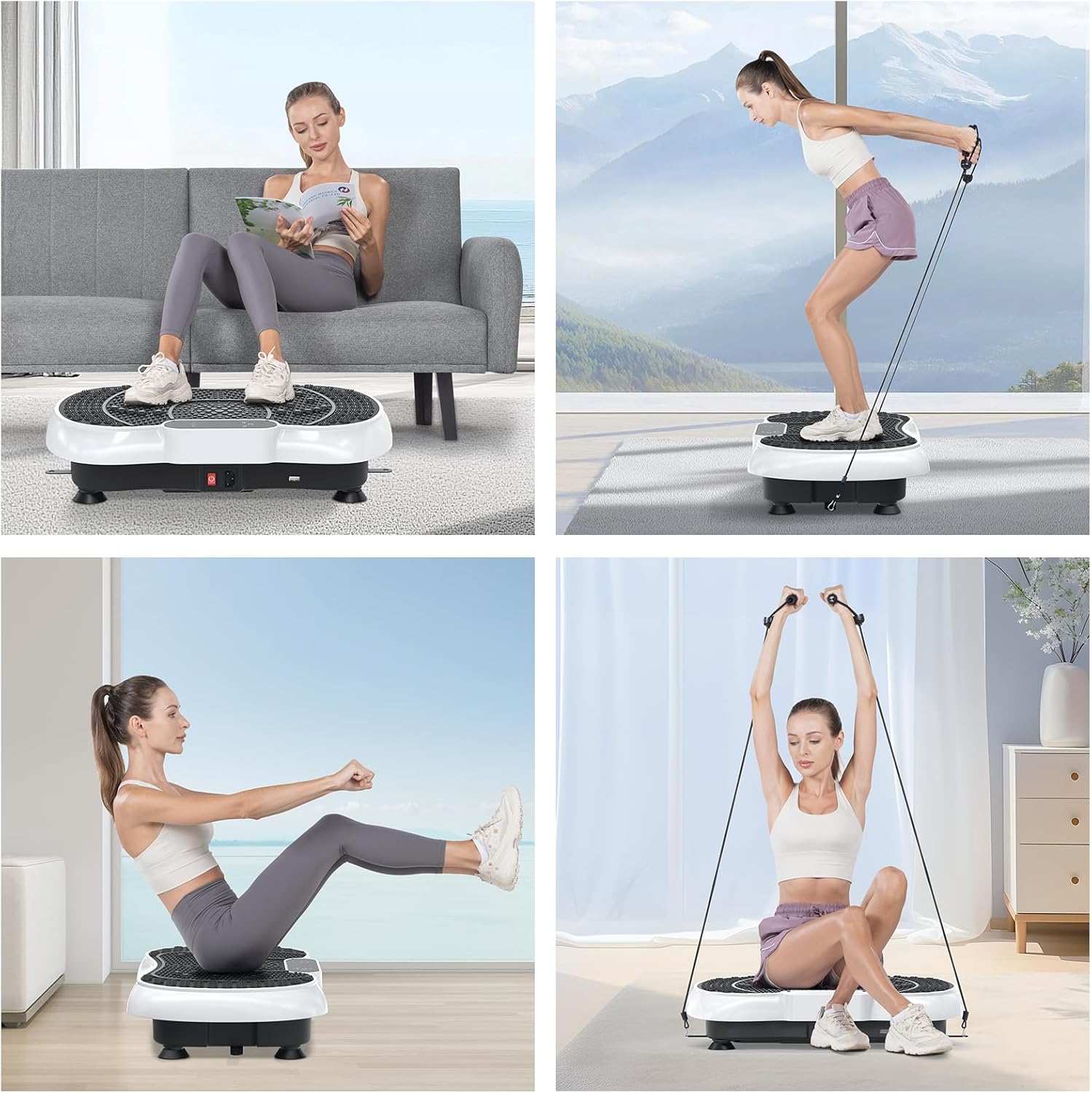
Image: Collage showing different exercise postures on the bigzzia Vibration Platform, including sitting, standing with bands, and planking.

Image: Further examples of exercises on the bigzzia Vibration Platform, such as squats, lunges, and core exercises.
Maintenance
Proper maintenance ensures the longevity and optimal performance of your vibration platform.
- Cleaning: Wipe the surface of the platform with a soft, damp cloth after each use. Do not use abrasive cleaners or solvents.
- Storage: Store the platform in a cool, dry place away from direct sunlight and moisture.
- Inspection: Regularly check the power cord for any damage. Ensure all parts are securely fastened.
- Moving: When moving the unit, lift it carefully to avoid damage.
Troubleshooting
If you encounter any issues with your bigzzia Vibration Platform, refer to the following common problems and solutions:
| Problem | Possible Cause | Solution |
|---|---|---|
| Platform does not turn on. | Power cord not properly connected; Main power switch off; Power outlet malfunction. | Ensure power cord is securely plugged in. Check if the main power switch is ON. Test the power outlet with another device. |
| No vibration or weak vibration. | Incorrect program/speed setting; Overload. | Adjust speed and program settings. Ensure user weight does not exceed the maximum capacity. |
| Unusual noise during operation. | Loose components; Uneven surface. | Check for any loose screws or parts. Ensure the platform is on a flat, stable surface. |
| Bluetooth not connecting. | Bluetooth on phone is off; Incorrect device selected. | Ensure Bluetooth is enabled on your phone. Search for "Bluetooth" in your phone's settings and select it. Restart both devices if necessary. |
If the problem persists, please contact customer support.
Specifications
| Feature | Detail |
|---|---|
| Power Source | Electric Cable |
| Manufacturer | bigzzia |
| Dimensions | 55.5 x 34 x 12 cm |
| Material Type | Acrylonitrile Butadiene Styrene (ABS) |
| Number of Programs | 9 |
| Included Components | Vibration Plate, Remote Control, Manual |
| Control Type | Remote Control |
| Operating Mode | Automatic |
Warranty and Support
bigzzia is committed to providing satisfactory home gym equipment and promoting a healthy lifestyle. For any product questions, please contact us directly. We will resolve any product issues within 24 hours.
Please retain your proof of purchase for warranty claims.


