
Introduction
The ASA SP-6 Pilot Master Logbook Cover is designed to protect and extend the life of your logbook. Crafted from rugged, water-resistant 600D canvas, this durable cover ensures your flight records remain safe while maintaining a sleek, professional appearance. It is specifically designed to fit The Standard Pilot Master Log SP-6 and most logbooks measuring approximately 11 x 6.5 inches. This cover is an essential accessory for pilots, safeguarding valuable flight history for years to come.
- Rugged Protection: Made from water-resistant 600D canvas for enhanced durability.
- Perfect Fit: Designed for The Standard Pilot Master Log SP-6 and other 11 x 6.5-inch logbooks.
- Professional Look: Maintains a sleek and polished appearance.
- Reusable Design: Slides onto new logbooks once the current one is full, offering long-term value.
- Essential for Pilots: Keeps flight history secure and protected.
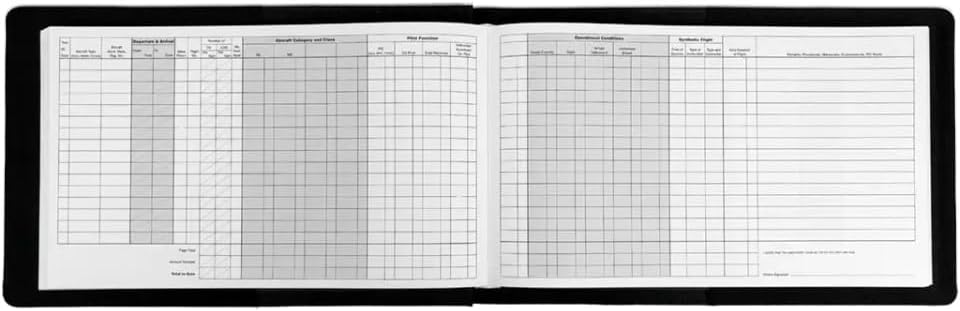
Image: The ASA SP-6 Pilot Master Logbook Cover in its closed state, showcasing the durable black canvas material.
Setup
- Unpack the Cover: Carefully remove the ASA SP-6 Pilot Master Logbook Cover from its packaging.
- Open the Cover: Lay the logbook cover flat on a clean surface, opening it completely.
- Insert Logbook Front: Gently slide the front cover of your logbook into the left internal sleeve of the logbook cover.
- Insert Logbook Back: Slide the back cover of your logbook into the right internal sleeve of the logbook cover.
- Adjust and Secure: Ensure the logbook is centered and securely held within both sleeves. The cover should fit snugly around your logbook.

Image: The ASA SP-6 Pilot Master Logbook Cover shown open with a logbook inserted, illustrating how the logbook fits into the internal sleeves.
Operating Instructions
The logbook cover is designed for continuous use to protect your logbook from wear and tear, spills, and environmental elements. Simply open the cover to access your logbook pages for recording flight information.
- Accessing Logbook: Open the cover like a book to access your logbook pages.
- Internal Pockets: Utilize any internal pockets for storing small documents, pilot certificates, or notes.
- Portability: The compact design allows for easy transport in flight bags or briefcases.
Maintenance
Proper care will ensure the longevity of your logbook cover.
- Cleaning: To clean the logbook cover, gently wipe the exterior with a damp cloth. For stubborn spots, a mild soap solution can be used.
- Drying: Allow the cover to air dry completely before reinserting your logbook. Do not use heat or direct sunlight for drying.
- Avoid Chemicals: Do not use harsh chemicals, abrasive cleaners, or solvents, as these can damage the canvas material.
- Storage: Store the cover in a cool, dry place away from direct sunlight when not in use for extended periods.
Troubleshooting
- Logbook Does Not Fit: Ensure your logbook dimensions are approximately 11 x 6.5 inches. This cover is specifically designed for The Standard Pilot Master Log SP-6 and similarly sized logbooks. Verify your logbook's measurements.
- Cover Appears Creased: Over time, minor creases may appear from use. Gently smooth the fabric by hand. Avoid folding the cover sharply or storing it under heavy objects.
- Stains or Dirt: Refer to the "Maintenance" section for cleaning instructions. Promptly address spills to prevent permanent staining.
Specifications
| Feature | Detail |
|---|---|
| Brand | ASA |
| Model Number | SP-6-CVR |
| Material | 600D Water-resistant Canvas |
| Color | Black |
| Dimensions (fits logbooks up to) | 11 x 6.5 inches |
| UPC | 850017481305 |
Warranty Information
This ASA SP-6 Pilot Master Logbook Cover is covered by a 5 Year Manufacturer Warranty. This warranty covers defects in materials and workmanship under normal use. Please retain your proof of purchase for any warranty claims.
For detailed terms and conditions, or to initiate a warranty claim, please refer to the official ASA website or contact ASA customer service directly.
Support
Should you require assistance, have questions about your logbook cover, or need to report an issue, please contact ASA customer support.
- Online Resources: Visit the official ASA website for product information, FAQs, and support contact details.
- Contact Information: Refer to the ASA website for the most current contact methods, including phone numbers and email addresses for customer service.
