
1. Introduction
This manual provides essential information for setting up, operating, maintaining, and troubleshooting your Motorola Moto G75 Dual-SIM 5G Smartphone. Please read this guide thoroughly to ensure optimal performance and longevity of your device.
The Motorola Moto G75 is a powerful 5G smartphone featuring a 6.78-inch IPS LCD display, a Qualcomm Snapdragon 6 Gen 3 processor, 8GB of RAM, and 256GB of internal storage, expandable via microSDXC. It operates on Android 14 and is equipped with a 5000mAh non-removable battery.
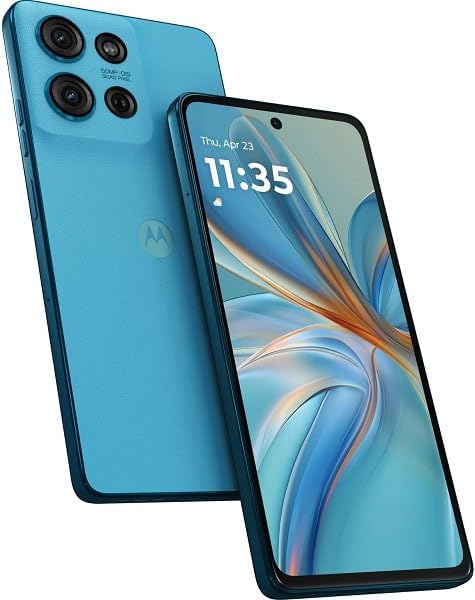
This image displays the Motorola Moto G75 smartphone in its Aqua Blue color. The front view shows the large display with a punch-hole camera, while the rear view highlights the triple camera system and the Motorola logo.
2. Setup
2.1 Unboxing
Upon opening the package, ensure all components are present. The standard package includes the Motorola Moto G75 smartphone and a USB Cable.
2.2 SIM and eSIM Installation
The Moto G75 supports Dual SIM functionality (SIM + eSIM). For physical SIM card installation, locate the SIM tray on the side of the device. Use the provided SIM ejector tool to open the tray. Insert your Nano-SIM card(s) into the designated slots. The device also supports microSDXC expansion, which uses a shared SIM slot. Ensure the SIM tray is securely reinserted.
2.3 Initial Power On and Setup
Press and hold the power button until the Motorola logo appears. Follow the on-screen prompts to complete the initial setup process. This includes selecting your language, connecting to a Wi-Fi network, signing in with your Google account, and setting up security features. The device runs on Android 14, providing a user-friendly interface.
2.4 Charging the Battery
Before first use, it is recommended to fully charge the device. Connect the USB cable to the phone's charging port and the other end to a compatible power adapter. The Moto G75 is powered by a 5000mAh non-removable battery.
3. Operating Your Device
3.1 Basic Navigation
The Moto G75 features a responsive IPS LCD touchscreen. Navigate by tapping, swiping, pinching, and spreading gestures. The Android 14 operating system provides intuitive controls for accessing apps, settings, and notifications.
3.2 Calls and Connectivity
The device supports 5G cellular technology. For calls, use the Phone application. Ensure your SIM card is active and your network provider supports the device's frequencies. The Moto G75 is compatible with GSM, HSDPA, FDD-LTE, and TDD-LTE networks across various bands. For USA buyers, please note this smartphone is not compatible with CDMA networks including VERIZON, SPRINT, and US CELLULAR. Always verify compatibility with your network provider before purchase.
3.3 Camera Usage
The Moto G75 is equipped with a versatile camera system. The rear camera features a 50 MP wide lens (f/1.8, AF), a 5 MP ultrawide lens (f/2.2), and a 2 MP macro lens (f/2.4). The front camera is 13 MP (f/2.0, wide). Open the Camera application to capture photos and videos. Various modes and settings are available to enhance your photography.
3.4 Storage Management
Your device comes with 256GB of internal storage. To manage your files, use the Files app. You can expand storage capacity using a microSDXC card in the shared SIM slot.
4. Maintenance
4.1 Battery Care
To maximize battery life, avoid extreme temperatures. Charge your device using only approved chargers and cables. While the 5000mAh battery provides extended usage, frequent full discharges and charges can impact its long-term health. Consider partial charges when possible.
4.2 Software Updates
Regularly check for and install software updates to ensure your device has the latest features, security patches, and performance improvements. You can typically find update options in the device's Settings menu under 'System' or 'Software Update'.
4.3 Cleaning Your Device
Use a soft, lint-free cloth to clean the screen and body of your phone. Avoid using harsh chemicals or abrasive materials, as these can damage the display or finish. If necessary, slightly dampen the cloth with water.
5. Troubleshooting
5.1 Network Connectivity Issues
- No Signal/Limited Service: Ensure your SIM card is properly inserted. Check with your network provider for service outages in your area. Verify that your device is compatible with your network's frequencies, especially if you are in the USA and using a CDMA network (which is not supported).
- Wi-Fi Connection Problems: Restart your Wi-Fi router and your phone. Forget the network on your phone and reconnect.
5.2 Performance Issues
- Device is Slow/Unresponsive: Close unnecessary background applications. Clear cache for frequently used apps. Restart your device.
- Battery Draining Quickly: Reduce screen brightness. Disable unused features like GPS, Bluetooth, or Wi-Fi when not needed. Check battery usage in settings to identify power-hungry apps.
5.3 Other Common Issues
- Apps Crashing: Ensure apps are updated to their latest versions. Clear app data/cache. Reinstall the app if the issue persists.
- Screen Not Responding: Perform a forced restart by holding the power button for an extended period (usually 10-15 seconds) until the device reboots.
6. Specifications
| Feature | Specification |
|---|---|
| Model Name | Motorola Moto G75 |
| Operating System | Android 14 |
| Processor | Qualcomm Snapdragon 6 Gen 3 (4 nm), Octa-core (4x2.4 GHz Cortex-A78 & 4x1.8 GHz Cortex-A55) |
| RAM | 8GB |
| Internal Storage | 256GB |
| Expandable Storage | microSDXC (uses shared SIM slot) |
| Display Size | 6.78 Inches |
| Display Type | IPS LCD, 1080 x 2388 pixels |
| Rear Camera | 50 MP (wide, f/1.8, AF), 5 MP (ultrawide, f/2.2), 2 MP (macro, f/2.4) |
| Front Camera | 13 MP (wide, f/2.0) |
| Battery Capacity | 5000mAh (non-removable) |
| SIM Type | Dual SIM (SIM + eSIM) |
| Cellular Technology | 5G |
| Wireless Network Technology | LTE |
| Audio Jack | 3.5 mm |
| Color | Aqua Blue |
| Item Weight | 11.6 ounces |
| Package Dimensions | 6.85 x 3.43 x 1.34 inches |
7. Warranty and Support
7.1 Warranty Information
Your Motorola Moto G75 comes with a standard manufacturer's warranty. Please refer to the warranty card included in your product packaging or visit the official Motorola website for detailed terms and conditions regarding warranty coverage and duration.
7.2 Customer Support
For technical assistance, troubleshooting beyond this manual, or service inquiries, please contact Motorola customer support. Support contact information can typically be found on the official Motorola website or within the device's 'Settings' menu under 'About phone' or 'Support'.


