
KCLASO V10
KCLASO Cordless Vacuum Cleaner User Manual
Model: V10
Introduction
The KCLASO V10 Cordless Vacuum Cleaner is designed for efficient and effortless home cleaning. Featuring a powerful 550W motor and 45KPa suction, it handles various cleaning tasks on multiple surfaces. Its intelligent touchscreen, multi-layer filtration system, and ergonomic design ensure a comfortable and thorough cleaning experience. This manual provides essential information for setup, operation, maintenance, and troubleshooting to help you get the most out of your vacuum cleaner.
Setup
Before first use, ensure all components are present and fully charge the battery. The modular design allows for easy assembly.
- Assemble the Main Unit: Connect the telescopic tube to the main vacuum body.
- Attach the Floor Brush: Secure the floor brush to the end of the telescopic tube.
- Install the Battery: Slide the rechargeable battery pack into the designated slot on the main unit until it clicks into place.
- Initial Charge: Fully charge the battery using the original adapter (identifiable by "V10 VACUUM"). The touchscreen will indicate battery percentage.


Operating Instructions
The KCLASO V10 offers intuitive operation with its intelligent touchscreen and versatile attachments.
Power Modes and Suction Adjustment
- The LED touchscreen allows for quick switching between 3 suction levels with a simple tap.
- The display shows real-time remaining battery life and current suction power.
- Choose from Min, Mid, or Max modes to suit your cleaning needs.

Versatile Cleaning with Attachments
The vacuum comes with various practical attachments for different cleaning scenarios:
- Crevice Tool: Ideal for hard-to-reach areas, window sills, frames, and car interiors.
- 2-in-1 Furniture Brush: Suitable for cleaning curtains, furniture surfaces, and soft furnishings.
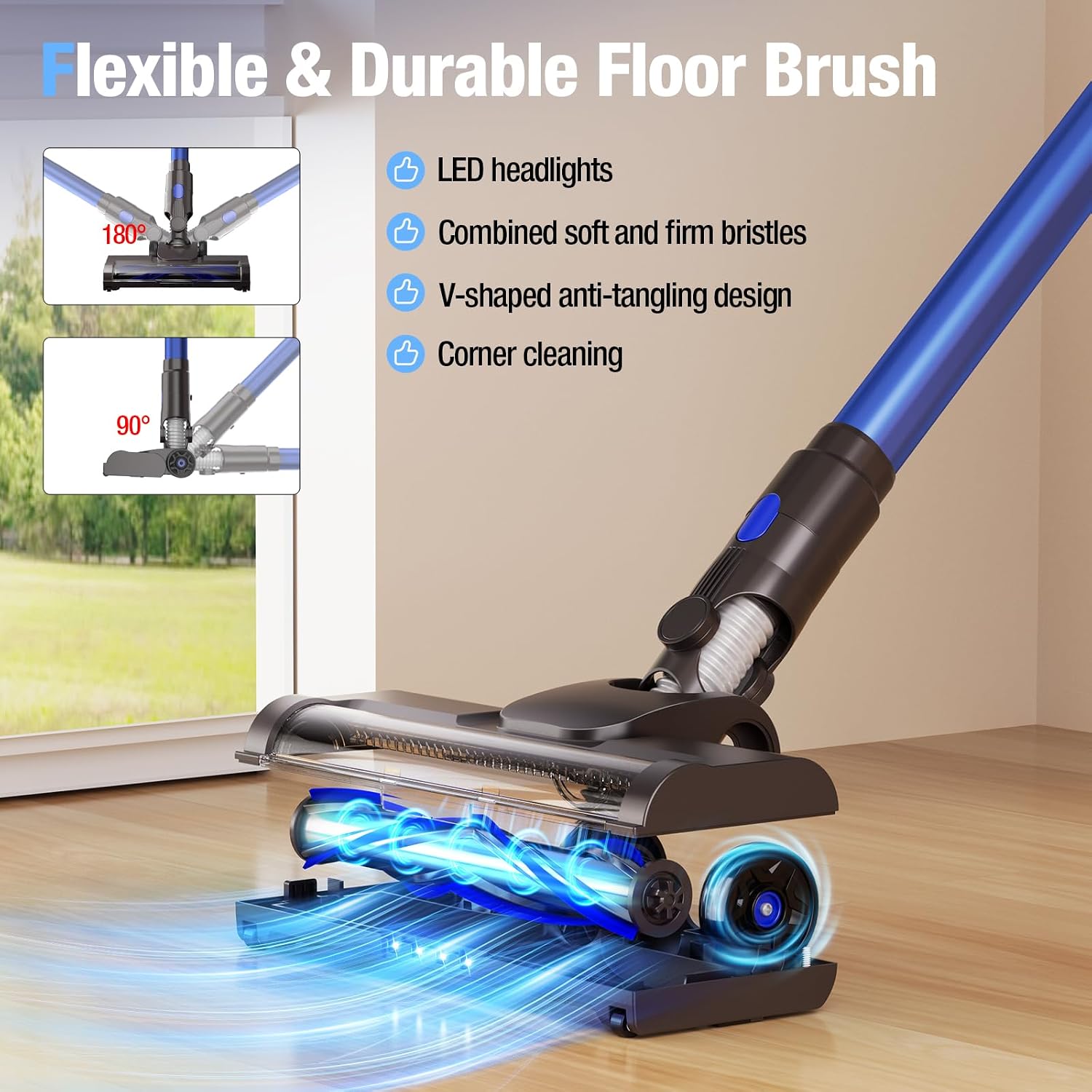
- The flexible swivel head rotates 0° to 180° sideways and 0° to 90° up and down, effortlessly reaching under furniture and into corners.
- Front LED lights illuminate the cleaning path, revealing hidden dust and debris.

Official Product Video
Video 1: A detailed review of the KCLASO Cordless Vacuum Cleaner, highlighting its lightweight design, powerful suction, and ease of use for various cleaning tasks. This video is provided by the seller, KCLASO US.
Maintenance
Regular maintenance ensures optimal performance and extends the lifespan of your vacuum cleaner.
Dust Cup Cleaning
- The dust cup has a one-touch dump design for easy, hygienic waste disposal.
- Press the button to release and empty the dust cup.
- Wash the dust cup and filters with cold water and dry completely before re-use.

Filter Cleaning
- The vacuum features a 6-layer filtration system including a HEPA filter, stainless steel filter, and sponge filters.
- For optimal performance, clean the HEPA filter every 2-3 weeks and replace it every 3 months.
- Ensure the dust cup’s exhaust port is aligned with the filter during assembly for proper installation.

Roller Brush Cleaning
- The innovative V-shaped roller brush and comb design guide hair smoothly into the air duct, reducing tangling.
- If the red anti-tangle alert lights up on the touchscreen, clean the floor brush.
- Remove the brush roller and clean any debris or tangled hair.

Troubleshooting
- Vacuum ceases functioning: Inspect the floor brush and air intake for any obstructions.
- Reduced suction power: Check if the dust cup is full and needs emptying. Clean or replace the HEPA filter if it's clogged. Ensure the dust cup's exhaust port is properly aligned with the filter.
- Short runtime: Ensure you are using the original "V10 VACUUM" adapter for charging. Fully charge the battery before each use. Note that runtime may vary on long pile carpets (under 20 minutes in MAX mode, or less than 40 minutes in MIN mode).
- Battery not charging: Verify the original adapter is used and properly connected. Ensure the battery is fully inserted into the main unit or charging dock.
Specifications
| Feature | Description |
|---|---|
| Brand | KCLASO |
| Model Name | V10 |
| Motor Horsepower | 550 Watts |
| Suction Power | 45KPa (Max Mode) |
| Power Modes | 3 (Min, Mid, Max) |
| Battery Type | Lithium-Ion (6 x 2500mAh) |
| Runtime | Up to 45 minutes (Min Mode) |
| Charging Time | 5 Hours |
| Dust Cup Capacity | 0.5 Liters (16 ounces) |
| Filtration System | 6-Layer (HEPA, Stainless Steel, Sponge Filters) |
| Noise Level | <75dB |
| Product Dimensions | 15"L x 12"W x 7"H |
| Item Weight | 6.43 pounds |
| Special Features | LED Headlight, Self-Standing, Bendable Brush, Touch Screen, 6-in-1 Combinations |
Warranty & Support
For warranty information, technical support, or service inquiries, please refer to the contact information provided in your product packaging or visit the official KCLASO website. KCLASO is committed to providing comprehensive after-sales support to ensure a positive customer experience.
Ask a question about this manual
Ask about setup, troubleshooting, compatibility, parts, safety, or missing instructions. Manuals+ will review the question and use this page’s manual context to help answer it.