
1. Introduction and Overview
The Meliconi TLC EVO.5 is a pre-programmed infrared remote control designed for seamless operation with all Thomson and TCL televisions that feature integrated DTT (Digital Terrestrial Television). This remote is ready to use right out of the box, requiring no complex programming before accessing 100% of the original remote control functions.
It includes dedicated direct access keys for popular streaming services such as Netflix, YouTube, and Amazon Prime Video, making it ideal for controlling modern smart televisions. The SMART HOME button provides quick access to your TV's application menu. Secondary functions can be accessed via the "M" key. The remote features a wide-angle, long-range infrared signal for reliable control and retains its configuration even when batteries are removed.
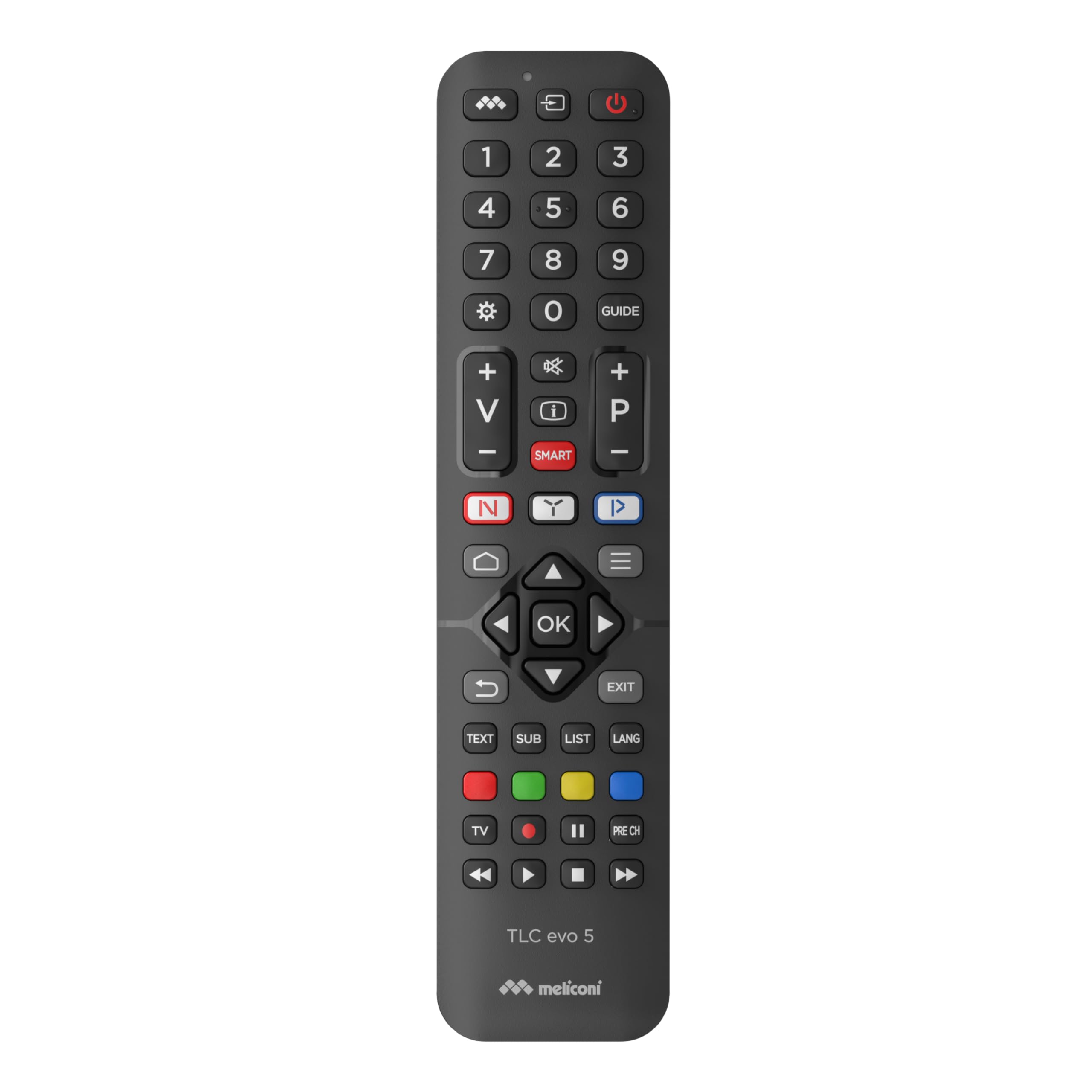
Image 1: Angled view of the Meliconi TLC EVO.5 remote control, showcasing its ergonomic design and button layout.
2. Setup
2.1. Battery Installation
- Locate the battery compartment cover on the back of the remote control.
- Slide the cover downwards or press the latch (if present) to open the compartment.
- Insert two (2) 1.5V AAA/LR03 alkaline batteries, ensuring the correct polarity (+ and -) as indicated inside the compartment. The remote features mechanical anti-inversion protection for batteries.
- Replace the battery compartment cover, sliding it back into place until it clicks securely.
Note: Batteries are not included with the remote control. Always use new, high-quality alkaline batteries for optimal performance. The remote retains its configuration even without batteries.

Image 2: Top-down view of the remote control, showing the full button layout, useful for identifying the battery compartment on the reverse side.
2.2. First Use (No Programming Required)
The Meliconi TLC EVO.5 remote control is pre-programmed for Thomson and TCL televisions. After installing the batteries, it is ready for immediate use. Simply point the remote at your television and begin operating it as you would with your original remote control.
3. Operating Instructions
This section details the primary functions of the Meliconi TLC EVO.5 remote control.

Image 3: The remote control positioned next to a television, illustrating its intended use.
3.1. Basic Functions
- Power Button (⏻): Turns the television on or off.
- Number Buttons (0-9): Selects TV channels directly.
- Volume Up/Down (+/-): Adjusts the television volume.
- Channel Up/Down (P+/P-): Changes TV channels sequentially.
- Mute Button (🔇): Mutes or unmutes the television audio.
- Navigation Arrows (▲ ▼ ◄ ►) and OK Button: Used to navigate menus and confirm selections.
- Exit Button: Exits current menu or function.
- Back/Return Button (↶): Returns to the previous screen or menu.
3.2. Smart Functions and Direct Access Keys
- Netflix Button (N): Provides direct access to the Netflix streaming service.
- YouTube Button (▶): Provides direct access to the YouTube video platform.
- Amazon Prime Video Button (▶): Provides direct access to the Amazon Prime Video streaming service.
- SMART HOME Button (⌂): Opens the television's smart home or application menu.
- "M" Key: Accesses secondary functions, which may vary depending on your television model. Refer to your TV's original manual for specific secondary functions.

Image 4: A user holding the remote control, demonstrating its comfortable grip and ease of use for accessing smart TV features.
3.3. Infrared Signal
The remote control utilizes a wide-angle, long-range infrared signal. For optimal performance, ensure there is a clear line of sight between the remote control's emitter and the television's infrared receiver. An indicator light on the remote confirms signal transmission.
4. Maintenance
4.1. Battery Replacement
When the remote control's response becomes sluggish or inconsistent, it is time to replace the batteries. Follow the steps outlined in Section 2.1. Battery Installation. Always replace both batteries simultaneously with new ones.
4.2. Cleaning
To clean the remote control, gently wipe it with a soft, dry cloth. For stubborn dirt, slightly dampen the cloth with water or a mild, non-abrasive cleaner. Avoid using harsh chemicals, solvents, or abrasive materials, as these can damage the remote's surface or internal components.
4.3. Storage
Store the remote control in a cool, dry place away from direct sunlight, extreme temperatures, and high humidity. If the remote will not be used for an extended period, it is advisable to remove the batteries to prevent leakage and potential damage.
5. Troubleshooting
- Remote not responding:
- Check if the batteries are correctly inserted with the correct polarity.
- Replace the batteries with new ones.
- Ensure there are no obstructions between the remote and the TV's infrared receiver.
- Verify that the remote is pointed directly at the TV.
- Specific functions not working:
- While the remote is designed to work with 100% of original functions, some advanced or TV-specific features might require the original TV remote or specific TV settings.
- Ensure your TV is a Thomson or TCL model with infrared capability.
- Indicator light not flashing:
- This usually indicates dead or incorrectly inserted batteries. Replace or reinsert batteries.
6. Specifications
| Model Name: | TLC Evo.5 |
| Brand: | Meliconi |
| Compatible Devices: | Thomson and TCL Televisions |
| Connectivity Technology: | Infrared |
| Special Feature: | Smart (Direct access to streaming services) |
| Color: | Black |
| Number of Buttons: | Multiple, including 3 direct access keys |
| Controller Type: | Tactile Control |
| Power Source: | 2 x 1.5V AAA/LR03 Alkaline Batteries (not included) |
7. Support
For further assistance or inquiries regarding your Meliconi TLC EVO.5 remote control, please refer to the official Meliconi website or contact their customer support. Keep your purchase receipt for any warranty-related claims.
You can visit the Meliconi Store on Amazon for more product information.


