
1. Introduction
This manual provides comprehensive instructions for the proper use and maintenance of your FalconEye Electronics Patriot Convertible Bluetooth Headset (Model HDE-1088). Please read this manual thoroughly before operating the device to ensure optimal performance and longevity.
The Patriot Convertible Headset offers a versatile design, allowing users to switch between single-ear and dual-ear configurations. It features advanced noise cancellation, stereo sound, and Bluetooth 5.0 technology for reliable connectivity.
2. What's Included
The package contains the following items:
- Patriot Convertible Bluetooth Headset
- USB charging cable
- User Manual (this document)
- Additional ear cup for dual-ear conversion

Figure 1: Package contents including the headset, USB charging cable, and user manual.
3. Key Features
- Convertible Design: Easily switch between single-ear headset and dual-ear headphones by replacing the side pad with the second ear cup.
- 10x Noise Cancellation: Minimizes background noise for clear communication in loud environments.
- Stereo Sound: Provides crisp audio for conversations, music, and videos.
- Hands-Free Use: Lightweight, comfortable design with an adjustable boom microphone for clear calls.
- Long Battery Life: Up to 35+ hours of talk/listening time and approximately 200 hours of standby time.
- Adjustable Microphone: Can be positioned on either ear or retracted when not in use.
- Bluetooth 5.0 Technology: Allows connection to two devices simultaneously, compatible with cell phones, laptops, tablets, and various communication applications.
- Comfortable Fit: Over-ear lightweight design ensures comfort during extended wear.
4. Setup and Initial Use
4.1. Charging the Headset
Before first use, fully charge the headset. Use the provided USB charging cable to connect the headset to a compatible USB power source.
- Connect the USB-C end of the charging cable to the charging port on the headset.
- Connect the USB-A end to a USB wall adapter or a computer's USB port.
- The LED indicator on the headset will illuminate red during charging and turn blue when fully charged.
- A full charge typically takes approximately 2 hours.
Video 1: Demonstrates charging the headset. The red light indicates charging, and blue indicates a full charge.
4.2. Powering On/Off
- To power on, press and hold the Power button (usually marked with a power symbol) on the headset for approximately 4 seconds until the LED indicator flashes.
- To power off, press and hold the Power button for approximately 4 seconds until the LED indicator turns off.
4.3. Bluetooth Pairing
The headset can be paired with up to two devices simultaneously.
- Ensure the headset is powered off.
- Press and hold the Power button for approximately 6-8 seconds until the LED indicator flashes red and blue alternately. This indicates pairing mode.
- On your device (smartphone, laptop, tablet), enable Bluetooth and search for available devices.
- Select "Patriot Convertible Headset" from the list of devices.
- Once connected, the LED indicator on the headset will flash blue slowly.
Video 2: Demonstrates the Bluetooth pairing process, showing the LED indicator status during pairing.
4.4. Converting Between Single and Dual Ear Modes
The Patriot headset offers flexibility to adapt to your needs.
- To convert to single-ear mode: Gently detach one of the ear cups by pressing the release button (if present) or sliding it off the headband. Replace it with the provided side pad.
- To convert to dual-ear mode: Remove the side pad and attach the second ear cup to the headband. Ensure it clicks securely into place.

Figure 2: The headset configured for single-ear use, showing the microphone boom.
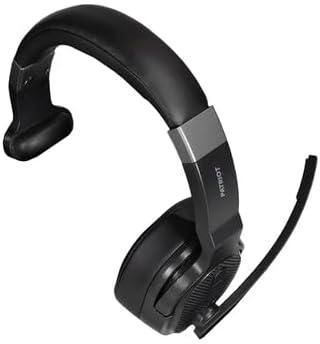
Figure 3: The headset configured for dual-ear use, providing stereo sound.
5. Operating Instructions
5.1. Call Management
- Answer/End Call: Press the Multi-Function Button (MFB) once.
- Reject Call: Press and hold the MFB for approximately 2 seconds.
- Redial Last Number: Double-press the MFB.
- Mute/Unmute Microphone: Press the dedicated Mute button on the microphone boom or the headset earcup.
5.2. Audio Control
- Volume Up: Press the Volume Up (+) button.
- Volume Down: Press the Volume Down (-) button.
- Next Track: Press and hold the Volume Up (+) button.
- Previous Track: Press and hold the Volume Down (-) button.
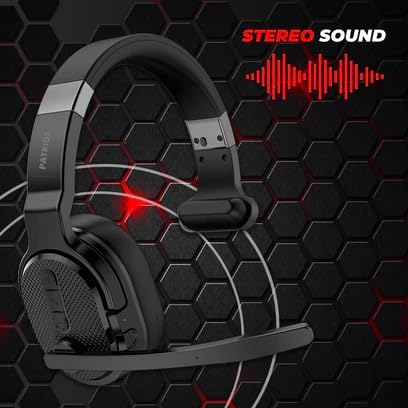
Figure 4: Detailed view of the control buttons on the headset earcup.
5.3. Microphone Adjustment
The flexible boom microphone can be adjusted for optimal voice pickup.
- Position the microphone approximately 1-2 inches from your mouth for the clearest audio.
- The microphone can be rotated 180 degrees to be used on either the left or right ear.
- When not in use, the microphone can be rotated upwards and out of the way.
6. Maintenance and Care
- Cleaning: Use a soft, dry cloth to clean the headset. Do not use abrasive cleaners or solvents.
- Storage: Store the headset in a cool, dry place away from direct sunlight and extreme temperatures.
- Battery Care: To prolong battery life, avoid fully discharging the headset frequently. Charge it regularly, even if not in constant use.
- Avoid Water: The headset is not waterproof. Avoid exposure to water or excessive moisture.
7. Troubleshooting
7.1. Headset Not Powering On
- Ensure the headset is fully charged. Connect it to a power source and check the LED indicator.
- Try pressing and holding the Power button for a longer duration (up to 10 seconds).
7.2. Cannot Pair with Device
- Make sure the headset is in pairing mode (LED flashing red and blue alternately).
- Ensure Bluetooth is enabled on your device and it is within range (up to 200ft+ / 61 meters).
- Forget the headset from your device's Bluetooth list and try pairing again.
- Restart both the headset and your device.
7.3. Poor Audio Quality or Static
- Ensure the headset is within the effective Bluetooth range of your device. Obstacles like walls or other electronic devices can interfere with the signal.
- Check the volume levels on both the headset and your connected device.
- Ensure the microphone is properly positioned and not obstructed.
- Disconnect and reconnect the headset to your device.
Video 3: Demonstrates the headset's audio quality in a noisy environment, highlighting its noise cancellation capabilities.
8. Specifications
| Feature | Detail |
|---|---|
| Model Name | Patriot Convertible Headset |
| Item Model Number | HDE-1088 |
| Connectivity Technology | Bluetooth 5.0 |
| Bluetooth Range | Up to 61 meters (200ft+) |
| Noise Control | Active Noise Cancellation (10x) |
| Battery Life (Talk/Listen) | Up to 35+ Hours |
| Standby Time | Approximately 200 Hours |
| Charging Time | Approx. 2 hours |
| Item Weight | 7.8 Ounces |
| Compatible Devices | Cellphones, Laptops, Tablets |
| Special Features | Adjustable Headband, Multipoint Pairing, Noise Cancellation |
9. Warranty and Support
For warranty information and customer support, please refer to the official Falcon Electronics website or contact their customer service directly. Details are typically provided on the product packaging or a separate warranty card.
Protection plans are available for purchase separately to extend coverage beyond the standard manufacturer's warranty. Please check with your retailer for available options.