
Introduction
Thank you for choosing the GLARRY DGBWS 88-Key Semi-Weighted Digital Piano. This manual provides essential information for the proper setup, operation, and maintenance of your new instrument. Please read it thoroughly to ensure optimal performance and longevity of your digital piano.

Image: The GLARRY DGBWS 88-Key Semi-Weighted Digital Piano in black, showcasing its sleek design and full keyboard.
Key Features
- 88 Semi-Weighted Keys: Provides a realistic piano feel with sensitive touch response, suitable for beginners.
- Rich Tones: Features 128 polyphony, 128 demo songs, 128 rhythms, and 380 timbres for diverse musical expression.
- Built-in Speakers: Equipped with two 15W stereo speakers for clear and delicate sound.
- Dual Bluetooth Connectivity: Supports both Audio Bluetooth for streaming and MIDI Bluetooth for connecting to computers or tablets.
- Multi-functionality: Includes split function for duet playing, recording/playback, metronome, and touch sensitivity adjustment.
- Quiet Mode: A 3.5mm headphone jack allows for private practice without disturbing others.
- Sturdy Design: Comes with a removable music stand and a stable stand structure.

Image: The digital piano's control panel highlighting its various functions like polyphony, demo songs, rhythm, and timbre.
Setup Instructions
- Unpacking: Carefully remove all components from the packaging. Ensure the power cord and earphones are located in the white foam on both sides of the package.
- Stand Assembly: Attach the legs to the digital piano body. Ensure all screws are tightened securely for stability.
- Pedal Connection: Connect the triple pedal unit to the designated port on the piano.
- Music Stand Installation: The removable music stand slides into the slots on top of the piano.
- Power Connection: Connect the power adapter to the DC-5V input on the piano and then to a power outlet.

Image: The GLARRY digital piano fully assembled on its stand, ready for use.
Video: A demonstration of the 88-key semi-weighted keyboard, showcasing its features and ease of assembly.
Operating Instructions
Basic Operation
- Power On/Off: Press the 'POWER' button to turn the piano on or off.
- Volume Adjustment: Use the 'VOLUME' buttons to increase or decrease the sound level.
- Tone Selection: Press 'TONE' and use the 'SELECT' knob to browse and choose from 380 different timbres.
- Rhythm Selection: Press 'RHYTHM' and use the 'SELECT' knob to choose from 128 rhythms.
- Demo Songs: Press 'DEMO' to play through the 128 built-in demo songs.
Advanced Functions
- Split Function: Press 'SPLIT' to divide the keyboard into two sections, allowing two players to use the instrument simultaneously.
- Recording & Playback: Use the 'RECORD' and 'PLAY' buttons to record your performances and play them back.
- Metronome: Activate the 'METRONOME' for timing assistance during practice.
- Touch Sensitivity: Adjust the 'TOUCH' setting to modify the keyboard's response to your playing dynamics.
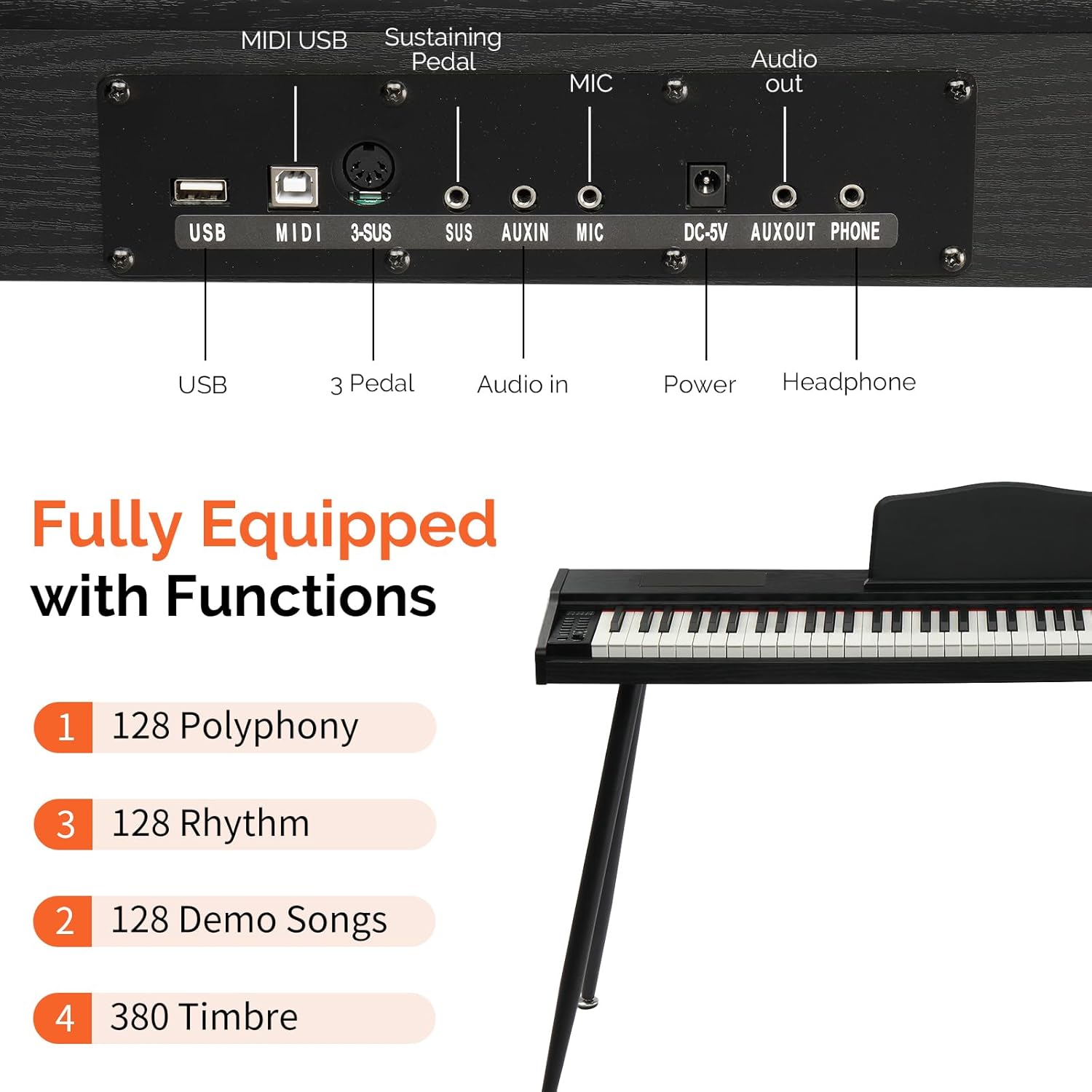
Image: A detailed view of the digital piano's control panel, showing buttons for volume, tone, rhythm, demo, split, record, play, metronome, and touch.
Connectivity
- Dual Bluetooth: The piano supports both Audio Bluetooth for wireless audio streaming and MIDI Bluetooth for connecting to music apps on your computer or tablet.
- USB MIDI: Connect a computer or tablet via a USB cable for multimedia interaction and advanced MIDI control.
- Headphone Jack: Use the 3.5mm headphone jack for silent practice. Earphones are included with the product.
- Audio Out: Connect to external amplification systems or recording devices.
- AUX IN: Connect external audio sources to play along with your favorite music.

Image: The digital piano with a graphic indicating Bluetooth wireless connectivity for smartphones, tablets, and other devices.
Sound and Tones
The GLARRY DGBWS digital piano is designed to provide a rich and expressive sound experience. With 128 polyphony, it ensures that complex musical passages are rendered clearly without note drop-out. The instrument offers 380 different timbres, allowing you to explore a wide range of instrument sounds beyond a traditional piano. The built-in 15W stereo speakers deliver a full and delicate sound, enhancing your playing and listening experience.

Image: A visual representation of the digital piano's two 15W stereo speakers, emphasizing perfect sound quality and stereo surround effect.
Maintenance
- Cleaning: Use a soft, dry cloth to wipe the surface of the piano. Avoid using abrasive cleaners or solvents.
- Dust Protection: When not in use, cover the keyboard with a dust cover to prevent dust and debris from accumulating on the keys and internal components.
- Storage: Store the piano in a cool, dry place away from direct sunlight and extreme temperatures.
- Power Cord: Always unplug the power cord from the outlet when the piano is not in use for extended periods.
Troubleshooting
- No Sound: Check if the power is on and the volume is turned up. Ensure headphones are not plugged in if you intend to use the speakers. Verify all cables are securely connected.
- Distorted Sound: Reduce the volume. Check for any loose connections or interference from other electronic devices.
- Keys Not Responding: Ensure the piano is powered on. If specific keys are unresponsive, contact customer support.
- Bluetooth Connectivity Issues: Ensure Bluetooth is enabled on both the piano and your device. Try restarting both devices.
Specifications
| Feature | Specification |
|---|---|
| Brand | GLARRY |
| Model Name | DGBWS |
| Number of Keys | 88 |
| Key Type | Semi-Weighted |
| Polyphony | 128 |
| Demo Songs | 128 |
| Rhythms | 128 |
| Timbres | 380 |
| Speakers | 2 x 15W Stereo |
| Connectivity | Dual Bluetooth (Audio & MIDI), USB Type A, 3.5mm Headphone Jack, AUX IN, Audio Out |
| Power Source | Corded Electric (DC-5V) |
| Item Dimensions (D x W x H) | 54.3" x 21.9" x 29.9" |
Warranty and Support
This GLARRY DGBWS Digital Piano comes with a 180-day warranty from the date of purchase. For warranty claims, technical support, or any inquiries regarding your product, please contact GLARRY customer service through the retailer where the product was purchased. Please retain your proof of purchase for warranty validation.


