YDS-CICOE-DHK800W-A1 V1.1 8.46MP IMX415 MIPI Interface Fixed Focus Camera Module
Model: YDS-CICOE-DHK800W-A1 V1.1 | Brand: Generic
Introduction
The YDS-CICOE-DHK800W-A1 V1.1 is a MIPI interface fixed focus camera module featuring the IMX415-AAQR sensor. This sensor is a diagonal 6.4 mm (Type 1/2.8) CMOS active pixel type solid-state image sensor with a square pixel array and 8.46 M effective pixels. It operates with analog 2.9 V, digital 1.1 V, and interface 1.8 V triple power supply, ensuring low power consumption. The module achieves high sensitivity, low dark current, and no smear through the use of R, G, and B primary color mosaic filters. It incorporates an electronic shutter with variable charge-integration time, making it suitable for applications such as surveillance cameras, FA cameras, and industrial cameras.
Safety Information
- Handle the camera module with care to avoid damage to the lens or flexible printed circuit (FPC).
- Ensure proper electrostatic discharge (ESD) precautions are taken when handling the module to prevent damage to sensitive electronic components.
- Do not expose the module to extreme temperatures, humidity, or corrosive environments. Operating temperature range is -30°C to +85°C.
- Verify power supply voltages (analog 2.9V, digital 1.1V, interface 1.8V) are within specified limits before connecting.
- Avoid direct exposure of the lens to strong light sources, as this may cause sensor damage.
- Keep the module away from magnetic fields that could interfere with its operation.
Product Overview
The YDS-CICOE-DHK800W-A1 V1.1 camera module consists of a lens assembly, an image sensor, and a flexible printed circuit (FPC) for MIPI interface connectivity. Its compact design allows for integration into various systems requiring high-resolution imaging.

Figure 1: Angled view of the YDS-CICOE-DHK800W-A1 V1.1 camera module, showing the lens and the flexible ribbon cable.

Figure 2: Front view of the camera module, highlighting the lens and the mounting points on the sensor board.

Figure 3: Rear view of the camera module, showing the back of the sensor board and the FPC connector.
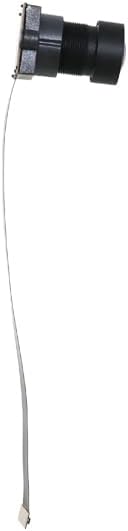
Figure 4: Side view of the camera module, illustrating the profile of the lens assembly and the FPC.
Setup
Follow these steps for the initial setup of your camera module:
- Prepare the Host System: Ensure your host system (e.g., development board, embedded system) is compatible with MIPI interface cameras and has the necessary drivers and software installed.
- Connect the FPC: Carefully connect the flexible printed circuit (FPC) of the camera module to the corresponding MIPI CSI-2 connector on your host system. Ensure the connection is secure and correctly oriented. The mating connector is BAF04-30083-0500.
- Power On: Apply power to your host system. The camera module will draw power from the host system via the MIPI interface.
- Driver Installation/Verification: Confirm that the necessary camera drivers are recognized and loaded by your operating system or embedded software.
- Software Configuration: Use your system's camera application or development environment to configure the camera settings, such as resolution, frame rate, and image format.
Video 1: An overview of the YDS-CICOE-DHK800W-A1 V1.1 High Quality Camera Module, demonstrating its physical appearance and key features. This video is provided by the seller, YingDeShun Co. Ltd.
Operating Instructions
Once the camera module is set up and recognized by your system, you can begin operation. The module supports various readout modes and features:
- Image Capture: Utilize your system's software to initiate image or video capture. The recommended recording pixels are 3840 (H) × 2160 (V), approximately 8.29 M pixels.
- Readout Modes: The module supports All-pixel scan mode, Horizontal / Vertical 2/2-line binning mode, Window cropping mode, and Horizontal / Vertical direction - Normal / Inverted readout mode. Select the appropriate mode based on your application requirements.
- Frame Rate: The maximum frame rate in All-pixel scan mode is 60.3 frames/s for 12-bit output and 90.9 frames/s for 10-bit output.
- High Dynamic Range (HDR): The module includes an HDR function with Multiple exposure HDR and Digital overlap HDR capabilities, enhancing image quality in challenging lighting conditions.
- Input Frequency: The module supports input frequencies of 24 MHz, 27 MHz, 37.125 MHz, 72 MHz, and 74.25 MHz.
- Built-in Circuits: Features a built-in timing adjustment circuit, H/V driver, and serial communication circuit for streamlined integration.
Maintenance
Proper maintenance ensures the longevity and optimal performance of your camera module:
- Cleaning the Lens: Use a soft, lint-free cloth specifically designed for optical lenses to gently clean the lens surface. Avoid abrasive materials or harsh chemicals.
- Dust Prevention: When not in use, store the camera module in a clean, dust-free environment. Consider using a protective cap for the lens.
- Environmental Conditions: Operate and store the module within the specified temperature and humidity ranges to prevent condensation or overheating.
- Handling: Always handle the module by its edges or mounting points, avoiding direct contact with the sensor or FPC.
Troubleshooting
If you encounter issues with your camera module, refer to the following common problems and solutions:
| Problem | Possible Cause | Solution |
|---|---|---|
| No image output | Incorrect FPC connection, missing/incorrect drivers, power issue. | Ensure FPC is securely connected. Install or update camera drivers. Verify power supply to the host system. |
| Poor image quality (blurry, noisy) | Dirty lens, insufficient lighting, incorrect software settings. | Clean the lens. Provide adequate lighting. Adjust software settings (e.g., exposure, gain, white balance). |
| Module not detected by system | Driver issue, hardware incompatibility, damaged FPC. | Reinstall drivers. Check system compatibility with MIPI CSI-2. Inspect FPC for damage. |
| Module overheating | Poor ventilation, excessive ambient temperature. | Ensure adequate airflow around the module. Operate within specified temperature range. |
Specifications
| Feature | Description |
|---|---|
| Model Number | YDS-CICOE-DHK800W-A1 V1.1 |
| Sensor Type | 1/2.8" CMOS IMX415-AAQR |
| Effective Pixels | 8.46 MP (3840 x 2160) |
| Pixel Size | 1.45 µm x 1.45 µm |
| Connectivity Technology | MIPI Interface |
| Lens Type | Fixed Focus, 650nm IR Cut |
| EFL (Effective Focal Length) | 2.70 mm |
| F.NO (F-number) | 2.80 |
| View Angle | 105.0° (DFOV), 92.8° (HFOV), 60.3° (VFOV) |
| Lens Dimensions | 15.30 x 15.30 x 23.40 mm |
| Module Size | 119.30 x 22.00 mm |
| Operating Temperature | -30°C to +85°C |
| Power Supply | Analog 2.9V, Digital 1.1V, Interface 1.8V |
| Max Frame Rate (All-pixel scan) | 12 bit: 60.3 fps, 10 bit: 90.9 fps |
| Video Capture Resolution | 4K |
| Video Capture Format | MJPG |
| Country of Origin | China |
What's in the Box
The product package includes the following item:
- YDS-CICOE-DHK800W-A1 V1.1 Camera Module
Warranty and Support
For information regarding warranty coverage, technical support, or service, please refer to the documentation provided with your purchase or contact the manufacturer/seller directly. Keep your proof of purchase for any warranty claims.


