
1. Product Overview
The treewell 240° & 360° Replacement Motion Sensor is designed to enhance security and convenience for outdoor lighting fixtures. This sensor features adjustable time and detection sensitivity, offering a wide sensing range and multiple operating modes to suit various needs. It is UL Listed for safety and reliability.

Image 1.1: treewell 240° & 360° Replacement Motion Sensor, White model.
2. Key Features
- Versatile Operating Modes: Includes Auto Mode, 3hrs/5hrs Countdown Mode, Day-to-Dusk (D2D) Mode, and Manual Override Mode.
- Adjustable Detection: Customize delay time (1, 5, or 20 minutes) and sensitivity (up to 70 feet range).
- Wide Sensing Angle: Provides a 240° forward detection range and a 360° downward sensing angle (up to 21 feet).
- Flexible Sensor Head: Features a 360-degree rotatable pivot arm for easy adjustment and optimal positioning.
- Easy Replacement: Designed to repair or upgrade existing light fixtures without full replacement.
- Broad Compatibility: Supports Max. 500W Incandescent Lamps and Max 120W LED DRIVER/LED Bulbs.
- Durable Design: IP44 waterproof rating for outdoor use in various weather conditions.
3. Operating Modes
The motion sensor offers four distinct operating modes, selectable via the 'SET MODE' knob:
- Auto Mode (Motion Sensor): When motion is detected in darkness, the connected light will turn on. The light will remain on for a preselected time delay (1, 5, or 20 minutes) after the last detected motion, then turn off.
- 3hrs/5hrs Countdown Mode: The light automatically turns on at night and stays on for either 3 or 5 hours. After the countdown, it transitions into Auto Mode, functioning only during nighttime hours.
- Day-to-Dusk (D2D) Mode: The light automatically turns on at night and remains on until daytime, then turns off. This mode provides continuous illumination throughout the night.
- Manual Override Mode: Allows for manual control of the light. When activated, the light will stay on for 8 hours continuously, then automatically turn off at dawn.

Image 3.1: Visual representation of the four operating modes and their functions.
4. Adjustments
The sensor features three adjustable knobs for fine-tuning its operation:
- SENSITIVITY Knob: Adjusts the detection range from 5 feet to 70 feet. Rotate the knob to increase or decrease the sensor's sensitivity to motion.
- ON-TIME Knob: Sets the duration the light remains on after motion is detected. Options include 1 minute, 5 minutes, or 20 minutes. A 'Test' setting is also available for initial setup.
- SET MODE Knob: Selects one of the four operating modes: Motion (Auto Mode), 3hrs, 5hrs, or D2D (Day-to-Dusk).

Image 4.1: Detailed view of the sensor's adjustment knobs.
Flexible Sensor Neck
The sensor is equipped with a flexible, 360-degree rotatable pivot arm. This design allows for easy and precise adjustment of the sensor's direction, ensuring optimal coverage for various outdoor and indoor wall or eave mount applications.

Image 4.2: Illustration of the flexible sensor neck and product dimensions.
5. Installation
This replacement motion sensor is designed for straightforward installation, allowing you to upgrade or repair existing floodlight fixtures. Ensure power is disconnected before beginning installation.
Wiring Instructions:
- Connect the Green or Bare Wire to the Ground wire.
- Connect the White Wire to the Neutral wire.
- Connect the Black Wire to the Live wire.
Wire nuts are included for secure connections. After wiring, mount the sensor to your desired location (e.g., porch, backyard, garage) and adjust the sensor head for optimal detection.
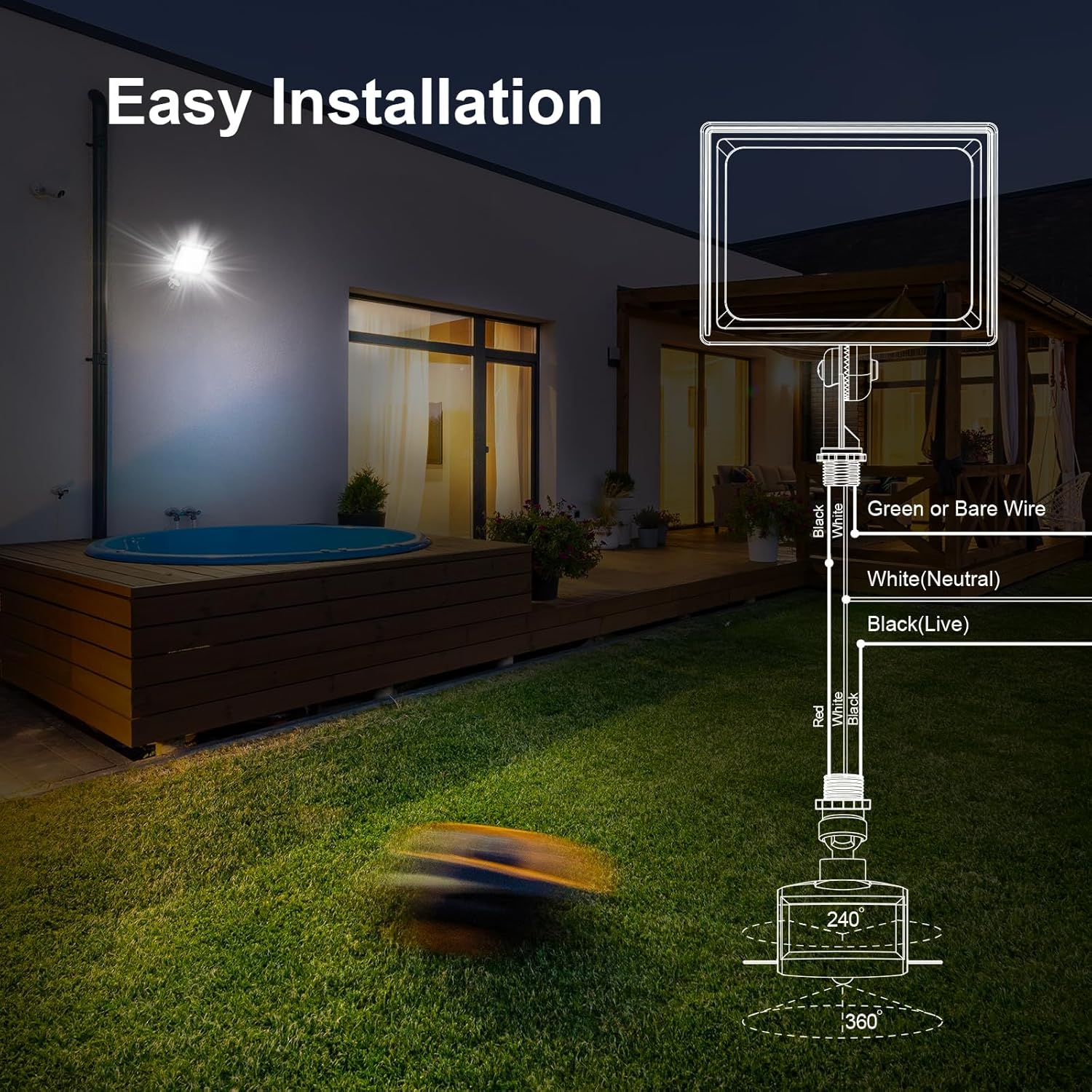
Image 5.1: Wiring diagram and typical installation scenario.
6. Detection Area
The treewell motion sensor provides comprehensive coverage with its dual detection capabilities:
- Forward Detection: Up to 70 feet range with a 240° angle.
- Downward Detection: Up to 21 feet range with a 360° angle.
This combination ensures a broad and effective sensing area, minimizing blind spots and enhancing security around your property.
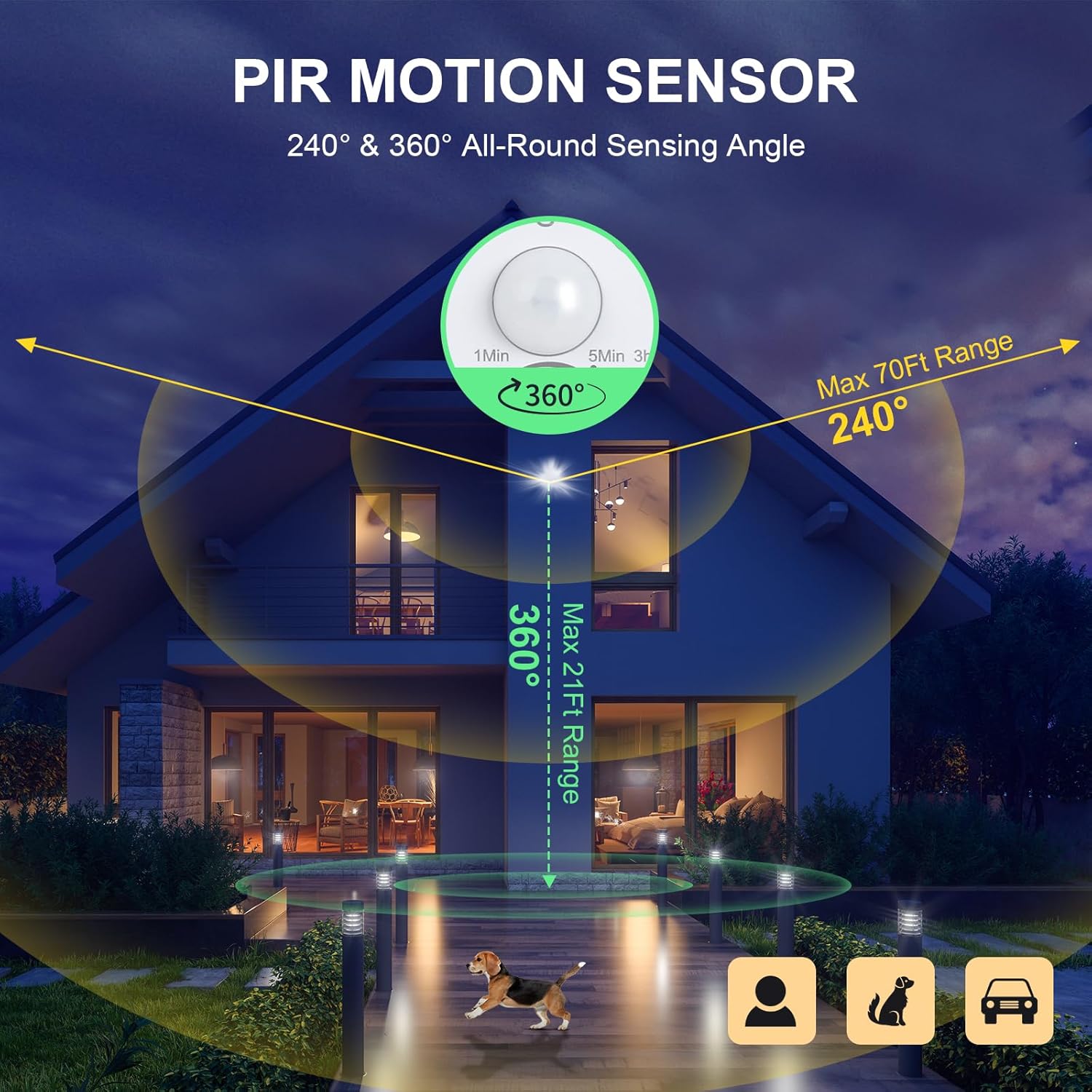
Image 6.1: Illustration of the sensor's detection angles and ranges.
7. Environmental Considerations
The treewell motion sensor is designed for outdoor use with an IP44 waterproof rating, ensuring protection against splashing water from any direction. It is built to operate reliably in a wide range of temperatures, from -22°F to 122°F (-30°C to 50°C).

Image 7.1: The sensor's IP44 waterproof rating and operating temperature range.
8. Specifications
| Feature | Detail |
|---|---|
| Brand | treewell |
| Model Number | TMD360B |
| Color | White |
| Power Source | Corded Electric |
| Maximum Range | 70 Feet |
| Mounting Type | Wall Mount |
| Compatible Devices | Fluorescent, Incandescent, LED |
| Antenna Location | Driveway, Garage, Garden, Lawn, Sidewalk, Terrace, Walkway |
| Frequency | 60 Hz |
| Item Dimensions (D x W x H) | 2"D x 3.39"W x 4.96"H |
| Built-In Media | Motion sensor |
| Load Rating (Incandescent) | Max. 500W |
| Load Rating (LED) | Max 120W LED DRIVER/LED Bulbs |
9. Troubleshooting
If you encounter issues with your motion sensor, consider the following common solutions:
- Light not turning on: Check power connections. Ensure the 'SET MODE' knob is not in 'D2D' during daytime or 'Manual Override' if expecting motion detection. Verify the 'SENSITIVITY' is set appropriately for the area.
- Light staying on too long/short: Adjust the 'ON-TIME' knob to the desired duration (1, 5, or 20 minutes).
- False triggers: Reduce the 'SENSITIVITY' setting. Ensure the sensor is not pointed at heat sources, reflective surfaces, or areas with constant movement (e.g., tree branches in wind).
- Sensor not detecting motion: Increase the 'SENSITIVITY'. Ensure the sensor's view is not obstructed. Adjust the sensor head's angle to cover the desired area.
- Light flickering: Check for loose wiring connections. Ensure the connected bulb's wattage does not exceed the sensor's load rating.
If problems persist after attempting these solutions, please contact customer support.
10. Warranty and Support
treewell provides a 2-year warranty for this product, covering manufacturing defects and quality-related issues. We are committed to customer satisfaction and offer 7*24h after-sales service. For any quality problems, easy and fast replacement or refund options are guaranteed.
For support, please refer to the contact information provided with your purchase or visit the treewell official website.